Free Overtime Forms and Timesheet Templates That Do the Math
Overtime takes three records: a request form that captures the decision before the work, a log that captures the hours during the period, and a pay sheet that turns those hours into money at the right rate. We give you six files free - those three, a time off in lieu tracker, a ready-written policy, and a claim form for overtime already worked - in Word or Excel with a printable PDF. No account, no email address, and you are free to put your own logo on them.
TL;DR
- Before the work: overtime request form, Word and PDF. Reason, dates, estimated hours, approver decision.
- During the period: overtime log, Excel and PDF. One row per session, with an automatic hours total.
- At payroll: overtime pay sheet, Excel and PDF. Regular, 1.5x, and 2x hours against a rate.
- If you repay in time off: time off in lieu tracker, Excel and PDF. Earned against taken, with a running balance.
- Once, up front: overtime policy, Word and PDF. What counts, who approves, how it is paid.
Free, no account, no email address. You can edit them, put your own branding on them, and use them with paying clients, because we place every file in the public domain rather than licensing it to you. Our wider free template library holds 40 files across timesheets, billing, leave, overtime, projects, and policies.
Who we are: we are the team behind Sandtime.io, and we make these templates. We sell nothing around them, and the product this article eventually points at is free for unlimited users, which is why none of it sits behind an email form.
What is an overtime request form?
An overtime request form is a short document that records an overtime decision before the work happens: the reason, the requested dates, the estimated hours, the project or cost center affected, and the approver's answer with any conditions or maximum. It leaves a dated record that the hours log and the payroll run can both point back to afterwards.
That last sentence is the whole point, and it is the part most teams skip. Overtime arguments are almost never about the hours themselves. They are about whether the hours were agreed, at what rate, and who said so. A form filled in before the work answers all three while the answer is still cheap to get.
Which overtime file do you need?
-
- Format
- Word, PDF
- What it gives you
- A dated decision, with a maximum and any conditions
- When you use it
- Before the work
-
- Format
- Excel, PDF
- What it gives you
- Total overtime hours for the period
- When you use it
- During the period
-
- Format
- Excel, PDF
- What it gives you
- Overtime pay and total pay, from 1.5x and 2x hours
- When you use it
- At payroll
-
- Format
- Excel, PDF
- What it gives you
- Running balance of hours earned minus hours taken
- When you use it
- When you repay in time off
-
- Format
- Word, PDF
- What it gives you
- The rule the other four follow
- When you use it
- Once, then on review
All five sit together in the free overtime template pack, in the order you use them, next to a claim form for overtime already worked.

What goes on an overtime request form?
Eight fields before the work and five after it. The form is deliberately short, because a form nobody completes is worse than no form.
Before the work, it captures the requested dates, the expected start and end time, the estimated overtime hours, the project or client affected, the reason and the work to be completed, the deadline or operational impact, the alternatives considered, and any health, safety, or scheduling notes. The approver then records a decision, a maximum approved number of hours, any conditions, the pay or time-off treatment to verify, and their name and date.
The last block is the one worth insisting on: after the work, the form records the actual overtime dates, the actual hours, the outcome, and a reference to the timesheet the hours ended up in. That is what turns a request into evidence.
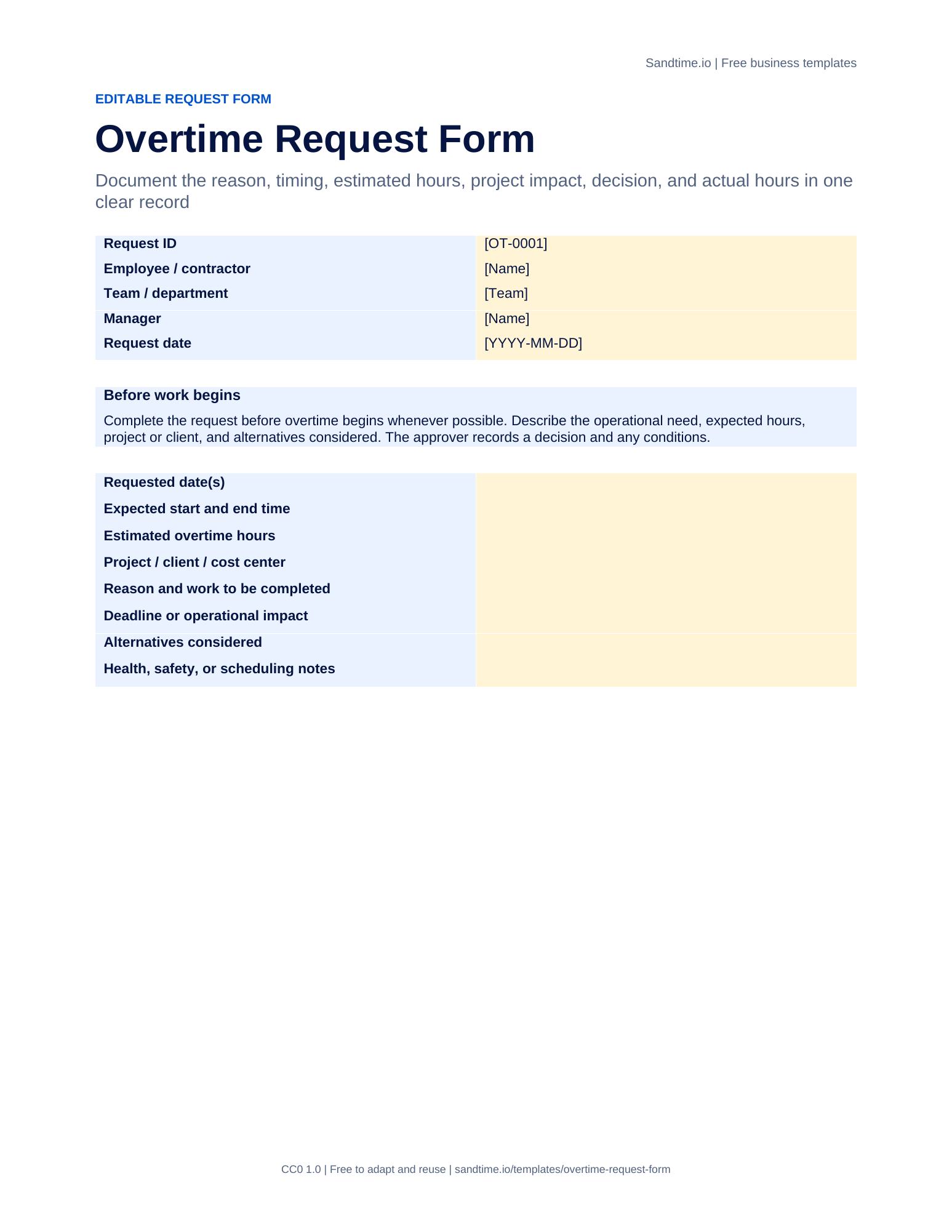
Fields: request ID, employee, team, approver, request date, requested dates, expected start and end, estimated hours, project or cost center, reason, deadline or impact, alternatives considered, health and safety notes, decision, maximum approved hours, conditions, pay or time-off treatment, actual dates, actual hours, outcome, timesheet reference.
If the hours were worked first and need paying afterwards, the request form is the wrong document. Use the overtime claim form instead: it lists each session already worked, whether it was approved beforehand, and whether the employee wants pay or time off in lieu, followed by a manager verification and a section for payroll.
What should an overtime log record?
Six columns, one row per session: date, employee, project or reason, overtime hours, approved by, and notes. The workbook totals the hours column for the period.
The "approved by" column is the one people leave out, and it is the reason logs get disputed. A row that says four hours is a claim. A row that says four hours approved by a named person on a named date is a record. If you are already using the request form, put its request ID in the notes column and the two documents link themselves.
Keep the reason specific enough to be useful three months later. "Release cutover" and "client deadline" survive a review. "Extra work" does not.
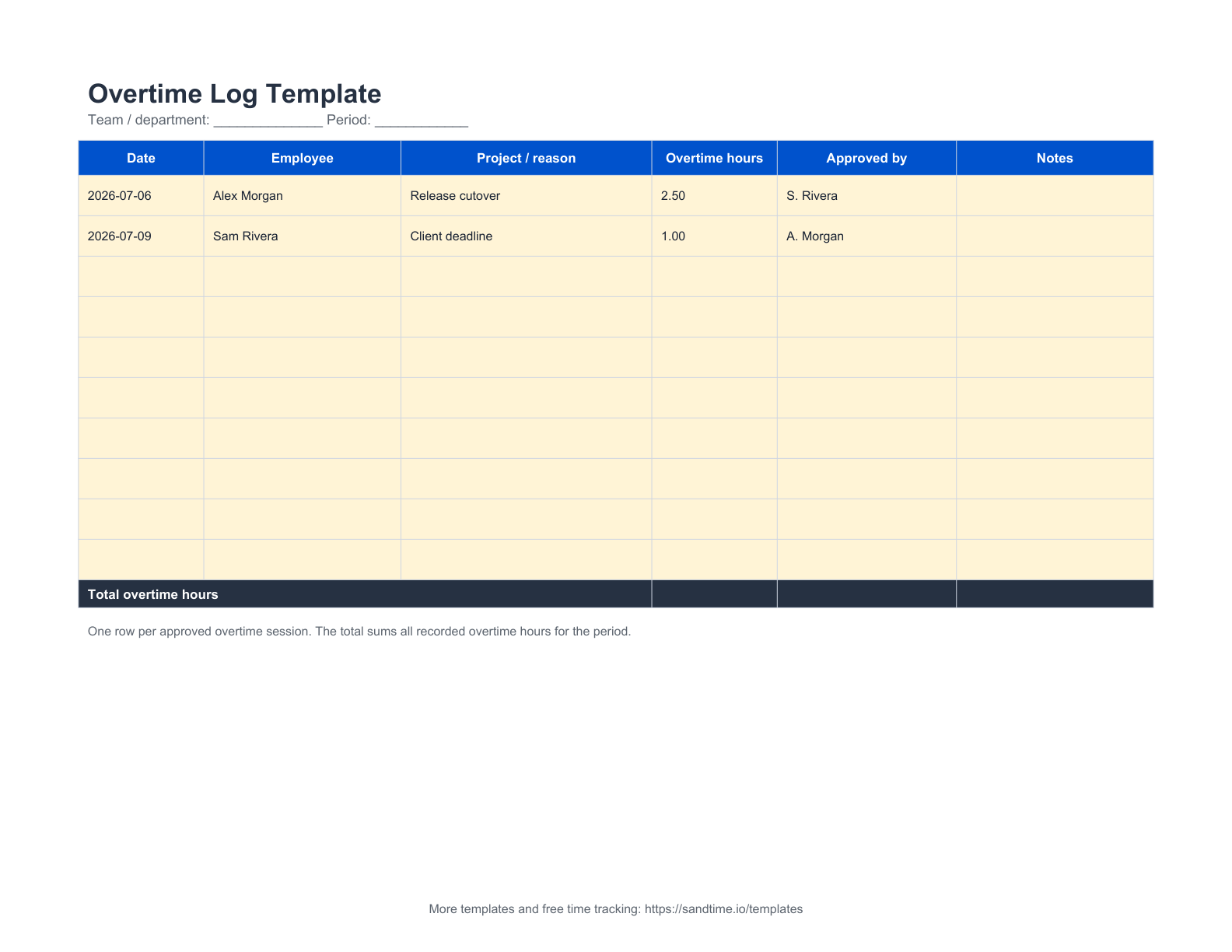
Fields: team or department, period, then one row each of date, employee, project or reason, overtime hours, approved by, notes, with an automatic period total.
How do you calculate overtime pay?
Split the hours by the rate that applies to them, multiply each band, and add the bands together:
- Regular hours × rate
- Overtime hours × rate × 1.5
- Double-time hours × rate × 2
- Add the three
A worked row: eight regular hours and two and a half overtime hours at $40 an hour gives $150 of overtime pay on top of $320 of regular pay, so $470 in total. The pay sheet does that arithmetic in two columns and totals the period underneath.
The multipliers are written into the formula rather than hidden behind it, because 1.5x and 2x are conventions, not universals. Premium rates for overtime, night work, weekends, and public holidays differ by country, sector, collective agreement, and individual contract. Open the overtime pay column, change the numbers, and the rest of the sheet keeps working. If you only need to check one figure, the free overtime pay calculator does the same sum in the browser.
Whatever multiplier you use, the hours it multiplies are bounded. The EU Working Time Directive requires that average working time for each seven-day period, including overtime, does not exceed 48 hours. Our guide to working time rules in the EU covers how that plays out in practice, and the reference period entry explains the averaging window it is measured over.
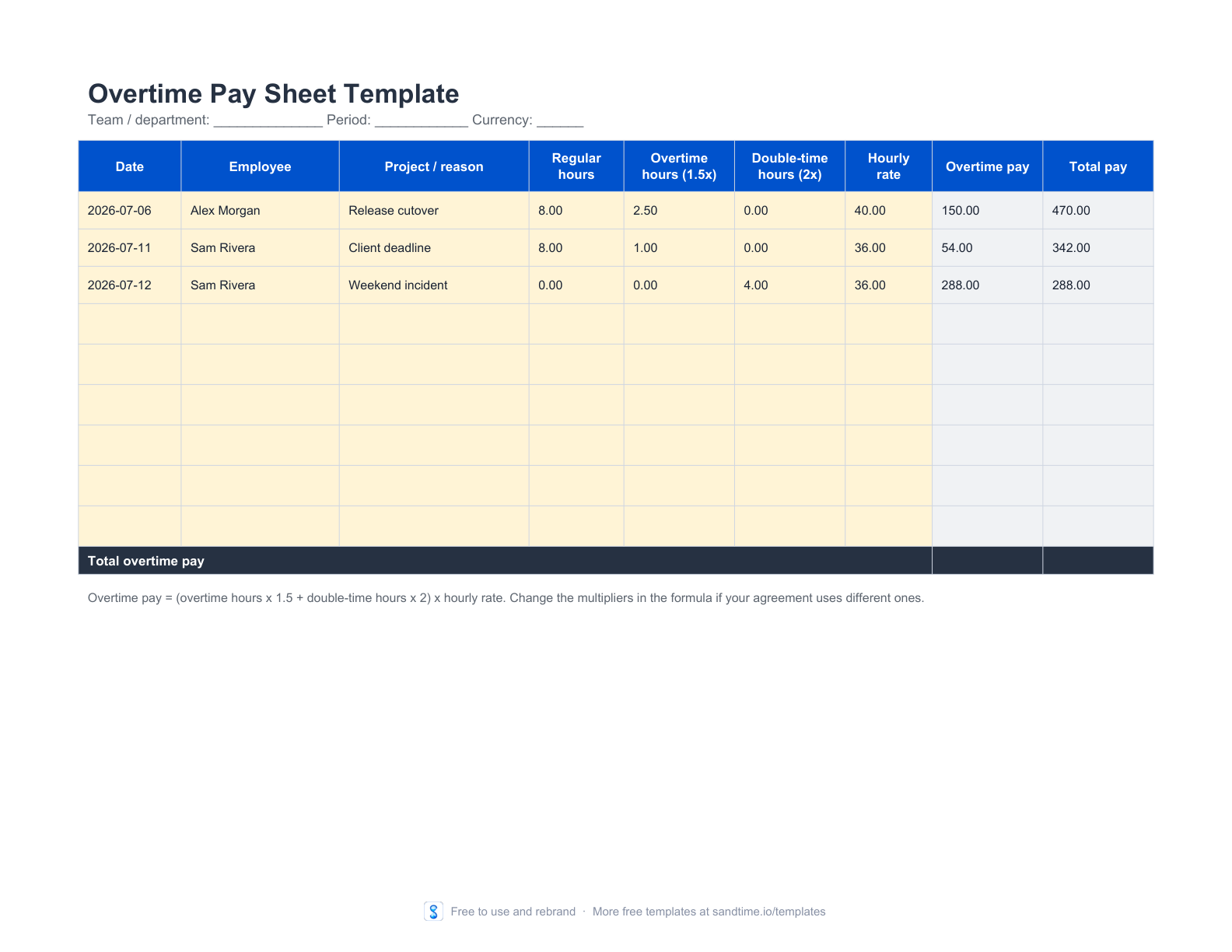
Fields: team, period, currency, then one row each of date, employee, project or reason, regular hours, overtime hours at 1.5x, double-time hours at 2x, hourly rate, calculated overtime pay, calculated total pay.
What is time off in lieu, and how do you track it?
Time off in lieu, often shortened to TOIL, is overtime repaid with an equivalent amount of time off instead of extra pay. Two hours worked late become two hours taken back later, sometimes at a premium, sometimes with a deadline by which the time must be used.
It is simple to agree and easy to lose track of, which is the whole problem. Balances live in one person's memory or in a chat thread, and when somebody leaves, the balance leaves with them.
The tracker keeps one row per event rather than one row per person: hours earned when the overtime is worked, hours taken when the time off is used, and a running balance that is earned minus taken up to that row. Each entry can carry its own expiry date, which matters if your agreement says the time has to be used within a quarter.
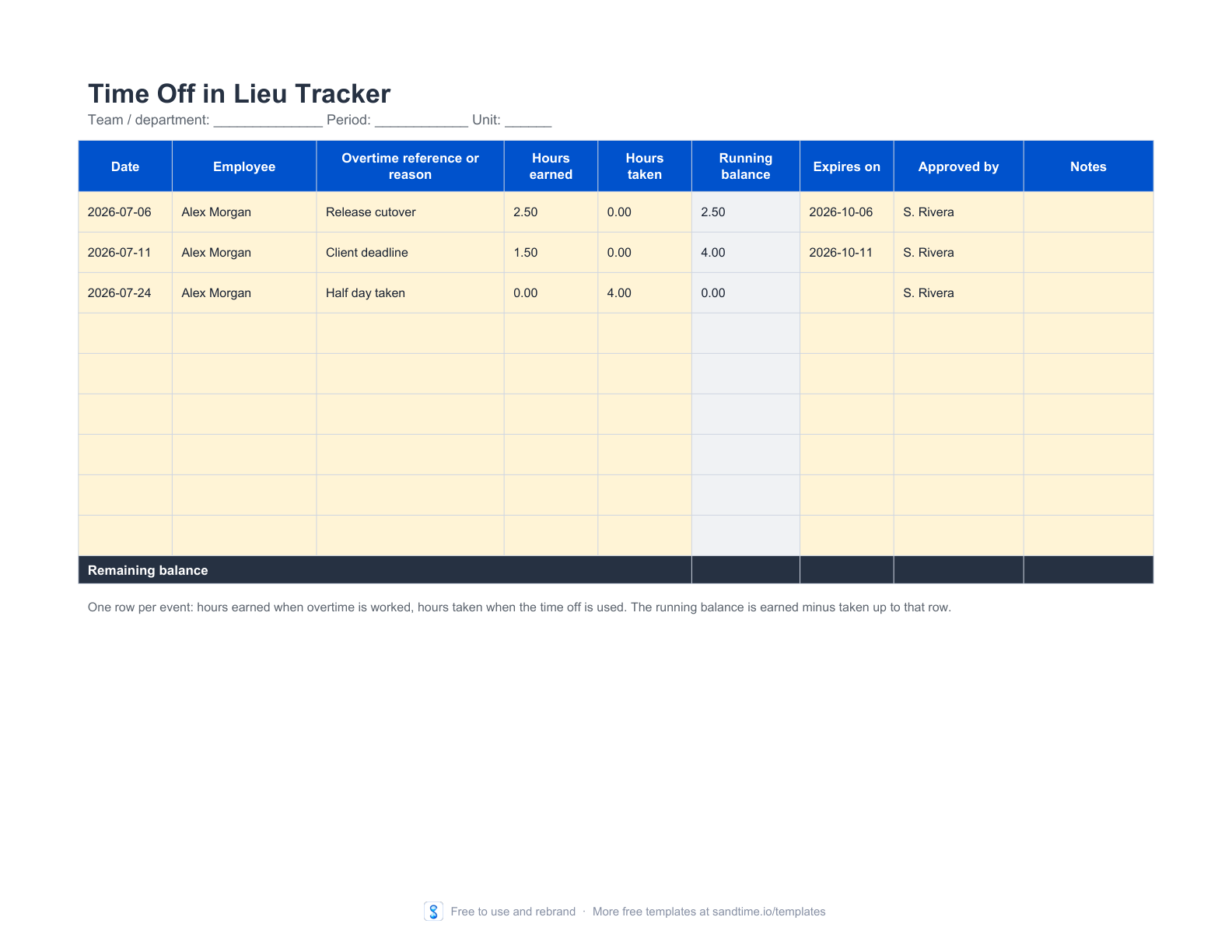
Fields: team, period, unit, then one row each of date, employee, overtime reference, hours earned, hours taken, calculated running balance, expiry date, approved by, notes.
What belongs in an overtime policy?
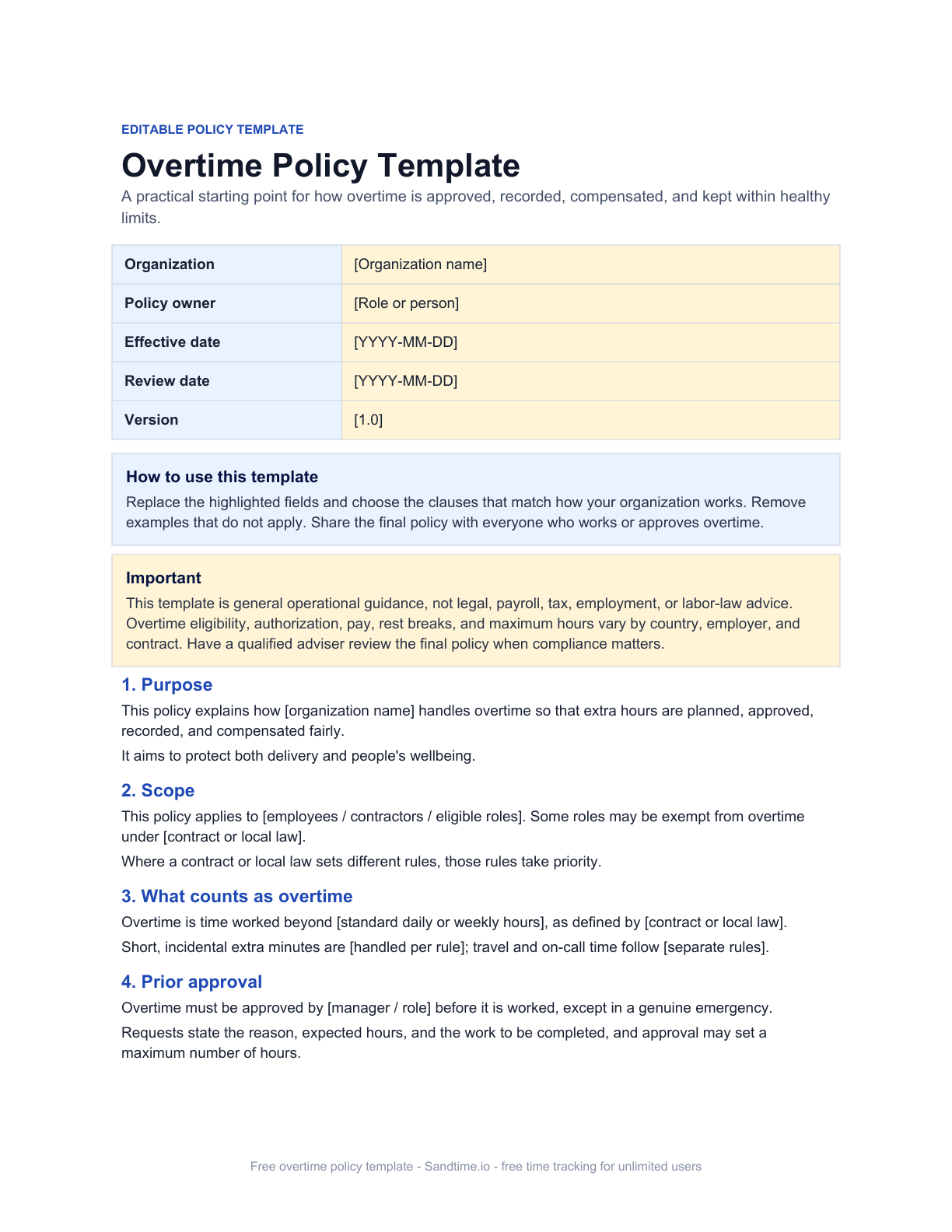
Ten clauses, and the template ships with all of them written: purpose, scope, what counts as overtime, prior approval, recording, compensation, limits and wellbeing, eligibility and exemptions, roles and responsibilities, and exceptions. It ends with an implementation checklist and an acknowledgment block.
Write the policy once and the other four files stop being improvised. Without it, every request is negotiated from scratch, and the answer depends on who is asked.
Two clauses do most of the work. "Prior approval" decides whether unapproved overtime gets paid, which is the question that causes the arguments. "Compensation" decides between pay and time off in lieu, which is the question that decides whether you need the pay sheet, the tracker, or both.
One week of approved overtime, end to end
A release is slipping and two people will need to work late on Thursday and Friday. On Monday they each complete a request form: the reason, the two dates, four estimated hours, the project, and the fact that moving the release date is the alternative. Their manager approves both with a maximum of five hours and a note that the hours will be paid rather than banked.
Thursday and Friday, each session goes into the overtime log as it happens, with the request ID in the notes. Come the following Monday, the log says 4.5 and 3.0 hours, both approved by a named person.
Before payroll runs, the hours move into the pay sheet, split into regular and 1.5x bands against each person's rate, and the sheet returns the overtime pay. The request forms, the log, and the pay sheet go into the same folder as the period they belong to. If somebody asks in April why March payroll was higher, the answer takes one minute instead of an afternoon of reconstruction.
What else is in the free library?
Forty files, all free, all yours to rebrand, none behind an email form. The six overtime files are the most complete set, but the rest of the library follows the same logic: one file per job, with the arithmetic already in it.
Recording the hours
Daily, weekly, biweekly, semimonthly, and monthly timesheet templates with formulas, plus a weekly time card for clock-in and clock-out, and a project time log.
Billing the hours
A freelancer and contractor timesheet, a project budget and billable-hours tracker, and an invoice and timesheet reconciliation worksheet for the check before you bill.
Fixing the record
A timesheet correction form for when an approved or locked entry has to change, and the timesheet approval and correction policy that sets the rule it follows.
Planning who works when
A weekly employee work schedule, a two-week shift rota, compressed 4/10 and 9/80 patterns, and a staffing and capacity planner that flags over-allocation.
Time off and absence
A leave request form, a vacation and leave planner, a PTO balance and accrual tracker, and an absence tracker for unplanned days.
Setting the rules
Editable Word policies for time tracking, paid time off, remote work, and attendance, each with an acknowledgment block.
There are calculators beside them: the overtime pay calculator, the time card calculator, the hours to decimal converter for anyone whose payroll system wants 7.5 rather than 7:30, and the PTO accrual calculator. Browse every free calculator or the whole template library.
Can you rebrand these for your clients?
Yes, and it is worth saying plainly because most template libraries do not allow it. We do not license these files to you, we give up our rights to them entirely and place them in the public domain. In practice that means you can put your own logo on the overtime policy, delete our footer, publish your own adapted version, and charge a client for the work of adapting it. You do not need our permission, you do not have to credit us, and there is nothing to pay.
"Overtime arguments are almost never about the hours. They are about whether the hours were agreed, at what rate, and who said so."
If you are a bookkeeper, a fractional operations lead, or an agency setting up a new client, that permission is the point. Take the six overtime files, put the client's name on them, and hand over a working process in an afternoon.
When does a spreadsheet stop being the right tool?
Not when somebody tells you a spreadsheet is unprofessional. A shared file is often exactly right, and plenty of teams run on one for years without a problem. The honest answer is that there is a threshold, and you can tell whether you have crossed it.

Collecting takes longer than filling in
When chasing seven files over chat costs more manager time than the seven files cost to complete, the file is no longer the cheap option. This is the most common trigger and the easiest to measure: time yourself for one period.
Formulas drift between copies
Somebody widens a column, somebody else overwrites a formula with a typed number, and two versions of the same month disagree. A spreadsheet survives being copied. It does not survive being copied and then edited.
Nobody can say which version was approved
If the answer to "was this approved?" is a search through email, the approval is not part of the record. That is when correction forms start appearing, and then a form for the forms.
Reporting takes longer than recording
When producing a client report or a payroll summary costs more time than logging the work did, the file has stopped being a record and become an input to a second job.
None of those means the templates were a mistake. They mean the templates did their job long enough for the process to outgrow them, which is the best outcome a free file can have.
Frequently asked questions
Is there a free overtime request form template?
Yes. We publish a free overtime request form in Word and printable PDF, with no account or email address required. It records the reason, the requested dates, the estimated hours, the project affected, and the approver decision with any maximum or conditions. You can edit it, put your own branding on it, and use it commercially, because we place it in the public domain rather than licensing it.
What is the difference between an overtime log and an overtime pay sheet?
The overtime log totals hours and nothing else, which is what a manager reviewing a period needs. The overtime pay sheet splits those hours into regular, 1.5x, and 2x bands against an hourly rate and returns overtime pay and total pay, which is what payroll needs. Most teams want both, filled in at different moments.
How do you calculate overtime pay in Excel?
Multiply each hour band by its own multiplier and add them: regular hours times the rate, plus overtime hours times the rate times 1.5, plus double-time hours times the rate times 2. The free overtime pay sheet does this in two formula columns and totals the period, and the multipliers are editable because premium rates differ by country and contract.
Do I need an overtime policy if I already use the forms?
The forms work without one, but every request is then negotiated from scratch. A policy fixes the answers to the two questions that cause disputes: whether unapproved overtime is paid, and whether overtime is repaid in money or in time off. That decides which of the other templates you need at all.
Can I use these templates in Google Sheets?
Yes. Download the Excel file and import it into Google Sheets, where the formulas and most formatting are preserved. Native Google Sheets copy links exist for the daily, weekly, and monthly timesheets; the other workbooks are Excel imports for now.
Are the templates free for commercial use?
Yes. We place every file in the public domain rather than licensing it, which is the most permissive option there is. You may use them commercially, put your own branding on them, publish an adapted version, and charge clients for work based on them. No permission, no credit, no fee.
How much overtime is legally allowed?
It depends on where you are. In the EU, the Working Time Directive requires that average working time for each seven-day period, including overtime, does not exceed 48 hours, measured over a reference period. National law, collective agreements, and individual contracts add further limits. These templates are general operational records and not legal advice, so confirm the rules that apply to you.
When should we stop using spreadsheets for overtime?
When collecting the files takes longer than filling them in, when formulas drift between copies, when nobody can say which version was approved, or when reporting takes longer than recording the work. Until one of those is true, a shared file is usually the cheaper answer.
Take the files, keep the habit
Download the six overtime templates, use them for a quarter, and see which parts of the process stick. The ones that stick are the ones worth automating later; the ones that do not were never your problem.
Get the overtime templates, browse the full library of 40 free downloads, or start tracking free when collecting the files becomes the expensive part. If you want the longer argument about paper, spreadsheets, and software, we wrote it in logging time in a timesheet and methods of recording time in projects.
About the contributors


Przemysław Zalewski
Sandtime.io engineer and Sanddev team member who reviews product accuracy, technical details, sources, and editorial quality.
LinkedInEmailSanddev profileWebsite