Best time tracking software for accountants and CPA firms (2026)
Our verdict: Sandtime.io is the best free time tracker for accounting firms that bill hours per client: every partner, accountant, and bookkeeper can log time against client projects with rates, approvals, and invoice-ready reports at no per-user cost. Choose Karbon or TaxDome when you want a full practice management suite, and BigTime or Harvest when invoicing has to live next to the timer.
- Best free time tracker for firms that bill hours per client: Sandtime.io.
- Best practice management suite for workflow-heavy firms: Karbon.
- Best all-in-one platform for tax practices with a client portal: TaxDome.
- Best time and billing platform for growing CPA firms: BigTime.
- Best simple time tracking with built-in invoices: Harvest.
We compared nine products across three categories: pure time trackers, time and billing tools, and practice management suites. Plan names, prices, and tiered features were checked against official vendor pricing, product, and help pages on September 29, 2026. Prices change, so if a vendor’s page disagrees with this guide, trust the vendor.
Disclosure: We build Sandtime.io and publish this guide, so our first-place ranking is not independent. We rank it first in one explicit category, free time tracking for firms that bill hours per client, and we state plainly where practice management suites and time and billing tools are the better purchase.
The best time tracking software for accountants is the one that turns every client call, review, and filing session into a billable record the firm can trust at month end. For most small and mid-sized firms that means three things: time logged against the right client, a rate attached to each hour, and a partner review before anything is billed. Everything else, from client portals to tax organizers, belongs to a different buying decision.
Compare the 9 best time tracking tools for accountants
This table separates pure time trackers from time and billing tools and full practice management suites. Use the product links to jump to each review, current pricing context, and main tradeoff.
| Rank and app | Best for | Type | Free plan | Paid from | Main tradeoff |
|---|---|---|---|---|---|
| 1. Sandtime.io | Firms that bill hours per client | Time tracker | Unlimited users | $0 | No invoice sending, payments, client portal, or tax workflows |
| 2. Karbon | Workflow-heavy accounting firms | Practice management | No free plan | $59/user/month annually | Highest per-user cost in this list |
| 3. TaxDome | Tax practices with many individual clients | Practice management | No free plan | $800/year for one solo seat | Billed upfront, and team seats start on Pro |
| 4. BigTime | Growing CPA firms that need WIP and billing | Time and billing | No free plan | $20/user/month | Client portal and multi-level approvals sit on higher tiers |
| 5. Harvest | Small firms that invoice from tracked time | Time and billing | 1 seat, 2 projects | $9/seat/month annually | Timesheet approvals require Enterprise |
| 6. Clockify | Low-cost paid time tracking with invoices | Time tracker with invoicing | Up to 5 users | $3.99/seat/month annually | Rounding, approvals, and invoicing start on Standard |
| 7. TimeCamp | Firms that export invoices to QuickBooks or Xero | Time tracker with invoicing | Unlimited users | $3.99/user/month annually | Billable rates and approvals require Ultimate |
| 8. Toggl Track | Solo accountants who want timer polish | Time tracker | Up to 3 users | $9/user/month annually | Timesheet approvals require Premium |
| 9. Timely | Staff who forget to start timers | Automatic time tracker | Trial only | $9/user/month annually | Starter caps a firm at 5 users and 20 projects |
Prices are public U.S. list prices, exclude taxes and temporary promotions, and use annual billing where the vendor publishes it. See the annual cost at 5, 15, and 40 staff below.
Time tracker, time and billing, or practice management?
Accounting firms shop across three categories that share the same search results. Mixing them up is the most expensive mistake in this purchase.
- Pure time trackers record who worked on which client, for how long, and at what rate, then hand the firm reports and exports. Sandtime.io, Toggl Track, and Timely belong here. Clockify and TimeCamp add basic invoicing on paid tiers.
- Time and billing tools such as Harvest and BigTime add invoices, and often payments, on top of the timesheet. BigTime reaches further into WIP, resource planning, and project budgets.
- Practice management suites such as Karbon and TaxDome run the whole firm: client records, recurring jobs, email, portals, e-signatures, billing, and payments. Time tracking is one module among many.
A firm that already runs a suite usually tracks time inside it. A firm that bills from QuickBooks, Xero, or another ledger and needs clean hours per client rarely needs suite prices for that, and this ranking is written for that firm.
How we researched and ranked these tools
We started from products that appear repeatedly for searches such as time tracking software for CPA firms and time and billing for accountants, then checked every price and tiered feature on the vendor’s own pricing, product, or help pages. The ranking is an editorial judgment, not a numeric score. Each product was assessed on six questions:
- Can staff log time per client without friction? Timers, manual entries after a call, and phone and browser access.
- Does every hour carry the right rate? Billing rates per person and per client, plus rate history.
- Can hours be rounded to billing increments? Many firms bill in 6-minute (0.1 hour) or 15-minute units.
- Can a partner review time before it is billed? Submission, approval, and locking.
- What reaches the client invoice? Native invoicing, a clean export, or a ledger sync.
- What does the whole firm cost? Free-plan limits, per-seat prices, commitments, and the tier that holds what accountants need.
Where a feature sits on a higher tier, we name the tier. Where a vendor did not publish a price, we say so.
The 9 best time tracking tools for accountants
1. Sandtime.io: Best free time tracker for firms that bill hours per client
Sandtime.io is a time tracking app that is free for unlimited users, so every partner, accountant, bookkeeper, and seasonal helper can use it without a per-user fee. The recommended setup for accountants and bookkeepers is one project per client, or per engagement for a large client, with time marked billable or non-billable. Practice admin goes on a non-billable project so it never reaches a client total.
Cost and revenue rates can be set per project and per team member, and rate history keeps last year’s hours at last year’s rates after the annual increase. Reports handle multiple currencies. Staff can run a timer, add a call afterwards, or keep several timers running at once, on the web, Windows, macOS, iPhone, Android, the Chrome extension, or Slack.
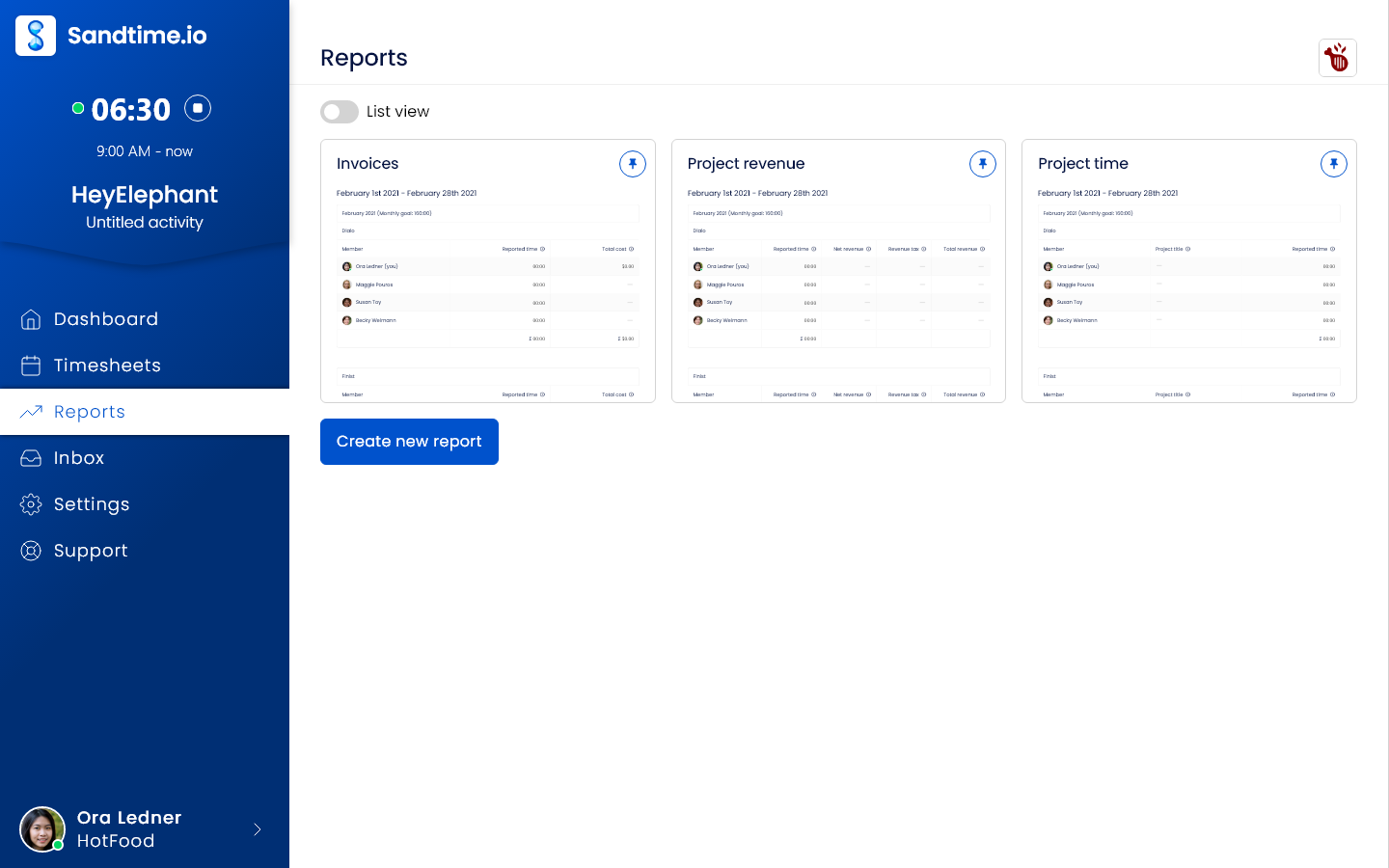
Fill-timesheet reminders arrive by email before the week locks, staff submit their timesheets, and a partner approves or rejects them, including with one click from the email. Past periods lock automatically, so billed hours stop changing. Reports group time by project, member, activity, or date, and time rounding rounds hours in reports to 5, 10, 15, 30, or 60 minutes, or to a custom interval such as 6 minutes, without changing the original entries. The Invoices report template lists time, hourly rate, net revenue, tax, and total revenue per project, with Monthly timesheet and Project revenue templates alongside. Everything exports to Excel or CSV.
Partners are Administrators, a senior running a group of clients can be a Project Administrator, and bookkeepers are Users who see only their assigned clients through project visibility. There are no screenshots, no keystroke logging, and no activity scores.
Why it ranks first: it is the only product in this list that gives an entire firm per-client time, rates with history, rounding, approvals, and locking at no cost.
Tradeoff: Sandtime.io does not send invoices, take payments, run a client portal, or manage tax workflows. Totals reach QuickBooks, Xero, or any other ledger through an Excel or CSV export. Choose Karbon or TaxDome for a full practice management suite, or BigTime and Harvest when invoices should be created in the same tool.
2. Karbon: Best practice management suite for workflow-heavy firms
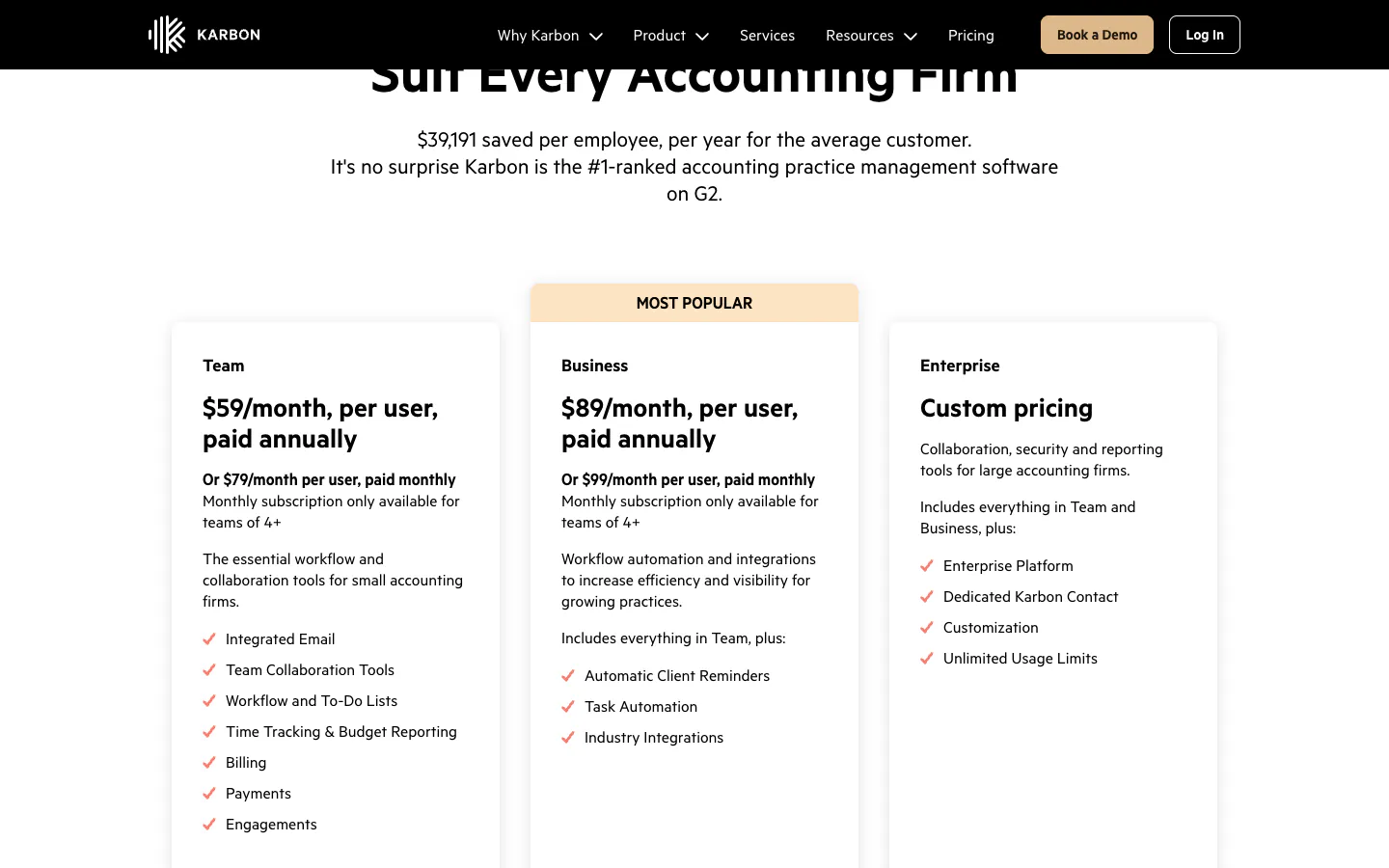
Karbon is practice management software built for accounting firms, with time tracking as one part of a larger system. Every plan includes email triage, workflow templates, client management, a client portal, document management, time tracking with work budgets, and billing and payments. Team costs $59 per user per month billed annually ($79 monthly), and Business costs $89 annually ($99 monthly) and adds automatic client reminders, task automation, and industry integrations. Monthly billing is available only for teams of four or more. Karbon Billing and Payments builds invoices from the work and syncs invoices and payments with QuickBooks Online or Xero.
Why it ranks second: for a firm whose bottleneck is recurring work, client requests, and email, Karbon replaces several tools at once, and time and billing come along inside the same client record.
Tradeoff: it is the most expensive per-user option in this guide, and a firm that only needs billable hours pays for a workflow system it may not use.
3. TaxDome: Best all-in-one platform for tax practices with a client portal
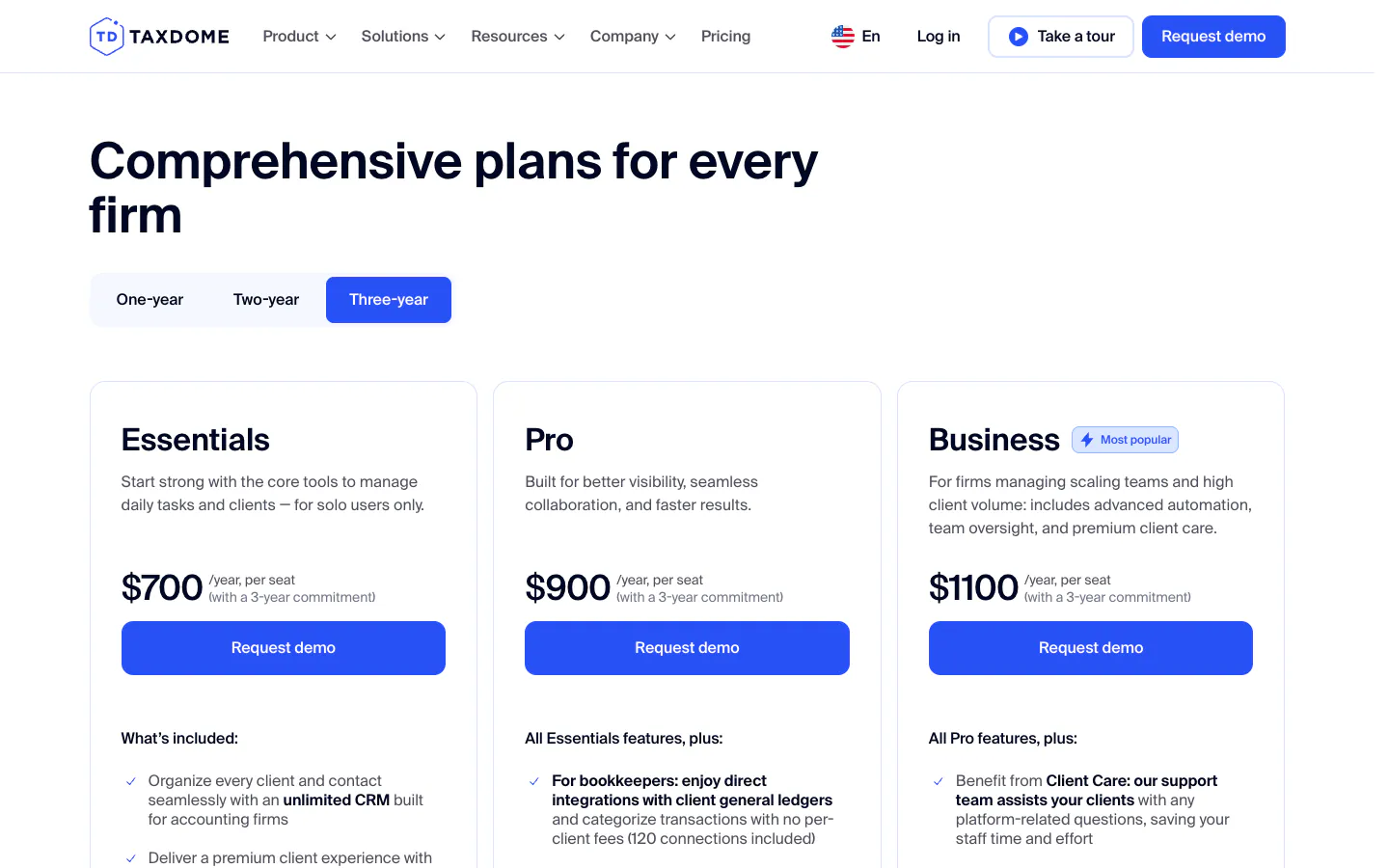
TaxDome combines CRM, a branded client portal and mobile app, document storage, e-signatures, workflow automation, proposals, and payments. Its time and billing module creates invoices from time entries with hourly rates per team member or per service, and a QuickBooks Online integration syncs invoices and payments. Pricing is per seat per year and billed upfront: Essentials costs $800 a year for a single solo user, Pro $1,000 per seat, and Business $1,200 per seat on a one-year commitment, with lower prices on three-year terms ($700, $900, and $1,100). Pro adds monthly seats for short-term staff at $100 per month, and Business adds seasonal seats at $500 for a four-month term.
Why it ranks third: tax practices with hundreds of individual clients get a client-facing portal, intake forms, and e-signatures that a time tracker is not built for, and seasonal seats fit the filing calendar.
Tradeoff: Essentials is limited to one user, so any team starts on Pro. The upfront annual billing makes it a firm-wide commitment rather than a tool to try on one team.
4. BigTime: Best time and billing platform for growing CPA firms
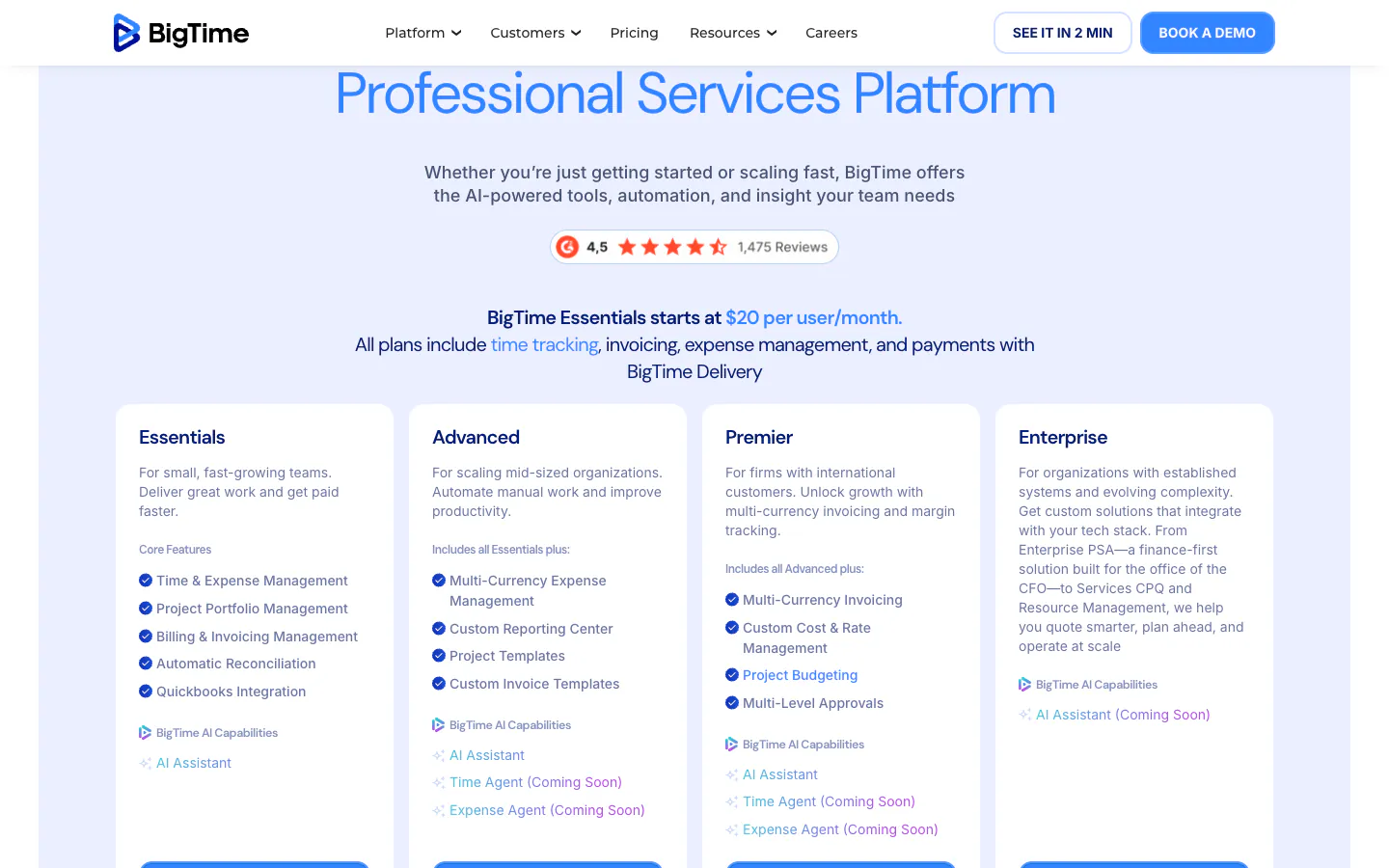
BigTime is a professional services automation platform whose accounting page highlights unbilled time reporting, cost rates, and bulk invoicing. Essentials starts at $20 per user per month and includes time and expense tracking, billing and invoicing, rate management, approvals, a mobile app, and QuickBooks integration. Advanced adds a self-service client portal, custom reporting, and project templates. Premier adds multi-currency invoicing, custom cost and rate management, project budgeting, multi-level approvals, and Sage Intacct, Lacerte, and API integrations. Advanced and Premier prices are available through a demo.
Why it ranks fourth: it is built for the questions a managing partner asks as the firm grows, such as how much work in progress is unbilled and which engagements lose money, while staying closer to time and billing than a full practice management suite.
Tradeoff: the public price covers only the entry tier, so the true cost of the client portal and multi-level approvals needs a sales conversation.
5. Harvest: Best simple time tracking with built-in invoices
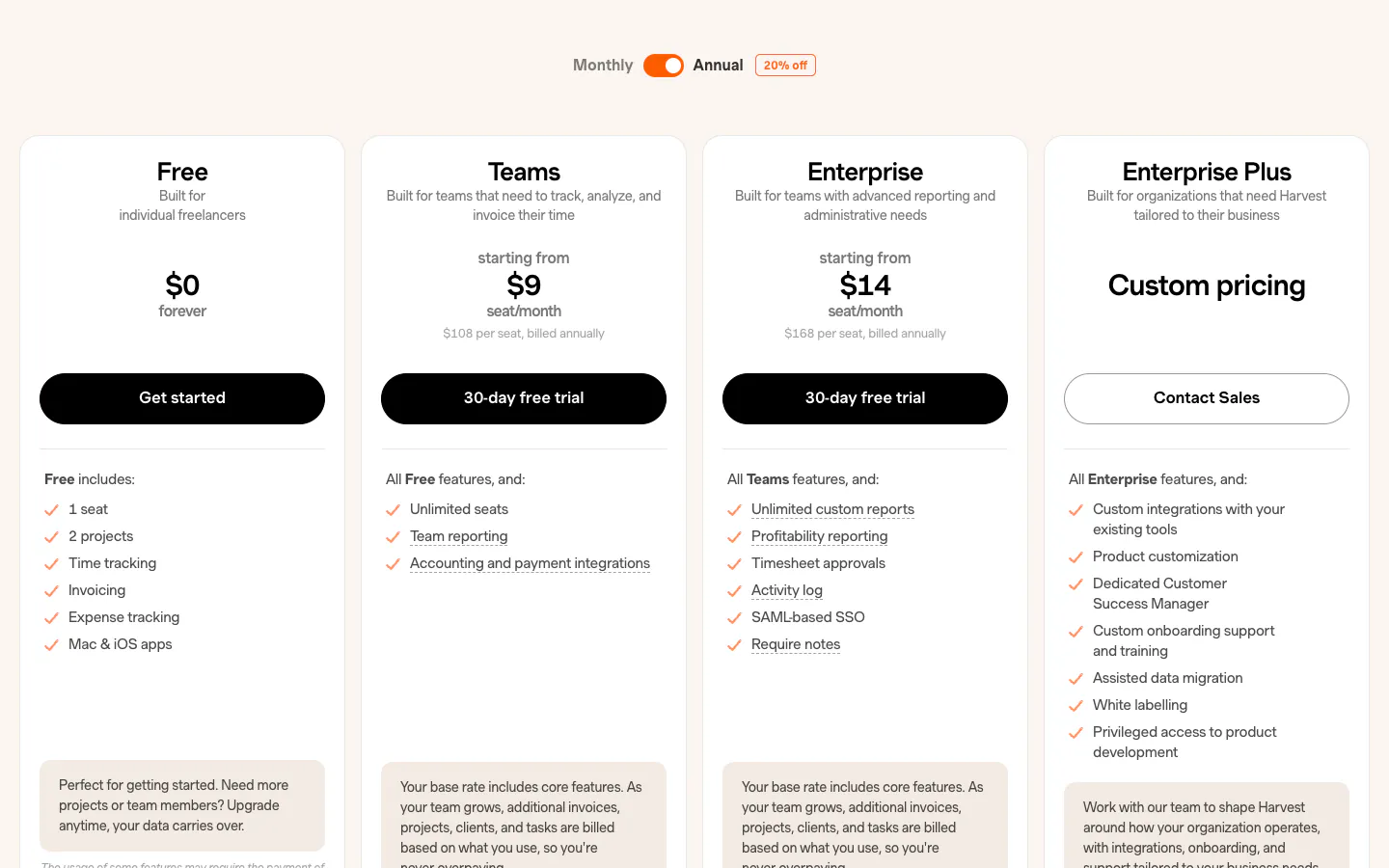
Harvest is the classic time and billing tool for small professional firms. The free plan covers one seat and two projects with time tracking and invoicing. Teams costs $9 per seat per month billed annually ($11 monthly) and adds unlimited seats, team reporting, and accounting and payment integrations with Stripe, QuickBooks Online, and Xero. Enterprise costs $14 per seat per month annually ($17.50 monthly) and adds timesheet approvals, profitability reporting, an activity log, and required notes. Harvest also charges for additional invoices, projects, clients, and tasks beyond each plan’s included usage. An administrator can turn on account-wide time rounding to 6, 15, or 30 minutes, which applies to summary reports and new invoices.
Why it ranks fifth: going from tracked hours to a sent invoice takes very few steps, and 6-minute rounding is available out of the box.
Tradeoff: a firm that needs partners to approve timesheets before billing must pay for Enterprise for every seat. Our Harvest alternative comparison covers the differences in more detail.
6. Clockify: Best low-cost paid time tracking with invoices
Clockify’s free plan supports up to five users, with unlimited tracking and PDF-only report exports. Basic costs $3.99 per seat per month billed annually ($4.99 monthly) and adds billable rates, historical rates, and CSV and Excel exports. Standard costs $5.49 annually ($6.99 monthly) and is the tier an accounting firm usually needs: it adds invoicing, recurring invoices, timesheet approval, locking of past time, rounding, task rates, and a QuickBooks integration. Pro costs $7.99 and Enterprise $11.99 per seat per month annually.
Why it ranks sixth: Standard gathers rates, rounding, approvals, invoicing, and a QuickBooks sync in one of the lowest per-seat prices on the market.
Tradeoff: a firm of six or more pays for every seat, and billable rates plus spreadsheet exports start on Basic. See the Clockify alternative page for a feature-by-feature view.
7. TimeCamp: Best for exporting invoices to QuickBooks or Xero
TimeCamp’s free plan includes unlimited users and projects. Starter costs $3.99 per user per month billed annually ($5.49 monthly) and adds invoicing and Excel report exports. Premium costs $6.99 annually ($9.99 monthly) and adds billable time, time rounding, and export of invoices to QuickBooks and Xero. Ultimate costs $9.99 annually ($13.99 monthly) and adds billable rates, historical billing rates, labor costs, and timesheet approvals. TimeCamp also offers automatic app and website tracking, and screenshots are listed on Ultimate.
Why it ranks seventh: Premium is an affordable way to send invoices from tracked time into QuickBooks or Xero, which is where most small firms keep their books.
Tradeoff: the combination accountants tend to want, per-person billable rates plus approvals, sits on Ultimate. Firms that prefer to avoid screenshots and activity tracking should check which features they switch on. Our TimeCamp alternative page compares the plans.
8. Toggl Track: Best timer experience for solo accountants
Toggl Track is one of the most polished timers on web, desktop, and mobile. According to its pricing page, the free plan covers up to 3 users. Starter costs $9 per user per month billed annually ($12 monthly) and adds billable rates, project estimates, and revenue reporting. Premium costs $16 annually ($24 monthly) and adds timesheet approvals, profitability analysis, fixed fee projects, and scheduled reports.
Why it ranks eighth: a sole practitioner or a two-person bookkeeping practice gets a fast, pleasant timer and clean client reports.
Tradeoff: the partner review step sits on Premium, which makes Toggl Track one of the more expensive trackers for a firm that needs approvals. Our Toggl Track alternative comparison maps the differences.
9. Timely: Best automatic time capture for staff who forget timers
Timely records app and website activity in the background and drafts timesheets from it. There is a free trial but no free plan. Starter costs $9 per user per month billed annually ($11 monthly) and is capped at five users and 20 projects. Premium costs $16 annually ($20 monthly) for up to 50 users and adds accounting tool integrations, budgets, and costs. Unlimited costs $22 annually ($28 monthly) and removes the user cap.
Why it ranks ninth: accountants who jump between many short client tasks can rebuild the day from an activity record instead of memory.
Tradeoff: automatic capture collects more activity data than a timer, which some staff will question, and the 20-project cap on Starter rules it out for any firm that keeps one project per client.
What accounting firms should check before choosing
Feature lists look alike. These five checks show whether a tool fits an accounting firm.
6-minute billing increments
Many CPA firms bill in tenths of an hour, so a 20-minute review becomes 0.4 hours. Check where rounding happens and whether the original entries survive. Sandtime.io rounds in reports, with a custom interval for 6 minutes, and keeps the underlying time unchanged. Harvest rounds summary reports and new invoices to 6, 15, or 30 minutes. Clockify has rounding on Standard, and TimeCamp on Premium. Rounding every entry up is a pricing decision clients notice, so agree on it with billable and non-billable hours in mind.
Rates per staff level
A partner hour and a junior bookkeeper hour have different prices. Look for rates per person and per client, and for rate history so the annual increase does not rewrite last year’s billed work. Sandtime.io covers this for free with historical rates. Clockify includes historical rates from Basic, TimeCamp includes historical billing rates on Ultimate, and BigTime lists custom cost and rate management on Premier.
Client billing export
Decide where the invoice is created. If your ledger creates it, the time tool needs a clean export by client with hours, rate, and amount. In Sandtime.io reports, the Invoices template gives time, hourly rate, net revenue, tax, and total revenue per project, exported to Excel or CSV. If you want the time tool to create the invoice, Harvest, BigTime, Clockify Standard, TimeCamp Starter, Karbon, and TaxDome do that directly. Our help article on creating and customizing reports shows how to build a client billing report.
Tax season capacity
Headcount grows between January and April. A per-seat tool bills every seasonal preparer, TaxDome sells seasonal seats, and Sandtime.io charges nothing for extra users. Reminders, partner approval, and locked periods matter most when everyone is behind. Our guide to spotting billable leakage lists the places where hours disappear.
Per-user cost at 5, 15, and 40 staff
Here is the annual list price for the plan each vendor needs to cover per-person billable rates and a partner approval step, at three firm sizes. Formula: seats × monthly price on annual billing × 12.
- Sandtime.io, free: $0 at 5, 15, or 40 staff.
- Clockify Standard, $5.49: 5 × $5.49 × 12 = $329.40; 15 staff = $988.20; 40 staff = $2,635.20.
- TimeCamp Ultimate, $9.99: 5 staff = $599.40; 15 staff = $1,798.20; 40 staff = $4,795.20.
- Harvest Enterprise, $14: 5 staff = $840; 15 staff = $2,520; 40 staff = $6,720, before any usage-based charges.
- Toggl Track Premium, $16: 5 staff = $960; 15 staff = $2,880; 40 staff = $7,680.
- BigTime Essentials, from $20: 5 staff = $1,200; 15 staff = $3,600; 40 staff = $9,600, as a floor, since BigTime does not state the billing term for this price.
- Karbon Team, $59: 5 staff = $3,540; 15 staff = $10,620; 40 staff = $28,320.
- TaxDome Pro, $1,000 per seat per year: 5 staff = $5,000; 15 staff = $15,000; 40 staff = $40,000 on a one-year commitment, or $4,500, $13,500, and $36,000 on a three-year term.

The same list prices for a 15-person firm. Karbon and TaxDome buy a whole practice management suite, not only a timer.
Karbon and TaxDome replace email triage, client portals, document tools, e-signatures, and billing, so compare them with the stack they would replace, not with a timer.
How an accounting practice closes client hours each month
Choosing the tool is the easy part. Hours reach the invoice only when the same six steps happen every month, in the same order, whoever is on leave:
- Set up clients once. Open one project per client, or per client and service for larger clients, such as "Acme - payroll" and "Acme - year-end accounts". Mark them billable, and put internal admin and training on non-billable projects so they never reach an invoice. Set a revenue rate per staff level, with rate history so the annual increase does not reprice last year.
- Log time the same day. A timer or a manual entry with a short description, from the web, desktop, or phone. Same-day entries are the difference between a billed 20-minute VAT query and a forgotten one.
- Let the reminders chase. Every Friday at 6 PM, before the week locks, automatic email reminders ask everyone who has switched them on to fill in their timesheet, so nobody has to send the chase message.
- Approve and lock. A partner approves the submitted timesheets, from email if needed, and the period locks. A correction after that is an unlock request, not a quiet edit to billed work.
- Run the Invoices report. Set time rounding to a custom 6-minute interval if you bill in tenths of an hour, then run the Invoices template for the previous month. It gives time, hourly rate, net revenue, tax, and total revenue per project, and exports to Excel or CSV for the system that issues the invoice.
- Review what did not reach a bill. Compare billable and non-billable hours per client before the invoices go out. Our guide to billable leakage lists where hours usually disappear.
A worked line: a bookkeeper spends 20 minutes on a client's VAT query. With 6-minute rounding the report shows 0.4 hours, and at a $90 hourly rate that is $36 on the client's invoice line. The original 20-minute entry stays unchanged underneath.
Law firms close the month the same way, with one project per client matter instead of per service. The law firm setup walks through it step by step.
Frequently asked questions
What is the best time tracking software for accountants?
For a firm that bills hours per client and invoices from its accounting system, Sandtime.io is the best free option: unlimited users, one project per client, rates per person and project, rounding, approvals, and locking. We publish this guide (see the disclosure). Karbon and TaxDome are better when you want a full practice management suite, and Harvest or BigTime when invoices should be created next to the timer.
What is the best time tracking software for CPA firms?
Small CPA firms that bill from QuickBooks or Xero get the most value from a free, focused tracker such as Sandtime.io. Growing firms that need WIP reporting, bulk invoicing, and project budgets fit BigTime. Firms that want workflows, a client portal, and billing in one place fit Karbon or, for tax-heavy practices, TaxDome.
What is the best time and billing software for accountants?
Harvest is the simplest way to go from tracked hours to an invoice, with QuickBooks Online and Xero integrations on Teams and approvals on Enterprise. BigTime suits firms that also need rate management, WIP, and project budgets. Inside practice management suites, Karbon and TaxDome both create invoices from time entries and collect payments.
Is there free timesheet software for accountants?
Yes. Sandtime.io is free for unlimited users and includes timesheets, billable rates, approvals, locking, reports, and Excel or CSV exports. As of September 29, 2026, TimeCamp also has a free plan for unlimited users, but billable time and rates sit on paid tiers. Clockify is free for up to five users, Toggl Track for up to three, and Harvest for one seat and two projects.
How do I track billable hours per client?
Create one project per client, or per engagement for larger clients, and put internal work on a separate non-billable project. Set revenue rates per client and staff level, log time as you work, and at month end approve timesheets, lock the period, and run a report grouped by client. In Sandtime.io, the Invoices template shows time, hourly rate, net revenue, tax, and total revenue per project. The time tracking for accountants page walks through the full setup.
How do 6-minute billing increments work?
With 6-minute increments, each hour is split into ten units of 0.1 hours, and time is rounded to the nearest unit or always up, depending on the engagement letter. A 14-minute call is 0.2 hours when rounded to the nearest unit and 0.3 hours when always rounded up. In Sandtime.io, set time rounding in a report to a custom 6-minute interval; the original entries stay unchanged.
Final verdict
The category you need matters more than the rank. If your firm needs workflows, a client portal, and billing in one place, buy a practice management suite such as Karbon or TaxDome. If you want invoices created next to the timer, Harvest and BigTime are proven choices.
If your firm bills hours per client and invoices from its ledger, Sandtime.io is the best place to start: per-client projects, cost and revenue reporting, time rounding, timesheet approvals, and invoice-ready reports, free for the whole firm. Firms moving from another tracker can compare the details on our Clockify, Harvest, TimeCamp, and Toggl Track pages.
About the contributors


Przemysław Zalewski
Sandtime.io engineer and Sanddev team member who reviews product accuracy, technical details, sources, and editorial quality.
LinkedInEmailSanddev profileWebsite