Best time tracking software for agencies (2026)
Our verdict: Sandtime.io is the best time tracking software for agencies in 2026 when the real problem is getting every timesheet in, approved, and locked before invoicing, because it does that free for unlimited users. Choose Harvest to invoice from the same tool, Productive for budgets and resource planning in one agency platform, and Toggl Track for the most polished timer.
- Best for complete timesheets before invoicing, free for unlimited users: Sandtime.io.
- Best for invoicing from tracked time: Harvest.
- Best all-in-one agency operations platform: Productive.
- Best time tracking inside Asana, Jira, or Trello: Everhour.
We compared nine tools used by marketing, creative, and software agencies. Plan names, prices, free plans, and the plan that contains timesheet approvals were checked against each vendor’s official pricing or help pages on September 29, 2026. If a vendor’s page disagrees with this guide, trust the vendor.
Disclosure: We build Sandtime.io and publish this guide, so our first-place ranking is not independent. Sandtime.io started inside a software agency that needed its own timesheets in on time. We explain our criteria, link to each vendor’s own pricing page, and say plainly where another product is the better fit.
The best time tracking software for agencies is the tool that turns everyone’s hours into a complete, approved record in time for the invoice run. For most marketing, creative, and software agencies, that means three things beyond a timer: automatic reminders to fill in timesheets, a quick approval step, and locked past periods. Invoicing, budgets, and resource planning come next, and they are where paid agency platforms earn their price.
Compare the 9 best time tracking tools for agencies
The Approvals column names the cheapest plan that contains timesheet approvals, because that is the plan an agency usually ends up paying for. Use the product links to jump to the full review.
| Rank and app | Best for | Approvals | Free plan | Paid from | Main tradeoff |
|---|---|---|---|---|---|
| 1. Sandtime.io | Agencies that need every timesheet in before invoicing | Included free, one click from email | Unlimited users | $0 | No invoicing, budgets, or resource planning |
| 2. Harvest | Invoicing from tracked time | Enterprise, $14/seat/month | 1 seat, 2 projects | $9/seat/month | Approvals need Enterprise; usage-based charges as you grow |
| 3. Productive | Full agency operations and profitability | Professional, $25/user/month | 14-day trial | $10/user/month, 3-seat minimum | Heavier rollout than a time tracker |
| 4. Toggl Track | Creative teams that want the best timer | Premium, $16/user/month | Up to 3 users | $9/user/month | Approvals and team reminders need Premium |
| 5. Everhour | Time tracking inside project tools | Team, $8.50/seat/month | Up to 5 seats | $8.50/seat/month, 5-seat minimum | Integrations and budgets sit on the paid plan |
| 6. Teamwork.com | Client work project management | Optimize, custom quote | Up to 5 users and 5 projects | $9.99/user/month, 3-seat minimum | Approvals need a quoted plan |
| 7. Clockify | Low-cost paid approvals and locking | Standard, $5.49/seat/month | Up to 5 users | $3.99/seat/month | Budgets and multi-currency need Pro |
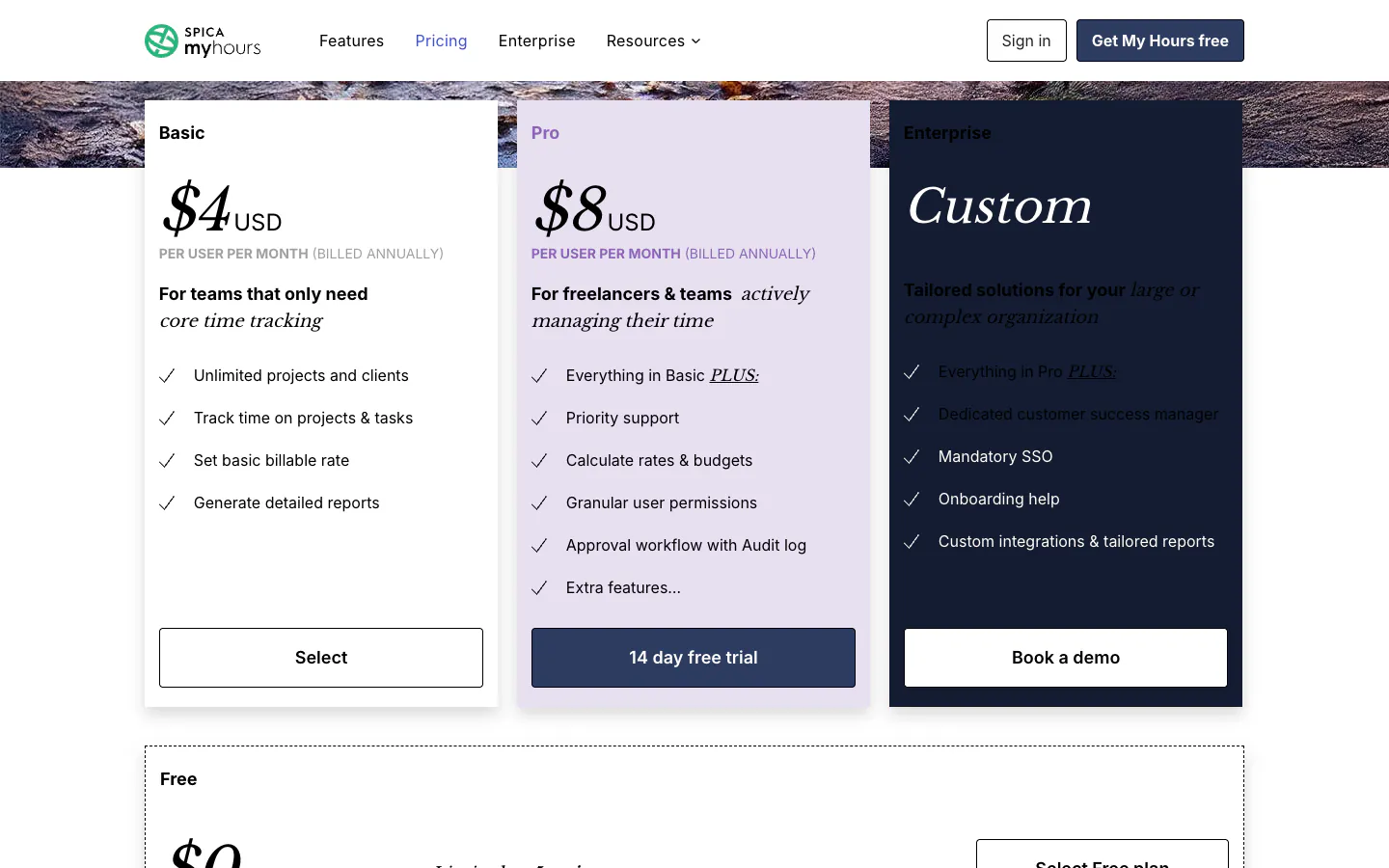
| 8. My Hours | Simple billing for small studios | Pro, $8/user/month | Up to 5 active users | $4/user/month | Approvals and budgets need Pro |
| 9. TimeCamp | Automatic desktop tracking | Ultimate, $9.99/user/month | Unlimited users and projects | $3.99/user/month | Approvals and billable rates need Ultimate |
Prices are public U.S. list prices per user or seat per month on annual billing, checked on September 29, 2026. They exclude taxes and promotions. Monthly billing costs more. See the monthly cost at 10, 25, and 50 people below.
Why agencies need a different kind of time tracker
An agency sells hours, or sells outcomes it prices from hours. Time is the raw material of every invoice, retainer report, and profitability review, so an agency cannot treat a missing timesheet as a small admin gap. One contractor who has not logged last week can hold up billing for a whole client.
That is why the familiar month-end ritual exists. A manager opens Slack or Microsoft Teams and sends "please fill in your timesheet" to the same three people, then checks again the next morning. Our guide to stopping the timesheet chase describes the pattern in detail: nobody skips a timesheet on purpose, but an empty timesheet never interrupts anyone, so it waits until someone with billing on their mind goes looking.
Agencies add their own complications. Marketing and creative teams split a day across many clients and retainers. Software agencies mix employees with contractors and rotate people between projects. Some work is billable, some is internal, and the split matters for margins. A generic timer records the minutes. An agency tool has to get those minutes complete, approved, and attributed to the right client before finance needs them.
How we researched and ranked these tools
We started from tools agencies repeatedly shortlist for time tracking and checked every price, plan name, free-plan limit, and tiered feature against the vendor’s own pricing page on September 29, 2026. Where a pricing page did not show which plan holds a feature, we used the vendor’s help center or left the claim out. The ranking is an editorial judgment, not a numeric score.
We separate three kinds of evidence. Vendor facts such as prices and plan contents come from linked official pages. First-hand experience applies only to Sandtime.io, which we use daily for our own client billing. Editorial judgments include the ranking and the best-for labels.
Each tool was assessed on six agency questions:
- Does every timesheet get finished? We looked for automatic reminders, a submission and approval step, and locking of past periods, and at which plan each one starts.
- Can hours be tied to clients and retainers? Projects per client, billable and non-billable status, and rates per project or person.
- Can the agency report to clients and to itself? Reports by project, person, and date, plus exports finance can reuse.
- What does the whole team cost? Free-plan limits, minimum seats, and the price of the plan that contains approvals at 10, 25, and 50 people.
- Will people actually use it? Web, desktop, mobile, browser, and chat access, and how little effort a daily entry takes.
- What does it leave to other tools? Invoicing, budgets, resource planning, and project management, and whether the tool covers them or hands them off.
The order favors agencies whose biggest leak is incomplete or late timesheets, because that is the problem Sandtime.io was built to solve. An agency whose biggest gap is invoicing or capacity planning should weigh Harvest or Productive higher, and the reviews say so.
The 9 best time tracking tools for agencies
1. Sandtime.io: Best for agencies that need every timesheet in before invoicing, free for unlimited users
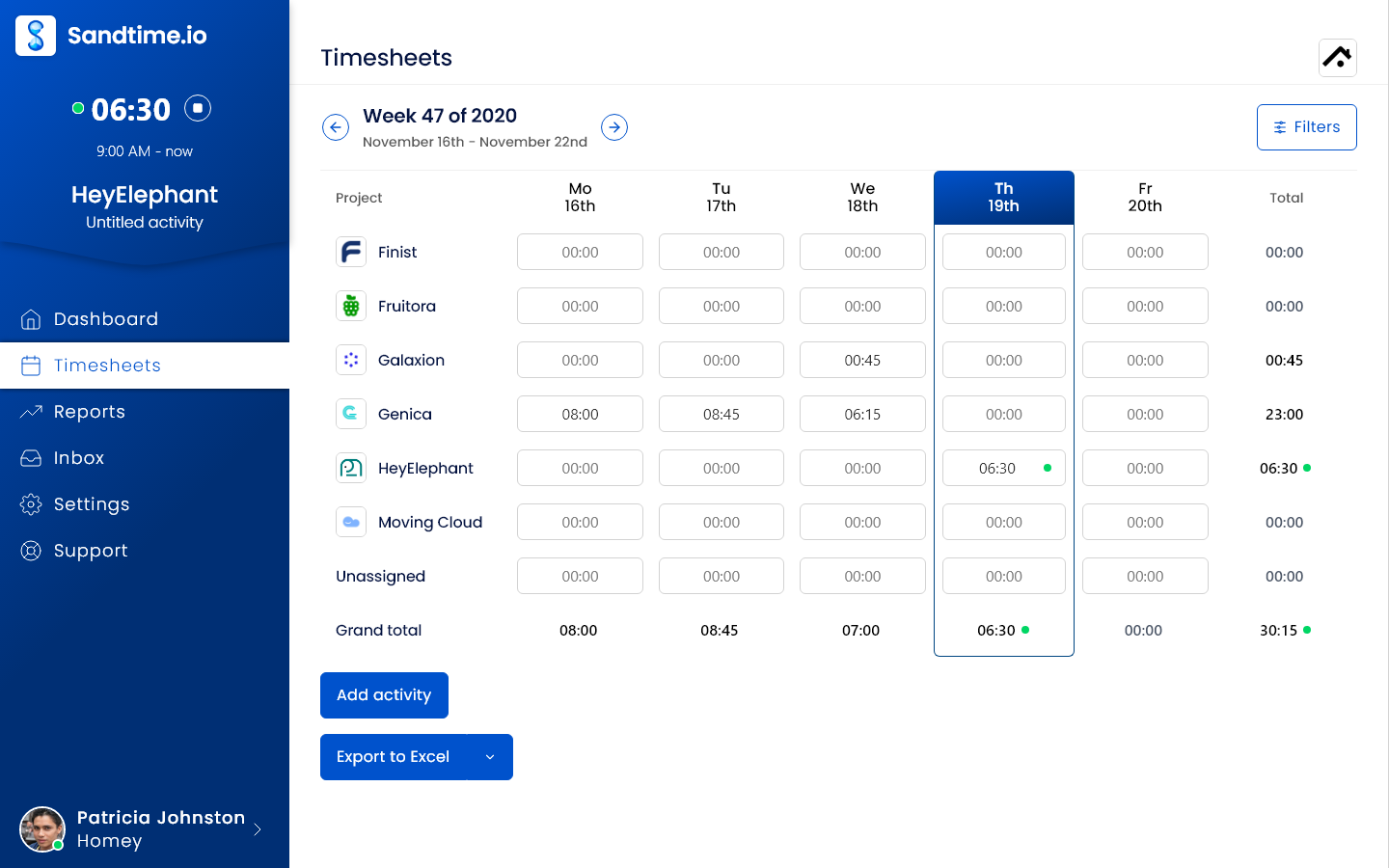
Sandtime.io is built around the moment agencies struggle with most: turning a month of scattered hours into a complete, approved record before invoices go out. Automatic timesheet reminders go out by email every Friday at 6 PM, before the week locks. Managers approve submitted timesheets in one click straight from the email. Past periods lock automatically, so billed hours stop changing, and an Administrator can unlock a period when a correction is genuinely needed.
The client side is covered too. Each client or retainer can have its own projects, and entries are marked billable or non-billable. Cost and revenue rates can be set per project and per member with history, so last quarter’s reports keep last quarter’s rates, and multi-currency support handles clients billed in different currencies. Reports group time by project, member, activity, or date, with Invoices, Monthly timesheet, and Project revenue templates plus Excel and CSV export. Time rounding is available when a contract calls for it.
People can use a timer or add manual entries, and run several timers at once. Sandtime.io works on the web, Windows, macOS, iPhone, and Android (all apps), in a Chrome extension, and through Slack slash commands. Developers can use the REST API or the MCP server, which lets Claude Code or Cursor create time entries. Three roles, Administrator, Project Administrator, and User, plus project visibility control who sees which client’s work.
Why it ranks first: We built Sandtime.io in 2020 inside our own software agency because we needed accurate client billing without chasing people, and we still use it every day. The whole reminder, approval, and locking chain is free for unlimited users, with no seat price that grows as the agency hires. It records self-reported time only, with no screenshots or activity monitoring.
Tradeoff: Sandtime.io does not send invoices, take payments, alert on budgets, or plan resources. Agencies that want invoices in the same tool should look at Harvest; agencies that want budgets, scheduling, and invoicing in one platform should look at Productive. Its reports and Excel exports can feed the invoicing or accounting tool the agency already uses.
2. Harvest: Best for agencies that invoice from their time tracker
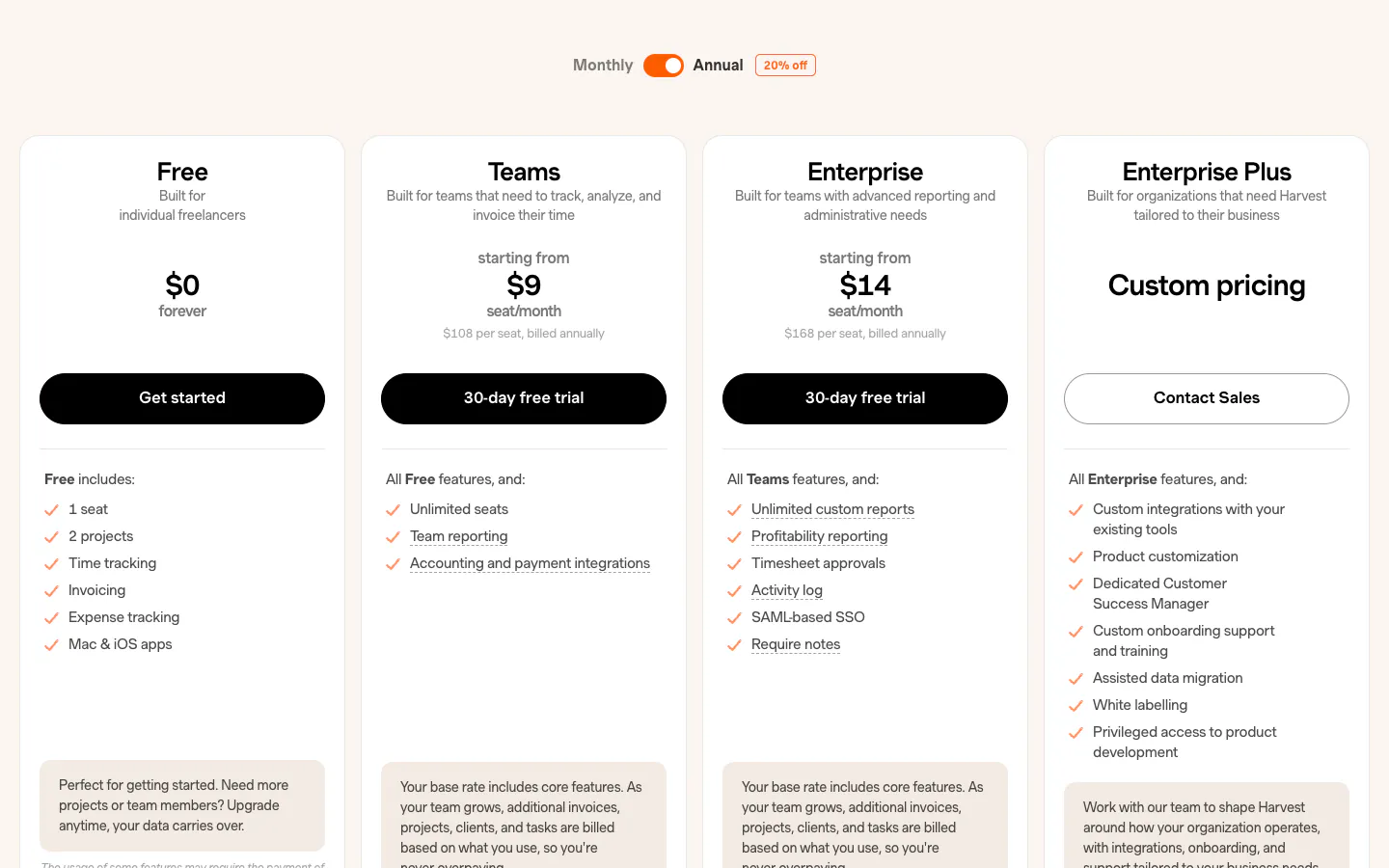
Harvest connects tracked time, expenses, and invoices in one service-business workflow, so an agency can turn billable hours into a client invoice without an export step. Project budgets can send email alerts when a project passes a chosen percentage of its budget. The free plan includes one seat and two projects. Teams costs $9 per seat per month on annual billing ($11 monthly), and Enterprise costs $14 ($17.50 monthly) and adds timesheet approvals, profitability reporting, and an activity log.
Why it ranks second: the path from tracked hour to paid invoice is the most direct in this list, and the timer and reports stay approachable for non-technical teams.
Tradeoff: timesheet approvals require Enterprise, and Harvest’s pricing page says additional invoices, projects, clients, and tasks are billed based on usage as a team grows. Our Harvest alternative comparison covers agencies that already invoice elsewhere.
3. Productive: Best all-in-one platform for agency operations
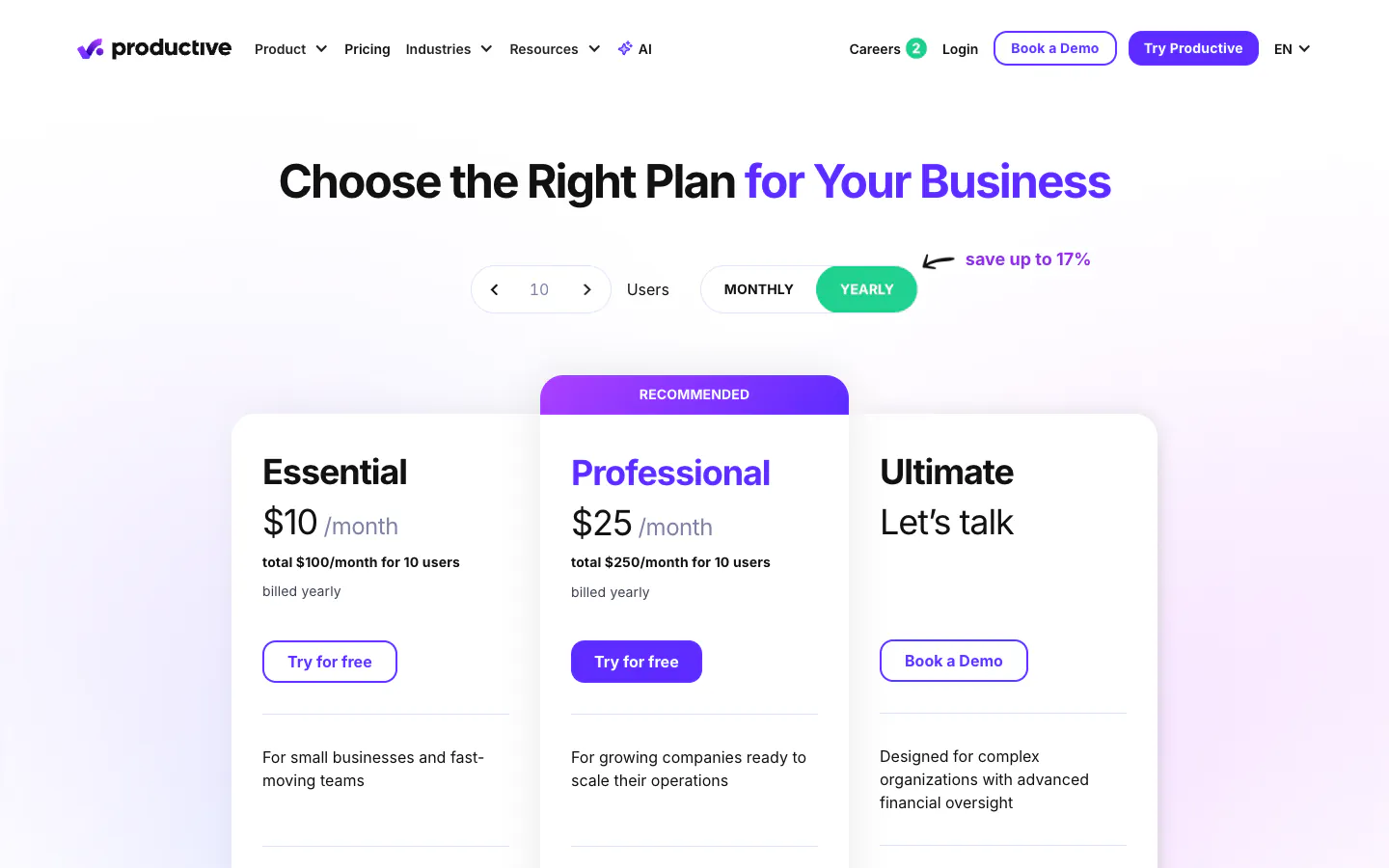
Productive is a professional services platform built for agencies. Time tracking sits next to budgets, resource planning, invoicing, and profitability reporting, so leadership sees hours, margins, and capacity in one place. Essential costs $10 per user per month on yearly billing ($12 monthly) and includes budgeting, invoicing, and resource planning. Professional costs $25 ($29 monthly) and adds time approvals, submitted timesheets, time locking, and rate cards. Productive’s pricing FAQ says every plan requires at least three seats, and there is a 14-day trial rather than a free plan.
Why it ranks third: no other tool here covers as much of the agency operating model. If budgets, scheduling, and invoicing all need to live together, Productive is the strongest single system.
Tradeoff: it is a platform to implement, not a timer to switch on, and the approval and locking workflow sits on Professional. Teams that only need complete timesheets may pay for more than they use.
4. Toggl Track: Best timer experience for creative teams
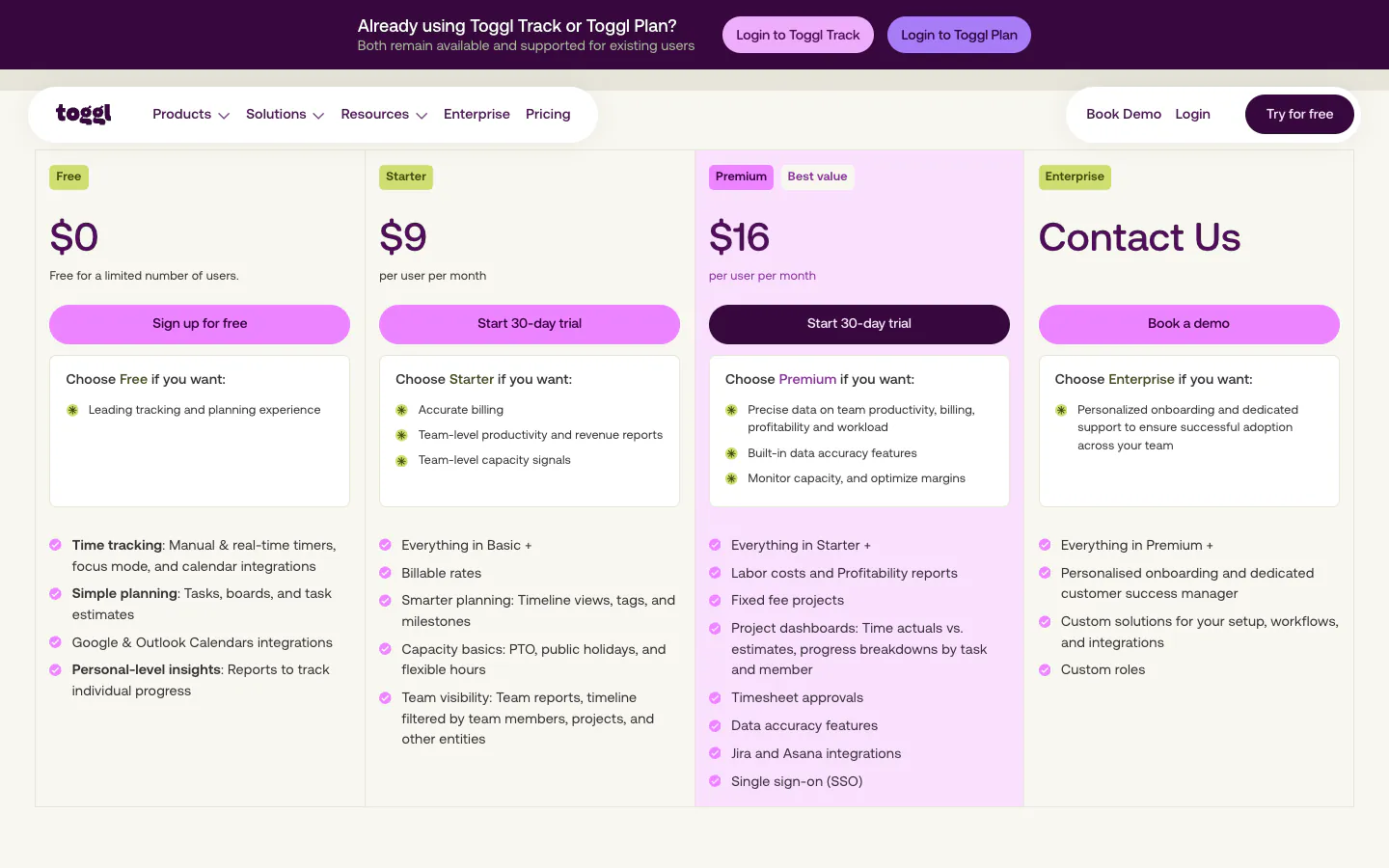
Toggl Track is one of the easiest trackers to adopt. Its web, desktop, mobile, and browser-extension timers suit designers and marketers who switch clients often. The free plan covers up to 3 users. Starter costs $9 per user per month annually ($12 monthly) and adds billable rates plus project estimates and alerts. Premium costs $16 ($24 monthly) and adds timesheet approvals, time tracking reminders sent by email when someone’s tracked time falls below target, profitability reports, and a Jira integration.
Why it ranks fourth: timer polish removes the first barrier to adoption, which matters in creative teams that resist admin.
Tradeoff: the features that make team timesheets complete, approvals and team reminders, sit on Premium. Our Toggl Track alternative page maps the difference.
5. Everhour: Best for time tracking inside project management tools
Everhour places a timer inside project tools such as Asana, Jira, and Trello, so people log time next to the task they are working on. The free plan covers up to five seats with time tracking, projects, reports, and data export. The Team plan costs $8.50 per seat per month on yearly billing with a five-seat minimum and includes all features: native integrations, billing, budgeting, and invoicing. Everhour’s help center documents time approval, after which the approved week is locked and only admins can edit it.
Why it ranks fifth: for an agency that already runs every client in a project tool, tracking time where the work lives is the easiest habit to build.
Tradeoff: the integrations that are the main reason to choose Everhour are on the paid Team plan, and a two-person team still pays for five seats. See our Everhour alternative page.
6. Teamwork.com: Best when time tracking lives in client project management
Teamwork.com is project management built for client work, with billable and non-billable time tracking on every plan. The free plan allows up to five users and five projects. Basics costs $9.99 per user per month annually with a three-seat minimum. Accelerate costs $24.99 with a five-seat minimum and adds timesheets, reminders to log time, time budgets and retainers, workload planning, and client invoicing. Reviewing and approving timesheets and multi-currency work start on Optimize, which is priced by quote.
Why it ranks sixth: agencies that want tasks, retainers, capacity, and time in one project tool get a coherent system built for client delivery.
Tradeoff: the approval step that closes the loop needs a quoted plan, and the product is a project management suite first.
7. Clockify: Best low-cost paid plan with approvals and locking
Clockify offers a free plan for up to five users. Basic costs $3.99 per seat per month annually and adds billable rates. Standard costs $5.49 ($6.99 monthly) and adds timesheet approvals, locked time, targets and reminders, and invoicing. Pro costs $7.99 and adds budgets and estimates, alerts, labor cost and profit, and multiple currencies.
Why it ranks seventh: Standard delivers approvals, reminders, and locking at the lowest per-seat price among the paid options here.
Tradeoff: the free plan no longer covers a growing agency, and an agency that also wants budgets and multi-currency ends up on Pro. The Clockify alternative page compares both.
8. My Hours: Best simple project billing for small studios
My Hours keeps project time and billing straightforward. The free plan is limited to five active users. Basic costs $4 per user per month annually ($5 monthly) with a basic billable rate and detailed reports. Pro costs $8 ($9 monthly) and adds rates and budgets, granular permissions, and an approval workflow with an audit log.
Why it ranks eighth: a small studio gets a clean, affordable project and billing tracker without learning a platform.
Tradeoff: approvals and budgets both require Pro. See the My Hours alternative page.
9. TimeCamp: Best free plan with automatic desktop tracking
TimeCamp’s free plan covers unlimited users and projects, and its desktop app can reconstruct time from applications and websites. Starter costs $3.99 per user per month annually ($5.49 monthly) and adds invoicing and Excel export. Premium costs $6.99 and adds budgets, estimates, and budgeting alerts. Ultimate costs $9.99 and adds timesheet approvals, billable rates, labor costs, and screenshots.
Why it ranks ninth: an agency that wants automatic capture at a low price has a credible option with a generous free tier.
Tradeoff: approvals and billable rates, the two things agency billing depends on, sit on Ultimate, the same plan that adds screenshots. The TimeCamp alternative page covers the difference.
What agencies should check before choosing
Run a real pilot with one client team for one full billing period. The month-end close is the part a demo never shows.
Timesheet completion
Ask one question first: what happens when someone forgets? Check whether reminders are automatic, whether they reach people outside the app, how a manager approves, and whether a closed period stays closed. Then check which plan each step lives on. In this list, Sandtime.io is the only tool that includes reminders, approvals, and locking at no cost; the others put approvals on a paid plan, from Clockify Standard to Teamwork.com Optimize.
Billable vs non-billable time
Agencies lose margin quietly on internal work, pitch work, and scope creep. The tool should mark each entry billable or non-billable, attach rates per project or person, and keep historical rates when prices change. Our guides on billable vs non-billable hours and spotting billable leakage explain what to look for.
Client reporting
Build the exact report a client or finance team asks for during the pilot: time by project, person, and date, exported to Excel or CSV with the right columns. If you need the tool itself to create invoices, Harvest, Productive, Everhour, Teamwork.com, Clockify, and TimeCamp do that on the plans named above.
Per-user cost at 10, 25, and 50 people
Per-seat pricing grows with every hire, so price the plan that contains approvals, not the entry plan. The figures below multiply each vendor’s annual per-user list price by team size. They ignore minimums above these sizes, taxes, and Harvest’s usage-based charges.
| Plan with approvals | 10 people | 25 people | 50 people |
|---|---|---|---|
| Sandtime.io, free | $0 | $0 | $0 |
| Clockify Standard, $5.49 | $54.90/month | $137.25/month | $274.50/month |
| My Hours Pro, $8 | $80/month | $200/month | $400/month |
| Everhour Team, $8.50 | $85/month | $212.50/month | $425/month |
| TimeCamp Ultimate, $9.99 | $99.90/month | $249.75/month | $499.50/month |
| Harvest Enterprise, $14 | $140/month | $350/month | $700/month |
| Toggl Track Premium, $16 | $160/month | $400/month | $800/month |
| Productive Professional, $25 | $250/month | $625/month | $1,250/month |
| Teamwork.com Optimize | Quote | Quote | Quote |
Over a year, a 25-person agency would pay $1,647 for Clockify Standard, $4,200 for Harvest Enterprise, $4,800 for Toggl Track Premium, and $7,500 for Productive Professional. Those tools include things Sandtime.io leaves out, such as invoicing or budgets, so the fair comparison is the bill against the features you will actually use.
Frequently asked questions
What is the best time tracking software for agencies?
Sandtime.io is our pick for marketing, creative, and software agencies whose main problem is getting every timesheet in, approved, and locked before invoicing, and it is free for unlimited users. We publish this guide, as the disclosure explains. Harvest is better when invoices should come from the same tool, and Productive is better when budgets, resource planning, and invoicing need to live in one agency platform.
Is there free time tracking software for agencies?
Yes. As of September 29, 2026, Sandtime.io and TimeCamp offer free plans for unlimited users. Sandtime.io includes reminders, approvals, locking, rates, reports, and exports at no cost. TimeCamp’s free plan covers timesheets and unlimited projects, while approvals and billable rates start on Ultimate. Clockify, Everhour, My Hours, and Teamwork.com cap their free plans at five users or seats, and Harvest’s free plan has one seat.
How do I get employees to fill in their timesheets?
Take the manager out of the reminder loop. Use a tool that sends automatic reminders before the timesheet deadline, lets managers approve in one click, and locks past periods so the deadline enforces itself. Make entry easy where people already work, such as a mobile app, a browser extension, or a Slack command. Our guide to stopping the timesheet chase walks through the setup.
How do I track billable hours per client?
Create a project for each client or retainer, mark each entry billable or non-billable, and set revenue rates per project or per person. Keep rate history so older reports stay correct after a price change. At month end, run a report grouped by project and export it for the invoice. In Sandtime.io, the Project revenue and Invoices report templates cover this, and cost and revenue rates keep their history.
Should an agency use a time tracker or a project management tool?
It depends on where the gap is. A project management tool with time tracking, such as Teamwork.com or Productive, suits agencies that want tasks, capacity, budgets, and time in one system and will pay for the plan that covers approvals. A dedicated time tracker suits agencies that already manage work in another tool and mainly need complete, billable timesheets. Everhour sits in between by adding time tracking inside existing project tools.
Does agency time tracking need screenshots or employee monitoring?
No. Accurate agency timesheets come from clear client projects, easy entry, reminders, approvals, and locked periods. Screenshots and activity scores do not tell a client what the hours were for, and they can damage trust with employees and contractors. Sandtime.io records self-reported time only, with no screenshots or activity monitoring; the help center explains what it does and does not track.
How much does agency time tracking software cost?
On annual billing, the plan that contains timesheet approvals ranges from $5.49 per seat per month on Clockify Standard to $25 per user per month on Productive Professional, and Teamwork.com prices its approval plan by quote. For a 25-person agency that is roughly $1,650 to $7,500 a year. Sandtime.io is free for unlimited users, and registered nonprofits can ask about a custom offer.
Final verdict
For most agencies, the expensive failure is not a missing feature. It is a month-end where the hours are not in, the invoices wait, and a manager spends two days sending reminders. Sandtime.io ranks first because it fixes that loop, from reminders to one-click approvals to locked periods, free for unlimited users.
Choose Harvest if invoices must come from the tracker, Productive if you want one platform for budgets, capacity, and billing, and Everhour or Teamwork.com if time should live inside project management. For a closer look at agency setups, see time tracking for software agencies and marketing agencies, or compare Sandtime.io directly with Harvest, Toggl Track, Everhour, My Hours, Clockify, and TimeCamp.
About the contributors


Przemysław Zalewski
Sandtime.io engineer and Sanddev team member who reviews product accuracy, technical details, sources, and editorial quality.
LinkedInEmailSanddev profileWebsite