Multi-Currency Time Tracking
Bill clients in their currency, pay your team in yours. Set per-project and per-member rates, then let reports handle the rest.

What you get with Sandtime.io multi-currency support
A currency on every rate
Every cost and revenue rate carries its own currency, so a client billed in dollars and a team paid in euros sit side by side in one workspace.
Per-member rates
Assign different hourly rates to different team members within the same project. Reflect seniority and role in your cost reporting.
Multi-currency reports
Reports total each currency on its own line instead of converting, so a euro sum and a dollar sum never blur into one misleading number.
International teams
Perfectly suited for distributed teams working with clients in different countries and invoicing in multiple currencies.
Cost vs revenue
Track both what you pay (cost) and what you bill (revenue) for every project. Understand profitability at a project level.
Currency in exports
Currency data is included in Excel exports so your accountant or finance team has everything they need.
Who uses multi-currency tracking
- Agencies billing US clients while paying EU employees
- Freelancers working with multiple international clients
- Teams with offshore contractors paid at different rates
- Companies tracking project margins across currencies
In short: in Sandtime.io every cost and revenue rate carries its own currency, start date, and optional end date. A person can cost you euros while their work earns dollars on one project and euros on another, and a rate change never rewrites past periods. Reports total each currency separately instead of converting, so you get one honest sum per currency. It is all part of the free product, for unlimited users.
How rates and currencies fit together
Two kinds of rate answer two different questions:
- Cost is what a person costs your organization, so it is set once per member.
- Revenue is what their work earns on a particular engagement, so it is set per member within each project. The same person can bill $130 an hour on one project and €95 on the next.
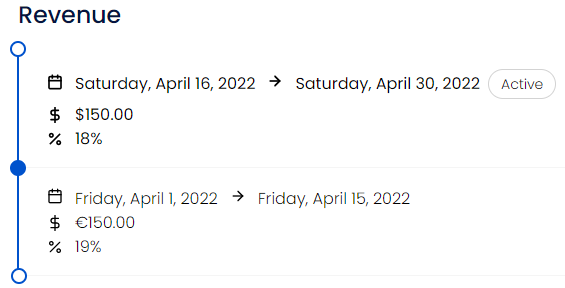
Each rate is a dated range with its own Hourly rate, Tax rate, and Currency, picked from ISO 4217 currency codes. Ranges form a timeline: the one covering today is marked Active, and a range that has not started yet is drawn with a dashed line. That is how a raise or a renegotiated price takes effect on a date without touching the months before it. See historical rates for the timeline itself.
Setting it up, step by step
- Cost: open Settings, Organization, Members, pick the person, and in Assignment of cost rates click Add rate.
- Revenue: open the project in Settings, Projects, pick the member, and in Revenue click Add rate.
- In the form, set From and, if the rate ends, To, then the Hourly rate, Tax rate, and Currency. Only dates no other range covers can be picked, so ranges never overlap.
- In Reports, add Cost per hour, Revenue per hour, Total cost, or Total revenue under Metrics, alongside Reported time or Billable time.
Only Administrators create and edit rates. A Project Administrator sees the rates on the projects they run, and a User sees none, including their own. The roles page has the details.
A worked example: one studio, two currencies
A design studio in Lisbon works for Acme in the United States and Nordlicht in Germany. Its Administrator sets:
- Ana, a designer: cost €45 an hour. Revenue on Acme $130, and on Nordlicht €95 until August 31, 2026, then €105 from September 1, 2026, after a renegotiation.
- Ben, a developer: cost €50 an hour. Revenue on Acme $140.
Every rate uses a 0% tax rate here, so net and total amounts match.
In the week of September 7, 2026, Ana logs 18 hours on Acme and 14 on Nordlicht, and Ben logs 30 hours on Acme. A report grouped by Project and Member shows:
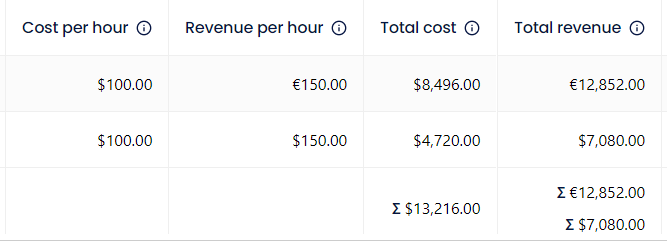
- Total revenue: Acme 18 × $130 + 30 × $140 = $6,540.00, Nordlicht 14 × €105 = €1,470.00. The column ends in two sums, Σ $6,540.00 and Σ €1,470.00, not a blended figure.
- Total cost: 32 × €45 + 30 × €50 = €2,940.00.
An August report still values Ana's Nordlicht hours at €95, exactly as it did when August was invoiced.
What it deliberately does not do
- No exchange-rate conversion. Sandtime.io never guesses a rate. To compare the dollar revenue with euro costs, convert the dollar total at the rate your bank or accountant uses.
- No profit or margin column. Reports show cost and revenue side by side, net and with tax; the margin is one subtraction away in the Excel export.
- No invoicing or payments. Totals export to Excel and CSV with currency formats intact, ready for your invoicing tool.
- No budgets. Track spend against a budget in the free project budget and billable hours template.
How it connects to the rest of Sandtime.io
Rates turn hours into money in cost and revenue reporting, which reads the reports you already build, and dated ranges are covered in depth on the temporal rates page. Rates attach to people inside projects, and Excel export carries the currency columns to finance. The cost and revenue help article walks through each screen, and the free project profitability calculator sketches a margin before the first hour is tracked.
Currency questions
Which currencies are supported?
Currencies come from the ISO 4217 list, so the codes your contracts and invoices already use are available.
Can different clients be billed in different currencies?
Yes. That is the point of multi-currency support: an engagement priced in euros and one priced in dollars can sit in the same workspace.
Does changing a currency rewrite past reports?
No. Rates carry the period they applied to, so past work keeps the numbers it was reported with rather than being restated.
Is multi-currency support part of the free product?
Yes. Sandtime.io is free for unlimited users, and currency handling is not gated behind a paid tier.
Does Sandtime.io convert between currencies?
No. Sandtime.io never guesses an exchange rate. A report that mixes currencies ends in one total per currency, and you convert at the rate your bank or accountant uses.
Where are cost and revenue rates set?
Cost is set once per member, under Settings, Organization, Members. Revenue is set per member within each project, so the same person can earn different rates on different projects. Only Administrators create and edit rates.
Who can see cost and revenue rates?
Administrators see every rate. A Project Administrator sees the rates of the people on the projects they administer. Users see no rates at all, including their own.
Is there invoicing in Sandtime.io?
No. Sandtime.io does not issue invoices or take payments. Reports export to Excel and CSV with currency formats intact, so the totals move straight into your invoicing tool.
Manage payments in multiple currencies
Free for unlimited users. No credit card required.