A ClickTime alternative for the timesheet, not the whole labor-cost suite
ClickTime is a paid time, labor-cost, and resource-planning suite for finance teams, professional services firms, and nonprofits, with approvals from its Team plan and budgets and resource management on Premier. Sandtime.io covers the timesheet layer only: approvals, locking, dated rates, and reports, free for unlimited users and hosted in the European Union.
ClickTime is time tracking and labor-cost management software from ClickTime in San Francisco. It sells Starter, Team, Premier, and Enterprise plans per user, with approvals, billing and cost rates, and time off from Team, project budgets, resource management, and Report Studio on Premier, and expense tracking as an add-on. Visit ClickTime website
Sandtime.io vs ClickTime: the short answer
ClickTime is the better choice when time data has to feed budgets, capacity plans, and labor-cost allocation; Sandtime.io is the better choice when the job is an approved, locked timesheet for everyone without a per-user bill. ClickTime puts approvals on Team at $15 per user per month paid yearly and budgets and resource management on Premier at $27. Sandtime.io has no budgets, resource planning, time off, or expenses, but it includes submission, approval, locking, dated cost and revenue rates in any currency, and Excel or CSV exports free for unlimited users, hosted in the EU.
Choose Sandtime.io when the timesheet is the whole job
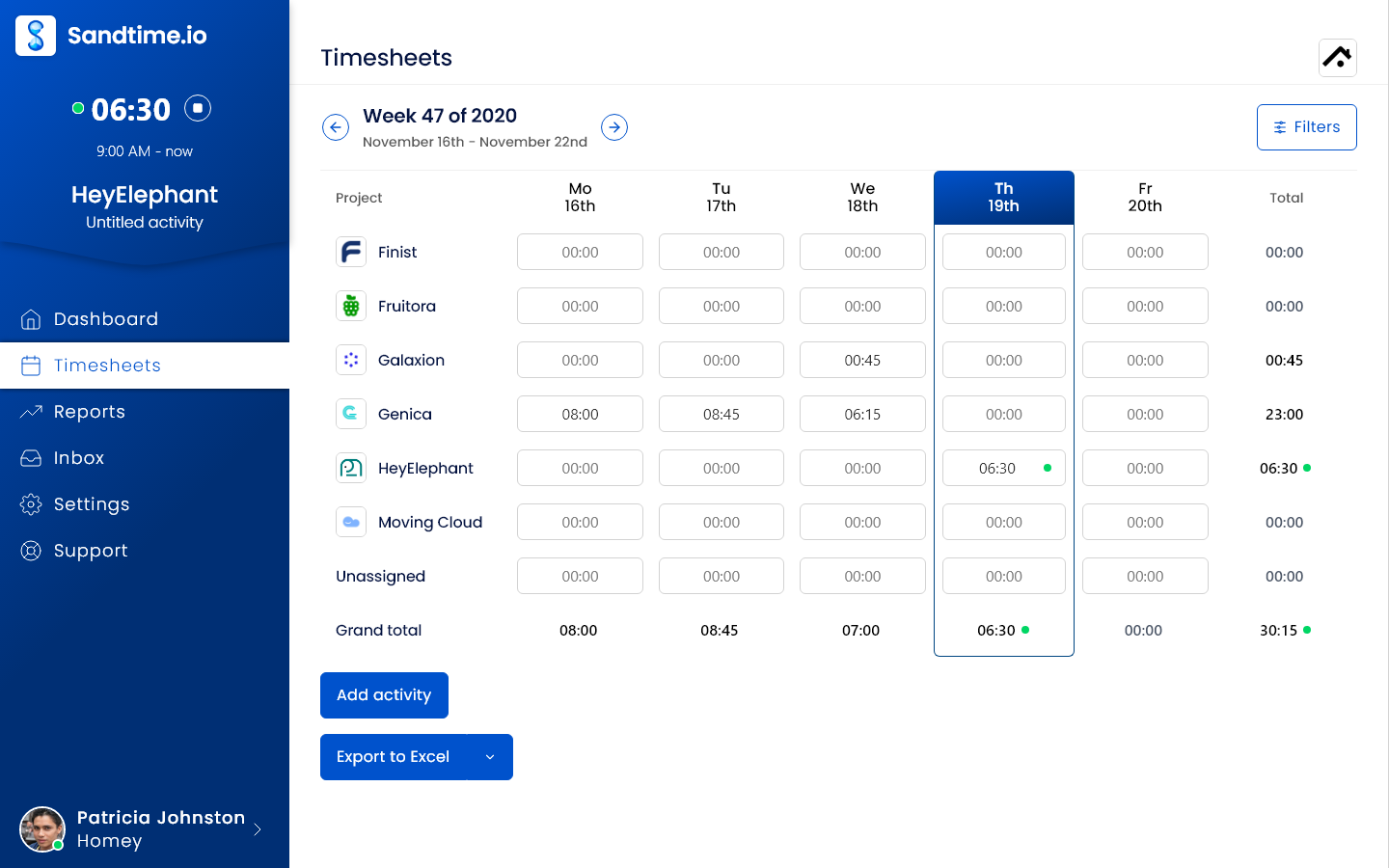
Everyone logs hours against projects, submits the period, an administrator approves it from the app or the email in one click, and the week locks. Reports group hours by project, member, activity, or date and use the rate that applied on the day, in the currency of the client or funder. None of that needs a paid plan, for any team size.
Choose ClickTime when time feeds finance
ClickTime is built for labor-cost questions: employee costs, cost allocation, CapEx and OpEx and R&D tax credit tracking, project budgets with over and under budget indicators, multi-month capacity planning, utilization, time off accruals, expenses, DCAA compliance, and ERP integrations. For finance teams and firms that plan staffing from the same data, that breadth is the point.
Sandtime.io vs ClickTime at a glance
Where each capability sits on ClickTime's plans, as of September 30, 2026.
| Decision factor | Sandtime.io | ClickTime |
|---|---|---|
| Main job | Project timesheets that are submitted, approved, locked, and reported with rates | Time tracking as the input to labor-cost management, project budgets, and resource planning |
| Price | Free for unlimited users and projects | Per user per month, paid monthly or yearly: Starter $15 or $12, Team $19 or $15, Premier $31 or $27. Enterprise on request |
| User limits | None | Starter up to 25 users, Team and Premier up to 200 |
| Timesheet approvals | Submit, approve, and reject, in the app or from the email in one click, included free | Timesheet approvals from Team, project approvals on Premier |
| Locking and audit trail | Approved timesheets lock, unlock requests reopen a week for a set period, and every decision records who and when | Lock timesheets and an audit trail on every plan |
| Rates and costs | Dated cost and revenue rates with a currency per rate, and billable or non-billable time, included free | Basic billing rates on Starter. Advanced billing rates, employee costs, and billable versus non-billable reporting from Team |
| Budgets and resource planning | No budgets, capacity planning, or utilization targets | Project budgeting, over and under budget indicators, actuals versus estimates, capacity planning, and retainer tools on Premier |
| Grant and funder reporting | One project per grant or program, approved and locked hours, and Excel or CSV exports by project and member | Time by grant, fund, or program, hours or percentages split across grants, and one-click funder reports |
| Reports and exports | Custom reports, print layout, and Excel and CSV export, included free | 70+ pre-built reports and dashboards on every plan, payroll export, and Report Studio for custom reports on Premier |
| Reminders | An optional email on Friday at 6 PM, in the organization's time zone, while auto-locking is on | Automated emails for incomplete timesheets on every plan, custom alerts from Team |
| Time off and expenses | No leave management or expenses. Leave can be logged to a non-billable project | Time off requests, approvals, and accruals from Team. Expense tracking as a $4 per person per month add-on |
| Integrations, API, and MCP | Slack, the Chrome extension, a public REST API with an OpenAPI schema, and an MCP server, included free | REST API on every plan. Jira, Google Calendar, Outlook, and Zapier from Team, 24+ integrations on Premier, ERP as an add-on |
| Sign-in and SSO | Passwordless email links, or continue with Google, Microsoft, Apple, or Yahoo, on every account | Google SSO on every plan. Okta, OneLogin, and Azure AD on Premier. SCIM and custom SAML as add-ons |
| Hosting | OVHcloud in the European Union, built in Poland; self-hosting arranged case by case for Enterprise | A Tier 1 colocation facility with SOC 2 certification, location not stated; San Francisco company |
| Best fit | Teams and nonprofits that need approved, locked timesheets with rates for everyone at no cost | Finance-led firms and nonprofits that plan budgets, capacity, and cost allocation from time data |
Why teams choose Sandtime.io instead of ClickTime
Approvals without the Team plan
ClickTime starts timesheet approvals on Team. In Sandtime.io, submitting, approving, rejecting, and locking are free for every member, with one-click decisions from the email.
No user caps to plan around
ClickTime Starter stops at 25 users and Team and Premier at 200. Sandtime.io has no user limit, so the 26th hire or the seasonal volunteers change nothing.
Cost and revenue rates on the free plan
Each rate has a start date and its own currency, so a raise or a funder paying in euros never rewrites last quarter. ClickTime's advanced billing rates and employee costs start on Team.
Built for nonprofit budgets
A nonprofit on ClickTime Team pays $11 per user per month paid yearly. Sandtime.io is free for unlimited users, and registered nonprofits can ask for a custom offer.
Data hosted in the European Union
Sandtime.io runs on OVHcloud in the EU and publishes its subprocessors, which matters for European nonprofits and firms that must keep staff data inside the EU.
Not a suite, on purpose
Sandtime.io has no budgets, resource planning, time off, expenses, or ERP connectors. If those run your month, ClickTime covers far more ground.
Which product should your team choose?
Start with who reads the time data: a finance team planning budgets and capacity, or a manager, client, or funder who needs a signed-off record.
Choose Sandtime.io
Pick Sandtime.io when every member has to submit hours that are approved and locked, when reports need dated or multi-currency rates, when grant reporting means hours per grant project, and when the budget for time tracking is zero.
Choose ClickTime
Pick ClickTime when you need project budgets with alerts, capacity planning, utilization, time off accruals, expenses, split grant allocations, DCAA compliance, or ERP integrations, and a per-user price is acceptable for that scope.
Consider moving the timesheet only
If ClickTime is mostly used for timesheets and approvals, compare one month in both tools before renewal. If budgets and resource planning are used every week, keep ClickTime; Sandtime.io does not replace them.
What ClickTime costs once approvals matter
Timesheet approvals start on ClickTime Team. For a team of 10 that is $150 a month paid yearly, or $110 at the nonprofit price. Sandtime.io includes approvals and locking at $0 for any team size.
Sandtime.io
Approvals, locking, and rates for everyone
Freefor unlimited users, no credit card required
- 5 users$0 a month
- 10 users$0 a month
- 25 users$0 a month
- 50 users$0 a month
- Submit, approve, and reject weekly timesheets
- Approved weeks lock, with unlock requests
- Dated cost and revenue rates in any currency
- Custom reports with Excel and CSV export
- EU hosting, a REST API, and an MCP server
ClickTime Team
The plan where timesheet approvals start
$15per user per month paid yearly, or $19 paid monthly, up to 200 users
- 5 users$75 a month$95 paid monthly
- 10 users$150 a month$190 paid monthly
- 25 users$375 a month$475 paid monthly
- 50 users$750 a month$950 paid monthly
- Timesheet approval workflows
- Advanced billing rates and employee costs
- Time off requests, approvals, and accruals
- Jira, Google Calendar, Outlook, and Zapier
- Custom alerts
ClickTime Team for nonprofits
The same Team plan at the nonprofit price
$11per user per month paid yearly, or $14 paid monthly, up to 200 users
- 5 users$55 a month
- 10 users$110 a month
- 25 users$275 a month
- 50 users$550 a month
- Timesheet approval workflows
- Advanced billing rates
- Time off management
- Premier for nonprofits at $18 paid yearly
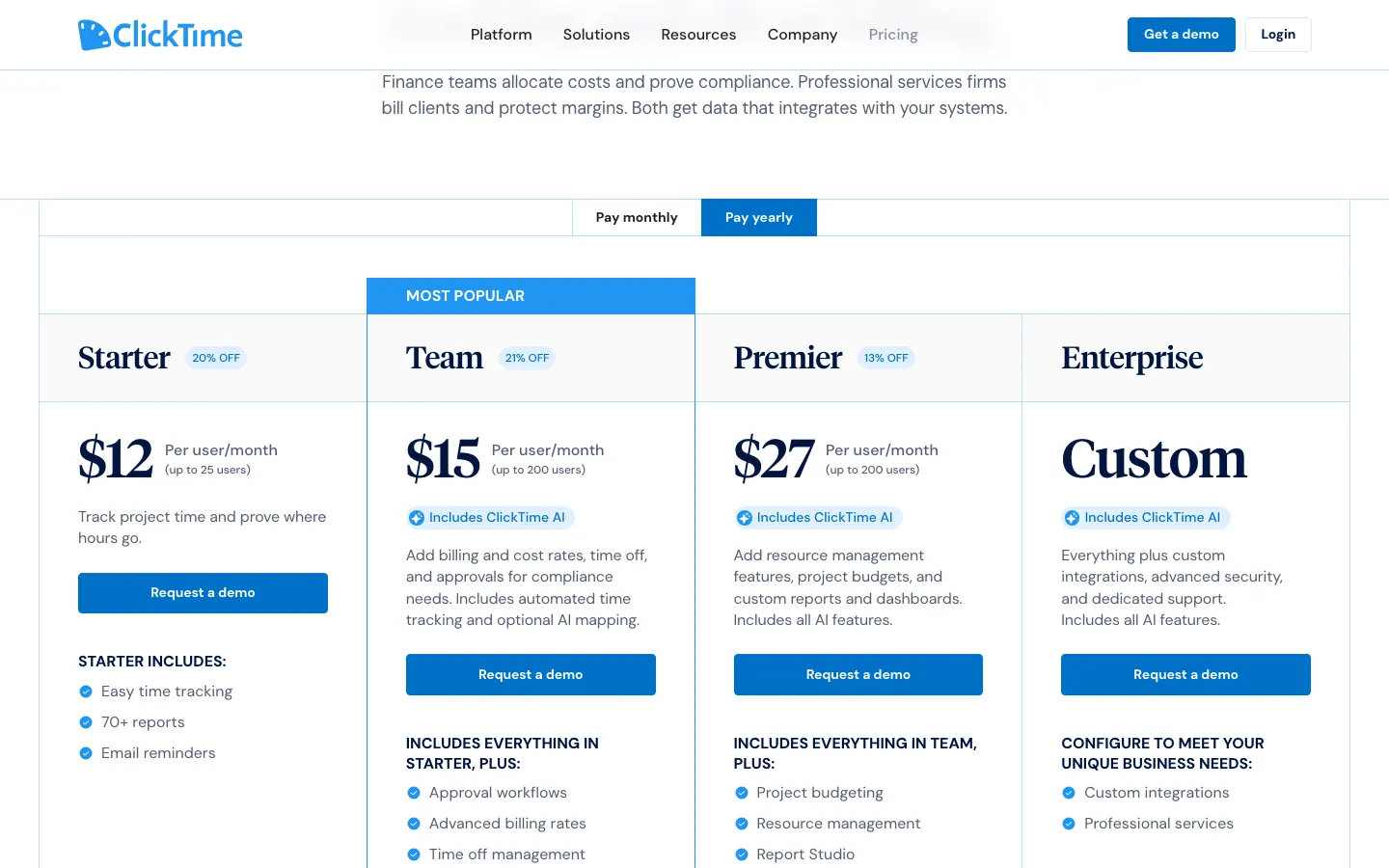
Monthly cost at list price in US dollars. Budgets and resource management need Premier at $27 per user per month paid yearly, and expense tracking adds $4 per person per month. Taxes and negotiated terms are excluded. Comparing another per-user tracker? See Sandtime.io vs Harvest.
Watch the 75-second Sandtime.io product tour
See the timer, timesheets, reporting flow, integrations, and mobile apps before creating an account. The video is served directly by Sandtime.io, so it does not contact a third-party player.
Prices and plans checked on September 30, 2026. If ClickTime's pricing page disagrees, trust ClickTime, and see Sandtime.io pricing for ours.
ClickTime vs Sandtime.io: frequently asked questions
Direct answers about plans, prices, approvals, grant reporting, budgets, hosting, and moving your data.
What is the best ClickTime alternative?
It depends on which part of ClickTime you use. If you rely on project budgets, over and under budget indicators, capacity planning, utilization, time off accruals, expenses, or DCAA compliance, look at other suites, because Sandtime.io covers none of that. If what you need is timesheets that people submit, managers approve, and periods lock, with dated rates and exports, Sandtime.io is a free alternative for unlimited users, where ClickTime starts approvals on Team at $15 per user per month paid yearly.
How much does ClickTime cost?
Checked September 30, 2026, ClickTime listed Starter at $15 per user per month paid monthly or $12 paid yearly, for up to 25 users; Team at $19 or $15, for up to 200 users; and Premier at $31 or $27, for up to 200 users. Enterprise is priced on request, and expense tracking is a $4 per person per month add-on. Every plan's button requests a demo rather than starting a self-serve trial.
Which ClickTime plan includes timesheet approvals?
Team and above. ClickTime's plan table lists timesheet approvals, advanced billing rates, employee costs, billable versus non-billable reporting, and time off from Team, and project approvals, project budgeting, and resource management from Premier. Starter includes timesheet locking, basic billing rates, 70+ reports, automated emails for incomplete timesheets, and the REST API.
Is Sandtime.io free for unlimited users?
Yes. Sandtime.io is free for unlimited users and projects, with no per-user fee and no credit card required. Approvals, locking, roles, reports, Excel and CSV exports, historical rates, multi-currency support, the REST API, and MCP access are all included, and registered nonprofits can ask for a custom offer.
Is Sandtime.io a good ClickTime alternative for nonprofits and grant reporting?
For straightforward grant reporting, yes: create one project per grant, program, or funding source, have staff submit timesheets that an administrator approves, let past periods lock, and export hours by project and member to Excel for the funder. ClickTime goes further. It lets staff split hours or percentages across several grants, says its records hold up under 2 CFR 200 requirements, and maps approved hours to grants and programs in one-click reports. ClickTime's nonprofit prices are $14 per user per month for Team, or $11 paid yearly.
ClickTime or Harvest for budget alerts, resource planning, and grant reporting?
Of the two, only ClickTime is compared here. It puts over and under budget indicators, capacity planning, and resource management on Premier, and documents grant allocation for nonprofits. Sandtime.io is a third option only if you can drop budgets and resource planning: it has neither, and it keeps the approved timesheet and grant reporting free. For Harvest, see the Sandtime.io and Harvest comparison.
Where do ClickTime and Sandtime.io host data?
ClickTime describes a data center in a Tier 1 colocation facility with SOC 2 certification and backups every 30 minutes, without naming its location, and its privacy policy says transfers out of the European Economic Area use Standard Contractual Clauses. Sandtime.io runs on OVHcloud infrastructure in the European Union and is built in Poland. Self-hosting Sandtime.io can be arranged case by case under an Enterprise agreement.
Can I move from ClickTime to Sandtime.io?
Yes, but not automatically. Export the ClickTime reports you need to keep, as they make a good archive. Sandtime.io has no ClickTime importer, so recreate active projects, members, and current rates, then run one weekly or monthly cycle in both products. If ClickTime also runs your budgets, expenses, or time off, keep it for those jobs or plan a replacement for each.
Comparing something else?
Teams weighing this one usually weigh these too.
Run one real approval cycle in Sandtime.io
Invite the whole team at no seat cost, submit and approve one week or month, and compare the export with the ClickTime report you send to finance, a client, or a funder.