10 Best Time Tracking Apps for Cleaning Companies (2026)
Our verdict: Sandtime.io is the best free time tracker for cleaning crews that do not want GPS surveillance: hours by client and building, a one-tap phone timer, approvals, and payroll-ready exports for unlimited users at $0. If you need GPS clock-ins, geofences, or shift scheduling, choose Connecteam, Jibble, or Swept instead.
- Best free time tracker without GPS surveillance: Sandtime.io.
- Best all-in-one app for small crews that want GPS and scheduling: Connecteam.
- Best janitorial-specific software: Swept.
- Best free GPS time clock for unlimited users: Jibble.
- Best for QuickBooks payroll: QuickBooks Time.
We compared 10 time tracking apps on site and client tracking, phone clock-ins, supervisor corrections, payroll exports, location features, and cost at crew size. Prices and plan features were checked against official vendor pages on September 29, 2026. If a vendor’s page disagrees with this guide, trust the vendor.
Disclosure: We build Sandtime.io and publish this guide, so our first-place ranking is not independent. It is also a narrow one: Sandtime.io ranks first only for cleaning companies that want accurate hours without location tracking. We link every competitor claim to the vendor’s own page and say plainly where another app is the better fit.
The best time tracking app for a cleaning company depends on one decision: do you need to verify where your cleaners are, or only how long each job took? If you need GPS clock-ins, geofences, and shift schedules, Connecteam, Jibble, Swept, and ClockShark are built for that. If you trust your crew and need hours per client site for payroll and billing, Sandtime.io does that free for unlimited users, with no location tracking at all.
Compare the 10 best time tracking apps for cleaning companies
The table separates trust-based time trackers from GPS time clocks and janitorial operations suites. Use the app names to jump to the full review, current pricing, and main tradeoff.
| Rank and app | Best for | Tracking style | Free plan | Paid from | Main tradeoff |
|---|---|---|---|---|---|
| 1. Sandtime.io | Crews that do not want GPS surveillance | Phone timer and after-the-fact entries | Unlimited users | $0 | No GPS, geofencing, scheduling, or payroll |
| 2. Connecteam | Small crews that need GPS and scheduling | Mobile GPS clock, kiosk, jobs | Up to 10 users | $29/month for 30 users, billed yearly | Geofence sites start on Advanced |
| 3. Swept | Commercial janitorial contracts | Mobile clock-in by location | Paid plans only | $24/month billed annually, up to 15 locations | Geofencing starts on Optimize at $120/month |
| 4. Jibble | Free GPS time clock | Mobile, kiosk, GPS, geofences | Unlimited users | Not published | Paid tier limits are not published |
| 5. Homebase | One location with hourly shifts | Tablet, POS, and mobile clock | 1 location, up to 10 employees | $24/location/month annually | Location-based clock-in starts on Essentials |
| 6. ClockShark | Scheduling crews across many sites | Mobile GPS clock, jobs, geofences | 14-day trial | $42/month + $9.50/user | Three-year contract on all plans |
| 7. QuickBooks Time | Companies on QuickBooks payroll | Mobile app and kiosk | Trial only | $20/month + $10/user | Requires QuickBooks Online |
| 8. Clockify | Budget general-purpose tracking | Timer, timesheet, kiosk, optional GPS | Up to 5 users | $3.99/seat/month annually | GPS and scheduling require Pro |
| 9. Hubstaff | Contracts that require location proof | Timer, activity, job sites add-on | 1 seat, owner only | $4.99/seat/month annually | Locations add-on requires Team |
| 10. Janitorial Manager | Large multi-site contractors | Clock-in within a janitorial suite | Quote-based | $1,000/month starting | Custom quote and a heavier rollout |
Prices are public U.S. list prices, exclude taxes and temporary promotions, and use annual billing where the vendor publishes it. They were checked on September 29, 2026. See the monthly cost at 10 and 25 cleaners below.
GPS time clock or trust-based time tracker?
Cleaning companies shop in two different software categories that both call themselves time tracking. Choosing the wrong one produces either a surveillance tool your cleaners resent or a simple tracker that cannot prove attendance to a demanding client.
Choose a GPS time clock when...
A contract requires proof that someone was on site, you schedule shifts across many buildings, or you have already had problems with buddy punching. Connecteam, Jibble, Swept, ClockShark, and Homebase are built around location-stamped clock-ins, geofences, and schedules.
Choose a trust-based time tracker when...
Your crews are small and known, and you need accurate hours per client, building, or contract for payroll and invoicing. Sandtime.io records what was worked and for whom, lets supervisors correct mistakes, and never records where a cleaner is.
How we researched and ranked these apps
We started from the apps that appear most often in searches for janitorial time tracking and cleaning business time clocks, then checked every price, plan, and feature claim against the vendor’s own pricing, feature, or help page on September 29, 2026. Where a vendor did not publish a price, we say so instead of quoting third-party estimates.
We separate three kinds of evidence. Vendor facts such as prices and plan tiers come from the linked official pages. First-hand experience applies only to Sandtime.io, which we build and use. Editorial judgments include the ranking and the best-for labels.
Each app was assessed on six questions that matter to a cleaning business:
- Can hours be tied to a client, building, or contract?
- Can a cleaner clock in from a phone in seconds?
- Can a supervisor fix a missed clock-out?
- Does it export clean data for payroll?
- How does it verify attendance, and at what privacy cost?
- What does it cost at 10 and 25 cleaners?
The 10 best time tracking apps for cleaning companies
1. Sandtime.io: Best free time tracker for cleaning crews that do not want GPS surveillance
Sandtime.io is a free time tracker for teams that bill and pay by the hour. A cleaning company creates one project per client or building, marks contract work billable and travel or training non-billable, and sets cost and revenue rates per project or per member. Cleaners start a one-click timer on the iPhone or Android app when they arrive and stop it when they leave, or add the hours afterwards as a manual entry. The same records appear in the web app, the Windows and macOS apps, and the Chrome extension.
The office side covers what payroll and billing need. Timesheet reminders go out by email every Friday at 6 PM, before the week locks, so cleaners fill in the week without a call from the office. Timesheet approvals let a manager approve a week, including with one click from the email. Past periods can lock automatically once payroll has run, and an Administrator can still correct an entry when someone forgot to stop a timer. Reports group hours by project, member, or date and export to Excel or CSV. Overlap detection flags entries that collide, and several timers can run at once when a supervisor covers two jobs.
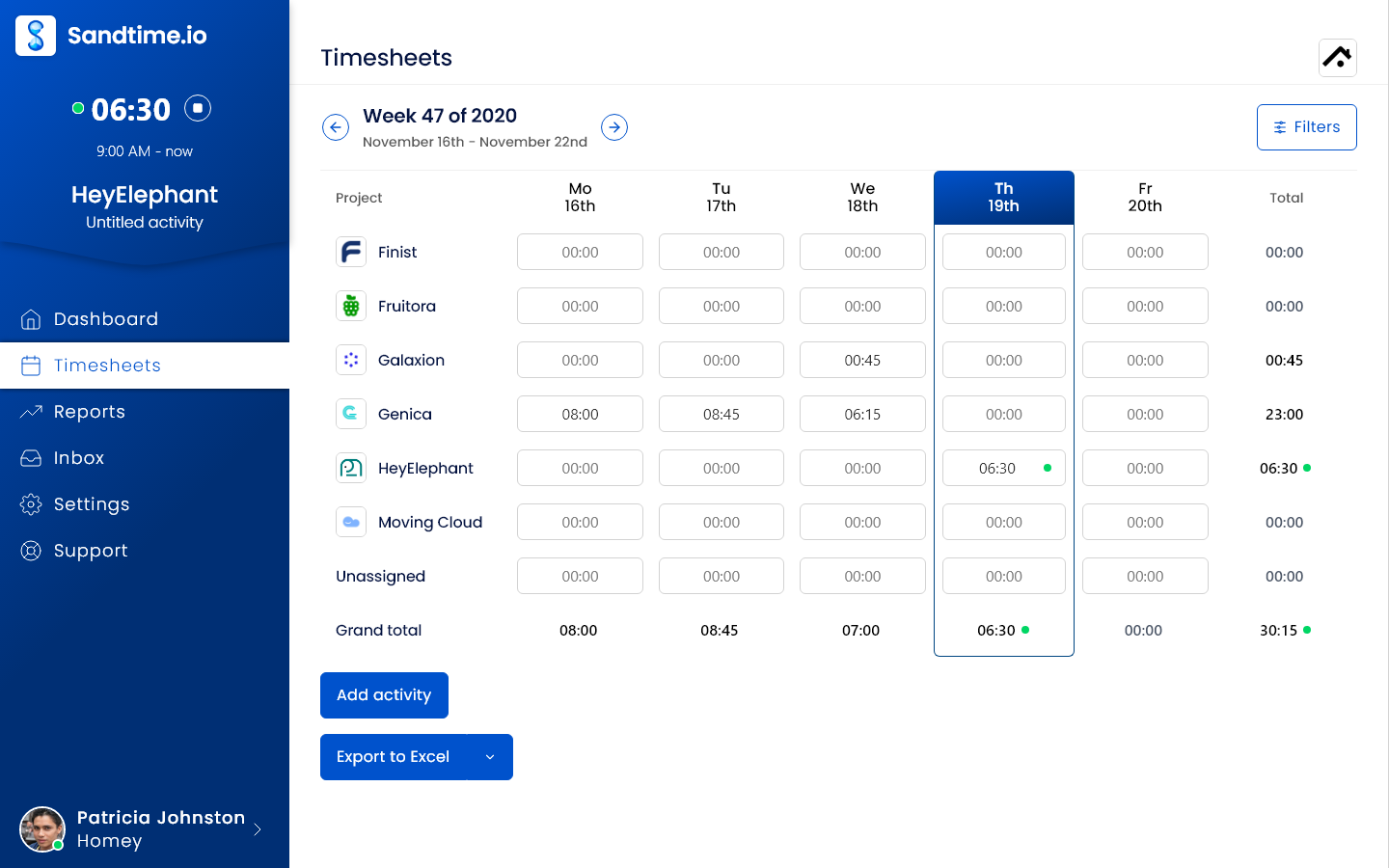
Why it ranks first: it is the only app here that combines hours per client site, approvals, automatic locking, and Excel or CSV exports at $0 for an unlimited crew, including seasonal staff, without collecting location data. There is no per-user fee and no card. It records no GPS location, screenshots, keystrokes, or activity levels, so the question it answers is how long the job took, not where a cleaner was standing. See why Sandtime.io is not employee monitoring software.
Tradeoff: Sandtime.io does not position on GPS clock-ins, geofencing, shift scheduling, payroll processing, or invoicing, and it has none of them. If a client contract requires location proof, or you need to build weekly shift rosters, one of the apps below is the better choice. Sandtime.io is the right pick when accurate hours per site matter more than verifying attendance.
2. Connecteam: Best all-in-one app for small crews that need GPS and scheduling
Connecteam is a mobile-first workforce app with a time clock, job scheduling, forms, checklists, chat, and HR tools in one place. Its Operations hub records clock-ins with GPS on every plan, supports unlimited jobs, and includes basic scheduling. As of September 29, 2026, the Small Business plan is free for up to 10 users. Paid Operations plans are priced for the first 30 users: Basic costs $29 per month billed yearly ($35 monthly), then $0.80 per extra user; Advanced costs $49 per month billed yearly and adds up to 10 geofence sites; Expert costs $99 per month billed yearly. Payroll integrations with QuickBooks Online, Gusto, Xero, and others are listed from Basic.
Why it ranks second: the flat price for the first 30 users suits a crew that grows from 12 to 28 people, and one app covers clock-ins, checklists, and schedules.
Tradeoff: geofence sites, the feature many cleaning companies buy a GPS clock for, start on Advanced, not Basic.
3. Swept: Best janitorial-specific software for commercial cleaning contracts
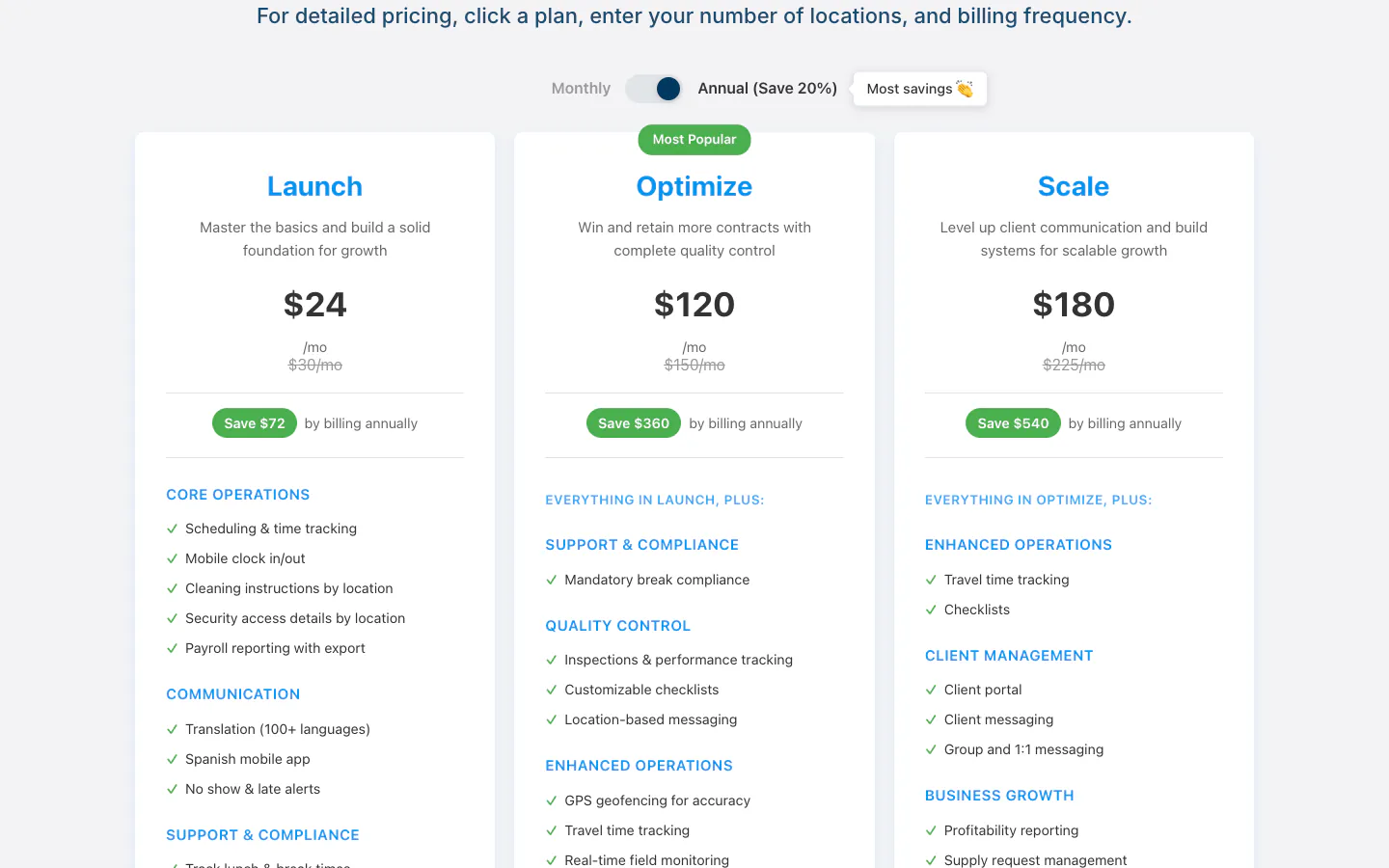
Swept is built for janitorial companies rather than adapted from general field service. Every plan includes scheduling and time tracking, mobile clock in and out, cleaning instructions and security details per location, payroll reporting with export, no-show and late alerts, a Spanish mobile app, and unlimited users. As of September 29, 2026, Swept prices by the number of locations you clean, and plans start at 15 locations: Launch costs $24 per month billed annually ($30 monthly), Optimize costs $120 per month billed annually and adds GPS geofencing and inspections, and Scale costs $180 per month billed annually and adds a client portal and profitability reporting.
Why it ranks third: location-based instructions, inspections, and no-show alerts match how commercial cleaning actually runs, and per-location pricing means you never pay for another cleaner.
Tradeoff: geofenced clock-ins start on Optimize, five times the Launch price. Its plans page lists paid plans only, and a small residential cleaning business may not need its inspection and client-portal depth.
4. Jibble: Best free GPS time clock for unlimited cleaners
Jibble is a time and attendance app with mobile and web clock-ins, a shared kiosk, face recognition, GPS stamps on each clock-in and clock-out, geofences, live location tracking, offline mode, work schedules, and time off. Its official site states that the core product is free for unlimited users, including mobile and web clock-ins, basic timesheets, and integrations with Slack, Microsoft Teams, and QuickBooks. As of September 29, 2026, Jibble does not publish paid tier prices or which location features sit in each tier.
Why it ranks fourth: no other GPS time clock here lets a crew of any size clock in with location stamps at no cost.
Tradeoff: because Jibble does not publish paid tier prices or limits, confirm in a trial which tier includes the geofences and live tracking you need before you depend on them. Jibble is attendance-first, so hours per client building take more setup than a project-based tracker. Our Jibble comparison covers the difference in detail.
5. Homebase: Best for a single-location cleaning business with hourly shifts
Homebase combines scheduling, a time clock, team messaging, and optional payroll for hourly teams. As of September 29, 2026, the free Basic plan covers one location and up to 10 employees with scheduling, clock-in on tablets, computers, and POS devices, and timesheets stored for 90 days. Essentials costs $24 per location per month billed annually ($30 monthly), supports unlimited employees, and adds location-based clock-in with the mobile time clock, overtime and break preferences, and time-off requests. Payroll is an add-on for any plan at a $49 monthly base fee plus $6 per employee paid.
Why it ranks fifth: a cleaning business run from one office can schedule and pay hourly cleaners without a per-user charge.
Tradeoff: Homebase prices by location, so a company whose locations are client buildings has to decide how to model them. Location-based mobile clock-ins start on Essentials.
6. ClockShark: Best for job scheduling across many cleaning sites
ClockShark ties mobile time tracking to jobs, tasks, GPS, geofencing, and drag-and-drop crew scheduling. As of September 29, 2026, the Standard plan costs $42 per month plus $9.50 per user and includes GPS tracking, job and task tracking, scheduling, manager approvals, built-in Spanish, and third-party integrations with accounting and payroll tools. Pro costs $63 per month plus $11.50 per user and adds paid time off, multi-office controls, advanced job costing, and shift wrap-up forms. The 14-day trial includes Pro features.
Why it ranks sixth: job-based scheduling and GPS fit a cleaning company that moves crews between many sites every day.
Tradeoff: the pricing page states that a three-year contract applies to all plans. That is a large commitment for a cleaning business whose headcount changes with contracts, and the base fee raises the cost for small crews.
7. QuickBooks Time: Best for cleaning companies already running QuickBooks payroll
QuickBooks Time connects mobile time tracking to QuickBooks accounting and payroll. As of September 29, 2026, Time Premium costs a $20 monthly base fee plus $10 per user and includes the Workforce app, payroll and invoicing sync, time off, alerts, photo attachments, and a time kiosk. Time Elite costs $40 plus $12 per user and adds mileage, project tracking, estimates versus actuals, an activity feed, and timesheet signatures. The base fee covers one admin, and both plans require QuickBooks Online. The pricing page lists geofencing in the Workforce Elite bundle, which combines time tracking with full-service payroll and HR.
Why it ranks seventh: if payroll already runs in QuickBooks, hours reach paychecks and invoices without re-entry.
Tradeoff: you pay for QuickBooks Online on top, and a base fee plus $10 per user adds up quickly as the crew grows.
8. Clockify: Best budget general-purpose tracker with paid GPS
Clockify is a broad time tracker with a timer, timesheets, a kiosk, and many paid modules. As of September 29, 2026, the free plan covers up to 5 users. Basic costs $3.99 per seat per month annually and adds the kiosk, billable rates, and exports. Standard costs $5.49 and adds approvals, locking, attendance and overtime, and a QuickBooks integration. Pro costs $7.99 and adds GPS tracking and scheduling. Every active or invited user occupies a paid seat.
Why it ranks eighth: a cleaning company can start with a simple timer and add GPS or scheduling later without switching vendors.
Tradeoff: the features a cleaning company needs most are spread across three tiers, so a crew that needs GPS pays the Pro rate for everyone. Our Clockify alternative comparison shows how the free Sandtime.io workflow compares.
9. Hubstaff: Best when client contracts demand location and activity proof
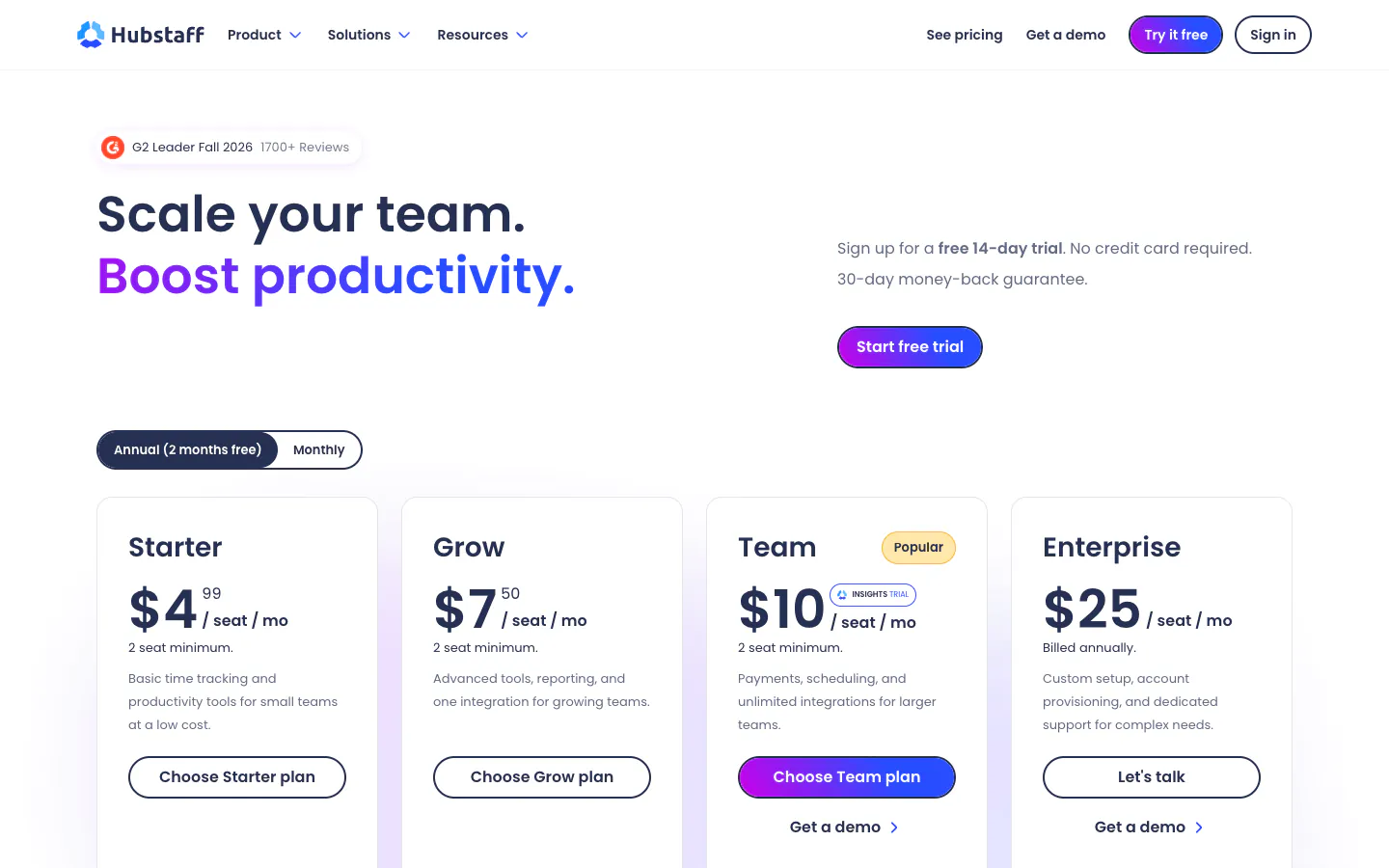
Hubstaff combines time tracking with activity levels, screenshots, scheduling, payroll, and a Locations add-on that creates job sites to clock teams in and out automatically. As of September 29, 2026, Starter costs $4.99 per seat per month annually, Grow $7.50, and Team $10, each with a two-seat minimum. Scheduling and attendance require Team, and the Locations add-on costs $3.33 per seat per month on Team (it is included in Enterprise at $25). Hubstaff’s plan help page documents a free plan for one seat, the organization owner only.
Why it ranks ninth: facilities contracts that require proof of location and activity can get both from one vendor.
Tradeoff: job-site tracking effectively costs $13.33 per seat per month, and screenshots and activity scores are rarely what a cleaning crew needs. The Hubstaff alternative comparison explains the difference from a trust-based tracker.
10. Janitorial Manager: Best for large multi-site janitorial contractors
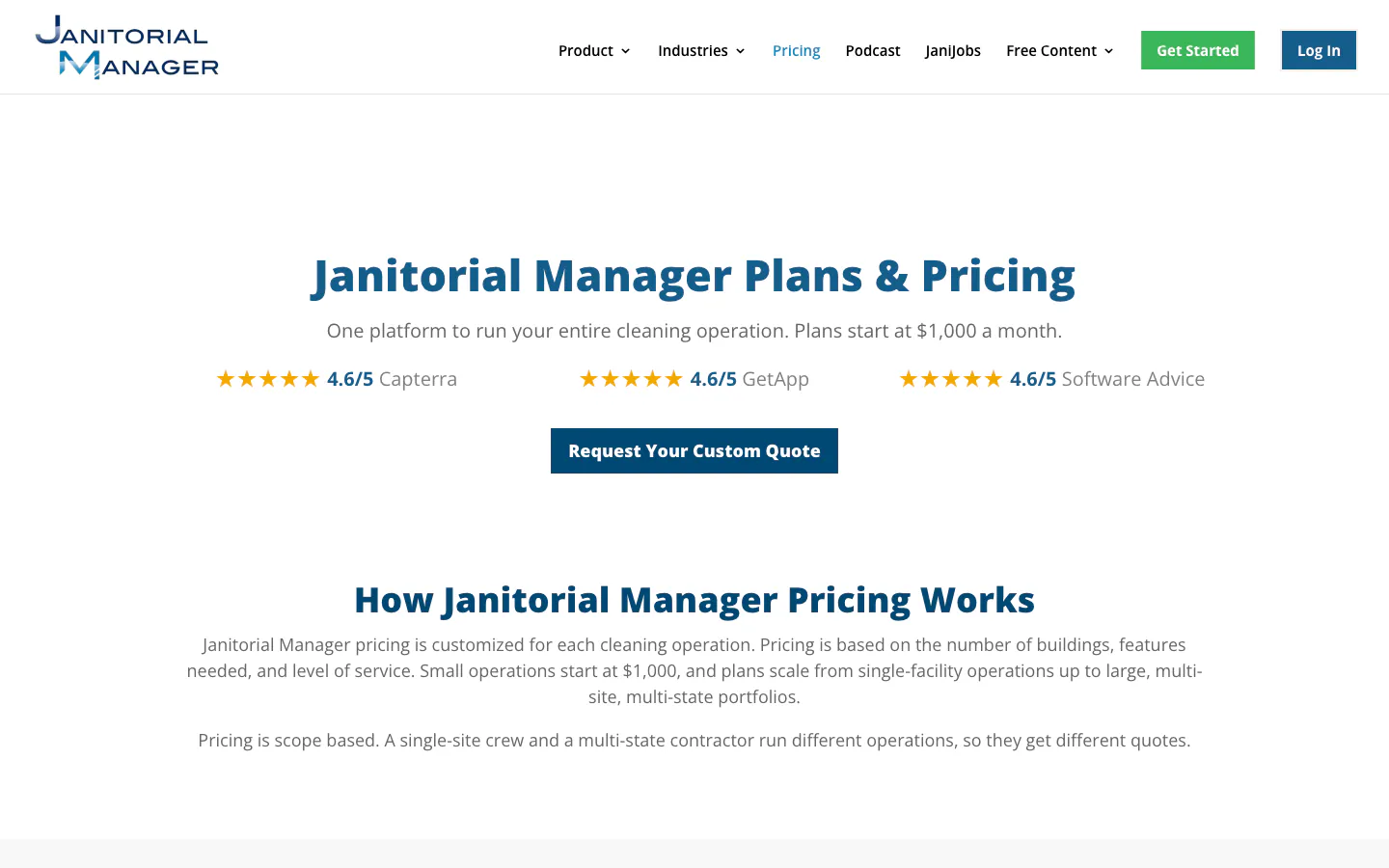
Janitorial Manager is a janitorial operations platform with time tracking, inspections, work orders, equipment tracking, and a mobile app for crews. As of September 29, 2026, its pricing page states that plans start at $1,000 a month, with custom quotes based on buildings, square footage, features, and level of service rather than a per-seat rate. Training, support, and upgrades are included.
Why it ranks tenth: it can run a multi-state portfolio the same way at every site, with time tracking as one part of the operation.
Tradeoff: the entry price is for established contractors, and a quote-based rollout is too heavy for a crew that only needs accurate hours.
Why is Workyard not on the list?
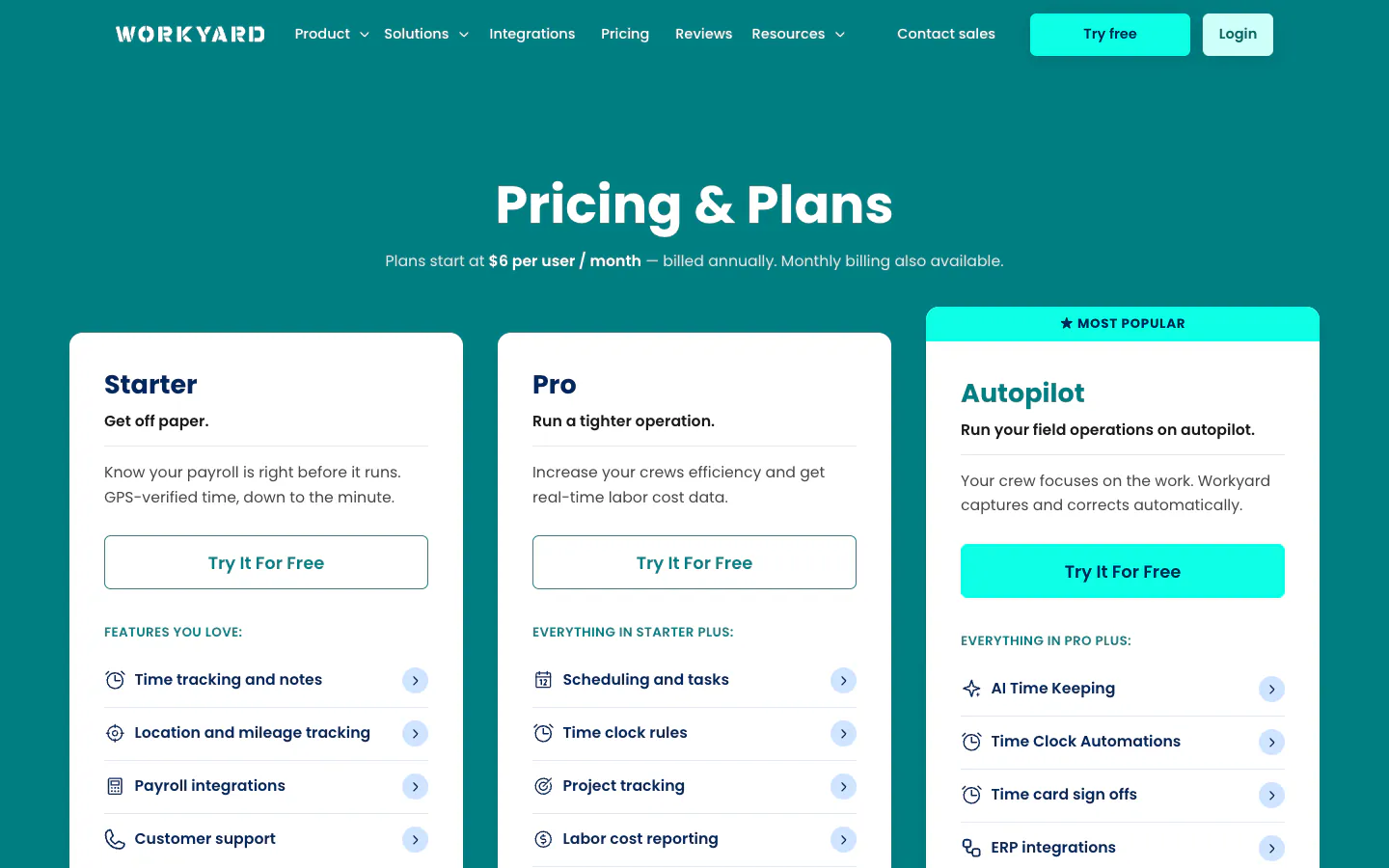
Workyard has a strong GPS time clock and payroll integrations, but it is built and marketed for construction crews. As of September 29, 2026, its pricing page shows only the entry price (plans start at $6 per user per month billed annually), so we could not compare its higher tiers fairly. Construction-focused teams can read our construction time tracking page.
What a cleaning company should check before choosing
Use this checklist in a two-week trial with one real client site before you roll anything out.
- GPS or trust. Decide whether you must prove where a cleaner was. If not, skip location tracking: it adds data you have to protect and explain to staff. If yes, check which tier includes geofences; in this list that is rarely the entry plan.
- Hours per site and client. Create one project, job, or location per building or contract and check that a report shows hours per site and per cleaner without spreadsheet work.
- The phone app on a real shift. Ask two cleaners to clock in and out for a week. Count missed punches. A one-tap timer beats a feature-rich app nobody opens.
- Supervisor corrections. Test what happens when someone forgets to clock out. A supervisor or admin should be able to fix it before payroll, and the fix should be visible.
- Payroll export. Export the week to Excel or CSV, or sync it to your payroll provider, and hand it to whoever runs payroll. If they have to retype anything, the tool has not solved the problem.
- Per-user price at your real crew size. Include seasonal cleaners, supervisors, and office staff. A $10 per-user plan is a $250 monthly bill at 25 people.
Still on paper? Our free timesheet templates standardize records while you trial software.
What does time tracking cost at 10 and 25 cleaners?
Here is the monthly cost of the plan each vendor needs for the features named, using the prices checked on September 29, 2026 and annual billing where published. Counts assume every cleaner is a user; add office staff and supervisors to your own math.
- Sandtime.io: $0 at 10 users and $0 at 25 users.
- Jibble free plan: $0 at any crew size. Paid tier prices are not published, so any upgrade is not included.
- Connecteam Operations: $0 at 10 users on the Small Business plan. At 25 users, Basic is $29, because the first 30 users are covered. With geofence sites, Advanced is $49 at both sizes.
- Homebase, one location: $0 at 10 employees on Basic. At 25 employees, Essentials is $24. Payroll adds $49 + 25 × $6 = $199.
- Swept Launch, up to 15 locations: $24 at both sizes, because Swept prices by location. With geofencing, Optimize is $120.
- Clockify Pro (GPS and scheduling): 10 × $7.99 = $79.90; 25 × $7.99 = $199.75.
- Hubstaff Team with Locations: 10 × ($10 + $3.33) = $133.30; 25 × $13.33 = $333.25.
- ClockShark Standard: $42 + 10 × $9.50 = $137; $42 + 25 × $9.50 = $279.50. Over the three-year term at 25 users, that is $279.50 × 36 = $10,062.
- QuickBooks Time Premium: $20 + 10 × $10 = $120; $20 + 25 × $10 = $270, plus QuickBooks Online.
- Janitorial Manager: from $1,000 per month, by quote.

Location-priced and free plans stay flat as the crew grows, while per-user plans with GPS or payroll sync pass $200 a month at 25 cleaners.
Per-user plans with GPS or payroll sync cost roughly $200 to $335 a month at 25 cleaners, while location-priced and free plans stay flat as the crew grows. If location proof is a requirement, that cost is worth paying. If it is not, a free tracker keeps the budget for the people doing the cleaning.
Frequently asked questions about time tracking for cleaning companies
What is the best janitorial time tracking app?
For commercial janitorial contracts that need geofenced clock-ins, inspections, and location-based instructions, Swept is the most janitorial-specific option in this comparison. For large multi-site contractors, Janitorial Manager covers the whole operation from $1,000 a month. For crews that need accurate hours per building without GPS, Sandtime.io is free for unlimited users.
Is there a free time tracking app for a cleaning business?
Yes. Sandtime.io is free for unlimited users and tracks hours per client and building, with approvals and Excel or CSV exports. Jibble has a free plan for unlimited users with GPS clock-ins. Connecteam is free for up to 10 users, and Homebase is free for one location with up to 10 employees.
Do I need GPS tracking for my cleaning staff?
Only if you need to prove where someone was. GPS and geofences help when a contract requires attendance proof or when buddy punching is a real problem. If your crews are small and trusted and you mainly need hours per site for payroll and billing, a time tracker without location tracking is simpler, cheaper, and easier to explain to staff.
How do I track hours per client site?
Create one project, job, or location for each client building or contract, and have cleaners start their timer or clock-in against it. At the end of the week, run a report grouped by project and member. In Sandtime.io, the Reports view groups hours by project, member, or date and exports to Excel or CSV for payroll and invoicing.
How do cleaners clock in from their phones?
Every app in this list has an iPhone and Android app. In Sandtime.io, a cleaner taps start on the project for the building on arrival and stops the timer on the way out. If they forget, they can add the hours later as a manual entry, and an Administrator can correct any mistake before payroll.
How can I stop time theft without monitoring my cleaners?
Compare recorded hours with the quoted hours per site every week, require supervisors to approve timesheets, and lock past periods once payroll has run. Unusual patterns show up quickly in a report grouped by site and cleaner. Sandtime.io also flags overlapping entries. Read more about time theft and how to address it fairly.
Which cleaning time tracking apps charge per user?
As of September 29, 2026, Clockify, Hubstaff, ClockShark, and QuickBooks Time charge per user or per seat. Connecteam charges a flat price for the first 30 users, Swept and Homebase price by location, and Sandtime.io and the Jibble free plan cost $0 regardless of crew size.
Final verdict
If you need GPS clock-ins, geofences, or shift schedules, pick the GPS time clock that fits your size: Connecteam for small crews, Swept for commercial janitorial contracts, Jibble for a free clock at any size, and ClockShark or Janitorial Manager for large multi-site operations. Accept the per-user or per-tier cost as the price of location proof.
If you trust your crew and need accurate hours per client and building for payroll and invoices, start with Sandtime.io. See how it fits a cleaning company on the time tracking for cleaning companies page, then set up one building and one week.
About the contributors


Przemysław Zalewski
Sandtime.io engineer and Sanddev team member who reviews product accuracy, technical details, sources, and editorial quality.
LinkedInEmailSanddev profileWebsite