Free overtime claim form template
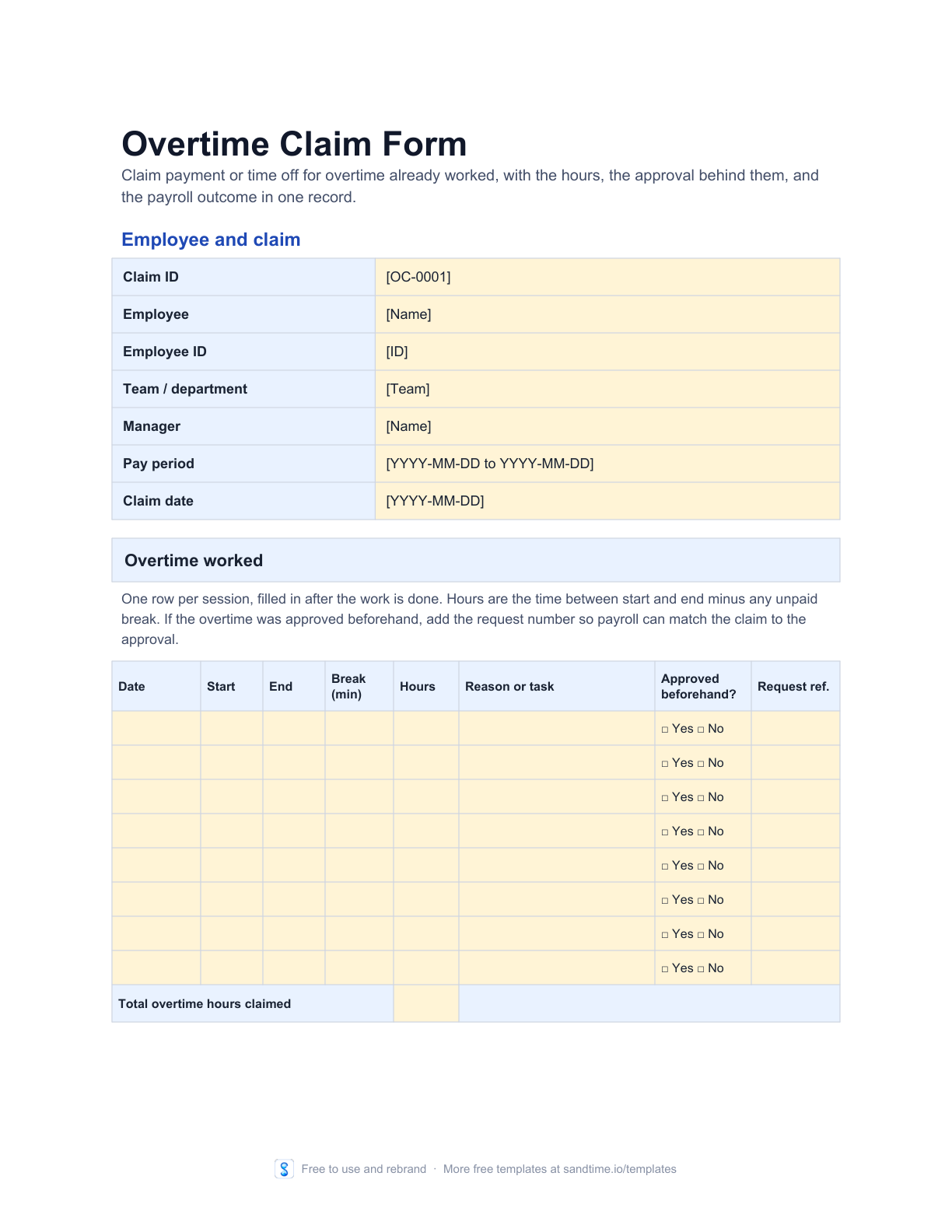
Claim pay or time off for overtime already worked. List each session with its hours and reason, then record the manager check and the payroll outcome.
- No signup or email address
- Editable and printable formats
- Rebrand it for your clients, no attribution
Overtime claim or overtime request?
An overtime claim form is filled in after the work. The employee lists the overtime already worked, session by session, and asks for it to be paid at the overtime rate or repaid as time off. The manager checks the hours against the time records, and payroll notes the pay run that settled the claim.
An overtime request form works the other way round: it asks for permission before the hours happen. Many teams use both, and the claim quotes the request number so the approval and the payment point at the same hours.
To keep a running record of overtime across a team, use the overtime log. To turn the approved hours into money at 1.5x and 2x, use the overtime pay sheet, or check a single figure with the overtime pay calculator.
Edit it digitally or print a clean copy
Best for employees claiming overtime they have already worked, and for the managers and payroll teams who verify and pay it.
A useful starting point, not an empty shell
- Session table with date, start, end, break, hours, reason, and prior approval
- Choice of overtime pay, time off in lieu, or a split between the two
- Employee declaration, manager verification, and a payroll-only section
- List each overtime session after it is worked, with the break and the request number if it was approved beforehand.
- Total the hours, choose pay, time off in lieu, or a split, and sign the declaration.
- Have the manager check the claim against the time records, then pass it to payroll to record the pay run.
Keep the template until the process needs more
A shared file can be the right tool for a new or small process. Sandtime.io becomes useful when reminders, approvals, locked records, project data, reports, and Excel exports must stay dependable across a growing team.
Check the claim against a record, not a memory
A claim is only as good as the hours behind it. Sandtime.io records them as they are worked: set expected daily hours and the dashboard shows the time above them, then submit, approve, and lock the period.
Free for unlimited users. No screenshots, keystroke logging, or activity scores.
Questions about this free template
What is an overtime claim form?
An overtime claim form is the record an employee submits after working overtime to ask for it to be compensated. It lists each session with the date, start and end times, break, hours, and reason, states whether the employee wants overtime pay or time off in lieu, and carries the manager’s verification and the payroll outcome.
How is an overtime claim different from an overtime request?
A request form asks for approval before the overtime is worked. A claim form asks for compensation after it was worked. The request records a decision and a maximum number of hours; the claim records the hours actually worked and whether they were paid or given back as time off. When both exist, the claim quotes the request number.
Do I need approval before working overtime?
That depends on your employer’s policy and your contract. Many organizations require approval in advance and query hours that were not approved. The claim form has an approved-beforehand column and a request reference on every row, so the manager can see which hours were agreed in advance and which need a decision now.
What records back up an overtime claim?
The hours on the claim should match the time records for the same days: a timesheet, time cards, or the entries in a time tracking tool. Reference them on the form, together with the approved request where there is one. The manager verification section records whether the claim was checked against those records.
How is overtime pay calculated?
Overtime pay is usually the overtime hours multiplied by the hourly rate and by a premium multiplier, such as 1.5 for time and a half or 2 for double time. For example, 3 hours at a rate of 20 with a 1.5 multiplier is 3 x 20 x 1.5 = 90. Which hours qualify and which multiplier applies depend on your country, contract, and policy.
Can overtime be claimed as time off instead of pay?
Where your employer offers time off in lieu, tick it on the form, or split the hours between pay and time off. Record the credited hours in a time off in lieu tracker so the balance stays accurate when the time is taken.
Is this template really free?
Yes. The editable file and the printable PDF are free and need no email address. We place them in the public domain rather than licensing them, so you may copy, edit, rebrand, redistribute, and use them commercially without asking permission.
Can I edit the template?
Yes. Open the Word file in Microsoft Word, LibreOffice, or another compatible editor, then replace the highlighted fields and remove clauses that do not apply.
Which format should I print?
Download the PDF when you need a clean paper copy. It uses high-contrast lines, safe print margins, and a layout designed for common A4 and US Letter printers.
Does this template guarantee compliance?
No. It is a general operational starting point and does not guarantee legal, payroll, tax, employment, record-retention, or labor-law compliance. Adapt it to the rules and contracts that apply to your organization.
Can I share or rebrand it?
Yes. Share the original file, add your own branding, publish an adapted version, or use it commercially. Nothing has to be credited back to us.
When should a team move beyond a template?
A file works well while one person owns the process and the team can keep it current. Consider Sandtime.io when reminders, approvals, locked records, project data, reports, and reliable exports need to work together.