


Sandtime.io reminds, not the manager
Automatic fill-timesheet reminders go out by email every Friday before the week locks - nobody has to type “please fill your timesheet” on Slack or Teams.
Sandtime.io is a free time tracking app for freelancers, agencies, and client-service teams. Track hours, fill timesheets, approve and lock them, and export client-ready reports.
Need proof before switching? Try the Billable Leakage Calculator.
Trusted by 4,000+ freelancers and teams, built by Sanddev, running since 2020.
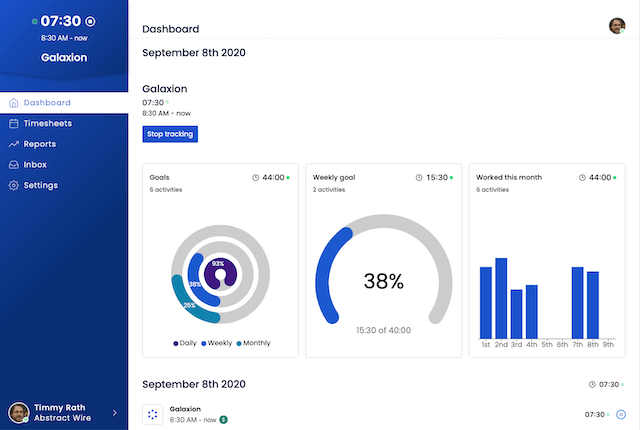
Capture every forgotten billable hour without surveillance - and spot project drift before margins disappear.
Track work across interrupted days, quick client requests, and context switching without rebuilding the week from memory.
Turn tracked time into clean reports for invoicing, approvals, and stakeholder updates without spreadsheet cleanup.
See profitability, budget burn, and workload before projects quietly slip past estimates and margins disappear.
Keep teams honest with shared visibility and approvals - not screenshots, keystroke logging, or monitoring creep.
Capture time while you work or fill it in later when your day gets fragmented. Sandtime.io helps you keep billable work from slipping through the cracks.
Learn more about time tracking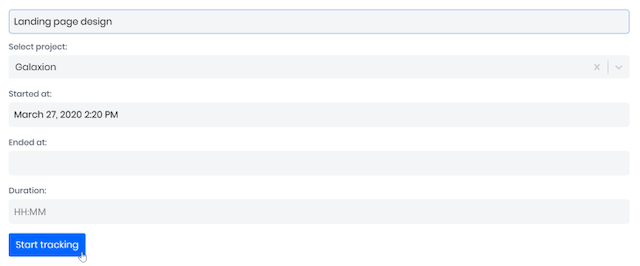
Timesheets make it easier to reconstruct the week, review what actually happened, and turn worked hours into invoice-ready records.
Add time manually in the format that feels natural and catch forgotten work before the month-end invoice or payroll run.
Learn more about timesheets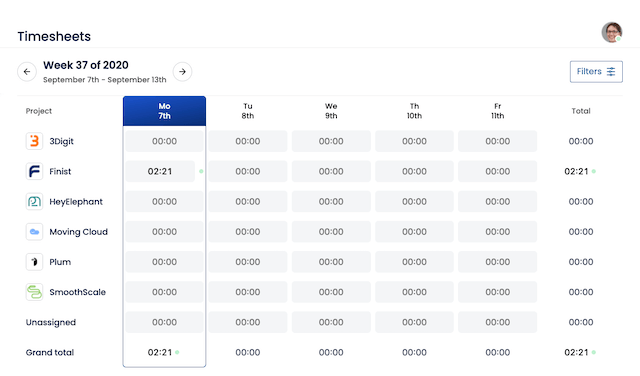
Create weekly, monthly, and custom reports that clients can actually understand. Billing, approvals, and profitability reviews all start from the same tracked time.
Download Excel exports, print clean summaries, or share reports directly with clients, managers, and finance stakeholders.
See which projects are healthy, which retainers are being drained, and where your team is spending more time than expected.
Learn more about reports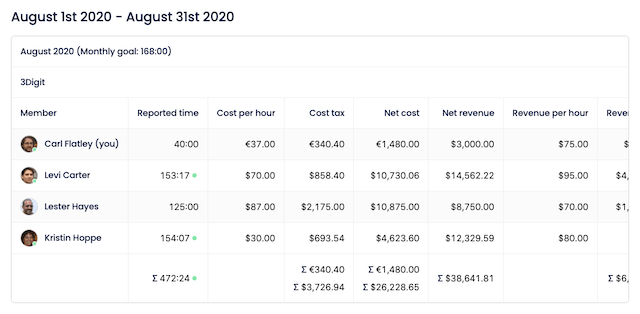
Give teams clear places to log work by client, project, and phase without adding operational clutter.
Assign team members to the right projects so tracked time stays organized, reportable, and easy to review.
Track time against real work so project visibility improves before scope creep and underbilling become expensive.
Learn more about project management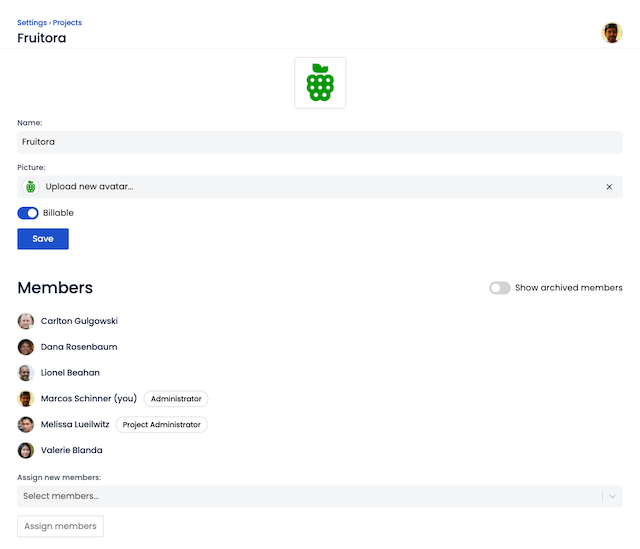
Round tracked time to 5, 10, 15, 30, or 60 minute blocks, or a custom interval, and choose whether it rounds to the nearest block, always up, or always down.
Rounding only changes what is displayed. Timesheets, reports, and invoices all read the same rounded figures, while the original tracked time stays untouched underneath.
Learn more about time rounding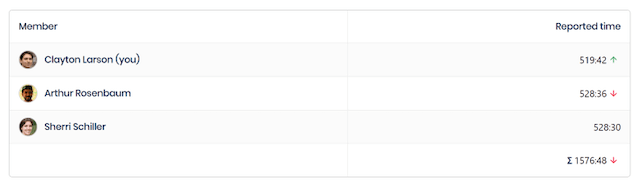
Set a currency per project, so you can bill a client in theirs while paying your team in yours.
Reports put costs and revenue side by side across currencies, so project margin stays readable however many are in play.
Learn more about multi-currency support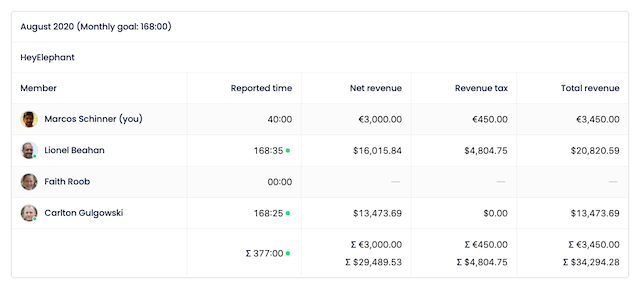
Rates change. A raise or a renegotiated contract should not quietly rewrite what last quarter cost you.
Every rate is valid for a defined period, so a report for any past month settles at the rate that applied then. No manual corrections, and no history to repair.
Learn more about temporal rates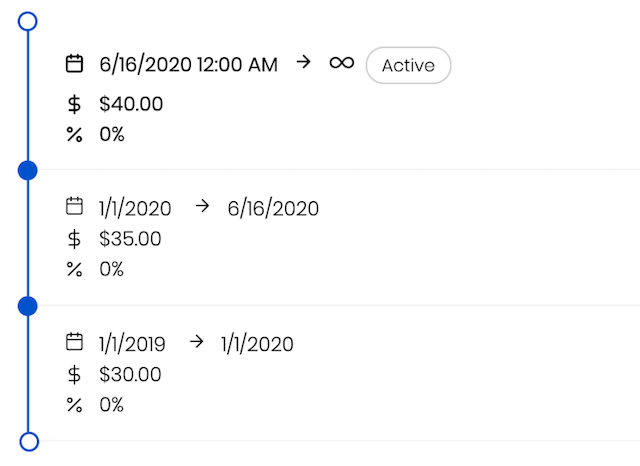
Reach your workspace at yourcompany.sandtime.io instead of a generic shared address - it is what people type to get in, and what clients see when you share a link.
Claim it in seconds from organization settings. No DNS setup, and free like everything else.
Learn more about custom subdomains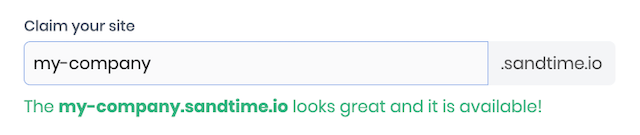
Start and stop the timer with a slash command in Slack, and pick the project without leaving the conversation.
Entries sync straight away, so timesheets and reports are current. Sanddev runs its own day in Slack, which is why this exists at all.
Learn more about Slack integration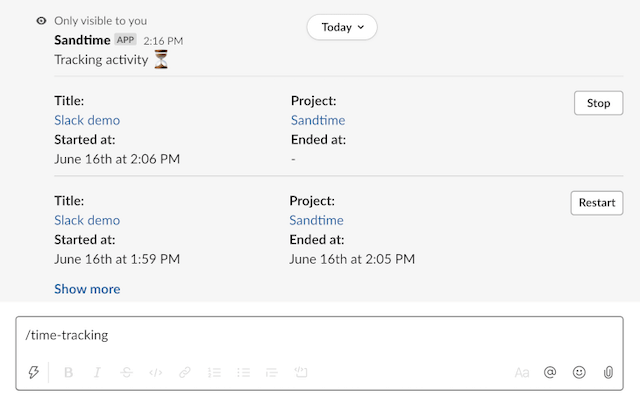
Work in Chrome all day? Keep time tracking in the same place. The Chrome Extension puts timer controls in your browser toolbar so starting work takes one click.
Open timesheets, reports, projects, and your running timer without digging for another app window.
Learn more about the Chrome Extension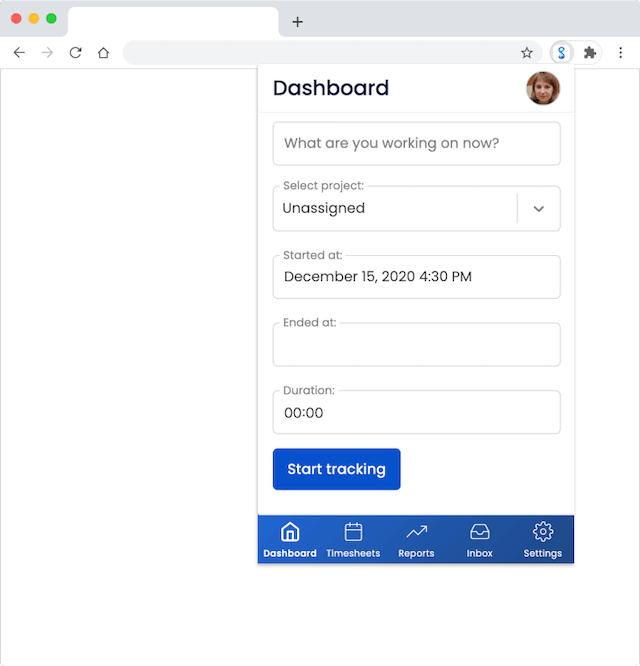
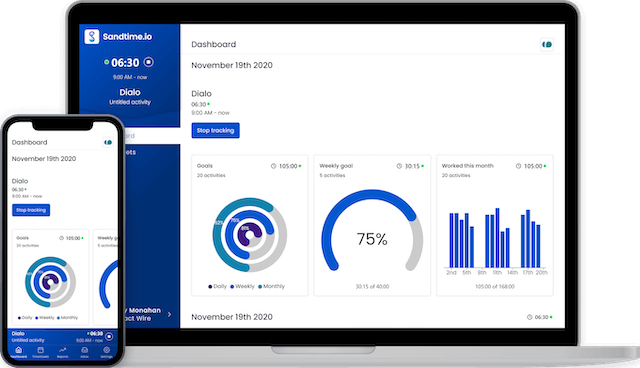
Managers spend the end of every month nagging their team over Slack and MS Teams to fill in timesheets. Without them, client billing stalls - even at 1,000-person software houses. Sandtime.io automates the nagging.
Automatic fill-timesheet reminders go out by email every Friday before the week locks - nobody has to type “please fill your timesheet” on Slack or Teams.
Managers approve or reject submitted timesheets from the email in one click, or open the timesheet for a full review.
Once approved, timesheets lock so the numbers used for billing do not change after the fact.
Approvals are the part of the workflow most trackers put on a paid plan. Where they sit on each vendor’s own pricing page, checked September 3, 2026:
Keep client work billable, get timesheets in on time, and see where projects stand - without turning time tracking into surveillance.
Reminders, one-click approvals, and locked periods so client billing is never blocked, plus retainer and margin visibility without surveillance
Track billable hours, reconstruct the week, and invoice with confidence
Track retainers, project phases, and client-ready reports across multiple accounts
Stop chasing timesheets and see where your team’s time goes before month-end billing is blocked
Keep every project and client visible with free, unlimited-user time tracking that grows with your team
Track by project and ticket, log retroactive entries, and log time from Claude Code and Codex over MCP
Track volunteer hours, grant-funded work, and nonprofit timesheets with a custom offer for eligible organizations
Track client work, retainer usage, and invoice-ready records without reconstructing the month from memory
Keep projects on budget with a clear record of delivery, support, and the work that usually slips through

"At Sanddev, client billing depended on complete timesheets, but the available tools forced a choice between surveillance and spreadsheets. We built Sandtime.io so people could report time quickly and managers could trust the records at month end."
Sandtime.io started inside Sanddev in 2020, when the software agency needed accurate, self-reported time for client billing. That experience still shapes the product: quick time capture for employees, dependable timesheets, approvals, and reports for managers.
Start tracking with a single click. No complex forms, no mandatory fields, no friction. Just hit start and get to work.
We don’t monitor apps, take screenshots, or track keystrokes. Your team’s privacy is respected by design.
Built for workplaces where trust between employees and employers is high. Time entries are self-reported declarations, not surveillance data.
Focus on what matters - your work. Sandtime.io handles the rest with timesheets, reports, and integrations that just work.
Join teams who value trust over surveillance. Start tracking for free!
No contract holds them and no seat bill traps them. They stay because their business runs on it - every timesheet, every invoice, every month.
Counted in August 2026 from workspaces that have signed in at least once, internal ones left out, and rounded down. See why teams stay - read their reviews
Join our community of loyal teams. Start tracking for free!
Client work rarely disappears in one obvious chunk. It leaks between Slack replies, QA passes, support pings, quick fixes, and after-hours cleanup. Sandtime.io helps teams capture the hours that usually stay invisible until the invoice is already out the door.
A realistic month for a 10-person client-service team. Small gaps feel harmless in the moment. Across a full month, they become revenue the team already earned and delivered, but never fully invoiced.
Sandtime.io is free for unlimited users. Recovering even part of that leak goes straight to revenue and margin.
Microsoft reports that the average employee gets interrupted roughly every two minutes. Fragmented days create work people forget to log later.
Atlassian found that teams spend about 25% of their time searching for answers. Context switching is where small billable tasks disappear.
Microsoft says 57% of meetings are ad hoc calls without a calendar invite. Unplanned work is harder to reconstruct when it is time to invoice.
Use the calculator to model your team size, billing rate, and recovery target. Then compare it against the research in our Time Tracking Statistics for 2026.
People switch to Sandtime.io to stop losing billable hours, retire the spreadsheets, and invoice without the month-end scramble. Here is what they say in their own words.
This is a useful tracker that has what I need. It tracks task/projects. Has the ability to put out a report and you can still edit the times if you forgot to start or stop the clock. I’m recommending it to everyone on my team at work.
That app is exactly what an app should look like, works perfect to have my work hours counted, and its free, amazing tool
So amazing - where have you been all my life? Can track time for different tasks and file them under projects - will tell you when times overlap. I just love it and it’s free.
I’ve been using Sandtime.io for my time tracking, and it works perfectly well for me. The app is simple, clean, and intuitive, which makes it easy to log and monitor hours without getting distracted by unnecessary features. What I like: ease of use, reliable tracking with no glitches or missing logs, smooth desktop and mobile support, and visual reports that show where time goes. It’s a strong fit for freelancers, architects/designers, small teams, and anyone who wants a lightweight but powerful time tracking tool. For me, it just works - no complications.
This is a really good application that solved one big issue for me: having multiple timers running at the same time. The only minor minus is the fact that it doesn’t have a dark theme. I’ve tried others, and this was the best out there. Thanks for creating this and making it free <3
For me it is a very nice app. I have not generated reports yet, but I am curious to see how it works for client billing.
As a professional IT consultant, I use this app every day. It helps me accurately track my billable hours across all my devices (Android, Windows, iOS). It has a clean interface and all the features I need. I highly recommend to anyone needing to keep diligent time keeping.
A very helpful app. It is a great fit for me because I often forget to track activities right away and fill them in later, so the start and stop flow works especially well.
As a freelancer who manages multiple projects, this software has helped me enormously. I decide which project I will work on, select it and just start working. When I want to take a break, I just stop the activity and start a new one when I’m back. The reports are very handy, and you can create a general one for all projects, grouped by day, export it to Excel for further analysis, or send it to your clients for billing purposes. What I would like to see is API access so I can obtain my production data in real time with Sandtime.io as the source of truth instead of a master Excel file.
Reply from Sandtime.io, July 2026: the REST API this review asks for is available, with API keys created in Settings > Integrations > API.
As a professional IT consultant, I use this app every day. It helps me accurately track my billable hours across all my devices (Android, Windows, iOS). It has a clean interface and all the features I need. I highly recommend to anyone needing to keep diligent time keeping.
Wonderful app for keeping track of freelance projects. Would like the reporting to be a bit better but I can live with it.
A very helpful app
This app has incredibly helped me to keep track of all the projects I work on. You can add multiple projects and stop or restart any that you might need. I only have two issues, sometimes it doesn’t load when I press it so I have to close it and reload it again but it takes like 3 secs and I can’t add notes to it. Other than that it has been the best I have found so far and completely free! No ads
I recently went from a job in academia to a private consultant where I have to track my time across billable projects. Coming from academia, where you don’t typically track your time so closely, I found it a huge challenge to adjust. I constantly found myself neglecting to track my time and completely forgetting what I had worked on all week. This app saved my life. It makes it so easy to track your workday at the push of a button. However, the app contains minor bugs which, though annoying, do not prevent the app from being a productive tool. The most annoying bug is that sometimes the app will not allow you to stop the timer and switch to another project which usually requires restarting your computer, not just the app, to correct. More customizations for the types of statistics you want to see on the dashboard would be nice too.
Good.
Ratings and reviews captured on 2026-09-17 from App Store, Google Play, Microsoft Store, and Chrome Web Store.
See the full wall of reviews and every source on the reviews page.
A few reviews were lightly edited or translated, but their meaning is unchanged.
Your team’s time records belong to your organization. Sandtime.io processes that workspace data to provide the service, while you remain in control. Our GDPR-compliant approach keeps your data hosted in the European Union and available to export whenever you need it.
Your organization remains the controller of its workspace data. Sandtime.io acts as the processor, using that data only to provide and protect the service.
Sandtime.io production servers are hosted by OVHcloud in the European Union, so your workspace data stays in the EU.
Administrators can download the complete organization and its related data from Settings with one click. Export whenever you want - no support ticket required.
Automated backups run every eight hours to help protect your records and keep your team’s history recoverable.
Explore our trust center for details about roles under GDPR, hosting in the EU and backups, and data portability. You can also read our privacy policy and security page.
Common questions from teams considering Sandtime.io.
Free for everyone. Unlimited seats, no credit card required. Create your account and start tracking in under two minutes.
No, and it never will. Sandtime.io has no screenshots, no keystroke logging, no activity scores, and no location tracking. Your team logs their own hours. You get the timesheets - nobody gets watched.
Sandtime.io reminds people to fill their timesheet automatically by email every Friday - no manager has to send a Slack or Teams message. Once submitted, managers approve with one click from email, and past periods lock automatically so month-end billing is never blocked.
Built for small to mid-sized teams that bill, budget, or report against time: freelancers, agencies, architecture and engineering studios, healthcare and legal practices, and nonprofits reporting grant-funded hours. If you need accurate timesheets without a surveillance product, Sandtime.io is built for you.
One click starts tracking and syncs across every platform (web, iOS, Android, macOS, Windows, Chrome, and Slack). Sandtime.io is free for unlimited users, with no credit card required. Toggl Track, Clockify, and Harvest split that combination across paid tiers.
Sandtime.io runs on web, iOS, Android, macOS, Windows, Chrome, and Slack. One account, all platforms, always in sync. See the full apps overview.
Sandtime.io has run without interruption since 2020, with customers from the first year still tracking time today. No surveillance features, no data selling. Full details at our security page.
Time tracking, timesheets, reporting and more. Unlimited users. Sign up for free!
See the full pricing page for what the free plan includes.
Looking for free time tracking software? Learn more about why Sandtime.io is 100% free.
For enterprise usage, self-hosting, and extended security, compliance, and deployment controls for organizations, please contact sales.
Sandtime.io has a unique plan for registered nonprofit organizations. Learn more about our efforts to aid nonprofits and NGOs.