Timesheet approval software compared: who charges for approvals in 2026
The short answer: of the 15 products compared, Sandtime.io is the only project time tracker where timesheet approvals, locking, and reminders are all free for unlimited users. Among per-user plans, Clockify Standard is the cheapest way to get all three together, at $5.49 per user per month on annual billing. Toggl Track, Harvest, and Productive put approvals on plans that cost $14 to $25 per user. See what that costs a 25-person team.
- Approvals free for unlimited users: Sandtime.io, and Jibble for attendance-style pay-period timesheets.
- Approvals, locking, and reminders on the same paid plan: Clockify Standard ($5.49), My Hours Pro ($8), Everhour Team ($8.50), TimeCamp Ultimate ($9.99), Harvest Enterprise ($14), Toggl Track Premium ($16), and QuickBooks Time Premium ($20 base plus $10 per user).
- Approvals first, locking or reminders one tier higher: Timely, Productive, and Connecteam.
Every plan, price, free-plan limit, and feature placement below was checked against the vendor’s own pricing page or help center on September 29, 2026, and is re-checked every quarter. Prices are public U.S.-dollar list prices per user per month, excluding taxes and promotions. If a vendor’s page disagrees, trust the vendor.
Disclosure: Sandtime.io is built by Sanddev, the publisher of this comparison. Sanddev uses it every day, and every Sanddev client invoice starts as a Sandtime.io timesheet. The facts about other vendors come from their own pages, linked in every row, so you can check each claim yourself.
A timesheet approval is the step where a person with authority reviews submitted hours and accepts or returns them before they reach an invoice or payroll. Almost every time tracking app has a timer. Far fewer include approvals on their entry plan, and the ones that do often split the rest of the chain, locking approved periods and reminding people to submit, across different tiers. This page answers one buyer question with sourced data: which apps include timesheet approvals, on which plan, and what that plan costs a real team.
For the wider shortlist, see our 20 best timesheet apps in 2026. If your pain is the Friday Slack message asking people to fill in their hours, start with how to stop chasing timesheets over Slack and Teams.
Which plan includes timesheet approvals
The table lists the cheapest plan on which each product documents a manager or administrator approving submitted time. The locking and reminders columns describe that same plan, and name a higher tier where the vendor places the feature there. Rows are ordered by the annual cost of that plan for 25 people.
| Vendor | Free plan | First plan with approvals | Price per user per month, annual / monthly | Locking on that plan | Reminders on that plan | Source |
|---|---|---|---|---|---|---|
| Sandtime.io | Unlimited users and projects | Free | $0 / $0 | Yes: auto-lock of past weeks, lock on approval, time-limited unlock requests | Yes: dashboard, email, and popup | Pricing |
| Jibble | Unlimited users | Free (pay-period timesheets) | $0 / $0 | Approved timesheets lock | Clock-in and clock-out reminders | Help center |
| Connecteam | Limited plan up to 30 users; Small Business plan under 10 employees | Basic (Operations Hub) | $29 / $35 per month for the first 30 users, then $0.80 / $1 per extra user | Approval locks the payroll days; manual day locking on Advanced | Yes: push notification reminders | Pricing |
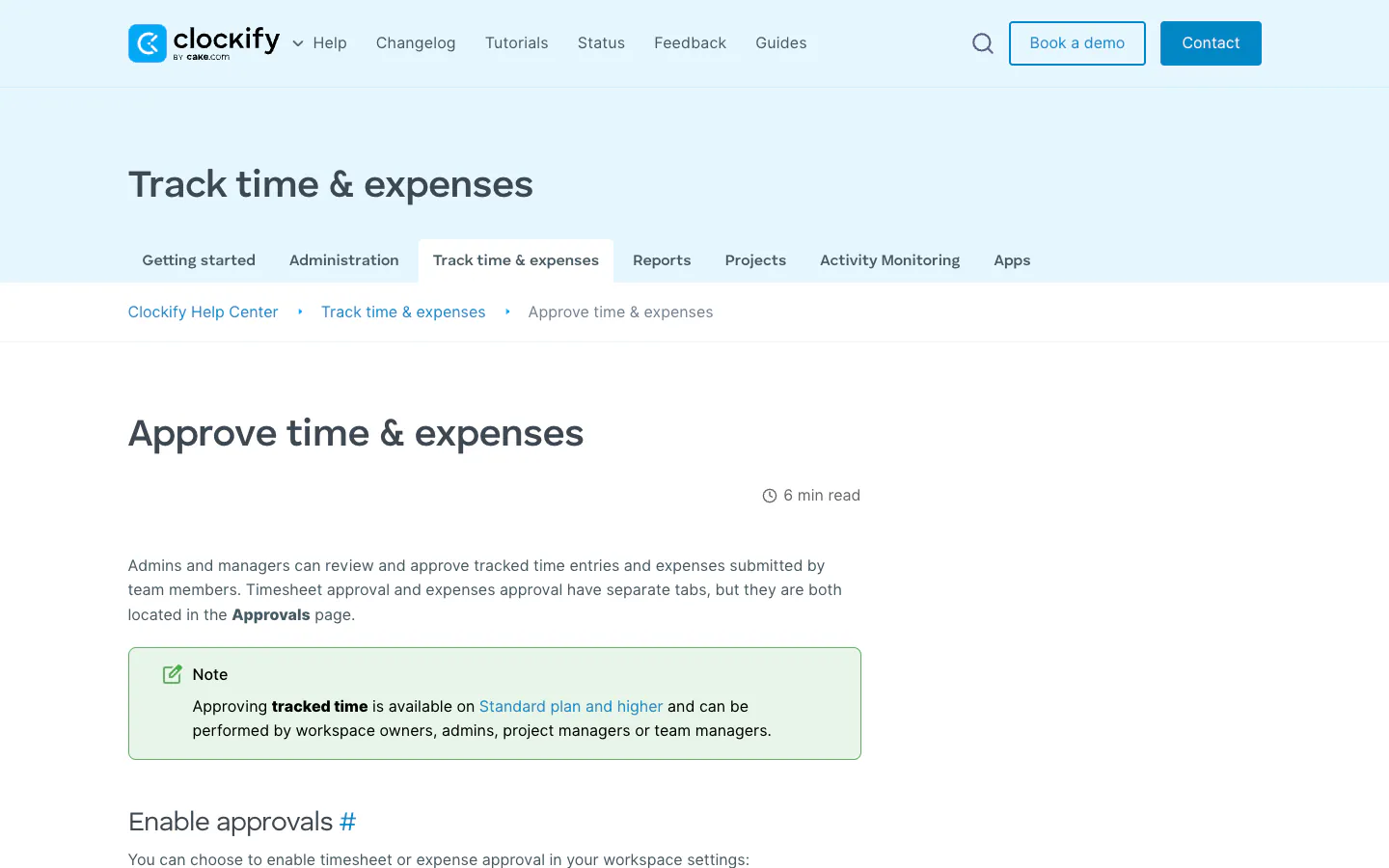
| Clockify | Up to 5 users | Standard | $5.49 / $6.99 | Yes: lock timesheets, approved entries locked | Yes: targets and email reminders | Pricing |
| TMetric | Up to 2 seats | Business (Team Timesheets) | $7.50 / $9 | Yes: timesheet locking | Email reminders to submit are documented; plan not named | Pricing |
| Traqq | Up to 3 users and 1 project, approvals by the Owner | Business for manager and admin approvers | $7.65 / $9 | Approved timesheets lock | Submission reminders not found in public docs | Pricing |
| My Hours | Up to 5 active users | Pro | $8 / $9 | Yes: auto-lock time logs | Yes: tracking reminders | Pricing |
| Everhour | Up to 5 seats | Team, 5-seat minimum | $8.50 / $10 | Yes: lock after a set number of days or on approval | Yes: team reminders to track time | Plans |
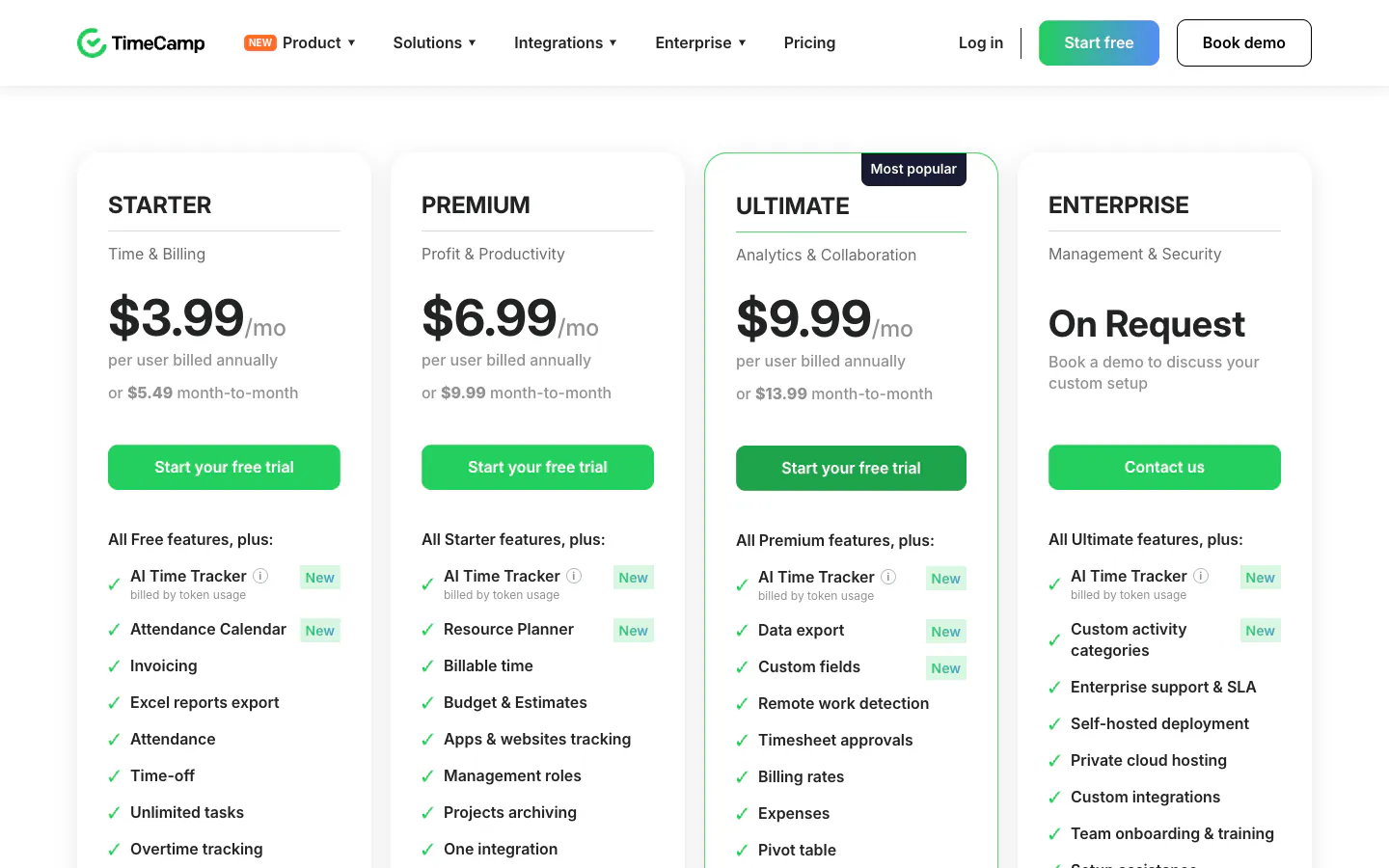
| TimeCamp | Unlimited users | Ultimate | $9.99 / $13.99 | Approved timesheets become uneditable | Yes: email reminders to submit | Pricing |
| Hubstaff | 1 seat (owner only) | Team, 2-seat minimum | $10 / $12 | Submitted and approved timesheets lock | Start-timer reminder documented; plan not named | Pricing |
| QuickBooks Time | 30-day trial; no free plan listed | Time Premium | $20 base plus $10 per user, monthly billing only | Yes: approve and lock | Yes: submission and approval reminders | Pricing |
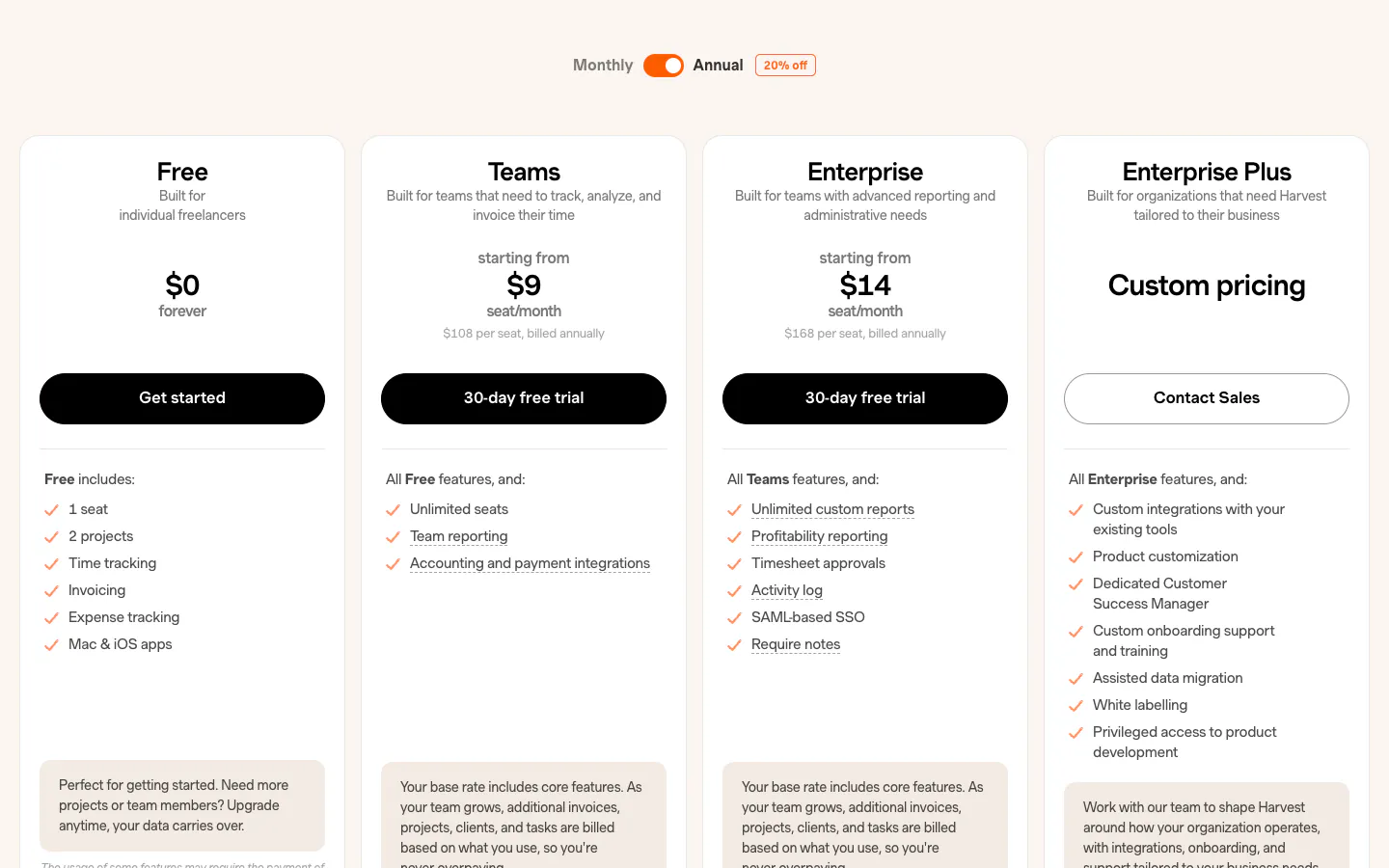
| Harvest | 1 seat and 2 projects | Enterprise | $14 / $17.50, plus usage charges on Flex billing | Yes: approving locks the week | Yes: submission reminders | Pricing |
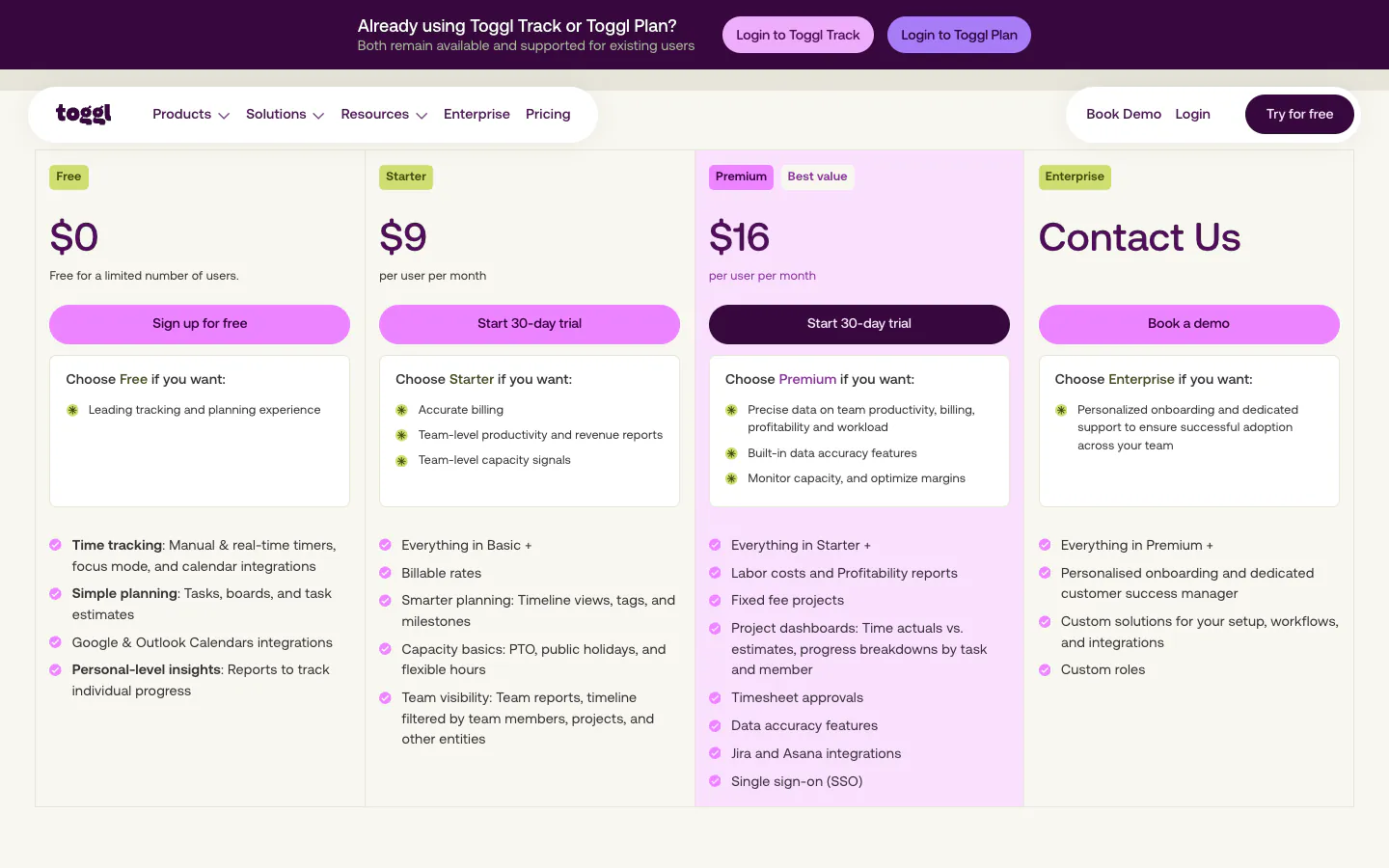
| Toggl Track | Up to 3 users | Premium | $16 / $24 | Yes: lock time entries, approved periods locked | Yes: tracking targets with reminders | Pricing |
| Timely | 14-day trial; no free plan listed | Premium (time entry states), up to 50 users | $16 / $20 | Approved state can lock entries; period locking on Unlimited | Self-reminders to log; manager logging nudge on Unlimited | Pricing |
| Productive | 14-day trial; no free plan listed | Professional, 3-seat minimum | $25 / $29 | Approved entries lock; period locking on Ultimate | Weekly submission reminders on Ultimate | Pricing |
| BigTime | No free plan listed | Essentials | From $20; billing term not stated | Period locking documented; plan not named | Due and overdue reminders documented; plan not named | Pricing |
Checked September 29, 2026. "Plan not named" means the vendor documents the feature without tying it to a tier. Replicon is left out because it publishes no public plans or prices.

Only Sandtime.io puts the whole chain on a free plan without a user cap. Everyone else trades a price, a user limit, or a missing link.
What approvals cost a team of 10, 25, and 50
Per-user pricing turns a feature placement into an operating expense, so the useful number is not the entry price but the price of the plan that contains approvals, multiplied by the whole team for a year. The table uses annual billing where the vendor publishes it. Every seat minimum in this comparison is below 10, so none of them changes these totals.
| Plan with approvals | 10 people | 25 people | 50 people |
|---|---|---|---|
| Sandtime.io, free | $0 | $0 | $0 |
| Jibble, free | $0 | $0 | $0 |
| Connecteam Basic | $348 | $348 | $540 |
| Clockify Standard | $659 | $1,647 | $3,294 |
| TMetric Business | $900 | $2,250 | $4,500 |
| Traqq Business | $918 | $2,295 | $4,590 |
| My Hours Pro | $960 | $2,400 | $4,800 |
| Everhour Team | $1,020 | $2,550 | $5,100 |
| TimeCamp Ultimate | $1,199 | $2,997 | $5,994 |
| Hubstaff Team | $1,200 | $3,000 | $6,000 |
| QuickBooks Time Premium | $1,440 | $3,240 | $6,240 |
| Harvest Enterprise | $1,680 | $4,200 | $8,400 |
| Toggl Track Premium | $1,920 | $4,800 | $9,600 |
| Timely Premium | $1,920 | $4,800 | $9,600 |
| Productive Professional | $3,000 | $7,500 | $15,000 |
Calculation: annual per-user list price × team size × 12, rounded to the dollar. Connecteam is a bundle: $29 per month covers the first 30 users, plus $0.80 per extra user per month. QuickBooks Time publishes monthly billing only ($20 base plus $10 per user, counted here for every person) and requires a separate QuickBooks Online subscription that is not included. Harvest Flex billing adds usage charges above the included allowance. BigTime is left out because its page does not say whether the $20 starting price is annual or monthly. Taxes and promotions are excluded.
The same numbers for a 25-person team
Scenario: 25 active users for 12 months on the first plan that includes timesheet approvals, public list prices checked September 29, 2026. This is a purchasing benchmark, not a quote.
Two patterns stand out. First, the spread between the cheapest and most expensive per-user plan with approvals is roughly 4.5 times at every team size, so the plan you pick matters more than the vendor’s headline entry price. Second, the higher-priced plans usually bundle much more than approvals: invoicing in Harvest, budgets and resourcing in Productive, payroll in QuickBooks Time, automatic time capture in Timely. If you will use those, the price buys something. If you only need approved, locked timesheets, you are paying for the rest of the suite.
What approvals, locking, and reminders actually do
The three features are sold separately on many price lists, but they only work as a chain. We call it the timesheet completion chain: reminders get hours in, approvals decide whether the hours are accepted, and locking keeps accepted hours from changing afterwards.
Timesheet approvals
A person submits a week, a reviewer approves it or sends it back, and the decision is recorded with who made it and when. That record is what lets finance invoice a client or pay a contractor without re-checking every entry. In Sandtime.io, a person selects Submit for approval in the Approvals section of their timesheet, and an Administrator approves or rejects it there or with one click from the notification email. The help article on submitting and approving timesheets walks through the flow, and the timesheet approvals feature page shows it in context.
Timesheet locking
Locking turns an approved or past period read-only, so the hours on a sent invoice or a closed payroll run cannot drift. Without it, an approval only proves what the timesheet said at the moment someone looked. Sandtime.io locks a week when it is approved, can auto-lock every past week, and lets an Administrator lock a single person’s week by hand. A team member who spots a mistake sends an unlock request, and once approved the week opens for a set duration, from 30 minutes to 24 hours, and then locks again. See locking and unlocking timesheets and the timesheet locking feature page.
Timesheet reminders
Reminders remove the manager from the chase. Sandtime.io emails a fill-timesheet reminder every Friday at 6 PM, before the week locks, to each member who switches it on in their notification settings. The timesheet reminders feature page covers the settings.
Why the chain matters for billing and payroll
Each link fails in a predictable way when it is missing. Without reminders, approvals wait on the last person who forgot, and the invoice waits with them. Without approvals, nobody has accepted the hours, so a client dispute becomes one person’s word against another’s. Without locking, the approved number can change after the invoice or payroll run has gone out, and the two records no longer match. That is why the table reports locking and reminders on the same plan as approvals: a plan that has approvals but puts period locking one tier higher still leaves past, unapproved weeks open to edits at month-end.
Vendor notes
The table compresses each vendor into one row. These notes carry the qualifications that did not fit.
Jibble advertises its product as free for unlimited users, and its help center documents approving pay-period timesheets, which then lock until the approver reopens them. It is built around clock-ins, attendance, and payroll periods rather than client projects.
Connecteam prices its Operations Hub as a bundle: Basic costs $29 per month on yearly billing for the first 30 users, plus $0.80 per extra user. Approvals start on Basic and manual day locking on Advanced ($49 per month for 30 users on yearly billing), above the free Limited plan for up to 30 users. It is a frontline time clock and shift product, not a project timesheet tool.
Clockify capped its free plan at five users in 2026. Standard is the first plan with approvals, locking, and targets with email reminders, and every active or invited user occupies a paid seat. It is the cheapest per-user route to the full chain in this comparison.
TMetric lists Team Timesheets, where managers approve or reject timesheets, and Timesheet locking on Business and Enterprise. Its help center documents automatic email reminders to submit timesheets but does not name the plan.
Traqq includes timesheets and approvals on its free plan for up to three users and one project, but on Free and Plus only the workspace Owner manages approvals. Admin and manager approvers start on Business, which is priced for up to 50 users.
My Hours puts approve and reject, auto-lock of time logs, and tracking reminders together on Pro. A daily mobile tracking reminder is available on every plan, including Free.
Everhour lists time approval among the features of its Team plan and documents locking after a set number of days, locking on approval, and team reminders in its support center. Team has a five-seat minimum.
TimeCamp is free for unlimited users, and approvals start on Ultimate, which also carries automatic email reminders to submit. Approved timesheets become uneditable until an administrator unlocks them.
Hubstaff starts timesheet approvals on Team, with a two-seat minimum, and time in submitted or approved timesheets is locked. Its free plan is one seat, for the owner.
QuickBooks Time documents approvals, approve and lock, and submission reminders for Time Premium and Time Elite. The price is a $20 monthly base fee plus $10 per user, and a QuickBooks Online subscription is required on top.
Harvest lists timesheet approvals on Enterprise; approving a timesheet locks that week. Reminders to enter time work on every plan, while reminders to submit a timesheet need approvals. Prices are "starting from", and Flex billing adds usage charges for projects, clients, tasks, and invoicing above the included allowance.
Toggl Track is free for up to three users. Timesheet approvals, locking time entries, and tracking targets with reminders are all on Premium, and approved periods are locked.
Timely runs approvals through time entry states on Premium, capped at 50 users, and an approved state can be set to lock its entries. Period locking and the manager logging nudge are on Unlimited, at $22 per user per month on annual billing.
Productive lists billable time approvals on Professional, with a three-seat minimum, and approved entries stay locked. Time locking, timesheet submission, and weekly submission reminders are on Ultimate, which is priced on request.
BigTime lists approvals on Essentials, from $20 per user per month, and adds multi-level approvals on Premier. Its help center documents weekly, monthly, and quarterly period locks and due or overdue timesheet notifications, without naming the plan.
How to choose
Start from the workflow, then price the plan that supports it, not the plan on the banner.
- Name who approves. One owner approving everything is a different requirement from project leads approving their own teams. Traqq’s free plan, for example, only lets the Owner approve.
- Check locking on the same plan. An approval that can be edited afterwards is a snapshot, not a record. Timely, Productive, and Connecteam place period or manual locking one tier above approvals.
- Check who sends the reminder. Self-reminders to log time and manager reminders to submit are different features, and several vendors split them across tiers.
- Multiply by the whole team for a year. Include seat minimums, base fees, and required subscriptions such as QuickBooks Online.
- Decide what else you are buying. Invoicing, payroll, budgets, and automatic capture are real reasons to pay. Sandtime.io does not create invoices or run payroll; it produces approved, locked records and invoice-ready exports.
- Pilot one full cycle. Submit, reject, correct, approve, lock, and export one real week before rolling out.
Frequently asked questions
Which time tracking apps include timesheet approvals for free?
As of September 29, 2026, Sandtime.io includes approvals, locking, and reminders free for unlimited users. Jibble includes pay-period timesheet approvals on its free offer for unlimited users, built around attendance and clock-ins. Traqq’s free plan includes approvals for up to three users and one project, managed by the workspace Owner.
What is the cheapest paid plan with timesheet approvals?
Per user, Clockify Standard at $5.49 per user per month on annual billing is the cheapest paid plan in this comparison with approvals, locking, and reminders together. Connecteam Basic costs less in total for up to 30 users because it is priced as a bundle, but it is a frontline time clock and puts manual day locking on Advanced.
Which plan of Toggl Track includes timesheet approvals?
Premium, at $16 per user per month on annual billing or $24 monthly. Starter, at $9 or $12, is the tier below it. Locking time entries and tracking reminders are also on Premium.
Does Harvest have timesheet approvals?
Yes, on the Enterprise plan, from $14 per seat per month on annual billing or $17.50 monthly. Approving a timesheet locks that week. Teams, from $9 per seat, is the tier below it and covers time tracking, invoicing, and reminders to enter time.
What does timesheet approval software cost for 25 people?
On annual list prices checked September 29, 2026, the first plan with approvals costs from $1,647 a year on Clockify Standard to $7,500 a year on Productive Professional for 25 people, with Toggl Track Premium and Timely Premium at $4,800 and Harvest Enterprise at $4,200. Sandtime.io costs $0 for any team size.
Why lock timesheets after approval?
Locking keeps the approved hours identical to the hours on the invoice or payroll run. Without it, an entry can be edited after approval and the two records stop matching. A good locking setup still has a documented way to unlock a period for a legitimate correction, such as a time-limited unlock request.
Can managers approve timesheets from email in Sandtime.io?
Yes. Administrators receive a notification email with quick actions to approve, reject, or open the timesheet for a full review, so routine approvals do not require opening the app.
Is Sandtime.io really free for unlimited users?
Yes. Timesheet approvals, locking, reminders, reports, and exports are included with no seat charge and no team size at which they become paid. Registered nonprofits can also ask about a custom offer. See why Sandtime.io is free.
Verdict
If approved, locked timesheets are the whole requirement, you do not need to pay per user for them. Sandtime.io includes the full completion chain, reminders, approvals, and locking, free for unlimited users. If you want a paid plan with all three, Clockify Standard is the cheapest per user, and My Hours Pro and Everhour Team follow closely. Pay for Harvest, Productive, QuickBooks Time, or Timely when you will actually use the invoicing, budgets, payroll, or automatic capture that come with their approval plans.
About the contributors


Przemysław Zalewski
Sandtime.io engineer and Sanddev team member who reviews product accuracy, technical details, sources, and editorial quality.
LinkedInEmailSanddev profileWebsite