Best time tracking software for software developers and software houses (2026)
Our verdict: Sandtime.io is the best time tracking software for software developers and software houses in 2026 when you need complete, approved timesheets and want to log time from Claude Code, Cursor, or a script, because its MCP server, REST API, approvals, and locking are free for unlimited users. Choose Tempo Timesheets if every hour must sit on a Jira work item, 7pace Timetracker for Azure DevOps, and Harvest to invoice clients from the same tool.
- Best for software houses that log time from the editor, free for unlimited users: Sandtime.io.
- Best for teams that live in Jira: Tempo Timesheets.
- Best for Azure DevOps teams: 7pace Timetracker.
- Best for measuring coding activity, not billing it: WakaTime.
We compared ten tools that developers and software houses shortlist. Plan names, prices, free plans, and the plan that unlocks approvals, API access, or developer integrations were checked against each vendor’s official pricing, help, or FAQ pages on September 29, 2026. If a vendor’s page disagrees with this guide, trust the vendor.
Disclosure: We build Sandtime.io and publish this guide, so our first-place ranking is not independent. Sanddev, the company behind Sandtime.io, is itself a software house, and our developers log their client work in Sandtime.io every day. We explain our criteria, link to each vendor’s own pricing page, and say plainly where another product is the better fit.
The best time tracking software for developers is the one that gets hours recorded where the work happens, attributes them to the right client and ticket, and turns them into an approved record before the invoice or the sprint review. For a software house that means four things: fast entry from the editor, terminal, or issue tracker, an API for your own automation, timesheet approvals and locking for billing, and a price that does not grow with every contractor you add. Commit history helps describe the work, but it is evidence that work happened, not a measure of how long it took.
Compare the 10 best time tracking tools for developers
The Developer access column names how each tool connects to developer workflows and which plan unlocks it, because that is usually what a dev team ends up paying for. Use the product links to jump to the full review.
| Rank and app | Best for | Developer access | Free plan | Paid from | Main tradeoff |
|---|---|---|---|---|---|
| 1. Sandtime.io | Software houses that bill clients and log time from the editor | MCP server and REST API, both free | Unlimited users | $0 | No native Git or Jira integration, no invoicing |
| 2. Tempo Timesheets | Teams that plan and log work in Jira | Inside Jira, plus the Tempo API | Free trial | $10 flat per month up to 10 users | License must match your Jira user count |
| 3. 7pace Timetracker | Teams on Azure DevOps | Inside Azure DevOps work items, plus a REST API | Up to 3 users | $8/user/month | Built around Azure DevOps |
| 4. Toggl Track | The most polished timer | API and MCP listed; Jira integration on Premium | Up to 3 users | $9/user/month | Approvals and Jira need Premium, $16 |
| 5. Harvest | Invoicing clients from tracked time | API v2 with personal access tokens | 1 seat, 2 projects | $9/seat/month | Approvals need Enterprise, $14 |
| 6. Everhour | A timer inside GitHub, Jira, and Linear | Native integrations on Team | Up to 5 seats | $8.50/seat/month, 5-seat minimum | Integrations need the paid plan |
| 7. Productive | Running a software house as a business | Open API, Jira time tracking add-on | 14-day trial | $10/user/month, 3-seat minimum | Approvals need Professional, $25 |
| 8. Clockify | Low-cost paid approvals and locking | API on every plan, 30 requests per hour on Free | Up to 5 users | $3.99/seat/month | Approvals and locking need Standard, $5.49 |
| 9. TimeCamp | Free unlimited users with automatic desktop tracking | GitHub, GitLab, Jira, and Azure DevOps integrations; one on Premium, unlimited on Ultimate | Unlimited users | $3.99/user/month | Approvals need Ultimate, $9.99 |
| 10. WakaTime | Coding activity metrics from IDE plugins | Editor plugins | 1 week of dashboard history | $8.25/month individual, $19.25/developer team | Measures editor activity, not client timesheets |
Prices are public U.S. list prices per user or seat per month on annual billing, checked on September 29, 2026, except Tempo, whose Jira Cloud prices are shown on monthly billing. They exclude taxes and promotions. See the monthly cost at 10, 25, and 50 people below.
Why developers need a different kind of time tracker
Developers rarely skip time tracking on purpose. The tracker lives in a browser tab several context switches away from the terminal, so the hours blur together and get reconstructed on Friday, or at month end, from Git history, pull requests, and calendar entries. That reconstruction is slow, and it is never quite right.
A software house adds billing to the problem. Client work is sold by the hour or estimated from hours, teams mix employees with contractors, and people rotate between codebases. A missing week holds up an invoice, and a vague entry such as "development" becomes an argument when a client asks what the hours bought. The tool has to make entries fast to create, specific enough to defend, and final once they are approved.
There is also a line worth drawing early. Some tools measure activity: how long an editor was in use, which apps were open. Others record declared time: what a person says they worked on, and for how long. Activity data is useful for personal insight, but a client invoice and an approval step need declared, reviewable time. This guide ranks tools for the second job and says clearly when a tool does the first.
How we researched and ranked these tools
We started from tools developers and software houses repeatedly shortlist, including the trackers built into Jira and Azure DevOps, and checked every price, plan name, free-plan limit, and tiered feature against the vendor’s own pricing page on September 29, 2026. Where a pricing page did not show which plan holds a feature, we used the vendor’s help center or FAQ, or left the claim out. The ranking is an editorial judgment, not a numeric score.
We separate three kinds of evidence. Vendor facts such as prices and plan contents come from linked official pages. First-hand experience applies only to Sandtime.io, which Sanddev uses daily for its own client work. Editorial judgments include the ranking and the best-for labels.
Each tool was assessed on six developer questions:
- Can time be logged where developers work? The editor, the terminal, an AI assistant, the issue tracker, or a desktop timer, and how much effort one entry takes.
- Can hours be tied to clients, codebases, and tickets? Projects per client, billable status, and a place for the ticket reference.
- Is there an API, and on which plan? Authentication, rate limits on free plans, and whether automation needs a paid tier.
- Does every timesheet get finished and stay finished? Reminders, approvals, and locking of past periods, and the plan each one starts on.
- What does the whole team cost? Free-plan limits, minimum seats, license rules, and the price of the plan with approvals at 10, 25, and 50 people.
- Does it record declared time or monitor activity? Screenshots, activity capture, and whether the record would stand up in front of a client.
The order favors software houses that bill clients and want to log time without leaving their tools, because that is the problem Sandtime.io solves for us. A team whose work is planned entirely in Jira or Azure DevOps should weigh Tempo or 7pace higher, and the reviews say so.
The 10 best time tracking tools for developers
1. Sandtime.io: Best for software houses that log time from the editor, free for unlimited users
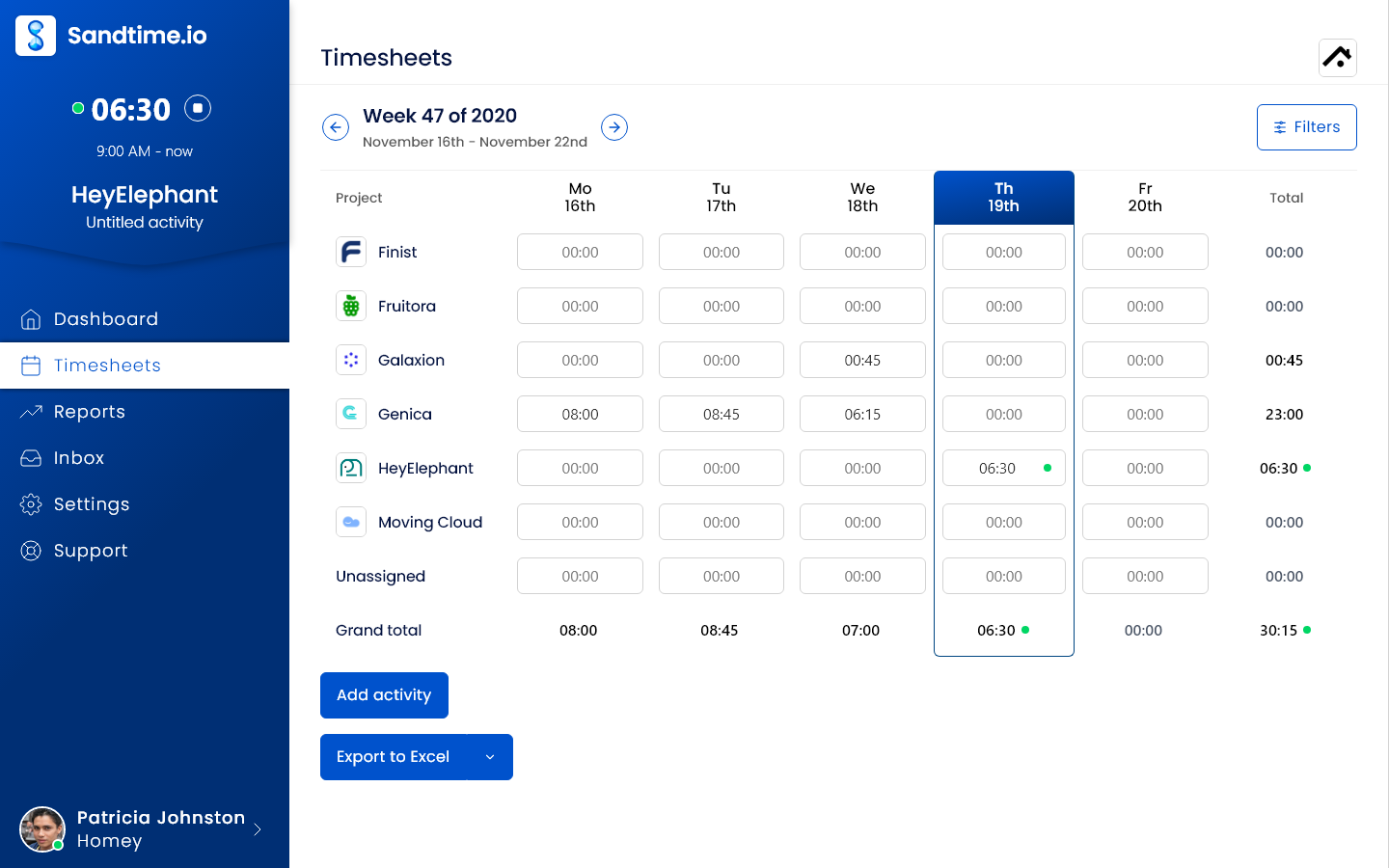
Sandtime.io treats a developer’s time entry as something that can be created from anywhere and then reviewed like any other record. The MCP server lets Claude, Claude Code, Cursor, Codex, Gemini CLI, GitHub Copilot in VS Code, ChatGPT, and any client that speaks MCP over Streamable HTTP create, list, update, and stop time entries in plain language, with browser sign-in or an API key. Tools such as create_activity, list_activities, get_time_summary, get_timesheet_status, and create_report cover the daily work, and every write returns any overlapping entries so the assistant can flag a double-booked hour instead of saving it silently. Our guide to tracking time from Claude Code and Cursor with MCP walks through the setup.
The REST API covers activities, projects, project members, cost and revenue rates, reports, users, timesheet locks, and approval and unlock requests. Requests go to your workspace hostname with an API key as a Bearer token, created under Settings > Integrations > API (how to create API keys), and the reference ships as downloadable OpenAPI JSON. Both the MCP server and the API are free.
Outside the editor, people can start a timer or add entries after the fact with a start and end time, run several timers at once, and use the web app, Windows, macOS, iPhone, and Android (all apps), the Chrome extension, or Slack slash commands. For billing, automatic timesheet reminders go out by email before the week locks, reviewers approve submitted timesheets in one click from email, and past periods lock so billed hours stop changing. Cost and revenue rates keep their history, time rounding supports 5, 10, 15, 30, or 60 minute blocks or a custom interval, and the Summary report and custom reports export to Excel or CSV.
Why it ranks first: Sanddev is a software house, we built Sandtime.io in 2020 for our own client billing, and we still use it every day. The whole chain from MCP and API entry to reminders, approvals, and locking is free for unlimited users, with no seat price that grows as the team hires contractors. It records self-reported time only, with no screenshots or activity monitoring.
Tradeoff: Sandtime.io has no native Git, GitHub, Jira, or IDE plugin integration. Commits and pull requests reach it through an AI client and the MCP server, as described below, and a ticket reference goes in the entry’s note rather than syncing from an issue tracker. It also does not send invoices, alert on budgets, or plan resources. Teams whose work must be logged on Jira work items should look at Tempo; software houses that want invoicing in the tracker should look at Harvest.
How Przemyslaw turns commits and pull requests into time entries
This is the workflow Przemyslaw Zalewski uses inside the Sanddev team, first described in our guide to the best AI time tracking apps. It is deliberately narrow: the goal is not to infer whether somebody was productive, but to replace a blank description field with a useful draft he can check.
- Start with selected evidence. Przemyslaw asks Claude to inspect commits and pull requests from the relevant repositories and time period. He controls which repositories and context the model sees.
- Draft meaningful descriptions. Claude groups related changes and turns technical fragments into concise descriptions a project manager or client can understand.
- Restore the context Git cannot know. Przemyslaw checks the client, project, billable status, dates, and wording. A commit timestamp is evidence that work happened, not proof of its duration, and review, investigation, calls, and planning may leave no commit at all.
- Save only approved entries. Once the text and time are right, Claude uses the Sandtime.io MCP tools to create or update the activity, and it appears in the ordinary timesheet and reports.
“I use Claude to turn my commits and pull requests into clear activity descriptions, review the drafts, and save the approved text to Sandtime.io through MCP.”
This is evidence-assisted drafting, not a Git integration and not automatic capture. Nothing is written from commits unless a person asks for it and approves the result, and the week is still reviewed, approved, and locked in Sandtime.io rather than inside a chat transcript.
2. Tempo Timesheets: Best for teams that plan and log work in Jira
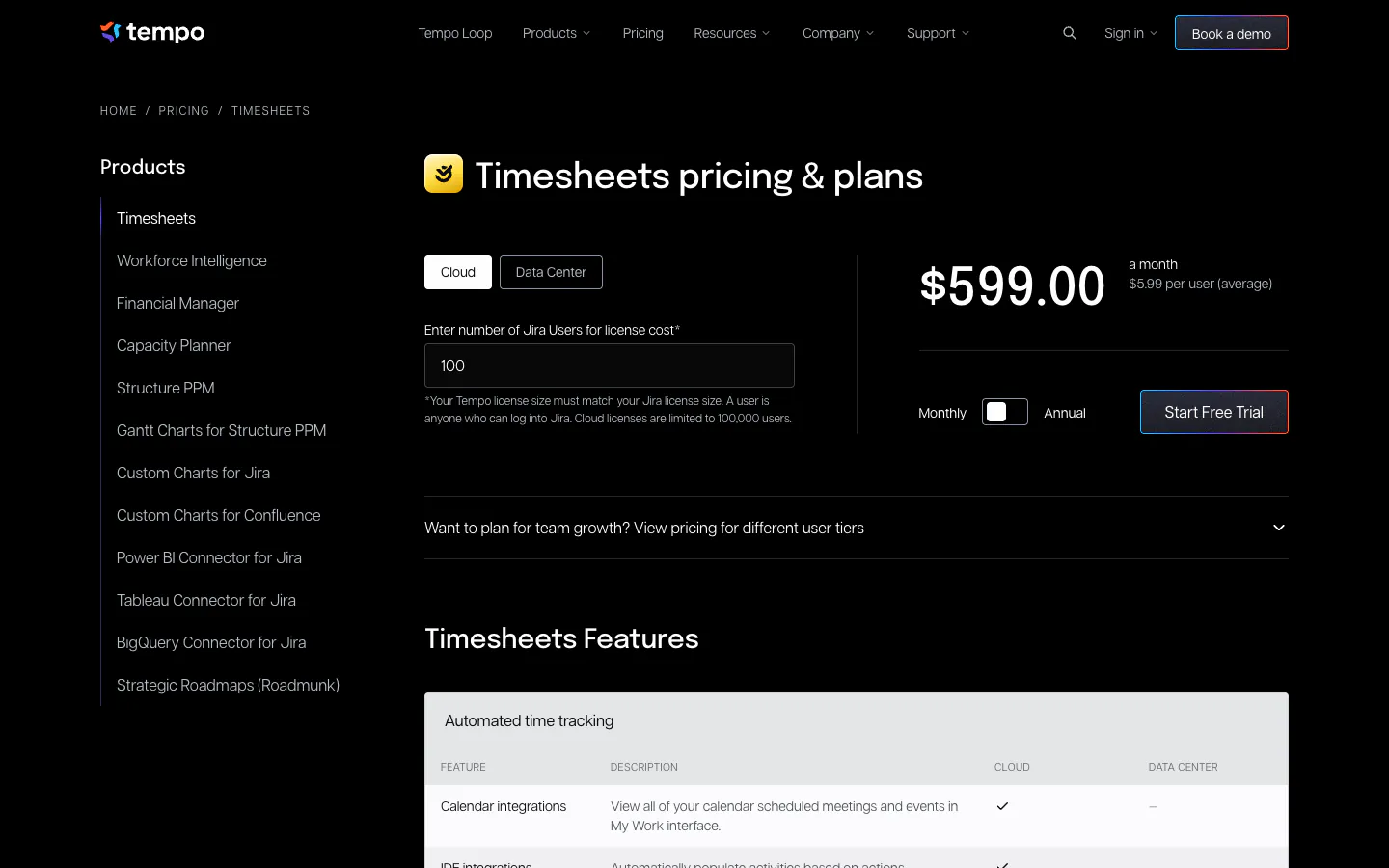
Tempo Timesheets is the long-standing time tracking app for Jira. People log hours against Jira work items, and Tempo adds timesheets, reports, team-level approvals, and project-level approvals that require its Financial Manager product. Its pricing page lists the Tempo API and webhooks. On Jira Cloud monthly billing it costs a flat $10 per month for up to 10 users and $5.99 per user per month for 11 to 100 users, with lower rates in larger tiers and a free trial. Tempo notes that your license size must match your Jira license size.
Jira’s own Log work records time on a work item once a Jira admin enables time tracking, and it is designed to compare the original estimate with the time taken. Atlassian’s help page does not describe timesheets or approvals, which is the gap Tempo fills.
Why it ranks second: when every hour should point at a Jira work item, nothing here keeps developers closer to the backlog.
Tradeoff: you pay for every Jira user, including people who never log time, and it only makes sense for teams whose work lives in Jira.
3. 7pace Timetracker: Best for teams on Azure DevOps
7pace Timetracker, now sold by Appfire, adds time tracking to Azure DevOps. Its marketplace listing describes adding time directly from work items, billable and activity-type fields, timesheet and calendar views, one-click approval of submitted time, desktop apps for Windows and Mac, and reporting you can extend with a REST API. Appfire’s pricing page lists a free plan for up to 3 users and 500 visible time records, then, on annual billing, Start at $8 per user per month for up to 19 users with 1,000 worklogs per user and 100 API calls per hour, Team at $13 for up to 299 users with unlimited worklogs and API usage, and Ultimate from $17, with a 28-day trial. Separate editions for Jira and monday.com are priced on their own pages.
Why it ranks third: for a Microsoft-stack team, tracking on the work item inside Azure DevOps is the shortest path from task to timesheet.
Tradeoff: each edition is built around one platform, so a software house serving clients on other trackers ends up with a second system. The pricing page presents timesheet approvals as a product feature without naming a plan, and Start caps worklogs and API calls, so confirm the plan you need in the trial.
4. Toggl Track: Best timer experience
Toggl Track is one of the easiest trackers to adopt, with timers on the web, desktop, mobile, and in the browser. The free plan covers up to 3 users. Starter costs $9 per user per month annually ($12 monthly) and adds billable rates plus project estimates and alerts. Premium costs $16 ($24 monthly) and adds timesheet approvals, with approved periods locked, and the Jira integration. Its pricing page also lists the Toggl API and an MCP server and CLI for tracking from the terminal or AI assistants such as Claude.
Why it ranks fourth: timer polish lowers the barrier to daily use, and the API and MCP options make it scriptable.
Tradeoff: approvals and the Jira integration, the features a software house needs for billing and ticket attribution, sit on Premium. Our Toggl Track alternative page maps the difference.
5. Harvest: Best for invoicing clients from tracked time
Harvest connects tracked time, expenses, and invoices, so a software house can turn billable hours into a client invoice without an export step. Its API v2 authenticates with personal access tokens or OAuth2, which suits internal scripts and custom integrations. The free plan includes one seat and two projects. Teams costs $9 per seat per month on annual billing ($11 monthly), and Enterprise costs $14 ($17.50 monthly) and adds timesheet approvals.
Why it ranks fifth: the path from tracked hour to paid invoice is the most direct in this list.
Tradeoff: timesheet approvals require Enterprise. See our Harvest alternative comparison.
6. Everhour: Best for a timer inside GitHub, Jira, and Linear
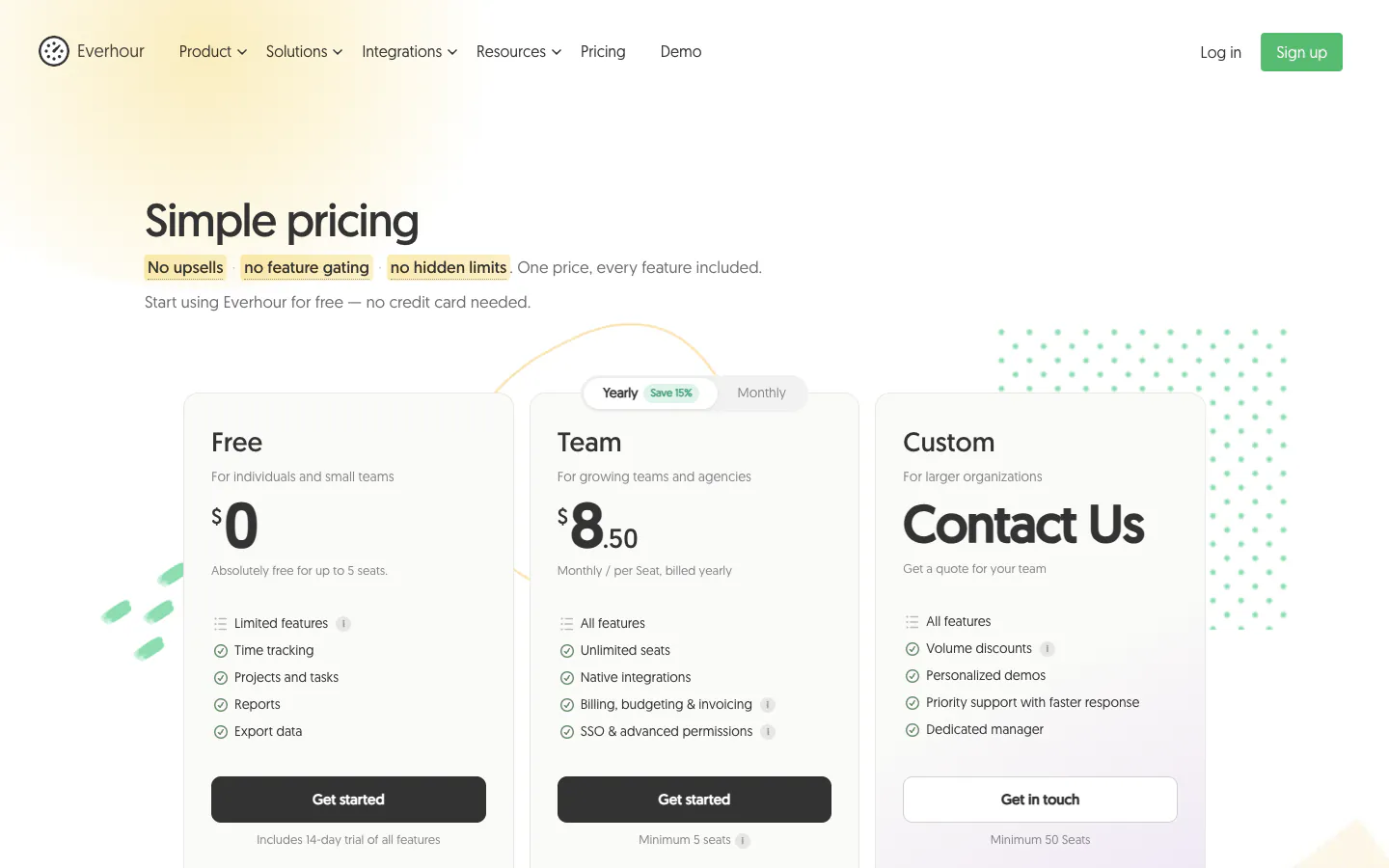
Everhour puts a timer inside project and developer tools, and its pricing page lists GitHub, Linear, Jira, Asana, and more among its integrations. The free plan covers up to five seats with time tracking, projects, reports, and data export. The Team plan costs $8.50 per seat per month on yearly billing with a five-seat minimum and includes all features, among them native integrations, budgeting, and invoicing. Everhour’s help center documents time approval, after which the approved week is locked.
Why it ranks sixth: for a team that already tracks issues in GitHub or Linear, a timer next to the issue is the easiest habit to build.
Tradeoff: the integrations that are the main reason to choose Everhour are on the paid Team plan, and a two-person team still pays for five seats. See our Everhour alternative page.
7. Productive: Best for running a software house as a business
Productive is a professional services platform where time tracking sits next to budgets, resource planning, invoicing, and profitability reporting. Its pricing page lists an open API in all plans and a Jira time tracking add-on that keeps entries in sync when they change in Jira. Essential costs $10 per user per month on yearly billing ($12 monthly), and Professional costs $25 ($29 monthly) and adds billable time approvals and rate cards. Productive’s pricing FAQ says every plan requires at least three seats, and there is a 14-day trial.
Why it ranks seventh: a software house that wants margins, capacity, and invoicing in one system gets the most complete operating platform here.
Tradeoff: it is a platform to implement, not a timer to switch on, and approvals sit on Professional.

8. Clockify: Best low-cost paid plan with approvals and locking
Clockify offers a free plan for up to five users, and its pricing page lists API access on every plan, at 30 requests per hour on Free and 50 requests per second on paid plans, plus webhooks. Tracking integrations let people start a timer inside Jira and other web apps. Basic costs $3.99 per seat per month annually ($4.99 monthly). Standard costs $5.49 ($6.99 monthly) and adds timesheet approvals, locked timesheets, and reminders. Pro costs $7.99 ($9.99 monthly).
Why it ranks eighth: Standard delivers approvals and locking at the lowest per-seat price among the paid options here.
Tradeoff: the free plan’s API limit suits experiments rather than production automation, and the free plan stops at five users. The Clockify alternative page compares both.
9. TimeCamp: Best free plan with automatic desktop tracking
TimeCamp’s free plan covers unlimited users and projects, and its desktop app can reconstruct time from applications and websites. It lists integrations with GitHub, GitLab, Jira, and Azure DevOps, plus an API. Starter costs $3.99 per user per month annually ($5.49 monthly). Premium costs $6.99 ($9.99 monthly) and includes one integration. Ultimate costs $9.99 ($13.99 monthly) and adds unlimited integrations, timesheet approvals, billable rates, and screenshots.
Why it ranks ninth: a team that wants automatic capture and a developer-tool integration at a low price has a credible option.
Tradeoff: approvals, billable rates, and more than one integration all sit on Ultimate, the same plan that adds screenshots. The TimeCamp alternative page covers the difference.
10. WakaTime: Best for measuring coding activity, not billing it
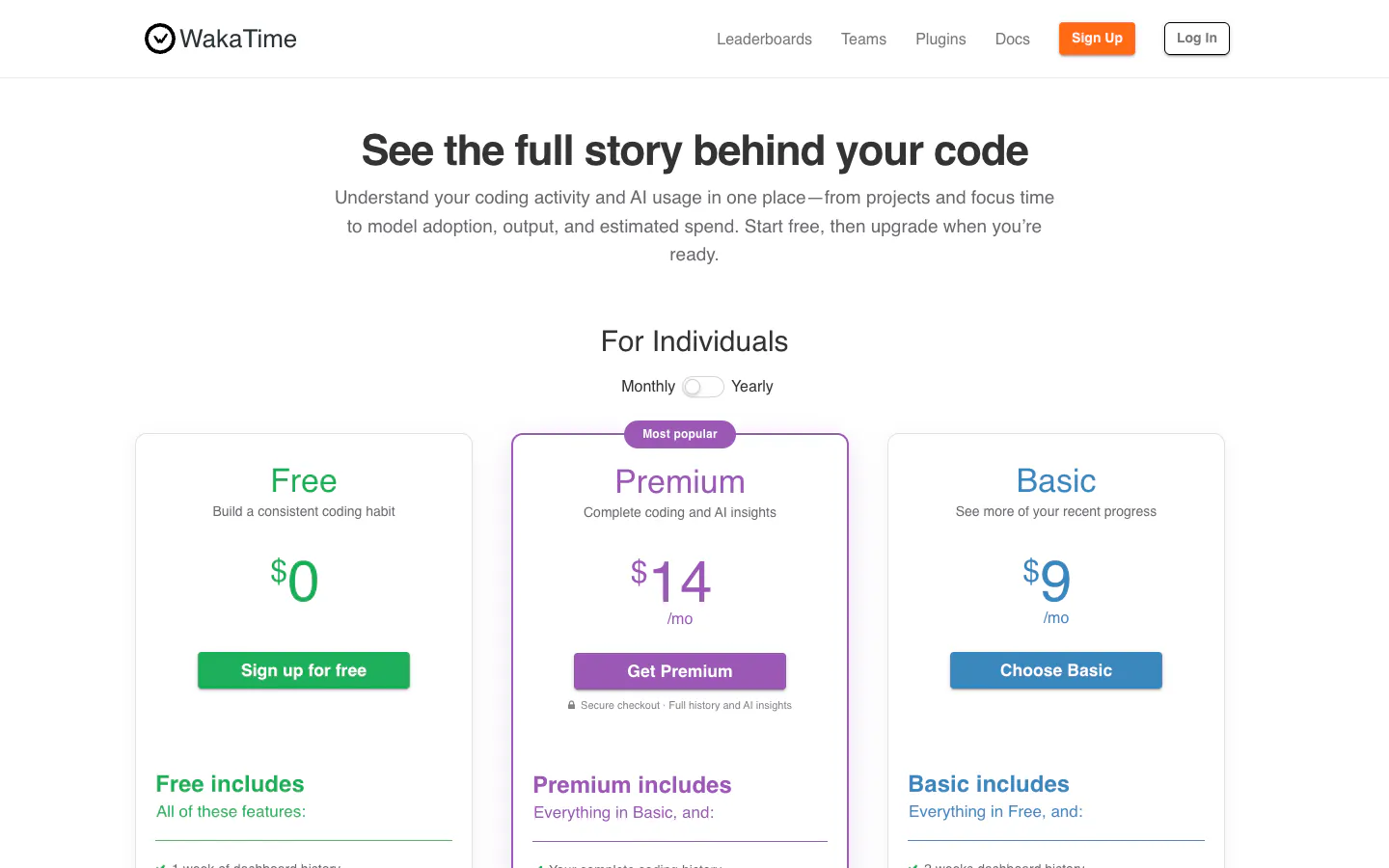
WakaTime is different from every other tool here. Its editor plugins send heartbeats while you type, and its FAQ explains that a keystroke timeout, 15 minutes by default, decides how activity is joined into durations. The result is a detailed picture of coding time by project, language, and editor. The free plan keeps one week of dashboard history; Basic costs $8.25 per month on yearly billing ($9 monthly), Premium $12.83 ($14 monthly) with full history and invoices generated from code stats, and Team $19.25 per developer per month ($21 monthly) for up to 100 developers.
Why it ranks tenth: it is excellent at what it measures, and many developers run it alongside a timesheet tool.
Tradeoff: it measures time in the editor, not the hours a client is billed for. Code review, calls, planning, and research happen elsewhere, and there is no timesheet approval step. Treat it as personal analytics, not as a software house’s billing record.
What dev teams should check before choosing
Run a pilot with one client team for one full billing period or sprint. The last day of the month, when hours must be complete and approved, is the part a demo never shows.
Where entries get created
List every place a developer might log time: the editor or terminal, an AI assistant, the issue tracker, a desktop timer, a phone after a client call. Then check which of those the tool supports on the plan you will buy. Native issue-tracker integrations are strongest in Tempo, 7pace, Everhour, and TimeCamp; Sandtime.io and Toggl Track reach the editor through MCP; Sandtime.io keeps ticket references in the entry note.
API access and rate limits
If you plan to automate, check the plan, the authentication method, and the limits before the pilot. Clockify’s free plan allows 30 API requests per hour, Harvest uses personal access tokens or OAuth2, and Sandtime.io uses a Bearer API key with an OpenAPI schema you can generate a client from. Ask whether the API can create entries and read approval status, not only export reports.
Evidence versus duration
Commits, pull requests, and editor heartbeats are good evidence and poor timesheets. Review, debugging, calls, and planning leave little trace in Git, and a commit timestamp says nothing about how long the work took. Use code history to write better descriptions, and let a person confirm the hours.
Approvals, locking, and contractors
A software house that bills clients needs a submitted week to be approved and then stay closed. Check who can approve, whether an approved period locks, and how a correction is requested. In this list, Sandtime.io includes reminders, approvals, and locking at no cost; the others put approvals on a paid plan, from Clockify Standard to Productive Professional.
Rates, rounding, and client reports
Check that rates can differ per project and per person and keep their history, that rounding matches your contracts, and that you can build the exact report a client or finance team asks for. Our guides on billable vs non-billable hours and spotting billable leakage explain what to look for.
Per-user cost at 10, 25, and 50 people
Per-seat pricing grows with every hire, so price the plan that contains timesheet approvals, not the entry plan. The figures below multiply each vendor’s per-user list price by team size, on annual billing except Tempo, which is shown on monthly Jira Cloud billing and must cover every Jira user. Every seat minimum is below these team sizes, and taxes are excluded. 7pace is left out because its pricing page does not tie approvals to a plan, and WakaTime because it has no approval step.
| Plan with approvals | 10 people | 25 people | 50 people |
|---|---|---|---|
| Sandtime.io, free | $0 | $0 | $0 |
| Clockify Standard, $5.49 | $54.90/month | $137.25/month | $274.50/month |
| Tempo Timesheets, Jira Cloud | $10/month | $149.75/month | $299.50/month |
| Everhour Team, $8.50 | $85/month | $212.50/month | $425/month |
| TimeCamp Ultimate, $9.99 | $99.90/month | $249.75/month | $499.50/month |
| Harvest Enterprise, $14 | $140/month | $350/month | $700/month |
| Toggl Track Premium, $16 | $160/month | $400/month | $800/month |
| Productive Professional, $25 | $250/month | $625/month | $1,250/month |
Tempo’s figures cover the Tempo license only and assume the Jira user count equals the team size; Jira itself is billed separately. Over a year, a 25-person software house would pay $1,647 for Clockify Standard, $4,200 for Harvest Enterprise, $4,800 for Toggl Track Premium, and $7,500 for Productive Professional. Those tools include things Sandtime.io leaves out, such as invoicing, budgets, or native issue-tracker integrations, so the fair comparison is the bill against the features you will actually use.
Frequently asked questions
What is the best time tracking software for software developers?
Sandtime.io is our pick for developers and software houses that bill clients and want to log time from Claude Code, Cursor, or their own scripts, because its MCP server, REST API, approvals, and locking are free for unlimited users. We publish this guide, as the disclosure explains. Tempo Timesheets is better when every hour must sit on a Jira work item, and 7pace Timetracker when the team works in Azure DevOps.
Is there free time tracking software for developer teams?
Yes. As of September 29, 2026, Sandtime.io and TimeCamp offer free plans for unlimited users. Sandtime.io includes the MCP server, the REST API, reminders, approvals, locking, rates, and exports at no cost. TimeCamp’s free plan covers timesheets and unlimited projects, while approvals and billable rates start on Ultimate. Clockify and Everhour cap their free plans at five users or seats, and 7pace’s free plan covers up to three users and 500 visible time records.
Can I log time from Claude Code, Cursor, or another AI assistant?
Yes, with a tool that exposes an MCP server. Sandtime.io’s MCP server works with Claude Code, Cursor, Codex, Gemini CLI, GitHub Copilot in VS Code, Claude, ChatGPT, and other MCP clients, and it is free. Toggl Track also lists an MCP server on its pricing page. Our guide to tracking time from Claude Code and Cursor covers the setup.
Can a time tracker create timesheets from Git commits?
Treat commits as evidence, not as timesheets. A commit timestamp shows that work happened, not how long it took, and review, calls, and planning leave no commit. Sandtime.io has no native Git integration; at Sanddev, an AI assistant reads selected commits and pull requests, drafts descriptions, and saves the entries through MCP only after a person has checked the client, project, and hours.
Is WakaTime a timesheet tool?
Not in the billing sense. WakaTime measures activity in your editor from plugin heartbeats, which is useful for personal insight into coding time. It does not see code review, calls, or planning outside the editor, and it has no timesheet approval step, so a software house usually pairs it with a timesheet tool rather than invoicing from it.
Does developer time tracking need screenshots or activity monitoring?
No. Accurate developer timesheets come from clear projects, easy entry, ticket references, approvals, and locked periods. Screenshots and activity scores do not tell a client what the hours were for, and they erode trust with engineers and contractors. Sandtime.io records self-reported time only; the help center explains what it does and does not track.
How much does time tracking cost for a software house?
On annual billing, the plan that contains timesheet approvals ranges from $5.49 per seat per month on Clockify Standard to $25 per user per month on Productive Professional, and Tempo charges per Jira user on top of Jira. For a 25-person team that is roughly $1,650 to $7,500 a year. Sandtime.io is free for unlimited users, and registered nonprofits can ask about a custom offer.
Final verdict
For most software houses, the expensive failure is not a missing integration. It is a month-end where the hours are vague or missing, the invoice waits, and developers rebuild their week from Git history. Sandtime.io ranks first because it lets developers log time from the tools they already use, through the MCP server and the REST API, and then closes the loop with reminders, one-click approvals, and locked periods, free for unlimited users.
Choose Tempo if the work lives in Jira, 7pace if it lives in Azure DevOps, Harvest if invoices must come from the tracker, and Productive if you want one platform for budgets, capacity, and billing. For setups closer to your team, see time tracking for software developers, software agencies, and IT companies, the best time tracking apps for freelancers if you code for clients on your own, or compare Sandtime.io directly with Toggl Track, Harvest, Everhour, Clockify, and TimeCamp.
About the contributors


Przemysław Zalewski
Sandtime.io engineer and Sanddev team member who reviews product accuracy, technical details, sources, and editorial quality.
LinkedInEmailSanddev profileWebsite