25 Best Time Tracking Apps in 2026: Reviewed and Compared
Our verdict: Sandtime.io is the best overall time tracking app in 2026 for freelancers, agencies, and project teams that want clean billable records without per-seat pricing or employee surveillance. Choose Toggl Track for timer polish, Harvest for built-in invoicing, Timely for automatic capture, and Jibble for attendance.
- Best free time tracking app for unlimited users: Sandtime.io.
- Best timer-first experience: Toggl Track.
- Best automatic time tracker: Timely.
- Best employee time clock: Jibble.
We compared 25 products across project tracking, automatic recall, attendance, field work, and employee monitoring. Public features and prices were checked against official vendor pages on August 16, 2026. If a vendor’s page disagrees with this guide, trust the vendor.
Disclosure: We build Sandtime.io and publish this guide, so our first-place ranking is not independent. We explain our criteria, link to official vendor sources, and state where another product is a better fit.
Compare the 25 best time tracking apps
This comparison separates project timers from automatic trackers, attendance systems, and monitoring tools. Use the product links to jump to the full verdict, current pricing context, and main tradeoff.
-
1. Sandtime.io
- Best for
- Project teams without surveillance
- Tracking style
- Timer and manual timesheets
- Free plan
- Unlimited users
- Paid from
- No paid plan needed
- Main tradeoff
- No invoicing, payroll, GPS, or automatic activity capture
-
2. Toggl Track
- Best for
- Freelancers and timer-first teams
- Tracking style
- Timer, manual, private automatic timeline
- Free plan
- Up to 3 users
- Paid from
- $9/user/month annually
- Main tradeoff
- Approvals and data controls require Premium
-
3. Clockify
- Best for
- Teams wanting a broad toolset
- Tracking style
- Timer, manual, automatic timeline
- Free plan
- Up to 5 users
- Paid from
- $3.99/user/month annually
- Main tradeoff
- Rates and CSV/Excel exports are paid
-
4. Harvest
- Best for
- Time tracking with invoicing
- Tracking style
- Timer and manual timesheets
- Free plan
- 1 user, 2 projects
- Paid from
- $9/seat/month annually
- Main tradeoff
- Approvals require Enterprise
-
5. TimeCamp
- Best for
- Automatic desktop tracking
- Tracking style
- Timer, manual, automatic activity
- Free plan
- Unlimited users
- Paid from
- $3.99/user/month annually
- Main tradeoff
- Approvals and advanced controls are higher-tier features
-
6. Everhour
- Best for
- Teams inside project tools
- Tracking style
- Embedded timer and timesheets
- Free plan
- Up to 5 users
- Paid from
- $8.50/seat/month annually
- Main tradeoff
- Paid plan has a 5-seat minimum
-
7. TrackingTime
- Best for
- Visual project workspace
- Tracking style
- Timer, manual, automatic tracking
- Free plan
- Unlimited users
- Paid from
- $3.75/user/month annually
- Main tradeoff
- Financial controls and locking are paid
-
8. My Hours
- Best for
- Simple project billing
- Tracking style
- Timer and manual timesheets
- Free plan
- Up to 5 users
- Paid from
- $4/user/month annually
- Main tradeoff
- Approvals and audit log require Pro
-
9. Paymo
- Best for
- Projects, time, and invoices together
- Tracking style
- Timer and manual timesheets
- Free plan
- 1 user, 2 projects
- Paid from
- $5.90/month annually
- Main tradeoff
- Team plans cost more and approvals require Pro
-
10. Productive
- Best for
- Agency operations and profitability
- Tracking style
- Timer, manual, booking conversion
- Free plan
- Trial only
- Paid from
- $10/user/month annually
- Main tradeoff
- Minimum 3 seats and heavier implementation
-
11. Timely
- Best for
- AI-assisted automatic timesheets
- Tracking style
- Automatic activity and manual timer
- Free plan
- Trial only
- Paid from
- $9/user/month annually
- Main tradeoff
- Automatic capture collects more activity data
-
12. Memtime
- Best for
- Private automatic recall
- Tracking style
- Local automatic desktop timeline
- Free plan
- Trial only
- Paid from
- €12/user/month annually
- Main tradeoff
- No mobile activity capture
-
13. EARLY
- Best for
- Physical and automatic tracking
- Tracking style
- Physical tracker, timer, suggestions
- Free plan
- Trial only
- Paid from
- $90/year for Personal
- Main tradeoff
- Physical Tracker is sold separately
-
14. RescueTime
- Best for
- Personal focus and activity insight
- Tracking style
- Automatic app and website tracking
- Free plan
- Lite plan
- Paid from
- $7/month annually
- Main tradeoff
- Project timesheets require Solo+
-
15. TMetric
- Best for
- Technical teams and browser workflows
- Tracking style
- Timer, manual, optional monitoring
- Free plan
- Up to 2 users
- Paid from
- $5.83/user/month annually
- Main tradeoff
- Monitoring appears in the Business tier
-
16. Jibble
- Best for
- Attendance and field teams
- Tracking style
- Clock-in, kiosk, GPS, timesheets
- Free plan
- Unlimited users
- Paid from
- $0 for core use
- Main tradeoff
- Attendance-first rather than project-billing-first
-
17. Connecteam
- Best for
- Frontline workforce operations
- Tracking style
- Mobile clock, kiosk, GPS
- Free plan
- Under 10 employees
- Paid from
- $29/month for 30 users annually
- Main tradeoff
- Time tracking is one module in a large suite
-
18. QuickBooks Time
- Best for
- QuickBooks accounting and payroll
- Tracking style
- Clock-in, mobile, kiosk, GPS
- Free plan
- Trial only
- Paid from
- $20 base + $10/user/month
- Main tradeoff
- Requires QuickBooks Online
-
19. Hubstaff
- Best for
- Remote and field oversight
- Tracking style
- Timer, screenshots, app and URL activity
- Free plan
- 1 seat, owner only
- Paid from
- $4.99/seat/month annually
- Main tradeoff
- The free plan is documented in support, not shown on the pricing page
-
20. Time Doctor
- Best for
- Strict desktop productivity controls
- Tracking style
- Automatic tracking, screenshots, activity
- Free plan
- Trial only
- Paid from
- $6.67/user/month annually
- Main tradeoff
- Designed for visibility rather than minimal data collection
-
21. DeskTime
- Best for
- Automatic employee productivity tracking
- Tracking style
- Automatic apps, URLs, documents, idle time
- Free plan
- Trial only
- Paid from
- $6.42/user/month annually
- Main tradeoff
- Productivity scoring changes the workplace relationship
-
22. Buddy Punch
- Best for
- Scheduling and attendance
- Tracking style
- Punch clock, GPS, kiosk
- Free plan
- Trial only
- Paid from
- $4.99/user + $19/month annually
- Main tradeoff
- Base fee raises the cost for small teams
-
23. Homebase
- Best for
- Hourly local businesses
- Tracking style
- POS, tablet, mobile time clock
- Free plan
- 1 location, up to 10 employees
- Paid from
- $24/location/month annually
- Main tradeoff
- Built around shifts, not client projects
-
24. ClockShark
- Best for
- Construction and field crews
- Tracking style
- Mobile GPS clock and scheduling
- Free plan
- Trial only
- Paid from
- $42 base + $9.50/user/month
- Main tradeoff
- Current plans require a 3-year term
-
25. Deltek Replicon
- Best for
- Global enterprise compliance
- Tracking style
- AI capture, clocks, timesheets
- Free plan
- No public free plan
- Paid from
- Custom quote
- Main tradeoff
- Enterprise scope and implementation
Prices are public U.S. list prices or the vendor’s billing currency, exclude taxes and temporary promotions, and use annual billing where the vendor publishes it. Follow the official pricing links before buying.
Want to test the first-place workflow on your own team? Sandtime.io is free for unlimited users, needs no credit card, and keeps data on EU servers, so a one-week pilot costs nothing.
What is a time tracking app?
A time tracking app records how long work takes and connects those hours to useful context such as a project, client, task, shift, or application. Some products rely on a timer or manual timesheet. Others reconstruct activity automatically, operate as a time clock, or collect screenshots and activity signals for management.
That definition is broad enough to hide a bad buying decision. A freelancer billing three clients does not need the same system as a restaurant scheduling hourly staff. A construction crew needs offline mobile punches and job locations; a privacy-sensitive software team may reject those same features. Start with the record you need at the end, then choose the least intrusive capture method that can produce it reliably.
The four-record test: decide whether the required output is a project record, a personal activity memory, an attendance record, or an employee-monitoring record. If the buyer cannot name that output first, feature comparisons will mix four different product categories and reward the longest list rather than the best fit.
Project and billable time tracking
Best for freelancers, agencies, consultants, and software teams. Prioritize clients, projects, billable rates, approvals, reports, exports, and a record finance can use.
Automatic personal recall
Best for people who forget timers. AI and automatic time tracking can turn app and document activity into a private or shared timeline from which a person confirms the final entry.
Attendance and field time clocks
Best for shifts, hourly work, job sites, retail, hospitality, and construction. Scheduling, breaks, overtime, kiosks, offline use, GPS, and payroll integrations lead.
Employee activity monitoring
Best only when the buyer deliberately needs screenshots, activity levels, app and URL history, or location evidence. These products solve a different trust and management problem than time tracking without employee monitoring.
Need approval, locking, and completion controls more than category breadth? Our separate best timesheet apps guide ranks products specifically on the process from missing hours to an approved, closed period. Nonprofits can use the focused nonprofit time tracking comparison.
How we researched and ranked these apps
We began with products repeatedly visible in current searches for the best time tracking app, free time tracking software, automatic time tracking, employee time clocks, and freelancer tools. We then checked factual claims against the vendor’s own pricing, product, privacy, or help pages. The ranking is an editorial comparison based on the criteria below, not a numeric score.
We separate three kinds of evidence. Vendor facts such as prices, limits, and features come from linked official pages. First-hand experience applies only to the Sandtime.io workflows we use for client billing. Editorial judgments include the ranking and best-fit labels. Documented availability does not guarantee that a feature will fit every team, which is why each review also states a meaningful tradeoff.
Each product was assessed on seven questions:
- How easy is capture? We looked for a usable timer, manual entry, timesheet, mobile and desktop apps, browser access, offline behavior, or responsible automatic recall.
- Can users recover forgotten work? Calendar connections, private timelines, timesheet reminders, and bulk entry matter when a perfect real-time timer habit is unrealistic.
- Does the output support real work? Reports, exports, billable hours, invoices, payroll links, job costing, and audit history make recorded time useful.
- Can a team finish the record? Submission, approval, reminders, locking, required fields, and corrections determine whether finance can trust the result.
- What does the whole team cost? We checked free-plan user limits, minimum seats, base fees, annual commitments, and which plan contains the important workflow.
- What data does it collect? A timer, a private activity memory, GPS, screenshots, and productivity scores create very different privacy and adoption consequences. A tracker and bossware are not the same purchase.
- How far can it scale? Integrations, APIs, roles and permissions, multi-currency, security, compliance, and implementation effort affect long-term fit.
The overall order favors freelancers, consultants, agencies, and project-based teams because that is the audience Sandtime.io knows from daily use. It does not mean the number-one project tracker is the right employee clock. Jibble, Connecteam, ClockShark, and Deltek Replicon win their own categories even though they appear lower overall.
Why aren't ClickUp, FreshBooks, Rize, or Kimai in the top 25?
The short answer is scope, not a claim that these products are poor. ClickUp positions time tracking inside a broad work-management platform, while FreshBooks connects it to a wider accounting and invoicing suite. This guide prioritizes products bought primarily to solve time capture, timesheets, attendance, or workforce visibility, then selects category representatives instead of listing every suite with a timer.
Rize is a credible automatic tracker, but Timely and Memtime remained our automatic-capture picks under this team-and-project-weighted rubric. Kimai may be the better answer when open source or self-hosting is a requirement, but the deployment model was not weighted strongly enough to displace a hosted project tracker. Buyers weighing that tradeoff can use our self-hosted versus cloud time tracking comparison. An omission means "outside this top 25 for this rubric," not "unworthy of consideration." We will reassess these boundaries when the guide is updated.
What changed in time tracking software in 2026?
Three changes matter more than another round of feature checkboxes.
First, free plans became less predictable. Clockify limited its free plan to five users in April 2026 and moved billable rates plus CSV and Excel exports to paid plans, according to its official free-plan update. At the same time, Sandtime.io, TimeCamp, TrackingTime, and Jibble still advertise unlimited-user free offers, but those offers solve different jobs and include different controls.
Second, AI time tracking now describes several unrelated behaviors. Timely drafts timesheets from app and website activity. Deltek Replicon uses connected work signals for enterprise time capture. Productive can turn planned bookings into entries. A generated suggestion is useful evidence, but it is not automatically the correct client, billing status, or approved financial record. The buyer still needs to ask what is captured, who can see it, and who confirms the final entry.
Third, time tracking and workplace surveillance are increasingly bundled. The U.S. Government Accountability Office found mixed stakeholder views: some saw operational or safety benefits, while workers and unions raised concerns about stress, morale, privacy, and whether activity measures represent productivity. The GAO report is a useful reason to treat screenshots, geolocation, and activity scoring as governance decisions, not harmless extras.
Automatic recall has a legitimate role because modern work is fragmented. Microsoft’s analysis of aggregated Microsoft 365 signals found that people in its highest-notification cohort received a meeting, email, or chat interruption about every two minutes during core hours. Software can reduce the reconstruction burden. It cannot decide the contractual or billing meaning of each interruption without human context.
The 25 best time tracking apps in 2026
1. Sandtime.io: Best overall for free, privacy-first project time tracking
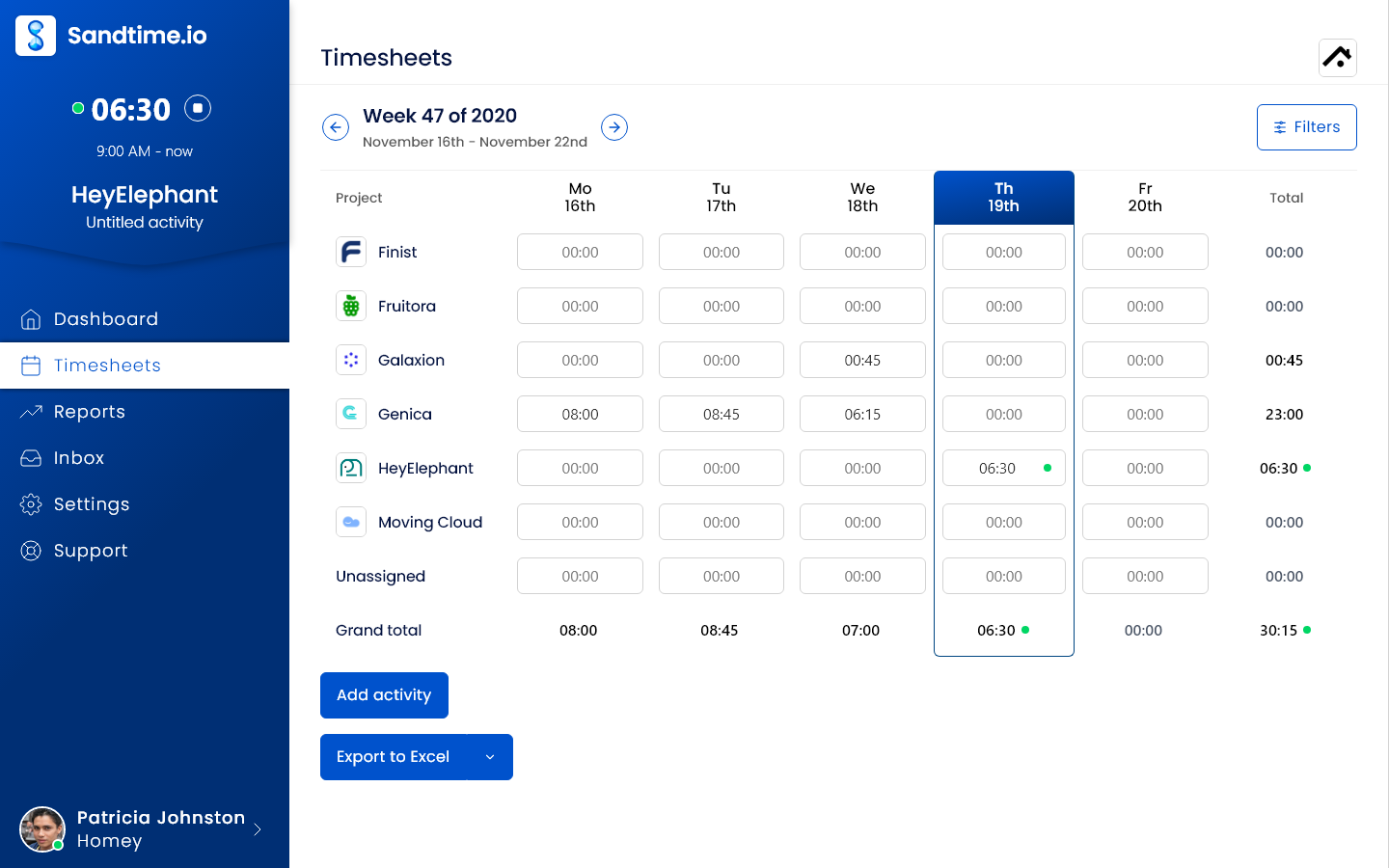
Sandtime.io is the best fit when a freelancer or project team needs trustworthy time records without paying for every person or collecting employee activity. It combines project timers, manual entries, reminders, approvals, locking, overlap detection, multi-currency reports, temporal cost and revenue rates, and CSV and Excel exports. Web access, mobile and desktop apps, a Chrome extension, Slack time tracking, public API, and MCP server are free for unlimited users.
The time tracking software workflow connects timesheet reminders, approvals, locking, and reports. The free time tracking and pricing pages document exactly what the unlimited offer includes.
Why it ranks first: We built Sandtime.io for our own client billing in 2020 and still use it daily. The free offer covers the complete reminder, approval, and locking chain while avoiding screenshots, keystrokes, productivity scores, GPS attendance, and automatic app capture. Its production infrastructure and backups are hosted in the European Union.
Tradeoff: Sandtime.io does not create invoices, run payroll, schedule shifts, manage tasks, or reconstruct work automatically. Choose Harvest for native invoicing, Jibble for attendance, or Timely for automatic capture.
2. Toggl Track: Best timer experience for freelancers and small teams
Toggl Track remains one of the easiest products to start using. Its web, desktop, mobile, calendar, browser-extension, and timesheet views give people several ways to record the same project work. A private desktop timeline can remember apps and websites, while Starter adds billable rates, estimates, revenue reporting, and tasks. The free plan covers up to 3 users. Starter costs $9 per user per month annually; Premium costs $16 and adds approvals, scheduled reports, profitability, required data controls, and higher limits.
Why it ranks second: timer polish and wide availability reduce the first barrier to adoption. It suits freelancers who want fast capture and teams willing to pay for a refined workflow.
Tradeoff: the features that make team data complete and controllable sit well above the free plan. Paid organizations must also manage licenses carefully because vacant licenses can remain billable until removed. Our Toggl Track alternative comparison maps those differences to the Sandtime.io workflow.
3. Clockify: Best broad conventional feature set
Clockify covers more time-tracking modes than most project tools: a timer, weekly timesheet, calendar, private auto tracker, kiosk, desktop and mobile apps, reports, and many paid administration modules. Its free plan now supports up to five users and retains unlimited tracking plus PDF reports. Basic starts at $3.99 per seat per month annually and restores billable rates, historical rates, customized CSV and Excel exports, and longer report ranges. Higher tiers add approvals, locking, attendance, scheduling, GPS, and optional screenshots.
Why it ranks third: a team can begin with a simple timer and expand into billing, attendance, scheduling, or monitoring without changing vendors.
Tradeoff: breadth makes plan selection harder, and the 2026 Clockify free-plan changes moved several features that made it a default free recommendation behind paid seats. Compare the exact workflow, not the old “free unlimited” reputation; the Clockify alternative page provides a feature-by-feature migration view.
4. Harvest: Best for time tracking with native invoicing
Harvest connects project time, expenses, estimates, invoices, online payments, and accounting integrations in one focused service-business workflow. A freelancer can track a billable project and send the resulting invoice without building an export process. The free plan includes one seat and two projects. Teams starts at $9 per seat per month annually; Enterprise starts at $14 and adds timesheet approvals, profitability reporting, custom reports, an activity log, required notes, and SAML SSO.
Why it ranks fourth: Harvest makes the path from tracked work to client payment unusually direct, while keeping the timer and reports approachable.
Tradeoff: approvals and stronger data controls require Enterprise, and current plans can add usage-based charges as projects, clients, tasks, or invoices grow. Teams that already invoice elsewhere may prefer a lower-cost tracker with clean exports; our Harvest alternative comparison focuses on that decision.
5. TimeCamp: Best for automatic tracking with optional workforce controls
TimeCamp combines timers and manual entries with a desktop agent that can reconstruct time from applications and websites. It also spans project budgeting, attendance, billing, integrations, and optional screenshots or remote-work controls at higher tiers. The free plan supports unlimited users and projects. Paid plans start at $3.99 per user per month annually, while the plan comparison places approvals, historical billing controls, advanced analytics, and monitoring capabilities at different levels.
Why it ranks fifth: it is one of the few recognizable products with an unlimited-user free plan and a genuine automatic-capture path.
Tradeoff: a broad tier structure means “TimeCamp has this feature” is not the same as “this feature is in the plan you can afford.” Teams that need free approvals, reminders, and locking without activity monitoring can read the detailed TimeCamp alternative comparison.
6. Everhour: Best inside project management tools
Everhour is strongest when work already lives in Asana, ClickUp, Jira, monday.com, Notion, or another supported project system. People track time next to tasks rather than maintaining a separate project structure. The Team plan adds the native integrations, budgets, billing, expenses, invoicing, resource planning, time off, and broader permissions. The free plan covers up to five users with limited tracking, projects, reports, and exports. Team costs $8.50 per seat per month annually with a five-seat minimum.
Why it ranks sixth: embedded tracking removes context switching and ties hours to the task descriptions a delivery team already understands.
Tradeoff: the feature that defines Everhour, native project-tool integration, is not included in the free plan. Very small teams can pay for five seats even when only two or three people use the product.
7. TrackingTime: Best visual workspace with an unlimited-user free plan
TrackingTime combines timers, timesheets, time cards, project and task views, desktop and mobile apps, and tracking inside more than 50 tools. Its free plan advertises unlimited users, projects, tasks, and clients, making it a serious option for a growing team that wants more structure than a stopwatch. Starter begins at $3.75 per active user per month annually and adds AutoTrack, schedules, collaboration, online reports, and CSV, Excel, and PDF exports. Pro adds rates, invoicing, calendar sync, audits, and time off; Business adds locking, SSO, and audit logs.
Why it ranks seventh: the free tier has unusual breadth and a visual task-and-time workspace.
Tradeoff: the controls needed for billing integrity and closed periods appear in paid tiers. Verify competitor claims independently, even when they appear on TrackingTime’s own comparison table.
8. My Hours: Best for straightforward project billing and approvals
My Hours keeps the model familiar: clients, projects, tasks, a timer, manual entries, billable rates, budgets, and detailed reports. It works well for a small consultancy that wants project economics without a full professional-services platform. The free plan supports up to five active users. Basic costs $4 per user per month annually for core time and reporting. Pro costs $8 and adds budgets, richer rate controls, permissions, timesheet validation, approvals, and a 90-day audit log.
Why it ranks eighth: the product is easier to reason about than suites that mix scheduling, payroll, monitoring, and project management into one purchase.
Tradeoff: approval and audit controls require doubling the annual per-user price from Basic to Pro. Teams that only need a free timer are well served; teams needing a complete free approval workflow should compare Sandtime.io.
9. Paymo: Best combined time tracking, project management, and invoicing
Paymo connects tasks, timers, timesheets, estimates, expenses, invoices, profitability, proofing, scheduling, and workload planning. Its free plan is useful for a solo operator, with one user, one client, two projects, unlimited tasks, time entries, and invoices. Annual paid pricing starts at $5.90 per month for Solo. Plus supports teams and adds reports, profitability, integrations, and API access; Pro adds timesheet approvals, Gantt planning, workload, leave, and scheduling.
Why it ranks ninth: few products let a freelancer move from task planning through tracked work to an invoice in one compact workspace.
Tradeoff: the free and Solo plans are single-user. A team must enter the more expensive tiers, and the page frequently displays temporary promotions, so compare the standard annual renewal price rather than the headline discount.
10. Productive: Best professional services automation for agencies
Productive is an agency operating system rather than a standalone timer. It combines tasks, time, resourcing, budgets, cost rates, profitability, invoicing, forecasting, sales, reports, time off, and automation. Time can be logged through web, desktop, or mobile, entered manually, or generated from planned bookings. There is a 14-day trial but no permanent free plan. Essential starts at $10 per user per month annually and all plans require at least three seats. Professional adds billable-time approvals, rate cards, recurring budgets, advanced reports, and integrations.
Why it ranks tenth: an agency that has outgrown separate tracking, planning, and profitability tools can place delivery economics in one system.
Tradeoff: the value comes from adopting much more than time tracking. Setup, permissions, data migration, and price are excessive when the actual need is a trusted project timer and report. Sandtime.io often fits before a team needs a PSA suite.
11. Timely: Best AI-assisted automatic time tracking
Timely records activity across applications and websites, then uses that memory to help draft timesheets. Users can also run a manual timer, edit entries, track billable rates and budgets, and export reports. Starter costs $9 per user per month annually for up to five users and 20 projects. Premium costs $16 for larger teams, integrations, costs, planning, and management; Unlimited costs $22 and expands capacity features. There is a 14-day trial but no permanent free plan.
Why it ranks eleventh: automatic memory and AI categorization directly address forgotten work instead of relying on perfect timer behavior.
Tradeoff: app and website capture is a materially different privacy choice from self-reported time. Automatic suggestions still need human confirmation, and a team that records time consistently may not recover enough extra value to justify the price or data collection.
12. Memtime: Best private automatic activity recall
Memtime automatically records desktop programs, windows, documents, and activity, but keeps the raw timeline locally on each computer instead of uploading it for managers. The user converts remembered activity into project entries and can sync confirmed entries to more than 100 project tools on the Connect plan. Basic includes automatic and offline tracking, calendars, reports, and Memtime Projects for €12 per user per month annually. Connect costs €18 annually; all plans begin with a 14-day trial.
Why it ranks twelfth: local storage gives forgetful professionals an activity memory without automatically turning that memory into manager-facing surveillance.
Tradeoff: there is no permanent free plan, integrations require a higher tier, and automatic activity does not sync between devices. Mobile-first or field work is outside its natural strength.
13. EARLY: Best physical tracker with automatic suggestions
EARLY, formerly Timeular, offers web, desktop, and mobile timers plus automatic recording of tools, documents, and websites. Its distinctive eight-sided physical Tracker lets a user flip between activities without opening software. There is a trial but no permanent free plan. Personal includes unlimited tracking, automatic activity, reminders, reports, one budget, API access, and webhooks. Personal costs $90 per year or $9 monthly; Personal Pro adds billable rates, exports, calendar suggestions, and multiple budgets. Team adds shared analytics and administration.
Why it ranks thirteenth: the physical device creates a memorable timer habit, while the automatic timeline helps repair gaps.
Tradeoff: the hardware is purchased separately, and the richer billing workflow requires Personal Pro or Team. The tactile system works best for a deliberate individual habit, not invisible organization-wide capture.
14. RescueTime: Best for personal focus and productivity analytics
RescueTime automatically categorizes applications, websites, documents, and idle time so an individual can understand attention patterns without operating a client timer all day. Lite is free with two weeks of activity history and basic reports. Solo Focus costs $7 per month annually for distraction blocking, goals, detailed tracking, offline activity, and unlimited history. Solo+ costs $12 and adds automatic project timesheets, clients, tasks, billable rates, finalization, and exports. Team equivalents add shared controls and reports.
Why it ranks fourteenth: it is the strongest product here when the primary question is “Where did my attention go?” rather than “Is this project ready to invoice?”
Tradeoff: the inexpensive plan is a focus tool, not a billable-time system. Project timesheets require Solo+, and team activity reporting deserves a clear privacy policy before rollout.
15. TMetric: Best low-cost tracker for technical teams
TMetric offers a timer in more than 50 web tools, unlimited clients and projects, desktop and mobile apps, a browser extension, API access, and exportable project reports on its free plan for two users. Professional adds billable rates, budgets, expenses, invoices, tasks, and calendar sync. Current vendor materials place annual Professional pricing around $5.83 per seat per month. Business adds team timesheets, locking, time off, QuickBooks sync, app and website monitoring, screenshots, and activity tracking.
Why it ranks fifteenth: developers and browser-heavy teams can put a timer next to the work instead of switching tabs, while the entry price stays competitive.
Tradeoff: TMetric changes character across tiers. Professional is a project tracker; Business also becomes an employee-monitoring product. Buyers should decide whether that second category belongs in the workspace before enabling it.
16. Jibble: Best free attendance and field time tracking
Jibble is a time and attendance system with mobile, web, desktop, Chrome, Slack, Teams, kiosk, PIN, NFC, face recognition, GPS, geofencing, offline punches, schedules, overtime, leave, approvals, projects, invoices, and payroll exports. Its core product is free forever for unlimited users, without a credit card. Teams can begin with clock-ins and basic timesheets, then add stricter verification and management features when the worksite requires them.
Why it ranks sixteenth: the free offer is unusually strong for hourly, field, manufacturing, construction, and on-site teams, and it supports capture methods a project timer should not pretend to replace.
Tradeoff: Jibble is attendance-first. A consultancy that needs client rates, temporal project economics, and low-surveillance adoption may find the identity, location, and presence model unnecessarily heavy. Choose it for clocking attendance, not merely because it is free.
17. Connecteam: Best frontline workforce suite
Connecteam combines an employee time clock and scheduling with forms, tasks, communication, training, documents, time off, recognition, hiring, and HR tools. The mobile-first Operations hub supports GPS, geofences, kiosks, jobs, breaks, overtime, approvals, and payroll integrations. Businesses with fewer than ten employees can use the Small Business plan free. For larger teams, Basic starts at $29 per month annually for the first 30 users, with separate plan choices across its Operations, Communications, and HR hubs.
Why it ranks seventeenth: a deskless company can replace several frontline systems instead of buying a time clock in isolation.
Tradeoff: pricing and configuration become more complex when multiple hubs and tiers are combined. Agencies and freelancers should not pay for a workforce platform when projects, billable time, and reports are the actual requirement.
18. QuickBooks Time: Best for QuickBooks and payroll workflows
QuickBooks Time, now sold through QuickBooks Workforce, connects mobile time and attendance to QuickBooks accounting and payroll. Premium includes the Workforce app, timesheets, approvals, time off, alerts, photos, a kiosk, and payroll or invoicing sync. Elite adds mileage, project estimates versus actuals, an activity feed, and timesheet signatures. There is no permanent free plan. Time Premium costs a $20 monthly base fee plus $10 per user; Elite costs a $40 base plus $12 per user. Promotional base discounts are temporary.
Why it ranks eighteenth: existing QuickBooks users and accounting teams can reduce re-entry between tracked hours, job costs, invoices, and payroll.
Tradeoff: a QuickBooks Online account is required, the base fee penalizes small teams, and the product is most valuable inside that accounting ecosystem. It is not a neutral standalone choice.
19. Hubstaff: Best for remote and field teams needing monitoring options
Hubstaff combines timers and automated timesheets with activity levels, screenshots, app and URL tracking, budgets, scheduling, payments, payroll, workforce analytics, and location add-ons. Its public pricing page promotes a 14-day trial and does not show a permanent free tier, but Hubstaff's official plan help still documents a permanent one-seat Free plan, with 100 screenshots per user each month. Starter begins at $4.99 per seat per month annually with a two-seat minimum. Grow costs $7.50; Team costs $10 and adds scheduling, full payroll, and the option of the paid location add-on. Screenshots are not what the paid plans unlock: Starter raises the allowance to 500 per user each month and Grow to 1500, and only Team removes the limit.
Why it ranks nineteenth: outsourcing, remote operations, and field teams that explicitly owe clients proof of activity can assemble time, payment, and oversight in one platform.
Tradeoff: screenshots and activity scoring are not neutral timer features. They can damage adoption in knowledge-work teams that need accountable outputs but do not need continuous observation. Sandtime.io replaces the time-record side, not Hubstaff’s monitoring promise.
20. Time Doctor: Best for strict desktop productivity monitoring
Time Doctor is designed to show how a remote or hybrid workforce uses computer time. Basic includes automatic tracking, projects, tasks, timelines, screenshots, online and offline tracking, and groups. Standard adds schedules, attendance, approvals, and detailed productivity reports; Premium goes deeper into workforce analytics. Basic costs $6.67 per user per month annually, Standard $11.67, and Premium $16.70. New accounts receive a 14-day Premium trial.
Why it ranks twentieth: organizations purchasing detailed desktop visibility get a mature monitoring workflow rather than a project timer with monitoring bolted on.
Tradeoff: the strength is also the risk. Screenshots, timelines, and productivity measurement require a clear purpose, proportional configuration, worker notice, and appropriate legal review. A client-service team needing only hours and reports should choose a smaller data footprint.
21. DeskTime: Best automatic employee productivity tracking
DeskTime automatically records applications, websites, document titles, idle time, projects, meetings, and private time, then classifies activity for individual and team productivity reports. It offers a 14-day trial but no permanent free plan. Pro includes the core automatic tracking, calculations, reports, and calendar connections. Pro costs $6.42 per user per month annually. Premium costs $9.17 and adds screenshots, integrations, API access, scheduling, absence management, offline approvals, and onboarding. Enterprise is a custom plan for 200 or more users.
Why it ranks twenty-first: teams that want automatic productivity classification can deploy a purpose-built system with little dependence on manual timers.
Tradeoff: a productivity score is a management model, not an objective measure of contribution. It can misread research, calls, accessibility needs, and thinking time. Teams should decide whether the category itself is appropriate before comparing DeskTime’s feature list.
22. Buddy Punch: Best for scheduling and attendance
Buddy Punch handles employee punches, GPS, time off, breaks, overtime, reports, time-card approvals, payroll integrations, and reminders. It offers a 14-day trial but no permanent free plan. Pro adds geofencing, a kiosk, QR codes, scheduling, and API access. The pricing page advertises MCP access, but the current Pro help page still marks MCP access as "Coming Soon", so confirm availability before buying. Starter costs $4.99 per user per month plus a $19 monthly base fee on annual billing. Pro costs $6.99 plus the base fee. Payroll is a separate add-on.
Why it ranks twenty-second: its punch options and payroll-oriented controls fit offices, shops, and field businesses moving away from paper time cards.
Tradeoff: there is no permanent free plan, and the base fee makes a tiny team expensive relative to per-seat-only products. It is also an attendance system, not the best way to analyze billable client projects.
23. Homebase: Best for hourly small businesses
Homebase is built around a physical business location and its hourly staff. The free Basic plan covers one location and up to ten employees with scheduling, time clocks on tablets, computers, and POS devices, timesheets, and team management. Essentials costs $24 per location per month with annual billing and supports unlimited employees plus advanced scheduling, time tracking, communication, overtime, breaks, availability, shift trades, and location-based mobile clock-ins. Payroll is an optional $39 base plus $6 per paid employee.
Why it ranks twenty-third: a restaurant, shop, salon, or other local employer can manage schedules and hours without paying a time-tracking seat for every employee.
Tradeoff: the location and shift model is poorly matched to consultants working across client projects. Multi-location and payroll costs also need a full calculation before choosing the apparently simple free entry point.
24. ClockShark: Best for construction and field crews
ClockShark ties mobile time and attendance to jobs, tasks, GPS, geofences, crew schedules, approvals, and accounting or payroll integrations. Standard targets small field businesses; Pro adds paid time off, multi-office controls, advanced job costing, and shift wrap-up forms. Current vendor material lists plans from $42 per month plus $9.50 per active user on Standard, with a 14-day trial and prorated activation or deactivation of seasonal workers.
Why it ranks twenty-fourth: construction, trades, and field service companies get job-site capture and scheduling designed around crews rather than office projects.
Tradeoff: the current pricing page states that a three-year contract applies to all plans. The commitment, base fee, and GPS-first workflow make it excessive for a small knowledge-work team even when its time clock is capable.
25. Deltek Replicon: Best for global enterprise time and compliance
Deltek Replicon combines project time, workforce attendance, schedules, leave, gross-pay rules, expenses, billing, costing, and global labor compliance. Its Dela and ZeroTime capabilities can capture or draft time from more than 100 work applications, while web, mobile, and CloudClock support different workforces. Deltek documents preconfigured rules across many jurisdictions and integrations with ERP, HCM, payroll, and project systems. There is no public free plan or list price; pricing is custom through Deltek’s Replicon product page.
Why it ranks twenty-fifth: a multinational organization with different pay, overtime, billing, and compliance rules needs a configurable enterprise platform, not a prettier stopwatch.
Tradeoff: implementation scope, procurement, configuration, and price are far beyond the needs of most freelancers and small agencies. Its low overall rank reflects audience fit, not lack of enterprise capability.
What is the best time tracking app for each use case?
Freelancers and consultants
Toggl Track for the smoothest timer, or Sandtime.io when freelancers need unlimited projects, client-ready reports, and a permanently free workflow.
Agencies and project teams
Sandtime.io for reminders, approvals, locking, rates, and reports without monitoring. Productive when an agency is ready for a full PSA suite.
Time tracking with invoicing
Harvest offers the clearest time-to-invoice workflow. Paymo adds more project-management depth around the same path.
Automatic time tracking
Timely for AI-assisted timesheets, Memtime for a local private timeline, and RescueTime for focus analysis.
Free employee attendance
Jibble for unlimited-user attendance, GPS, kiosks, and field capture. Connecteam for a broader frontline suite with fewer than ten employees.
QuickBooks users
QuickBooks Time when direct accounting, payroll, and job-costing integration is worth its base fee and ecosystem requirement.
Remote employee monitoring
Hubstaff for a wider remote and field workflow, or Time Doctor for strict desktop visibility. Use either only with a clear monitoring purpose.
Construction and field service
ClockShark for construction crews that need scheduling, GPS, job time, and job costing. Buddy Punch is a simpler attendance alternative.
Global enterprise compliance
Deltek Replicon for complex pay, labor, and project rules across countries. It is intentionally not the small-team recommendation.
Best time tracking apps by industry
The ranking above is general. These guides rank the same category for one kind of team, with prices checked on each vendor's page:
- Freelancers: billing several clients by the hour.
- Consultants and consulting firms: rates per engagement and approved hours before invoicing.
- Agencies: complete timesheets before client invoicing.
- Software developers and software houses: logging time from the editor, the API, or MCP.
- Accountants and CPA firms: billable hours per client.
- Nonprofits: hours per grant, program, and volunteer.
- Cleaning companies: hours per client site from a phone.
- Engineering and architecture firms: hours and cost per project and phase.
Two more guides answer the questions buyers ask most often: who charges for timesheet approvals, plan by plan, and what EU grant auditors expect from project timesheets.
How to choose a time tracking app
The best product is the one that produces the required record with the least friction and the least unnecessary data. Run a real one-week pilot before importing the whole company.
- Write down the final output. Decide whether you need a client report, invoice, approved timesheet, payroll export, attendance record, job cost, or personal focus history.
- Choose the capture model deliberately. Test timer, manual correction, automatic memory, kiosk, GPS, and screenshot modes only when they match the work.
- Track one normal week. Include meetings, short messages, support work, travel, forgotten timer starts, breaks, and project switching. A clean demo day proves little.
- Repair missing time. Ask each pilot user to reconstruct a gap. Check whether calendars, reminders, timelines, or bulk entry help without creating false precision.
- Produce the real report. Test the required reports and Excel or CSV export with the exact columns and grouping finance, payroll, or the client needs. Confirm currencies, time rounding, billable status, and historical rates.
- Close the period. If records need approval, test submission, rejection, correction, timesheet approval, locking, and the audit trail. Do not assume “timesheets” means a completion workflow exists.
- Review privacy and access. Document which raw activity, locations, screenshots, titles, and reports are collected, who can view them, retention, and whether a less intrusive setting works. Review roles and permissions and the vendor’s privacy and security documentation, including Sandtime.io’s trust center, rather than relying on a feature-list label.
- Test mobile and offline use. Field teams should clock in where the work occurs, including weak-signal locations. Office teams should verify that mobile entry does not make projects harder to select. Use the focused mobile and desktop time tracking buyer guide to test a real device handoff, and compare the available Sandtime.io apps before the pilot.
- Calculate the real annual cost. Include every active user, administrator, minimum seat, base fee, location, add-on, required accounting subscription, and the plan containing approvals or exports. A free plan is only free for your workflow if it includes the controls you need.
- Ask whether people will still use it in month three. Adoption matters more than the longest feature list. Keep the smallest system that reliably creates the right record; our guide to why simple time tracking wins explains the adoption tradeoff.
Frequently asked questions
What is the best time tracking app in 2026?
Sandtime.io is our best overall time tracking app for freelancers, agencies, consultants, and project teams because it is free for unlimited users and combines timers, timesheets, reminders, approvals, locking, rates, reports, and exports without employee monitoring. We publish this guide, and the disclosure above explains our relationship to the product. Toggl Track is better for timer polish, Harvest for native invoicing, Timely for automatic capture, and Jibble for attendance.
What is the best free time tracking app?
Sandtime.io is the best free app for project-based teams that need billable records, reports, approvals, and locking. Jibble is the best free attendance system, while TrackingTime offers a broad free task-and-time workspace. The separate free time tracking guide explains Sandtime.io’s unlimited-user offer. Clockify, Toggl Track, My Hours, Paymo, TMetric, Homebase, and RescueTime also have free plans, but their user, project, history, or feature limits differ materially.
Which time tracking apps are truly free for unlimited users?
As of August 16, 2026, Sandtime.io, TimeCamp, TrackingTime, and Jibble publicly advertise free plans for unlimited users. They are not interchangeable: Sandtime.io focuses on privacy-first project timesheets, TimeCamp on automatic tracking, TrackingTime on tasks and time, and Jibble on attendance. Check the current vendor pages because free-plan limits and included features can change.
What is the best time tracking app for freelancers?
Toggl Track is the best fit for a freelancer who values the fastest, most polished timer across devices. Sandtime.io is stronger when a freelancer wants a fully free project record with billable rates, multi-currency reports, Excel and CSV exports, API access, and no upgrade gate. Harvest is the better choice when creating and sending invoices in the same product matters most. See the focused time tracking for freelancers guide and compare Sandtime.io’s desktop and mobile apps before choosing.
What is the best time tracking software for a small business or team?
Sandtime.io is the best fit for a project-based small business, especially an agency or consultancy. Homebase fits an hourly business at one physical location, Jibble fits attendance and field teams, and Connecteam fits a deskless business that also needs communication and HR tools. The right category matters more than the overall rank.
What is the best automatic time tracking app?
Timely is the strongest team product for automatic activity capture and AI-assisted timesheets. Memtime is best when each person should keep the raw desktop activity timeline locally and private. RescueTime is best for personal focus analysis. TimeCamp is a lower-cost option that combines automatic tracking with attendance and optional monitoring features. Compare these models in the AI time tracking guide.
What is the best time tracker without employee monitoring?
Sandtime.io is designed around self-reported time and has no screenshots, keystroke logging, activity scores, automatic app tracking, or GPS attendance at any tier. Harvest, My Hours, Paymo, and Everhour are also primarily project and billing tools, although every buyer should still review current privacy settings. The Sandtime.io help center explains exactly what the product does and does not monitor.
What is the difference between a time tracker, a timesheet app, and a time clock?
A time tracker captures duration, usually with a timer or automatic activity. A timesheet app organizes entries into a period that can be reviewed, submitted, approved, corrected, and exported. A time clock records attendance through clock-in and clock-out events, often with schedules, breaks, overtime, kiosks, or location verification. One product can contain all three, but the buying jobs remain different.
How much do time tracking apps cost?
Sandtime.io is free for unlimited users. Other project trackers commonly start around $4 to $10 per active user per month on annual billing, while automatic and monitoring tools often begin around $7 to $12. Attendance products may add a monthly base or location fee, and enterprise platforms use custom quotes. Free plans can be excellent, but compare user caps, exports, approvals, rates, minimum seats, and required add-ons before calculating annual cost.
Do teams need screenshots or employee monitoring to track time accurately?
No. Project teams can create accurate records with clear project choices, low-friction timers, manual corrections, reminders, approvals, locking, and audit history. Screenshots, GPS, and activity scores may serve a specific outsourced, field, safety, or compliance use case, but they are not prerequisites for reliable time tracking. Use them only when the purpose is explicit, proportionate, lawful, and understood by the people being tracked.
Final verdict
There is no honest universal winner across project billing, automatic recall, attendance, and employee monitoring. For Sandtime.io’s audience of freelancers, agencies, consultants, and project teams, the best default is the smallest trustworthy system that gets the whole record finished. That is why Sandtime.io ranks first here.
It is free for unlimited users, includes the timer-to-approved-and-locked-timesheet workflow, and never asks a team to trade privacy for basic reporting. If your actual requirement is invoicing, automatic activity, GPS attendance, or enterprise labor compliance, choose the category winner that provides it and accept the tradeoff openly.
About the contributors


Przemysław Zalewski
Sandtime.io engineer and Sanddev team member who reviews product accuracy, technical details, sources, and editorial quality.
LinkedInEmailSanddev profileWebsite