Best time tracking software for engineering and architecture firms (2026)
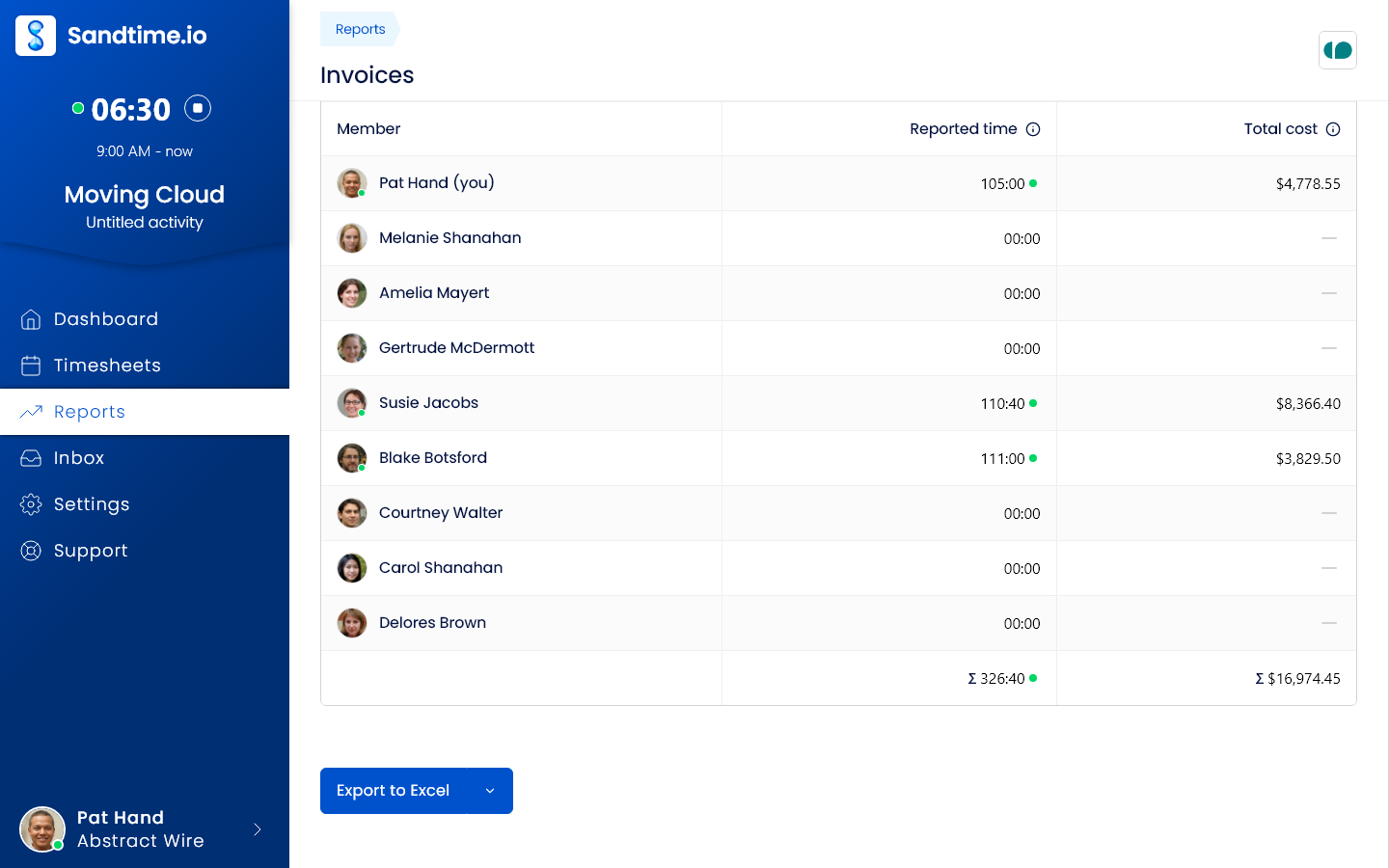
Our verdict: Sandtime.io is the best time tracking software for engineering and architecture firms in 2026 when you need hours logged against each project phase, valued at the right cost and revenue rates, and approved and locked before the phase is invoiced, because rates with history, approvals, and locking are free for unlimited users. Choose Monograph for an all-in-one platform built for architects and engineers, BQE CORE if the firm wants billing and accounting in the same system, and ClickTime for labor costing and approvals on a mid-priced plan.
- Best for approved, phase-level hours with cost and revenue rates, free for unlimited users: Sandtime.io.
- Best all-in-one platform built for architecture and engineering firms: Monograph.
- Best for firms that want billing and accounting in one system: BQE CORE.
- Best for labor costing and approvals at a mid-range price: ClickTime.
We compared nine tools that engineering consultancies, architecture practices, and surveying and civil firms shortlist. Plan names, prices, free plans, and the plan that contains approvals, cost rates, and budgets were checked against each vendor’s official pricing or product pages on September 29, 2026. If a vendor’s page disagrees with this guide, trust the vendor.
Disclosure: We build Sandtime.io and publish this guide, so our first-place ranking is not independent. Sanddev, the company behind Sandtime.io, is a software house that bills clients for its team’s time, and it tracks that work in Sandtime.io every day. We explain our criteria, link to each vendor’s own pricing page, and say plainly where another product is the better fit.
The best time tracking software for an engineering or architecture firm is the one that tells you, before the invoice, how many hours each phase of each job has used and what they cost. Engineering and architecture firms sell professional time against a fee: a structural design phase quoted at 120 hours, a design development stage worth a fixed share of the fee, a round of site visits billed hourly. That means four things: hours tied to a project and phase rather than a client bucket, cost and revenue rates per person that keep their history, a review step that approves and locks the hours before they are billed, and reports a principal and a client can both read.
Compare the 9 best time tracking tools for engineering and architecture firms
The Approvals and cost rates column names the plan that contains both timesheet approvals and the rates a firm needs to cost a job, because that is the plan an engineering or architecture firm ends up paying for. Use the product links to jump to the full review.
| Rank and app | Best for | Approvals and cost rates | Free plan | Paid from | Main tradeoff |
|---|---|---|---|---|---|
| 1. Sandtime.io | Firms that need approved, locked hours per phase at the right rates | Included free | Unlimited users | $0 | No invoicing, budgets, expenses, or resource planning |
| 2. Monograph | Architecture and engineering firms that want one platform | Every core feature in one subscription | Demo on request | About $60 to $75 per employee/month, annual | Priced by firm size and paid upfront each year |
| 3. BQE CORE | Firms that want billing and accounting in one system | Foundations module | Demo on request | Custom quote | No published price; accounting, CRM, HR, and payroll are extra modules |
| 4. BigTime | Engineering consultancies that want a full PSA | Essentials, from $20/user/month | Demo on request | $20/user/month | Project budgeting and cost management sit on quoted Premier |
| 5. ClickTime | Labor costing and approvals at a mid-range price | Team, $15/user/month | Demo on request | $12/user/month, up to 25 users | Project budgets and resource management need Premier, $27 |
| 6. Harvest | Invoicing clients from tracked time | Enterprise, $14/seat/month | 1 seat, 2 projects | $9/seat/month | Approvals need Enterprise; usage-based charges |
| 7. Toggl Track | Small studios that want a polished timer | Premium, $16/user/month | Up to 3 users | $9/user/month | Labor costs, fixed fees, and approvals need Premium |
| 8. Clockify | The lowest-cost paid approvals | Pro, $7.99/seat/month | Up to 5 users | $3.99/seat/month | Approvals on Standard, but labor cost and budgets need Pro |
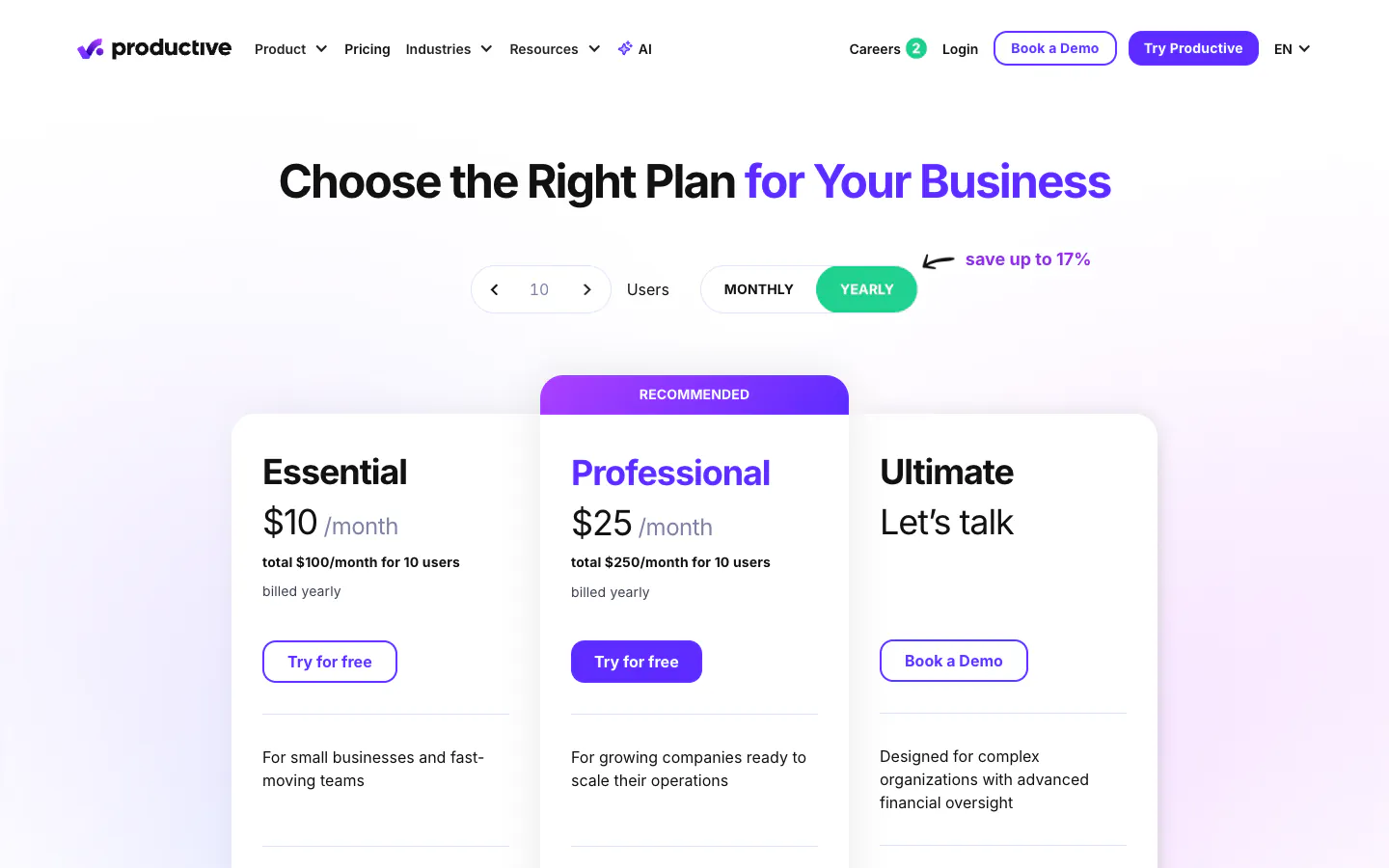
| 9. Productive | Firms that plan capacity and budgets per phase | Professional, $25/user/month | 14-day trial | $10/user/month, 3-seat minimum | A platform to implement, not a timer |
Prices are public list prices per user, seat, or employee per month, checked on September 29, 2026, on annual billing where the vendor shows it. Monograph prices by firm size, BigTime publishes a starting price, and BQE CORE quotes every firm. They exclude taxes and promotions. See the cost at 5, 15, and 40 people below.
Why engineering and architecture firms need a different kind of time tracker
An engineering or architecture firm is paid for professional judgment, applied in phases. A commission moves through feasibility, schematic design, design development, construction documents, and construction administration, and each phase carries its own share of the fee or its own hourly budget. The questions a principal asks are phase questions: how many hours has design development used against the 60 it was worth, who carried them, and what did they cost at each person’s rate?
Two things make that hard. First, the work is split between the desk and the field. Calculations and drawings happen at a workstation, while site visits, surveys, inspections, and client meetings happen away from it, so the hours that are easiest to forget are the ones logged from a phone in a car park or added the next morning. Second, the fee rarely matches the time one to one. A fixed fee per phase, an hourly site-visit rate, and additional services billed separately can sit on one job, so the firm needs cost rates to know its margin and revenue rates to know what it can invoice.
This guide is about that office side of the work: project-based professional firms billing hours per project and phase. It is not about field crews clocking in and out. A contractor running site crews needs a GPS time clock with crew scheduling and payroll exports, which is what tools such as ClockShark, which sells field service and construction time tracking, and Workyard, a construction operations platform for contractors, are built for. None of the tools below is ranked on that job, and Sandtime.io has no clock-in or GPS features at all.
How we researched and ranked these tools
We started from tools that engineering consultancies, architecture practices, and surveying and civil firms repeatedly shortlist, including platforms built specifically for architecture and engineering. Every price, plan name, free-plan limit, and tiered feature was checked against the vendor’s own pricing or product page on September 29, 2026. Where a page did not show which plan holds a feature, we left the claim out. Deltek Ajera, Deltek Vantagepoint, and Unanet ERP for A&E were considered and dropped because none of them publishes a price, and BQE CORE is included because its pricing page at least sets out what each module contains. The ranking is an editorial judgment, not a numeric score.
We separate three kinds of evidence. Vendor facts such as prices and plan contents come from linked official pages. First-hand experience applies only to Sandtime.io, which Sanddev uses daily to bill its own client work. Editorial judgments include the ranking and the best-for labels.
Each tool was assessed on six questions an engineering or architecture firm asks:
- Can hours be tied to a project and phase? A structure that separates feasibility from design from construction administration, with billable and non-billable time kept apart.
- Do rates work the way a firm costs its people? Cost rates next to revenue rates, set per person and per project, with history when a rate changes.
- Can you compare hours with the fee? Budgets and alerts where the tool has them, and reports that show hours and value per phase where it does not.
- Is every hour approved and then closed? Approvals before invoicing, locked periods after billing, and a controlled way to correct one.
- Can a principal and a client read the report? Time by job, phase, person, and date, exported in a format the invoicing or accounting tool can use.
- What does the firm cost at 5, 15, and 40 people? Free-plan limits, seat minimums, quoted tiers, and the price of the plan with approvals and cost rates.
The order favors firms that already invoice in accounting software and want a trustworthy time record, because that is the problem Sandtime.io solves for us. A firm that wants budgets, invoicing, and resource planning in the same system should weigh Monograph, BQE CORE, BigTime, or Productive higher, and the reviews say so.
The 9 best time tracking tools for engineering and architecture firms
1. Sandtime.io: Best for approved, phase-level hours with cost and revenue rates, free for unlimited users
Sandtime.io keeps phases as projects. A firm creates one project per phase and prefixes it with the job number, such as 2417 - Design development or 2417 - Construction administration, and marks internal work such as competitions, marketing, and continuing education as non-billable. Project visibility means a technician or subconsultant sees only the phases they are assigned to, and a project engineer or job architect can be a Project Administrator for their own jobs while principals are Administrators (roles and permissions).
Each project and each person can carry cost and revenue rates, and every rate has a start date, so a raise or a renegotiated rate changes only the work after that date and last quarter’s job cost still matches last quarter’s report (historical rates). With both rates in one report, cost and revenue per phase is visible without a spreadsheet, and multi-currency support covers clients billed in another currency.
Before a phase is invoiced, the record gets closed. Automatic timesheet reminders go out by email every Friday at 6 PM, before the week locks. People submit their week, and an Administrator approves or rejects it in one click straight from the email, with every decision kept in the approval history. Past periods lock automatically, and an approved timesheet locks as part of the approval, so billed hours stop changing. When a correction is genuinely needed, the person requests an unlock and an Administrator grants it for a limited time.
For the invoice and the client, reports group time by project, member, activity, or date and come with Invoices, Monthly timesheet, and Project revenue templates plus Excel and CSV export. The Summary report shows hours worked, each person’s hours, and time per project for any date range with no setup. Desk work can run on a timer in the Windows or macOS app or the Chrome extension, while site visits are logged from the iPhone or Android app or added afterwards with a start and end time (all apps), and overlap detection flags two entries that cover the same hours. Firms with their own dashboards can read entries through the REST API and MCP server. Data is hosted on OVHcloud infrastructure in the European Union (trust and hosting).
Why it ranks first: we built Sandtime.io in 2020 for our own client billing, and we still use it every day to account for client work. Phases, cost and revenue rates with history, approvals, locking, and exports are free for unlimited users, so adding a technician, an intern, or a subconsultant to a job never adds a seat price. It records self-reported time only, with no screenshots, GPS, or activity monitoring.
Tradeoff: Sandtime.io does not create or send invoices, set budgets or alert when a phase runs over, track expenses or mileage, or plan resources, and it does not connect to an ERP or accounting system for job costing. Costing a job means reading hours, cost, and revenue per phase in a report or an Excel export and comparing them with the fee yourself. Firms that want budgets and invoicing in one system should look at Monograph, BQE CORE, or BigTime.
2. Monograph: Best all-in-one platform built for architecture and engineering firms
Monograph is project management and project accounting software built specifically for architecture and engineering firms. Its time tracking page describes weekly timesheets logged directly to projects and phases, billable, non-billable, and overhead time, timesheet approval with per-phase rejection, and a mobile app for time and expenses during site visits, with hours flowing into project budgets, invoicing, and profitability. Its pricing page says a subscription includes every core feature, including forecasting, reports, and staffing, with Pipeline sold as an add-on. Pricing depends on firm size: a 10-person firm pays $600 to $750 a month, or $60 to $75 per employee per month, from a minimum of five employees, paid annually upfront. Subscriptions start with a demo.
Why it ranks second: it speaks the language of an architecture or engineering practice out of the box, with phases, fees, and budgets connected to the timesheet, and a firm gets every core feature without choosing a tier.
Tradeoff: it is the most expensive per person in this list at that price range, the price is paid a year at a time, and it is a system to adopt across the firm rather than a tracker to switch on.
3. BQE CORE: Best for firms that want billing and accounting in one system
BQE CORE describes itself as a platform for architects and engineers, and its founders built it to run their own firms. Its pricing page describes per-user pricing built from modules. The Foundations module covers time and expense tracking with pre-populated timesheets, billing and invoicing with flexible billing schedules, project management with budgets, estimates, fee schedules, and phased billing and reporting of cost and schedule by phase, utilization and profitability reporting, and native iOS and Android apps. Accounting, CRM, HR, and payroll are additional modules. The page publishes no figure: BQE puts together a custom quote based on the firm’s size and requirements.
Why it ranks third: a firm that wants phased billing, job costing, and its general ledger in one product gets a system designed around architecture and engineering practice.
Tradeoff: with no published price you cannot compare it without a sales call, and the modules a growing firm usually wants next are priced on top. It is an accounting-grade system with the implementation that implies.
4. BigTime: Best PSA for engineering consultancies
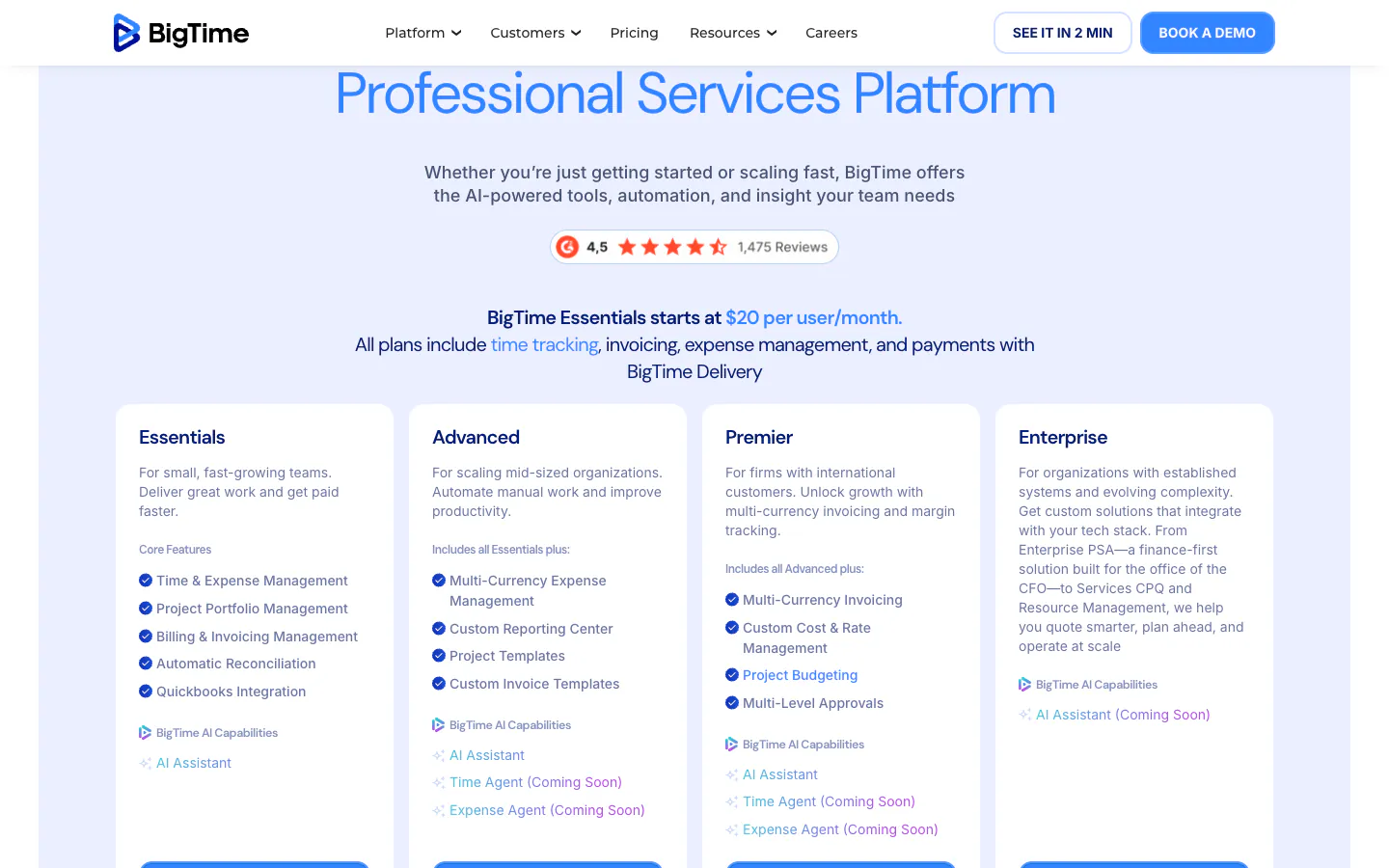
BigTime is a professional services automation platform that lists architecture and engineering among the industries it serves. Its pricing page says Essentials starts at $20 per user per month and that every plan includes time tracking, invoicing, expense management, and payments. Essentials lists rate management, approvals, and a mobile app for time and expenses. Advanced adds custom reports and project templates; Premier adds custom cost and rate management, project budgeting, multi-level approvals, and multi-currency invoicing. Advanced, Premier, and Enterprise are priced after a demo, and resource management is a separate module.
Why it ranks fourth: an engineering consultancy that bills time and materials, fixed fees, and expenses to many clients gets a mature billing platform with approvals on its entry plan.
Tradeoff: the job-costing features a firm most wants, project budgeting and custom cost management, sit on Premier, whose price is quoted. See also our guide for consultants, where BigTime ranks third.
5. ClickTime: Best for labor costing and approvals at a mid-range price
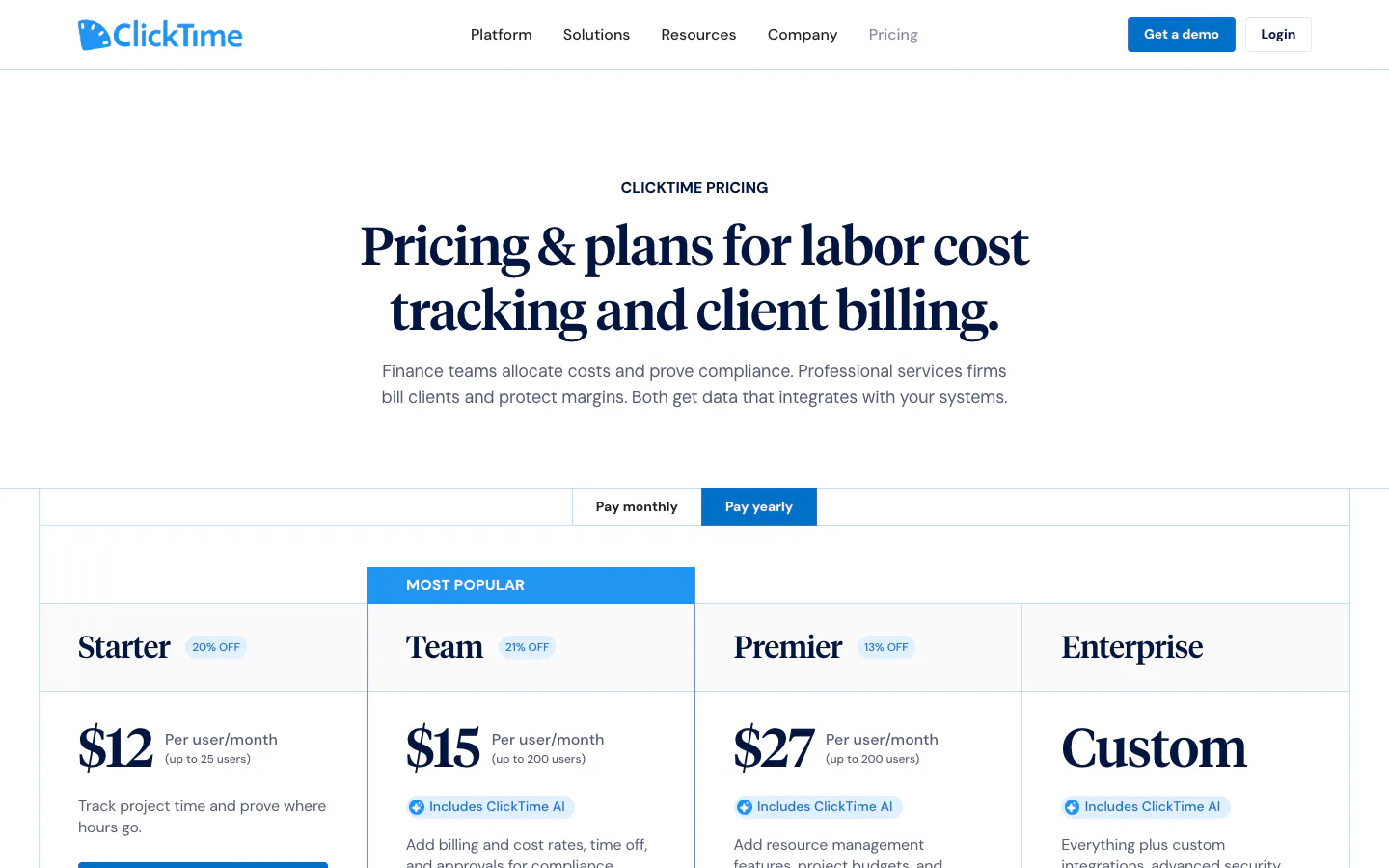
ClickTime sells time tracking as labor cost data for finance and professional services teams. Starter costs $12 per user per month on yearly billing ($15 monthly) for up to 25 users and includes time tracking, more than 70 reports, and email reminders. Team costs $15 ($19 monthly) for up to 200 users and adds approval workflows, advanced billing rates, cost rates, and time off management. Premier costs $27 ($31 monthly) and adds project budgeting, resource management, and custom reports and dashboards. Expense tracking is a $4 per person add-on, and Enterprise is priced on request.
Why it ranks fifth: Team puts approvals and both billing and cost rates on one published plan, which is the combination job costing starts from.
Tradeoff: a firm that wants hours compared with a phase budget in the tool needs Premier, and ClickTime is built for labor accounting rather than for the phase vocabulary of design work. See our ClickTime comparison.
6. Harvest: Best for invoicing clients from tracked time
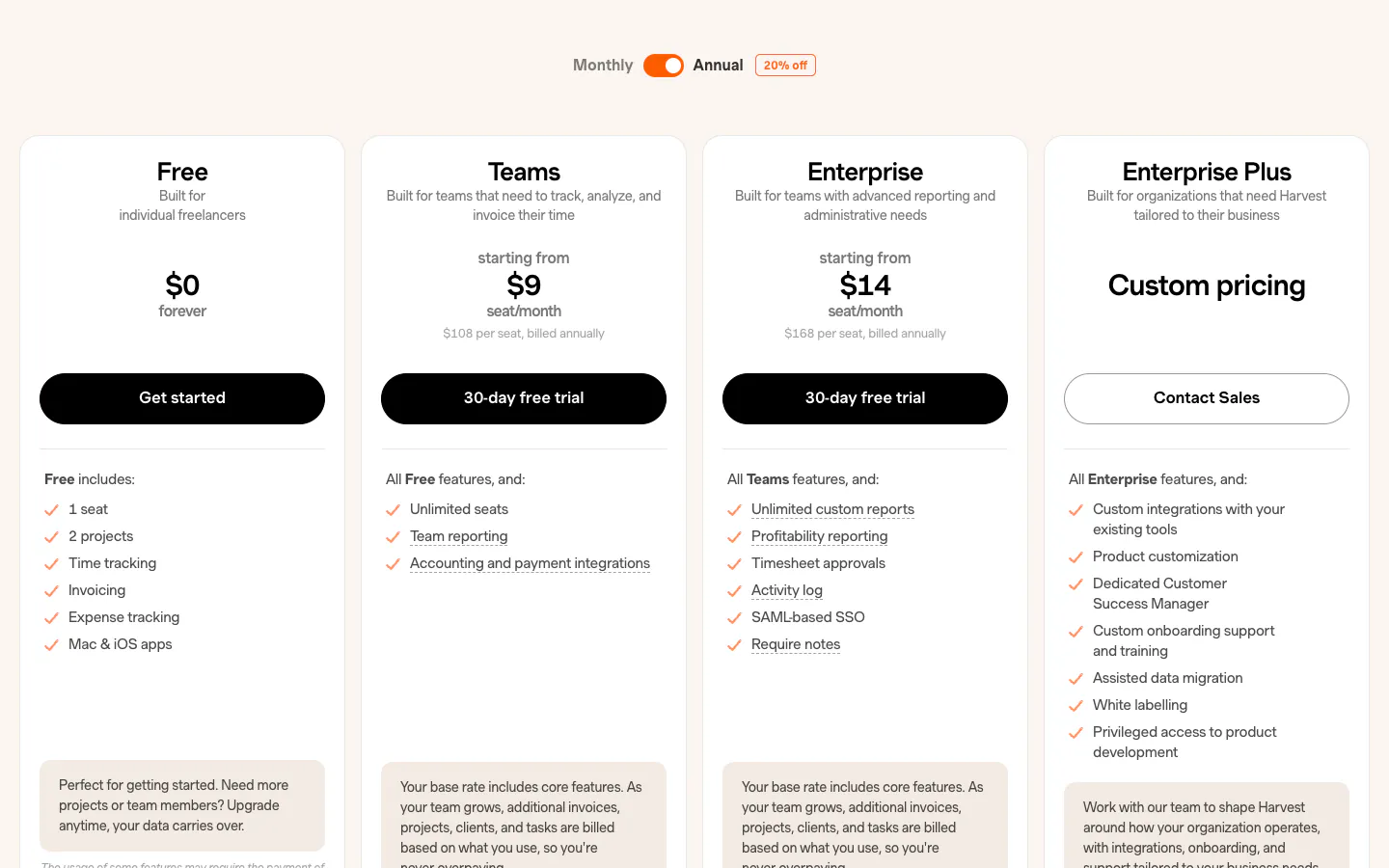
Harvest connects tracked time, expenses, and invoices, and every plan supports both time and materials and fixed-fee projects, with project estimates to forecast hours before kickoff. The free plan includes one seat and two projects. Teams costs $9 per seat per month on annual billing ($11 monthly) and adds billable and cost rates and team reporting on capacity and utilization. Enterprise costs $14 ($17.50 monthly) and adds timesheet approvals, profitability reporting by client, project, task, or team, an activity log, and required notes. Harvest also bills additional invoices, projects, clients, and tasks based on usage as a team grows.
Why it ranks sixth: the path from an approved hour to a sent invoice is the most direct among the general-purpose trackers here, and cost rates sit on the entry team plan.
Tradeoff: approvals and profitability reporting require Enterprise, and a firm that creates a project per phase will feel usage-based project charges sooner than most. See our Harvest alternative comparison.
7. Toggl Track: Best for small studios that want a polished timer
Toggl Track is one of the easiest trackers to adopt, with timers on the web, desktop, mobile, and in the browser. Its pricing FAQ says the free plan covers teams of up to three users. Starter costs $9 per user per month annually ($12 monthly) and adds billable rates. Premium costs $16 ($24 monthly) and adds labor costs and profitability reports, fixed-fee projects, project dashboards comparing time actuals with estimates, and timesheet approvals, with approved periods locked.
Why it ranks seventh: a small studio or a sole practitioner gets a polished timer and billable rates at a low price, with a clear upgrade path to approvals.
Tradeoff: everything a firm needs to cost a phase, labor costs, fixed fees, actuals against estimates, and approvals, sits on Premium. Our Toggl Track alternative page maps the difference.
8. Clockify: Best for the lowest-cost paid approvals
Clockify offers a free plan for up to five users. Basic costs $3.99 per seat per month annually ($4.99 monthly) and adds billable rates and historical rates. Standard costs $5.49 ($6.99 monthly) and adds timesheet approvals, locked timesheets, and invoicing. Pro costs $7.99 ($9.99 monthly) and adds labor cost and profit, budgets and estimates, multiple currencies, scheduling, and GPS tracking.
Why it ranks eighth: Standard delivers approvals and locking at the lowest per-seat price among the paid options here, and Pro adds job costing for less than most entry plans elsewhere.
Tradeoff: a firm that wants cost against revenue per phase needs Pro, and the free plan stops at five users. The Clockify alternative page compares both.
9. Productive: Best for firms that plan capacity and budgets per phase
Productive is a professional services platform where time tracking sits next to budgets, resource planning, expenses, and profitability reporting, and its feature list describes multiple budgets under one project, such as phases or service scopes. Essential costs $10 per user per month on yearly billing ($12 monthly) and includes budgeting, resource planning, expense management, and API access. Professional costs $25 ($29 monthly) and adds billable time approvals, rate cards, recurring budgets, and invoicing integrations. Productive’s pricing FAQ says every plan requires at least three seats, and there is a 14-day trial.
Why it ranks ninth: a firm that manages staffing and phase budgets as closely as it manages hours gets both in one place, at a published price.
Tradeoff: approvals and rate cards sit on Professional, it was built for agencies rather than for design phases, and the rollout is closer to adopting an operating system than switching on a timer.
What engineering and architecture firms should check before choosing
Run a pilot on one live job for one full phase, including its invoice. The week a phase runs over, and the day a client queries a bill, are the parts a demo never shows.
Projects and phases
Set up one real job with its phases before anything else, and check that people can find the right phase quickly on a phone. Monograph logs time to projects and phases natively, and BQE CORE bills and reports by phase. In Sandtime.io, Harvest, Toggl Track, Clockify, and ClickTime, a phase is a project or a task you name with the job number, which works well as long as the naming convention is agreed on the first day.
Cost and revenue rates per person
Set a cost rate and a billing rate for two people on the pilot job, then change one rate halfway through. Check that earlier hours keep the old rate and that cost and revenue appear side by side. Sandtime.io includes both rates with history free; Harvest puts cost rates on Teams, ClickTime on Team, Toggl Track puts labor costs on Premium, Clockify puts labor cost and profit on Pro, and BigTime puts custom cost management on Premier.
Budgets and job costing
A phase budget tells you it is running over while you can still raise an additional services request. Monograph, BQE CORE, and Productive include budgets in their core offer; ClickTime puts project budgeting on Premier, BigTime on Premier, Clockify budgets and estimates on Pro, and Toggl Track actuals against estimates on Premium. Sandtime.io has no budgets or alerts: a report shows hours, cost, and revenue per phase, and someone compares them with the fee. Our project profitability calculator and labor cost calculator help with that arithmetic, and none of these tools replaces an ERP for full project accounting.
Approvals and locking before invoicing
A phase invoice should rest on hours someone approved, in a period that cannot quietly change afterward. Check who approves, whether the decision is recorded, whether an approved period locks, and how a correction is requested. Sandtime.io includes reminders, approvals, and locking at no cost; Clockify puts approvals and locked timesheets on Standard, ClickTime on Team, Harvest on Enterprise, Toggl Track on Premium, and Productive on Professional.
Client-ready reports
Build the exact report a client or a funder asks for during the pilot: time by job, phase, person, and date, with notes, exported with the right columns. If the tool itself must issue invoices, Monograph, BQE CORE, BigTime, Harvest, and Clockify Standard do that. Sandtime.io exports Excel and CSV for the invoicing or accounting tool the firm already uses.
Working on site from a phone
Site visits, surveys, and inspections are the hours most often lost. Check that the mobile app can start a timer on the right phase in a few taps and that a forgotten visit can be added afterwards with its start and end time. Sandtime.io, Monograph, BQE CORE, BigTime, ClickTime, Harvest, and Toggl Track all list mobile apps on the pages we checked; confirm the rest during a trial. If what you actually need is crews clocking in at a site with GPS, that is a different category, covered by field tools such as ClockShark and Workyard.
Per-user cost at 5, 15, and 40 people
Per-seat pricing grows with every technician, intern, and subconsultant, so price the plan that contains both approvals and cost rates, not the entry plan. The figures below multiply each vendor’s published per-user price by team size. They use annual billing, the published starting price for BigTime, and the low and high ends of Monograph’s 10-person price. They exclude taxes and Harvest’s usage-based charges. BQE CORE is left out because it publishes no price.
| Plan with approvals and cost rates | 5 people | 15 people | 40 people |
|---|---|---|---|
| Sandtime.io, free | $0 | $0 | $0 |
| Clockify Pro, $7.99 | $39.95/month | $119.85/month | $319.60/month |
| Harvest Enterprise, $14 | $70/month | $210/month | $560/month |
| ClickTime Team, $15 | $75/month | $225/month | $600/month |
| Toggl Track Premium, $16 | $80/month | $240/month | $640/month |
| BigTime Essentials, from $20 | $100/month | $300/month | $800/month |
| Productive Professional, $25 | $125/month | $375/month | $1,000/month |
| Monograph, $60 to $75 | $300 to $375/month | $900 to $1,125/month | $2,400 to $3,000/month |
Over a year, a 15-person firm would pay $1,438.20 for Clockify Pro, $2,520 for Harvest Enterprise, $2,700 for ClickTime Team, $2,880 for Toggl Track Premium, $3,600 for BigTime Essentials, $4,500 for Productive Professional, and $10,800 to $13,500 for Monograph. Those tools include things Sandtime.io leaves out, such as invoicing, budgets, expenses, or resource planning, so the fair comparison is the bill against the features you will actually use.
Frequently asked questions
What is the best time tracking software for engineering and architecture firms?
Sandtime.io is our pick for firms that need hours per project phase, valued at cost and revenue rates, and approved and locked before invoicing, because rates with history, approvals, and locking are free for unlimited users. We publish this guide, as the disclosure explains. Monograph is better when the firm wants one platform built for architects and engineers, BQE CORE when billing and accounting belong in the same system, and ClickTime for labor costing on a mid-priced plan.
Is there free time tracking software for architecture and engineering firms?
Yes. As of September 29, 2026, Sandtime.io is free for unlimited users and includes cost and revenue rates with history, reminders, approvals, locking, reports, and exports. Clockify is free for up to five users, Toggl Track for up to three, and Harvest for one seat and two projects. Monograph, BQE CORE, BigTime, ClickTime, and Productive offer a demo or a trial rather than a permanent free plan.
How should an architecture or engineering firm track time by phase?
Give each phase of each job its own project or task, prefixed with the job number, such as feasibility, schematic design, design development, construction documents, and construction administration. Keep competitions, marketing, and training on non-billable projects, and add site visits from a phone the same day. Monograph and BQE CORE structure time by phase natively; in Sandtime.io each phase is a project, as the architecture and engineering setup guides show.
How do engineering firms compare hours with the fee?
Job costing multiplies each person’s hours by their cost rate and compares the total, and the value at billing rates, with the fee for the phase. Monograph, BQE CORE, and Productive include budgets, and ClickTime, BigTime, Clockify, and Toggl Track put budgets or estimates on the plans named in this guide. Sandtime.io has no budgets or alerts; it reports hours, cost, and revenue per phase, and the firm compares them with the fee in a report or an Excel export.
Can site crews clock in with these tools?
These tools are built for professional staff logging hours against projects, not for crews clocking in at a site. A contractor that needs GPS clock-ins, crew scheduling, and payroll exports should look at field tools such as ClockShark or Workyard. Sandtime.io has no clock-in or GPS features; engineers and architects on a site visit log the hours from the mobile app against the job’s phase.
Do we need an ERP such as Deltek or BQE CORE, or a time tracker?
An ERP makes sense when the firm wants project accounting, billing, and its general ledger in one system and is ready for the implementation and quoted pricing that come with it. A time tracker makes sense when invoicing and accounting already work and the problem is getting accurate, approved hours per phase into them. Many small firms start with a tracker and move to a platform such as Monograph or BQE CORE when they outgrow spreadsheets for budgets.
How much does time tracking cost for a 15-person engineering firm?
For 15 people, the plan with approvals and cost rates ranges from about $1,440 a year on Clockify Pro to $4,500 on Productive Professional, and $10,800 to $13,500 on Monograph at its published range, with BQE CORE and BigTime’s higher tiers quoted. Sandtime.io is free for unlimited users, and registered nonprofits can ask about a custom offer.
Final verdict
For most engineering and architecture firms, the expensive failure is not a missing feature. It is a phase that ran over without anyone noticing, invoiced from hours nobody approved, at a rate that changed after the work was done. Sandtime.io ranks first because it keeps each phase’s hours at the cost and revenue rates in force when they were worked, then closes the record with reminders, one-click approvals, and locked periods, free for unlimited users.
Choose Monograph for one platform built for architects and engineers, BQE CORE for billing and accounting in the same system, BigTime or Productive for a professional services platform, ClickTime for labor costing, and Harvest if invoices must come from the tracker. For setups closer to your firm, see time tracking for engineers, architects, and construction and engineering, read our guide to billable vs non-billable hours, or compare Sandtime.io directly with Harvest, Toggl Track, and Clockify.
About the contributors


Przemysław Zalewski
Sandtime.io engineer and Sanddev team member who reviews product accuracy, technical details, sources, and editorial quality.
LinkedInEmailSanddev profileWebsite