Time Reports for Teams
Turn tracked hours into actionable data. Generate weekly summaries, custom reports, and Excel exports for payroll, invoicing, and project analysis - and pin the ones you check daily to your dashboard.

What you get with Sandtime.io reports
Weekly reports
Get a summary of hours worked by each team member for any given week. Ready for payroll review in minutes.
Summary report
Hours worked, who worked and time per project for any date range, ready in every workspace with nothing to build.
Monthly summaries
Monthly overviews of logged hours, costs, and revenues. Aligned with your billing and payroll cycles.
Custom reports
Filter by project, member, and date range, group by date, project, member, or activity, and add the columns you need.
Multi-currency
Every rate carries its own currency, and reports total each currency separately instead of converting.
Excel export
Download any report as an invoice-ready Excel file. Share with clients, your accountant, or HR with one click.
Print-ready layout
Reports print A4 landscape from the browser without the app menus, or to PDF. Exported Excel and CSV files open anywhere.
Pin to dashboard
Pin the reports you open most to your dashboard and reach them in one click. Unpin them just as easily when the month closes and priorities move on.
Who uses time reports
- Freelancers preparing monthly invoices from tracked hours
- Agencies reviewing project profitability at the end of each sprint
- Managers preparing weekly payroll data from time reports
- Finance teams auditing labor costs per project or department
- Team leads keeping a pinned weekly report one click from the dashboard
In short: a Sandtime.io report is a table you shape yourself. Pick a date range, nest the rows by date, project, member, or activity, choose from 13 metrics covering hours, cost, revenue, and tax, then save it, pin it to your dashboard, and export it to Excel or CSV. A built-in Summary report needs no setup at all. Reports are part of the free product, for unlimited users.
Building a report, step by step
- Open Reports and choose Create new report. The report opens straight away with default settings.
- Choose Edit and set the Date range. Presets such as This week, Last month, and Up to today move forward on their own; a start and end date you pick stay fixed.
- Under Group by, add dimensions in order: Year-Month-Day, Year-Month, Year, Project, Member, or Activity. The first becomes the outer grouping and the next nests inside it.
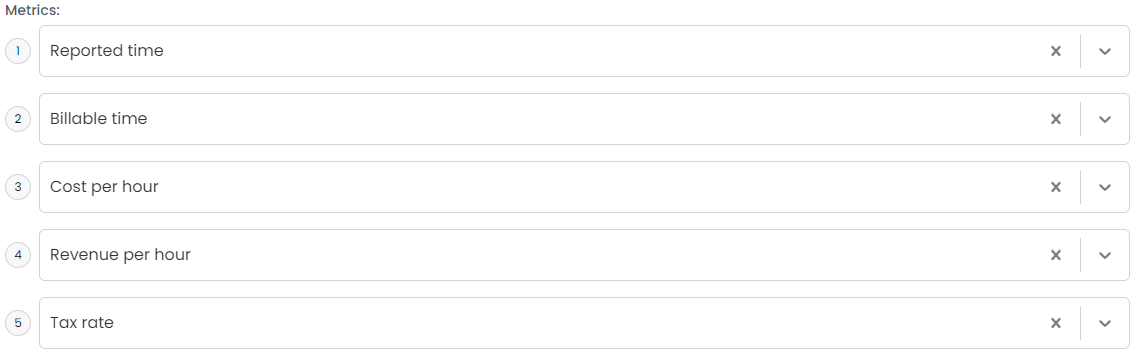
- Under Metrics, choose what each row carries: Reported time, Billable time, Non-billable time, and, where rates are set, Cost per hour, Revenue per hour, Net cost, Total cost, Net revenue, Total revenue, the taxes, and Tax rate.
- Narrow it with Projects and Members, switch on Hide empty rows, and turn on Show archived when archived projects or members belong in the numbers.
- Add Additional columns such as Start time and End time when an export must show exactly when work happened.
- Save it, or Save as a copy under a new name. On the report tile, Pin to dashboard keeps it one click away.

Three prepared reports, Invoices, Monthly timesheet, and Project revenue, come with every new organization as starting points. The Summary report sits next to them and answers "who worked on what this week" with nothing to configure.
A worked example: closing September
A five-person agency closes the month on October 1, 2026. September had 22 working days, and the team reported 842 hours.
- Payroll. A saved report named "Payroll - monthly" uses Last month, groups by Member and then Year-Month-Day, and shows Reported time, Billable time, and Non-billable time. It reads 842 hours, 634 of them billable and 208 not: a 75.3% billable ratio. Because the range is a preset, the report was ready this morning without editing, and Export to Excel sends it to the accountant.
- Client invoice. A second report filters Projects to Acme, groups by Member and then Activity, and shows Billable time, Revenue per hour, and Total revenue: 212 billable hours at $130, or $27,560.00. The Excel file carries every line the client may ask about.
- Check before sending. The pinned weekly report on the dashboard had already shown that one designer was 6 hours short in week 38, so the gap was fixed before the month closed. With timesheet locking on, those weeks cannot change after the numbers go out.
Who sees what
Each person sees the reports they created. What goes into them follows the role: an Administrator reports on everyone, and a User reports on their own time and their teammates' time on shared projects. Money follows the same rule. An Administrator sees every rate, a Project Administrator sees the rates on their projects, and a User sees none. See roles and permissions.
What it deliberately does not do
- No charts in reports. Custom reports and the Summary report are tables; the dashboard carries the goal and monthly charts.
- No billable filter. Billable and non-billable time are metrics side by side, so neither half drops out unnoticed.
- No currency conversion. A report that mixes currencies ends in one total per currency. See multi-currency support.
- No two-week grouping. A 14-day date range does the job, as the guide to two-week pay period reports shows.
There is no print button either; the report is laid out for the browser's own print command, A4 landscape without the app menus, which also prints to PDF. See printing and itemized exports.
How it connects to the rest of Sandtime.io
Reports read the same entries as the weekly timesheet, whether they came from the timer or were typed in, and they apply your time rounding. Rates from cost and revenue reporting turn the hours into money, and Excel export hands the result to finance. The report builder guide walks through every control, and the free billable leakage calculator estimates what untracked hours cost before the first report runs.
Reporting questions
What can I report on?
Time by person, project, activity, and period, split between billable and non-billable work, plus cost and revenue where rates are set. Reports can be saved and pinned so the ones you check daily are one click away.
Can I export reports to Excel?
Yes. Reports export to Excel and CSV, which is usually the fastest route into payroll, invoicing, or a client’s own reporting format.
Can I build a report for one client and reuse it?
Save a report with the filters you need and pin it to the dashboard, and the same view is waiting next month without being rebuilt.
Do reports show cost and revenue as well as hours?
Yes, when rates are set. Cost and revenue reporting uses the rate that applied at the time the work was done, so past periods keep the numbers they were reported with.
Who can see my reports and the numbers in them?
Each person sees the reports they created. An Administrator can report on everyone, a User on their own time and teammates' time on shared projects, and only Administrators and Project Administrators see rates.
Can a saved report roll forward to the next period by itself?
Yes. Presets such as Last week and Last month move forward on their own, so a saved payroll report is ready on the first of the month without editing. A two-week period uses a 14-day date range instead.
Do reports convert currencies into one total?
No. A report that mixes currencies ends in one total per currency rather than one converted figure, so nothing depends on an exchange rate Sandtime.io would have to guess.
Is there a report that works without any setup?
Yes. The Summary report comes with every workspace and shows hours worked, who worked, and time per project for any date range with nothing to set up.
Create your first report
Free for unlimited users. No credit card required.