Best Timesheet Software in 2026 and 2027: 18 Products Compared and Priced
Timesheet software is the system that turns tracked hours into an approved, locked record that payroll, client invoices and auditors can rely on. This guide compares 18 timesheet products for agencies, consultancies, software teams, nonprofits and any team that must submit, approve and lock hours every week: what the plan with approvals costs for 10, 25 and 50 people, which vendor gates which part of the chain, where the data lives, and what each product collects about the people using it. Sandtime.io, the publisher's own free time tracking app for freelancers, agencies and client-service teams, is in the comparison and scored with the same sheet as everyone else.
Which timesheet software should you shortlist?
Our verdict: Sandtime.io is the best timesheet software in this comparison for teams whose problem is getting complete, approved, locked hours out every week without paying per seat or watching anyone's screen. It is best for trusted timesheets, not for every form of workforce management, and the picks below name the product to choose when the requirement is something else.
- Best free timesheet software with approvals: Sandtime.io, free for unlimited users, with reminders, approvals and locking included.
- Lowest-priced paid plan with the whole chain: Clockify Standard at $5.49 per user per month on annual billing.
- Best for invoicing in the same product: Harvest, with approvals on its Enterprise plan; Paymo for small agencies that also want tasks.
- Best timer and security paperwork: Toggl Track, ISO 27001 and SOC 2 Type II, with approvals on Premium.
- Best for multi-stage approvals and an audit trail: BeeBole; ClickTime for grant and DCAA reporting; Deltek Replicon for FedRAMP-grade enterprises.
- Best privacy-first alternative with broader operations: Traqq.
- Best when the record is attendance, not projects: Jibble free for unlimited users, QuickBooks Time for payroll, Connecteam and Deputy for shifts.
Every price, plan limit and feature placement was read on the vendor's own pricing or help pages on October 26, 2026, and each profile links the page it came from. If a vendor's page disagrees with this guide, trust the vendor and tell us.
Publisher disclosure: Sandtime.io publishes this guide and is one of the 18 products in it. Its first place reflects the publisher's judgment under the criteria stated below, not an independent award; every competitor's strengths are named, every tier that includes a feature is named rather than called absent, and every claim links to the vendor's page so you can check it. Prices were checked on October 26, 2026 and will move.
This guide is about the system of record. For a broader list of 20 timesheet apps with the story of how Sandtime.io came to exist, read the 20 best timesheet apps for teams; for the narrow question of who charges for approvals, read timesheet approval software compared. If the Friday chase over Slack is the pain, start with how to stop chasing timesheets.
What timesheet software is, and how it differs from a time tracker
Timesheet software is a system that keeps a structured, attributable record of working time per person and per day, classifies each entry by project, client, task or billing status, and carries the record through submission, approval and locking so that payroll, client invoices and audits can rely on it. A time tracker is the capture end of that system: a timer or a form that records hours. The difference is what happens to the hours after they are recorded.
Four kinds of product carry the timesheet label in 2026, and the label hides which record they produce.
Project timesheets
Hours by project, client and billable status, submitted weekly and approved before billing. Built for agencies, consultancies, software teams and nonprofits that report time against work.
Attendance timesheets
Clock-ins, breaks, shifts and overtime per pay period, often with GPS or a kiosk. Built for hourly, field and retail teams whose record is presence, not projects.
Automatic capture
Desktop activity, calendar events and documents turned into suggested entries. Built for people who forget timers, at the price of a local activity log that the team must agree to.
Monitoring platforms
Screenshots, activity scores and location as evidence behind the hours. Built for buyers who want proof of work, with the trust and data-protection costs that come with it.
This guide ranks the first kind in full, because that is where approvals, locking and reminders decide whether the record can be trusted, and covers the other three in shorter notes so that a team that needs them chooses them knowingly.
“A timer records hours. Timesheet software records who approved them, when, and that nothing changed afterwards.”
How we evaluated 18 timesheet products
Each product was scored on seven weighted criteria, from the vendor's own pricing and help pages first, review-site counts second, and third-party editorial reviews last. The weights say what this guide thinks matters for a team that must get complete, approved hours out every week.
- Approval chain (25%): Submission, approval, rejection, locking and reminders, and which plan each sits on.
- Cost at team scale (20%): Annual list price of the first plan with approvals for 10, 25 and 50 people, with seat minimums and base fees.
- Record integrity and compliance (15%): Approval history, locked periods, overlap or duplicate checks, exports an auditor can read.
- Privacy and data handling (15%): Whether screenshots, activity scores or location are collected, data region options, published certifications.
- Reporting and export (10%): Reports by project, client and person; Excel, CSV and payroll exports; billable rates and currencies.
- Integrations and API (10%): Public API, accounting and project tool connections, assistant access.
- Mobile and offline (5%): Native apps and documented offline behavior.
Three rules kept the comparison honest. Ratings are quoted per site and never averaged across sites. A feature a vendor gates behind a tier is named by that tier rather than called absent. Where a vendor's pages do not say, the entry reads "unspecified" rather than a guess. Sandtime.io is the publisher's own product and was scored with the same sheet; its tradeoffs are listed in its profile, not footnoted.
Compare 18 timesheet software products
Each card names the cheapest plan on which the vendor documents a manager or administrator approving submitted time, its per-user price on annual billing where published, and the limit that most often surprises a buyer. Open Features by plan on any card to see where the vendor puts approvals, locking, reminders, audit history, offline use, invoicing, monitoring, single sign-on, the API, the data region and multi-currency. Products are ordered by category and then by the cost of that plan for 25 people; the profiles below give the sources.
Project and client timesheets
-
Approved, locked weekly timesheets without seat fees or monitoring
- Free plan
- Unlimited users and projects
- First plan with approvals
- Free, with locking and reminders
- Watch out for
- No invoicing engine, offline mode, attendance or automatic capture
Features by plan
- Approvals
- Free
- Locking
- Free, auto-lock and lock on approval
- Reminders
- Free, email on Friday
- Audit history
- Approval and lock history
- Offline
- No
- Invoicing
- Invoice-ready exports
- GPS or screenshots
- None
- SSO
- Email link sign-in, no SAML
- Public API
- Free, with MCP
- Data region
- EU (OVHcloud)
- Multi-currency
- Yes
-
Broad feature set at the lowest paid price
- Free plan
- Up to 5 users
- First plan with approvals
- Standard, $5.49 per user per month
- Watch out for
- Exports and billable rates are paid; audit log on Enterprise
Features by plan
- Approvals
- Standard
- Locking
- Standard
- Reminders
- Standard
- Audit history
- Enterprise
- Offline
- Mobile
- Invoicing
- Standard
- GPS or screenshots
- Pro, optional
- SSO
- Enterprise
- Public API
- Yes, rate-limited on Free
- Data region
- US, EU, UK, AU on Pro
- Multi-currency
- Pro
-
Privacy-first tracking with invoicing and expenses
- Free plan
- Up to 3 users and 1 project
- First plan with approvals
- Free; Plus $4 monthly up to 10 users, Business $9 up to 50
- Watch out for
- Period locking, reminders, audit log and API unspecified
Features by plan
- Approvals
- Free
- Locking
- On approval
- Reminders
- Unspecified
- Audit history
- Unspecified
- Offline
- Unspecified
- Invoicing
- Plus
- GPS or screenshots
- None
- SSO
- Unspecified
- Public API
- Unspecified
- Data region
- Unspecified
- Multi-currency
- Per invoice
-
Simple approvals and invoicing, EU hosted
- Free plan
- Up to 5 active users
- First plan with approvals
- Pro, $8 per user per month
- Watch out for
- One currency per account; admins can edit approved entries
Features by plan
- Approvals
- Pro
- Locking
- Pro, soft
- Reminders
- Pro
- Audit history
- Pro, 90 days
- Offline
- Mobile
- Invoicing
- Pro
- GPS or screenshots
- None
- SSO
- Pro
- Public API
- Basic
- Data region
- Netherlands (Azure)
- Multi-currency
- No
-
Time tracked on Asana, ClickUp and Jira tasks
- Free plan
- Up to 5 seats, no integrations
- First plan with approvals
- Team, $8.50 per seat per month, 5-seat minimum
- Watch out for
- Desktop app needs a connection; macOS only
Features by plan
- Approvals
- Team
- Locking
- Team
- Reminders
- Team
- Audit history
- Team
- Offline
- No
- Invoicing
- Team
- GPS or screenshots
- Screenshots on Team, optional
- SSO
- Team, SAML
- Public API
- Yes
- Data region
- US and Germany (AWS)
- Multi-currency
- No
-
Multi-stage approvals and an audit trail
- Free plan
- Up to 5 users, with lock dates and reminders
- First plan with approvals
- Essential, $9 per user per month (9 EUR)
- Watch out for
- Billable rates and multi-currency are paid; invoicing unspecified
Features by plan
- Approvals
- Essential, multi-stage
- Locking
- Yes
- Reminders
- Yes
- Audit history
- Essential
- Offline
- Unspecified
- Invoicing
- Unspecified
- GPS or screenshots
- None
- SSO
- Essential, OpenID
- Public API
- Yes, GraphQL
- Data region
- EU or US by customer
- Multi-currency
- Essential
-
Unlimited free users and optional automatic capture
- Free plan
- Unlimited users and projects
- First plan with approvals
- Ultimate, $9.99 per user per month
- Watch out for
- Excel export, billable rates and approvals each sit a tier up
Features by plan
- Approvals
- Ultimate
- Locking
- Ultimate, via approvals
- Reminders
- Ultimate
- Audit history
- Ultimate (history), Enterprise (log)
- Offline
- Yes
- Invoicing
- Starter
- GPS or screenshots
- GPS Free, screenshots Ultimate, optional
- SSO
- Ultimate, SAML
- Public API
- Free
- Data region
- Unspecified (AWS)
- Multi-currency
- Per invoice
-
Time to invoice and online payments
- Free plan
- 1 seat and 2 projects
- First plan with approvals
- Enterprise, $14 per seat per month, plus Flex usage charges
- Watch out for
- US hosting only; approvals on the top plan
Features by plan
- Approvals
- Enterprise
- Locking
- Enterprise
- Reminders
- Enterprise for submission
- Audit history
- Enterprise, 6 months
- Offline
- Mobile
- Invoicing
- Yes, including Free
- GPS or screenshots
- None
- SSO
- Enterprise, SAML
- Public API
- Yes
- Data region
- US only
- Multi-currency
- Yes
-
The best timer, SOC 2 Type II and ISO 27001
- Free plan
- Up to 3 users
- First plan with approvals
- Premium, $16 per user per month ($18 in Track support articles)
- Watch out for
- Approvals, locking, reminders and audit log all on the top plan
Features by plan
- Approvals
- Premium
- Locking
- Premium
- Reminders
- Premium
- Audit history
- Premium
- Offline
- Yes
- Invoicing
- Yes
- GPS or screenshots
- None
- SSO
- Premium, SAML
- Public API
- Yes
- Data region
- Unspecified (Google Cloud)
- Multi-currency
- Unspecified
-
Tasks, timesheets and invoices for small agencies
- Free plan
- 1 user, 1 client, 2 projects
- First plan with approvals
- Pro, $16.90 per user per month
- Watch out for
- Hosting region, SSO and audit history unspecified
Features by plan
- Approvals
- Pro
- Locking
- Yes, plan unspecified
- Reminders
- Yes, plan unspecified
- Audit history
- Unspecified
- Offline
- Unspecified
- Invoicing
- Yes, including Free
- GPS or screenshots
- App titles on desktop, optional
- SSO
- Unspecified
- Public API
- Plus
- Data region
- Unspecified
- Multi-currency
- Unspecified
-
Grant reporting and DCAA timesheets
- Free plan
- None
- First plan with approvals
- Team, quoted; $14 per user per month on the nonprofit page
- Watch out for
- Starter has no approvals; no EU region
Features by plan
- Approvals
- Team
- Locking
- Yes
- Reminders
- Yes
- Audit history
- Yes
- Offline
- Mobile
- Invoicing
- Unspecified
- GPS or screenshots
- None stated
- SSO
- Team (Okta, Entra)
- Public API
- Yes
- Data region
- Unspecified
- Multi-currency
- Unspecified
-
Enterprise and federal time with FedRAMP
- Free plan
- None
- First plan with approvals
- Quoted
- Watch out for
- No public prices; AI capture is a paid extra
Features by plan
- Approvals
- Quoted, multi-tier
- Locking
- Unspecified
- Reminders
- Unspecified
- Audit history
- Unspecified
- Offline
- Yes
- Invoicing
- Yes
- GPS or screenshots
- GPS and geofencing
- SSO
- Unspecified
- Public API
- Unspecified
- Data region
- Unspecified
- Multi-currency
- Unspecified
Attendance, payroll, monitoring and automatic capture
-
Free attendance timesheets for unlimited users
- Free plan
- Unlimited users
- First plan with approvals
- Free, per pay period
- Watch out for
- No public price list; GPS, screenshots and app tracking are in the product
Features by plan
- Approvals
- Free, per pay period
- Locking
- On approval
- Reminders
- Yes
- Audit history
- Action log
- Offline
- Yes
- Invoicing
- Yes
- GPS or screenshots
- GPS, geofencing, screenshots, app tracking
- SSO
- Enterprise
- Public API
- Yes
- Data region
- Unspecified
- Multi-currency
- 1:1 only
-
Deskless crews with clock-ins and scheduling
- Free plan
- Up to 10 users, all hubs
- First plan with approvals
- Basic, $29 per month for the first 30 users
- Watch out for
- No offline clock-in; locking days on Advanced
Features by plan
- Approvals
- Basic
- Locking
- Advanced
- Reminders
- Basic, push
- Audit history
- Export audit log
- Offline
- No
- Invoicing
- Unspecified
- GPS or screenshots
- GPS stamps Basic, geofences Advanced
- SSO
- Enterprise
- Public API
- Expert
- Data region
- Netherlands primary, choice unspecified
- Multi-currency
- Unspecified
-
Shift scheduling with attendance timesheets
- Free plan
- None
- First plan with approvals
- Lite, $5 per user per month, $30 monthly minimum
- Watch out for
- Locking unspecified; audit report needs Analytics+
Features by plan
- Approvals
- Lite
- Locking
- Unspecified
- Reminders
- Shift reminders
- Audit history
- Analytics+ add-on
- Offline
- Legacy iPad kiosk
- Invoicing
- Unspecified
- GPS or screenshots
- Geofencing; biometrics on Core
- SSO
- Pro
- Public API
- Yes
- Data region
- AU, UK or US (AWS)
- Multi-currency
- Unspecified
-
Payroll-connected timesheets for QuickBooks users
- Free plan
- None, 30-day trial
- First plan with approvals
- Premium, $20 base plus $10 per user per month
- Watch out for
- Monthly billing only; QuickBooks Online required
Features by plan
- Approvals
- Premium
- Locking
- On approval
- Reminders
- Clock-in and clock-out
- Audit history
- Timesheet log
- Offline
- Mobile
- Invoicing
- Via QuickBooks Online
- GPS or screenshots
- GPS; geofencing on Elite
- SSO
- Unspecified
- Public API
- Yes, add-on
- Data region
- Unspecified
- Multi-currency
- Unspecified
-
AI-drafted timesheets from a private activity memory
- Free plan
- None, 14-day trial
- First plan with approvals
- Premium, $16 per user per month, via custom entry states
- Watch out for
- Period locking on Unlimited ($22); no dedicated approve or reject
Features by plan
- Approvals
- Premium, entry states
- Locking
- Unlimited
- Reminders
- Yes
- Audit history
- Premium
- Offline
- Unspecified
- Invoicing
- Yes
- GPS or screenshots
- GPS on mobile; private Memory capture
- SSO
- Unlimited, SAML
- Public API
- Yes
- Data region
- EU (AWS)
- Multi-currency
- Unlimited
-
Proof-of-work buyers who want screenshots and GPS
- Free plan
- Owner only, if at all
- First plan with approvals
- Team, $10 per seat per month, 2-seat minimum
- Watch out for
- Monitoring is the product; named in the 2026 bossware study
Features by plan
- Approvals
- Team
- Locking
- On approval, payment or invoice
- Reminders
- Unspecified
- Audit history
- Beta report
- Offline
- Unspecified
- Invoicing
- Starter
- GPS or screenshots
- Screenshots and activity on every plan; GPS add-on
- SSO
- Enterprise
- Public API
- Team, limited
- Data region
- AWS, on request
- Multi-currency
- Yes, payments
Prices are per user per month on annual billing where the vendor publishes one, in US dollars, read on October 26, 2026. "Unspecified" means the vendor's pages do not say.
Read on vendor pricing, help and security pages on October 26, 2026. A vendor that gates a feature is named by tier; "none" for monitoring means the vendor's pages describe no screenshots, activity scores or location tracking.
Who pays for timesheet approvals
Approvals, locking and reminders are sold separately on many price lists, but they only work as a chain: reminders get the hours in, approvals decide whether the hours are accepted, locking keeps accepted hours from changing afterwards. Where each vendor places that chain is the single most useful fact on a pricing page, and the hardest to find.

- Free for unlimited users: Sandtime.io, with approvals, locking and reminders on its only plan.
- Free with a limit: Jibble approves pay-period timesheets for unlimited users but publishes no price list for anything else; Traqq includes approvals on a free plan capped at three users and one project.
- One paid plan carries the chain: Clockify Standard, My Hours Pro, Everhour Team, BeeBole Essential, TimeCamp Ultimate, Harvest Enterprise, Toggl Track Premium, Paymo Pro, Hubstaff Team and QuickBooks Time Premium (Hubstaff documents approvals and locking on Team; its reminders are unspecified).
- Split or unpriced: Timely puts entry states on Premium and period locking on Unlimited; Connecteam puts approvals on Basic and locked days on Advanced; Deputy documents approvals on Lite and no lock; ClickTime and Deltek Replicon do not publish the price of the plan with approvals.
What approval-ready timesheet software costs for 10, 25 and 50 people
Per-user pricing turns a feature placement into an operating expense, so the number to compare is not the entry price but the annual price of the plan that contains approvals, multiplied by the whole team. The list uses annual billing where the vendor publishes it, the vendor's seat minimum and base fee, and no taxes, promotions or usage charges.
- Sandtime.io, free: $0 at every team size.
- Jibble, free: $0 at every team size.
- Connecteam Basic: $348 for 10 people, $348 for 25 and $540 for 50.
- Deputy Lite: $600 for 10 people, $1,500 for 25 and $3,000 for 50.
- Clockify Standard: $659 for 10 people, $1,647 for 25 and $3,294 for 50.
- Traqq Plus or Business: $408 for 10 people, $2,295 for 25 and $4,590 for 50.
- My Hours Pro: $960 for 10 people, $2,400 for 25 and $4,800 for 50.
- Everhour Team: $1,020 for 10 people, $2,550 for 25 and $5,100 for 50.
- BeeBole Essential: $1,080 for 10 people, $2,700 for 25 and $5,400 for 50.
- TimeCamp Ultimate: $1,199 for 10 people, $2,997 for 25 and $5,994 for 50.
- Hubstaff Team: $1,200 for 10 people, $3,000 for 25 and $6,000 for 50.
- QuickBooks Time Premium: $1,440 for 10 people, $3,240 for 25 and $6,240 for 50.
- Harvest Enterprise: $1,680 for 10 people, $4,200 for 25 and $8,400 for 50.
- Toggl Track Premium: $1,920 for 10 people, $4,800 for 25 and $9,600 for 50.
- Timely Premium: $1,920 for 10 people, $4,800 for 25 and $9,600 for 50.
- Paymo Pro: $2,028 for 10 people, $5,070 for 25 and $10,140 for 50.
Calculation: per-user list price × team size × 12, rounded to the dollar, from vendor pages read on October 26, 2026. Connecteam Basic is $29 a month on annual billing for the first 30 users plus $0.80 per extra user. Deputy publishes monthly prices with a $30 monthly minimum and no annual figure. Traqq's annual figures are its monthly prices less the 15 percent annual discount the vendor states. QuickBooks Time bills monthly only ($20 base plus $10 per user) and requires a QuickBooks Online subscription that is not included. Harvest Flex billing adds usage charges above an included allowance. ClickTime and Deltek Replicon are left out because they publish no price for the plan with approvals.

The spread between the cheapest and the most expensive per-user plan with approvals is about three times at every team size. Most of the higher-priced plans bundle more than approvals: invoicing in Harvest and Paymo, planning and utilization reporting in Toggl, automatic capture in Timely, payroll in QuickBooks Time. If the team will use those, the price buys something; if it only needs approved, locked timesheets, it is paying for the rest of the suite.
Sandtime.io is the $0 row at every team size. Create a free workspace and run the two-week pilot described below while the quotes for the other plans come in; nothing in it becomes paid at a headcount.
The 12 best timesheet tools for project and client hours
Profiles are ordered by how much of the approval chain each product includes for the price, with the publisher first and the honest reasons to choose someone else in every profile. Every price was read on the vendor page linked in the profile on October 26, 2026.
1.  Sandtime.io: the complete approval chain, free for unlimited users
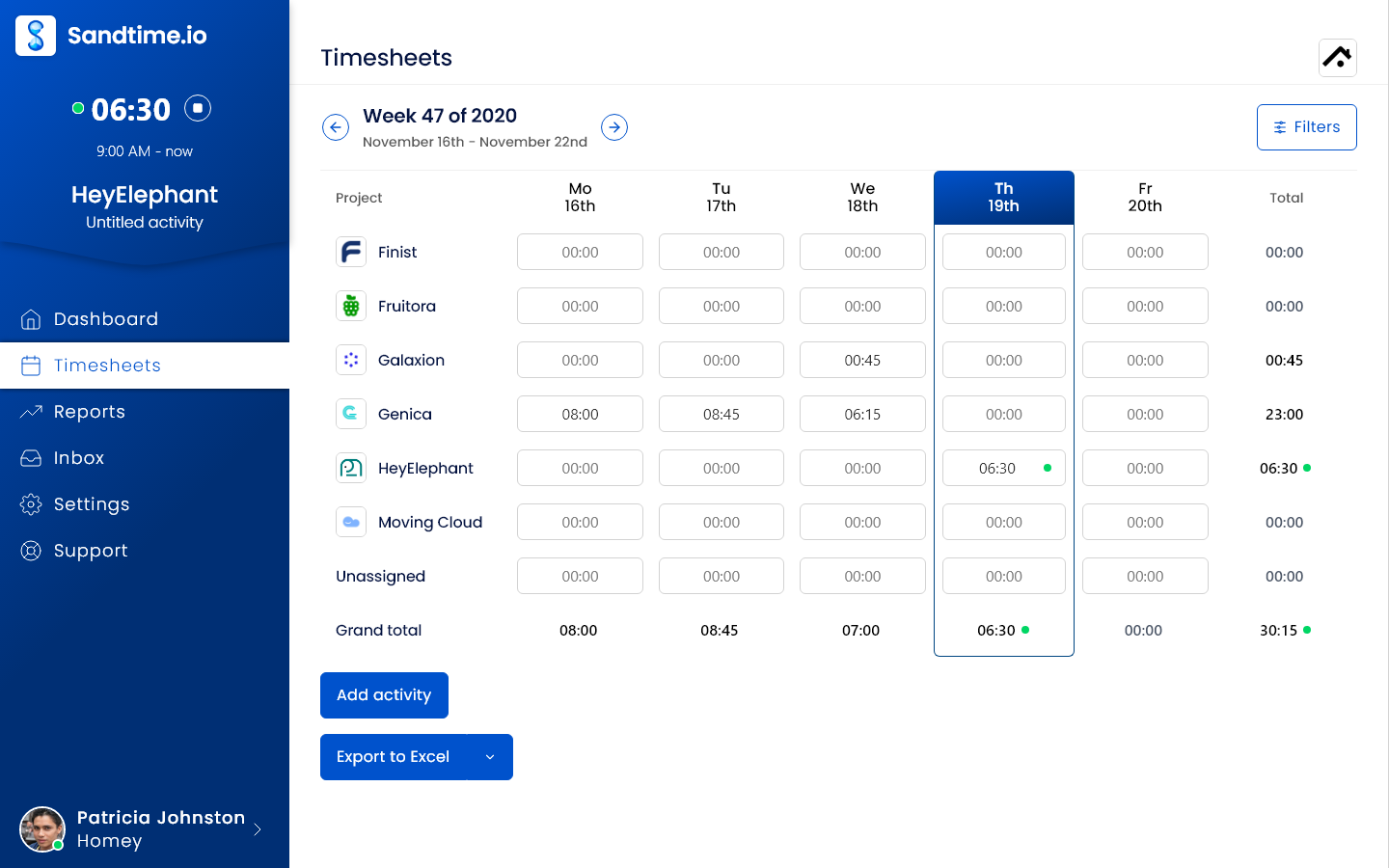
Sandtime.io is a free time tracking app for freelancers, agencies and client-service teams, built by Sanddev in Wrocław for its own client billing and used there since 2020. People record work with a timer or by hand, assign it to a project, and mark it billable or not. The week is laid out as a timesheet by project and day, so a missing afternoon is visible before anyone asks. At the end of the week a member selects Submit for approval, an Administrator approves or rejects it in the app or with one click from the notification email, and approval locks the week. With automatic weekly locking on, each member can switch on an email reminder that goes out on Friday at 6 PM in the organization's time zone, before the week closes; the email is off by default and does not inspect whether the sheet is complete.
That chain is the reason it ranks first. Among the 12 project and client timesheet products in this guide, it is the only one whose free plan has no user cap and includes reminders, approvals and locking together; Jibble offers the same on its free attendance timesheets, for a different record. Reports group approved hours by project, client, person and period, keep historical cost and revenue rates so an old week is billed at the rate that applied then, support several currencies, and export to Excel or CSV for billing and payroll. Overlap detection flags two entries that cannot both be true. A public API with an OpenAPI schema and an MCP server let scripts and AI assistants read and log time. Production servers and backups run at OVHcloud in the European Union, with backups every eight hours kept for 14 days and a one-click export of the whole organization (trust page). There are no screenshots, no keystroke logging, no activity scores and no location tracking.
Price and fit: free for unlimited users and projects, with no card, no seat limit and no feature that becomes paid at a headcount. Registered nonprofits can ask for a custom offer. Apps for web, Windows, macOS, iOS and Android, a Chrome extension and Slack timer commands are included.
Tradeoff: Sandtime.io produces invoice-ready exports; it does not create or send invoices, run payroll, track expenses, schedule shifts, record attendance or GPS, or capture activity automatically. The apps need a connection, so there is no offline mode. Integrations are Slack, the API, MCP and file exports, not a Zapier catalogue. Roles are Administrator, Project Administrator and User, which covers a small or mid-sized team and not a multi-level corporate approval tree. Self-hosting is arranged case by case under an Enterprise agreement, not sold as a plan.
Choose it when: the recurring problem is getting complete, approved, locked hours out of a team every week, and billing already happens in accounting software.
2.  Clockify: the cheapest paid plan with the whole approval chain
Clockify is the broadest product in this guide at the lowest paid price. Timers, a weekly timesheet, projects, tags and reports are on every plan, and the Standard plan adds timesheet approvals with submit, approve and reject, locked timesheets on a fixed or recurring date, and tracking targets with email reminders, all three on the same tier. Invoicing starts on Standard, and Pro adds scheduling, GPS, screenshots and, since September 2026, app and website monitoring under "Productivity rules", so a team that only wants approved hours can stop at Standard and never switch the monitoring on. Workspaces on Pro and Enterprise can pick a data region (United States, Germany for the EU, United Kingdom or Australia); the parent company publishes a SOC 2 Type II report and ISO 27001 certification.
Price and fit: the free plan was capped at five users in April 2026 and lost CSV and Excel exports, billable rates, the kiosk and shared reports at the same time; it keeps unlimited projects and 30 API requests an hour. Paid plans per user per month on annual billing: Basic $3.99, Standard $5.49, Pro $7.99, Enterprise $11.99 (monthly billing $4.99, $6.99, $9.99 and $14.99). The pricing FAQ says the annual discount is the only discount, nonprofits included. Clockify pricing, free plan changes, checked October 26, 2026.
Tradeoff: approvals, locking, reminders and exports all cost money from the sixth user, the audit log is Enterprise only, and multi-currency rates per client sit on Pro. The feature breadth that makes Clockify cheap per module makes it a larger product to administer than a single-purpose timesheet.
Choose it instead of Sandtime.io when: the team needs invoicing, a kiosk or scheduling in the same product and will pay per seat for the bundle. Sandtime.io and Clockify compared.
3.  Toggl Track: the best timer, with approvals on the most expensive plan
Toggl Track remains the reference for a timer that people actually press: one-click start across web, desktop, mobile and browser extension, offline tracking that syncs when the connection returns, and clean reports by project and client. In June 2026 the company launched a unified "Toggl" product with capacity management and project planning, made it the flagship in September 2026, and kept Track running for existing customers; toggl.com/pricing now shows the unified product. Timesheet approvals with an approval log, locking of time entries, tracking targets with reminders and the audit log are all on Premium, which is the highest placement of the completion chain among the products here. Toggl publishes an ISO 27001 certificate and a SOC 2 Type II report (June 2026), and SAML single sign-on is included on Premium.
Price and fit: the free plan covers up to three users. Starter is $9 per user per month on annual billing ($12 monthly); Premium is $16 on annual billing ($24 monthly) on the pricing page, while two Toggl Track support articles updated in July 2026 still quote Premium at $18 annual and $20 monthly, so check the figure at checkout for the product you are buying. Capacity management is a $5 per user add-on. Nonprofits can apply for 30 to 50 percent off for six or twelve months; the discount does not renew by itself. Toggl pricing, approvals overview, discounts, checked October 26, 2026.
Tradeoff: a 25-person team pays $4,800 a year for approvals it could get on a cheaper plan elsewhere, and the data region is not stated on a live Toggl page (the service runs on Google Cloud). Toggl's pricing and support pages describe no screenshots or activity tracking, which is a plus for trust.
Choose it instead of Sandtime.io when: the timer experience and the planning and capacity features justify the Premium price, or the team already runs invoicing inside Toggl. Sandtime.io and Toggl Track compared.
4.  TimeCamp: unlimited free users, approvals on Ultimate
TimeCamp, built in Wrocław like Sandtime.io, keeps a free plan with unlimited users and projects that includes timesheets, the desktop and mobile apps, GPS location in the mobile app, idle detection and the API. Its distinctive feature is optional automatic capture: the desktop agent can record which applications and websites were open and turn them into entries, and an AI Time Tracker drafts entries from that record. Timesheet approvals with submit, approve, reject and reopen, daily or weekly periods, submission reminders set by an administrator, locked submitted sheets and the time entry history all arrive on Ultimate; the standalone audit log is Enterprise. TimeCamp is ISO 27001 certified, runs on Amazon Web Services and does not name a region on its security page.
Price and fit: Starter $3.99, Premium $6.99 and Ultimate $9.99 per user per month on annual billing ($5.49, $9.99 and $13.99 monthly), Enterprise on request. The Polish price list shows the same US dollar prices and offers bank transfer in złoty on request. Nonprofits, schools and universities get 30 percent off with proof of status. The pricing page says the AI Time Tracker is billed by token use at roughly $6 per user per month, while the feature page says it is free for now, so ask before relying on it. TimeCamp pricing, approvals, checked October 26, 2026.
Tradeoff: the free plan has no Excel export (Starter), no billable rates or budgets (Premium) and no approvals (Ultimate), so a team that wants the completion chain pays $2,997 a year at 25 people. App and website tracking on Premium and screenshots on Ultimate are optional, and a team should decide in writing whether to switch them on.
Choose it instead of Sandtime.io when: people forget timers and will accept an activity log, or invoicing and attendance belong in the same tool. Sandtime.io and TimeCamp compared.
5.  Harvest: time to invoice, with approvals on Enterprise
Harvest is the product to pick when the invoice is the point. Time and expenses flow into invoices and online payments on every plan, including the free one, with per-client and per-project currencies, a redesigned app that became the default in May 2026, and more than 50 integrations with accounting and project tools. Flexible timesheet approval, auto-lock of approved weeks, submission reminders and a six-month activity log are Enterprise features; time tracking reminders are on every account. The company hosts on Google Cloud in the United States only and relies on its host's SOC 2 report rather than its own certification.
Price and fit: the free plan is one seat and two projects. Teams is $9 per seat per month on annual billing ($11 monthly) and Enterprise $14 ($17.50 monthly); SAML single sign-on is Enterprise only. Since 2026 each plan is billed either as Unlimited at a fixed price or as Flex, a per-seat rate plus usage charges for active projects, clients, tasks and invoicing above an included allowance, calculated from the previous billing period and starting at the second paid renewal; the allowance sizes are not published. Harvest's support site says it offers no discount beyond annual billing, nonprofits and schools included. Harvest pricing, pricing plans and Flex billing, timesheet approval, checked October 26, 2026.
Tradeoff: approvals and locking sit on the most expensive plan, so a 25-person team pays $4,200 a year before any Flex usage charge, and the data never leaves the United States, which rules Harvest out for some EU buyers. Offline tracking is mobile only.
Choose it instead of Sandtime.io when: invoicing, payments and expenses must live in the time tracker. What changed in Harvest pricing and a free alternative.
6.  Everhour: timesheets inside Asana, ClickUp and Jira
Everhour puts the timer inside the project tool: its browser extension adds time tracking controls to tasks in Asana, ClickUp, Jira, Trello, Basecamp, Notion and GitHub, and the time rolls up into budgets and invoices. The Team plan carries everything, including approve-or-reject with a per-request action log, a rule that stops members editing entries after a set period, reminders to track time, optional screenshots every ten minutes on the desktop app and SAML single sign-on. Data lives on Amazon Web Services in Oregon and Frankfurt, and Everhour relies on its host's SOC 2 report.
Price and fit: free for up to five seats with limited features and no integrations. Team is $8.50 per seat per month on annual billing ($10 monthly) with a five-seat minimum, so two users pay for five; Custom starts at 50 seats. There is no published nonprofit discount. Everhour pricing, plans, checked October 26, 2026.
Tradeoff: the desktop app needs a connection, the macOS app is the only desktop app and Windows is listed as coming soon, invoices are single-currency, and the product only shows its value if the team already works in one of the supported project tools.
Choose it instead of Sandtime.io when: tasks live in Asana, ClickUp or Jira and time should be tracked on the task card. Sandtime.io and Everhour compared.
7.  My Hours: simple approvals at a low price, hosted in Amsterdam
My Hours is a project time tracker that stays small on purpose: projects, tasks, billable rates, a weekly timesheet and reports, with no monitoring of any kind, which its help center says it will never add. The Pro plan carries approve or reject, auto-lock of time logs after each timesheet period (administrators can still edit approved entries), tracking reminders, a 90-day audit log, invoicing and single sign-on. The company runs on Microsoft Azure with its main database in Amsterdam, holds ISO 27001, 27017 and 27018 certificates and states GDPR compliance; a Jira sync and an MCP server for Claude are on the paid plans.
Price and fit: free for up to five active users without API, exports, approvals or reminders. Basic is $4 per user per month on annual billing ($5 monthly), Pro $8 ($9 monthly), with no seat minimum. The nonprofit page says there is no nonprofit-specific discount beyond the free plan, while the pricing FAQ mentions discounts for nonprofits and larger teams; ask. My Hours pricing, approval setup, checked October 26, 2026.
Tradeoff: one currency per account, mobile-only offline tracking, and the approval lock is soft because administrators can edit approved entries without an unlock request.
Choose it instead of Sandtime.io when: the team wants invoicing in the same tool at the lowest paid price and accepts a five-user cap on the free plan. Sandtime.io and My Hours compared.
8.  BeeBole: multi-stage approvals and an audit trail for compliance-minded teams
BeeBole is the timesheet product in this list built around the approval tree rather than the timer. Approval workflows on the paid plans run in configurable stages, each with its own approver types and an "any" or "all" quorum, a rejection requires a comment and sends the sheet back to its owner, and a submitted sheet locks. Lock dates that freeze every record on or before a chosen day, automated reminders to submit and reminders to approvers after a number of days are on every plan including the free one, and the audit trail is on Essential and above. The company relaunched its application in June 2026 and now hosts EU customers' data on Google Cloud servers in the EU and US customers' data in the United States; it states GDPR and DCAA compliance and claims no ISO or SOC certificate.
Price and fit: free for up to five users with lock dates, reminders, the GraphQL API and Google or Microsoft sign-in. Essential is $9 per user per month on annual billing ($10 monthly), also priced at 9 EUR or 8 GBP, and Advanced $18 ($20 monthly); add-ons such as costs and budgets or custom fields are billed per user on Essential. Nonprofits and schools get special pricing case by case. BeeBole pricing, approval documentation, checked October 26, 2026.
Tradeoff: billable rates and multi-currency are paid, the current mobile app needs a connection, and native invoicing is not documented; QuickBooks and Xero exports carry the hours out. The AI-suggested entries on every plan draft time from browser page titles, which a privacy-sensitive team may want to switch off.
Choose it instead of Sandtime.io when: approvals must route through several stages with named approvers at each, and an audit trail is a contractual requirement. Sandtime.io and BeeBole compared.
9.  ClickTime: grant reporting and DCAA timesheets for nonprofits and professional services
ClickTime sells to organizations that report time to funders and government clients. Timesheet locking, email reminders for incomplete timesheets, an audit trail with full change history, a REST API and payroll export are on every plan; timesheet approval workflows, billing and cost rates by person, project and date, DCAA-compliant timesheets and automated capture from calendars, Jira, GitHub, Zoom and Microsoft 365 start on Team. The pricing table states that the product reads connected work tools only, with no screenshots, keystroke logging or browser tracking. The company lists SOC 2, GDPR and CCPA compliance on every plan and runs from a colocation data center whose region it does not name.
Price and fit: there is no free plan. Starter is "from $12 per user per month" and the only public list price; Team, Premier and Enterprise are quoted after a demo. The nonprofit page publishes Team at $14 and Premier at $21 per user per month for up to 200 users, which is the only public sign of what the approval-capable tier costs. Expense tracking is a $4 add-on. ClickTime pricing, nonprofit pricing, checked October 26, 2026.
Tradeoff: approvals are not on the entry plan and the tier that has them is unpriced, so the cost list above leaves ClickTime out; there is no EU data region and no free plan for a small team to start on.
Choose it instead of Sandtime.io when: funder reports, DCAA audits or ERP connections such as NetSuite or Sage Intacct are the requirement and the budget supports a quoted plan. Sandtime.io and ClickTime compared.
10.  Deltek Replicon: enterprise time with FedRAMP, multi-tier approvals and AI capture
Replicon, now part of Deltek, is the enterprise end of this list. Multi-tier, configurable approval workflows route timesheets to the right people automatically, validation rules alert on violations, the mobile apps capture time online or offline with GPS, geofencing and facial recognition where a customer wants them, and invoices can be created and exported from approved time. ZeroTime, powered by Deltek's Dela assistant, captures time from more than 100 applications and pre-populates entries, and is a paid capability. Deltek publishes SOC 1, 2 and 3 reports, CSA STAR Level 2, ISO 27001:2022 and, since March 2026, a FedRAMP Moderate authorization for project time tracking, and markets DCAA-ready time entry.
Price and fit: no free plan and no published prices; every plan is quoted. The old Replicon help center now redirects to Deltek's product pages, so locking, reminders, single sign-on and API details cannot be sourced from a live vendor page and are listed as unspecified in the comparison. Deltek Replicon, compliance, checked October 26, 2026.
Tradeoff: a quoted enterprise product with a sales cycle, implementation and a data region that the public pages do not name; the AI capture adds to the price.
Choose it instead of Sandtime.io when: federal contracting, multi-entity audits or an existing Deltek ERP make an enterprise suite the only acceptable system of record.
11.  Paymo: tasks, timesheets and invoices for small agencies
Paymo bundles task management, time tracking, invoicing and, on the top plan, scheduling and leave into one application for small agencies and studios. Timesheet approvals with submit, approve and reject with a reason are on Pro; automatic locking after the selected period and daily, weekly or monthly tracking reminders exist, without a tier named on the vendor's pages. Invoices, including recurring ones from Plus, are native on every plan. The desktop tracker, Paymo Track, records applications and window titles to suggest entries and detects idle time, with no screenshots mentioned.
Price and fit: the free plan is one user, one client and two projects with unlimited invoices. Solo is $5.90 per month on annual billing for one user ($9.90 monthly), Plus $10.90 per user ($15.90 monthly) and Pro $16.90 per user ($23.90 monthly), in US dollars only. Nonprofits get 50 percent off and universities can request free access. Paymo pricing, timesheet approvals, nonprofit discount, checked October 26, 2026.
Tradeoff: approvals sit on the most expensive per-user plan in the cost list ($5,070 a year for 25 people), the hosting region, single sign-on and audit history are unspecified, and the API starts on Plus.
Choose it instead of Sandtime.io when: the team wants tasks, time and invoices in one tool and will pay per user for the bundle rather than exporting hours to accounting software.
12.  Traqq: a privacy-first tracker with approvals on the free plan
Traqq is the closest head-to-head with Sandtime.io on principles. Its data-collection page says the product does not collect applications and websites used, input activity, idle time, activity scores, screenshots or screen recordings, location, webcam or microphone, and that there are no hidden monitoring options; the desktop app has an optional idle notification and a "smart" mode that pauses the timer on non-work applications, which the privacy policy says may process application names. Timesheets and approvals are on every plan including the free one: owners and administrators approve, managers can be allowed to, an approved sheet cannot be edited, and a decline with a reason reopens it. Invoicing, clients, breaks, expenses and roles start on Plus. Thirty integrations run through the browser extension.
Price and fit: free for up to three users and one project. Plus is $4 per user per month for up to 10 users, Business $9 for up to 50 and Scale $13 for up to 300, with 15 percent off on annual billing (about $3.40, $7.65 and $11.05); the pricing page renders its figures in the browser, and the subscription article is the readable source. The company is Traqq Pty Ltd in Sydney, states GDPR compliance and publishes no security page, hosting region or certification. Traqq pricing, subscription plans, what Traqq collects, checked October 26, 2026.
Tradeoff: the free plan stops at three users and one project, period locking, automatic submission reminders, an audit log, single sign-on and a public API are unspecified on the vendor's pages, and the plan ceilings mean a growing team changes plan at 10, 50 and 300 users.
Choose it instead of Sandtime.io when: the team wants expenses, invoicing, leave and capacity planning in the same privacy-first product and is small enough for the Plus or Business ceiling. Sandtime.io and Traqq compared.
Attendance, payroll and automatic capture: six tools for a different record
The products below keep a timesheet, but the record they are built around is presence, pay or captured activity rather than project hours. A team whose auditor asks "who was on site, when, and what did payroll pay" needs one of these; a team whose auditor asks "which client was this hour for, and who approved it" does not.
13.  Jibble: free attendance timesheets for unlimited users
Jibble is a time clock first: clock-ins from mobile, web, desktop and a shared kiosk, with face recognition, GPS stamps and geofencing where an employer wants them, offline clock-ins that sync later, pay-period timesheets that a manager approves and that lock on approval, and exports to Xero, QuickBooks and Deel. The whole site now says "free forever for unlimited users", and the pricing page has been removed, so the paid tiers the help center still mentions (Basic, Premium, Ultimate and Enterprise with single sign-on) have no public price; a 50 percent lifetime nonprofit discount on upgrades is still offered through support. Screenshots, desktop activity and app and website tracking are part of the product, so a team that chooses Jibble for its free attendance record should decide which of those to leave off. Jibble, approvals, checked October 26, 2026. Sandtime.io and Jibble compared.
14.  Connecteam: deskless crews with clock-ins, scheduling and a free plan to ten users
Connecteam bundles a time clock, scheduling, forms, chat and HR into hubs priced for the first 30 users: the Operations hub is $29 a month on annual billing on Basic ($35 monthly) plus $0.80 per extra user, $49 on Advanced and $99 on Expert, in US dollars only, and the Small Business plan is free for up to ten users with every hub. Timesheet approvals that lock a payroll cycle and push reminders are on Basic; locking individual days and payroll-period notifications are on Advanced; the API starts on Expert and single sign-on on Enterprise. A dated help article says the mobile app, kiosk and desktop clock do not support offline clock-in. The company publishes SOC 2 Type II and ISO 27001 certificates and lists its primary data center in the Netherlands. Connecteam pricing, approving timesheets, offline, checked October 26, 2026.
15.  Deputy: shift scheduling with attendance timesheets and payroll exports
Deputy is a scheduling product whose timesheets come from the roster: Lite at $5, Core at $6.50 and Pro at $9 per user per month in US dollars on monthly billing, with a $30 minimum monthly spend, an annual discount whose figures the page does not render, billing in Australian dollars or pounds by country, and add-ons for payroll, HR, messaging and analytics. Approval permissions exist on every plan and auto-approval starts on Core; the timesheet audit report requires the Analytics+ add-on, included in Pro; period locking is not documented. Offline clock-in survives only in the legacy iPad kiosk. Deputy publishes ISO 27001, SOC 2 Type II and Cyber Essentials and hosts in AWS regions in Australia, the United Kingdom or the United States; charities get an unspecified discount on monthly plans only. Deputy pricing, security, checked October 26, 2026.
16.  QuickBooks Time: payroll-connected timesheets for QuickBooks Online users
QuickBooks Time exists to feed QuickBooks Online payroll and invoicing, and it requires a QuickBooks Online subscription. Premium is a $20 monthly base fee plus $10 per user per month and Elite $40 plus $12, on monthly billing only; the per-user price rose by $2 on July 1, 2026 when Intuit renamed its payroll plans to QuickBooks Workforce. Approving a timesheet locks all time up to the chosen date and rejecting with a reason unlocks it, on both plans; clock-in and clock-out reminders and a per-timesheet edit log are included; GPS is on both plans and geofencing on Elite. Hosting region, certifications, single sign-on and multi-currency are not stated on the product pages. QuickBooks Time pricing, approve, unapprove and reject, checked October 26, 2026.
17.  Hubstaff: screenshots, activity levels and GPS as the evidence behind the hours
Hubstaff is the monitoring reference in this list. Screenshots (500 per seat per month on Starter, 1,500 on Grow, unlimited on Team), activity levels on every plan, app and URL tracking, and GPS and geofences through a paid Locations add-on are the product; timesheet approvals arrive on Team at $10 per seat per month on annual billing ($12 monthly) with a two-seat minimum, and approved, paid or invoiced time locks. The company publishes a SOC 2 Type II report and offers nonprofits 30 percent off; its own pages disagree on whether a free plan for a single owner exists. Hubstaff was one of the nine platforms in the May 2026 investigation of workplace monitoring software described below, which found every platform in the sample sharing identifying worker data with third parties. Hubstaff pricing, plans, locked time, checked October 26, 2026. Sandtime.io and Hubstaff compared.
18.  Timely: AI-drafted timesheets from a private activity memory
Timely's Memory app records application names, window titles and browser URLs on the person's own computer, privately to that person, and its AutoSheet feature drafts a timesheet from that record for the person to confirm; the company states that it never captures keystrokes, screenshots or audio, holds ISO 27001:2022 and hosts on Amazon Web Services in the European Union. There is no free plan: Starter is $9 per user per month on annual billing ($11 monthly) for up to five users, Premium $16 ($20) for up to 50 and Unlimited $22 ($28). Approval is not a dedicated feature; Premium's custom entry states can model "submitted" and "approved" with a locked attribute, and locking a day, week or month is Unlimited only, which is why Timely sits in the "split" group above. Automatic reminders are on every plan. Timely pricing, what Memory captures, time entry states, checked October 26, 2026.
What a timesheet has to prove in 2026 and 2027
A timesheet is evidence before it is a report. Three bodies of rules decide what the record must contain, and timesheet software either makes those records cheap to produce or leaves the proof to a spreadsheet.
Working-time law. In the European Union, the Court of Justice ruled in CCOO v Deutsche Bank (C-55/18) in May 2019 that employers must run an objective, reliable and accessible system that measures each worker's daily working time. Denmark wrote that duty into statute from July 1, 2024, with records kept for five years, and the Danish working-time rules page lists the details. Poland requires a working-time record per employee under the Labour Code and keeps the employee file for ten years after employment ends for people hired from 2019 on (Polish rules). In the United States, the Fair Labor Standards Act record-keeping fact sheet asks employers to keep payroll records for three years and the time cards those records are computed from for two (US rules). Australia keeps time and wage records for seven years (Australian rules). The software requirement that follows is the same everywhere: a dated record per person per day that the person can see, that cannot be silently edited after the fact, and that can be exported when an inspector or auditor asks.
Grant and client audits. Federally funded work in the United States follows 2 CFR 200.430, which does not prescribe a form but asks for records that reflect the total activity a person was paid for. Horizon Europe accepts monthly declarations of days worked, signed by the person and their supervisor, and the guide to timesheets for EU-funded projects walks through what auditors reject. A client audit of an agency invoice asks a simpler question: were these hours approved by someone before they were billed, and have they changed since? Approval history and locking answer it; a timer alone does not.
Data protection. A timesheet is personal data under the GDPR, so where it is stored and who can read it are part of the purchase. Besides Sandtime.io, the vendors that publish an EU data region are Clockify (on Pro), Everhour (servers in the US and Germany), My Hours (the Netherlands), BeeBole (EU or US by customer), Timely and Connecteam (the Netherlands as its primary site). Sandtime.io runs its production servers and database backups on OVHcloud infrastructure in the European Union, with backups every eight hours kept for 14 days and a one-click export of the whole organization, as described on its trust page. The EU AI Act adds one date to the calendar: the rules for high-risk uses of AI in employment, which include systems that evaluate or monitor workers, apply from December 2, 2027. A timesheet that a person fills in and a manager approves is not such a system. A product that scores productivity from captured activity may be, and its vendor's compliance plan is worth a question before the renewal.
In Sandtime.io the approval history records who submitted, approved or rejected a week and when, locking keeps a closed week from changing, and an unlock request opens the week for a set duration, from 30 minutes to 24 hours, with everyone involved notified. There is no separate audit dashboard; the history lives on the timesheet and in the notification emails, and the Excel and CSV exports carry the approved hours out to payroll or billing.
Why monitoring does not make timesheets better
The pitch for screenshots, activity scores and GPS is that a verified record is a better record. The research says the verification costs more than it returns. A 2023 meta-analysis in Personnel Psychology by Ravid and colleagues, covering 94 independent samples and 23,461 workers, found no evidence that electronic performance monitoring improves performance, and found it associated with higher stress regardless of how the monitoring was configured; monitoring that was more transparent and less invasive predicted better attitudes. The United States Government Accountability Office reviewed 122 studies published from 2020 to 2024 in GAO-25-107126 and reported that surveillance can add stress and anxiety, push people toward unsafe work speeds, and lead to unfair evaluations when productivity benchmarks are flawed.
The data handling is the second problem. In May 2026, researchers from Northeastern University, Columbia Law School, Vanderbilt and UC Berkeley published an investigation of nine workplace monitoring platforms, among them Hubstaff, Time Doctor and Deputy. All nine sent identifying worker data to third parties, in 121 separate instances, and sent online activity data to 145 distinct third-party domains; three of the nine could collect precise location while the app ran in the background. One vendor disputed the findings, and the sample is nine products, not the market. The practical reading is narrower: a timesheet system that captures only what people type into it has a much smaller data-protection surface than one that watches the screen.
Record integrity does not need surveillance. Sandtime.io's overlap detection flags two entries that cannot both be true, approvals put a second person's name on every billed week, and locking keeps the approved week from drifting. Those three controls catch the 25th hour of a day without a single screenshot, which is the difference between a system of record and tattleware.
What changes in 2027
Four movements visible on vendor pages in 2026 will shape the 2027 shortlist.
Free tiers keep shrinking. Clockify capped its free plan at five users in April 2026 and moved exports and billable rates to paid plans; Toggl Track's free plan covers three users; Harvest's free plan is one seat and two projects, and its paid plans moved to Flex billing with usage charges above an included allowance. The direction is the same at every vendor that once competed on "free for unlimited users": the free plan is a trial with a headcount, and the completion chain sits one or two tiers up. Among the 18 products here, Sandtime.io, TimeCamp and Jibble still publish a free plan without a user cap, and among the project timesheet products only Sandtime.io puts approvals, locking and reminders on it. Expect the gap between "free to try" and "free to run" to widen, and price the plan you will actually run.
Automatic capture becomes a tier, and a charge. TimeCamp sells its AI features through tokens on top of the plan, Timely's Memory app and Deltek Replicon's ZeroTime draft entries from calendar and application signals, and more vendors will follow. A drafted entry still needs a person to confirm it and a reviewer to approve it, so the approval chain does not go away; it moves one step later. Teams that adopt capture should budget for the add-on and decide, in writing, what the activity log may be used for.
Monitoring gets a legal calendar. The EU AI Act applies its high-risk rules for AI in employment from December 2, 2027. A self-reported timesheet with human approval sits outside that scope; a product that scores workers from captured activity may sit inside it. In the United States, the GAO review above and state biometric laws such as Illinois BIPA are pushing the same way. A buyer who chooses a monitoring platform in 2027 should ask the vendor for its AI Act position in writing.
Timesheets become a data source for assistants. Sandtime.io publishes a public API and an MCP server that let an AI assistant read and log time from the tools where the work happens, such as Claude Code and Cursor. Most competitors expose a REST API on a paid tier; few expose an MCP endpoint yet. If your team already uses assistants for status reports or invoice preparation, the API tier and the assistant access belong on the evaluation sheet next to the price.
European buyers weigh hosting. EU hosting with published backup and export terms is a purchasing criterion for public bodies, grant holders and regulated clients, and each card in the comparison names the vendor's data region. Sandtime.io hosts production and backups at OVHcloud in the European Union; Clockify lets a workspace pick a region; Harvest stores data in the United States. For a team whose clients ask where the hours live, that line may matter more than any feature.
Which timesheet software fits your team
Agency or consultancy billing by the hour
Sandtime.io for approved, locked weekly hours exported to the accounting tool; Harvest when invoices and payments must come from the tracker; Clockify Standard when a paid bundle with invoicing is acceptable at $5.49 per user.
Software team with work in Jira, Asana or ClickUp
Everhour to track on the task card; Sandtime.io to keep the timesheet separate from the task tool and let an assistant log time through the API or MCP; Clockwork for Jira if the hours must live inside Jira.
Nonprofit reporting to funders
Sandtime.io free for unlimited staff and volunteers, with a custom offer for registered nonprofits; ClickTime when DCAA or grant allocation reports are the deliverable; Jibble at 50 percent off for attendance records.
Compliance-minded team with layered approvals
BeeBole for multi-stage approvals with named approvers and an audit trail; Deltek Replicon for federal or multi-entity audits; Sandtime.io when a single Administrator approval per week is enough.
Field crew, shifts or hourly staff
Jibble for free attendance timesheets, Connecteam for scheduling and clock-ins with a free plan to ten users, Deputy for rosters, QuickBooks Time when QuickBooks Online payroll is already in place.
People who forget the timer
Timely for private automatic capture with AI-drafted sheets, TimeCamp for optional capture with unlimited free users; both still need someone to confirm and approve, and the team should agree in writing what the activity log is for.
How to run a two-week pilot
A pricing page cannot tell you whether your team will submit on time. One real billing cycle can. Run the pilot on the product you are leaning toward, with the people who will actually fill in the sheets, and measure these six steps.
Pass the pilot only when all five acceptance tests hold:
- At least 95 percent of timesheets were submitted without a manager asking. Count the chases. If the reminder did not do its job, the tool will not either.
- Approvals and locking match your policy. One owner approving everything is a different requirement from project leads approving their own people; make the real approver do it, including one rejection.
- Finance closed the cycle without a spreadsheet rework. The export from step six went into the invoice or the payroll run as it came out.
- The exports and the API cover what the next system needs. If accounting, a PSA suite or an AI assistant will read the hours, test that read now.
- Security signed off on the documented controls. Data region, retention, export and deletion, from the vendor's own pages, not the sales deck.
In Sandtime.io the pilot is the free product: invite the team, set projects and rates, switch on automatic weekly locking so the Friday reminder goes out, approve or reject the submitted weeks from the email, request one unlock to see the expiry, and export the approved hours. If the team is still on a spreadsheet, the free timesheet templates give a baseline to measure the pilot against.
Frequently asked questions
What is the best timesheet software in 2026?
It depends on the record you need. For project and client hours that must be submitted, approved and locked every week, Sandtime.io is the best fit in this comparison because the whole chain is free for unlimited users; Clockify Standard is the cheapest paid plan with the same chain, Harvest is the pick when invoices come from the tracker, BeeBole when approvals run in several stages, and Toggl Track when the timer and security certifications matter most. For attendance, Jibble is free for unlimited users and Connecteam, Deputy and QuickBooks Time connect clock-ins to schedules and payroll.
Which timesheet software is free for unlimited users?
As of October 26, 2026, three of the 18 products publish a free plan without a user cap: Sandtime.io for project timesheets, TimeCamp for time tracking with approvals reserved for its Ultimate plan, and Jibble for attendance timesheets. Clockify capped its free plan at five users in April 2026, Toggl Track covers three and Everhour and My Hours five.
Which timesheet software includes approvals for free?
Sandtime.io includes approvals, locking and reminders free for unlimited users. Jibble approves pay-period timesheets on its free offer for unlimited users. Traqq includes approvals on a free plan limited to three users and one project. Every other product in this guide places approvals on a paid plan or publishes no price for the plan that has them.
How much does timesheet software with approvals cost for 25 people?
On list prices read on October 26, 2026, the first plan with approvals costs from $0 a year (Sandtime.io, Jibble) through $348 (Connecteam Basic, a bundle for 30 users), $1,500 (Deputy Lite), $1,647 (Clockify Standard), $2,295 (Traqq Business), $2,400 (My Hours Pro), $2,550 (Everhour Team), $2,700 (BeeBole Essential), $2,997 (TimeCamp Ultimate), $3,000 (Hubstaff Team), $3,240 (QuickBooks Time Premium) and $4,200 (Harvest Enterprise) to $4,800 (Toggl Track Premium and Timely Premium) and $5,070 (Paymo Pro) a year for 25 people, before taxes and usage charges.
What is the difference between timesheet software and a time tracker?
A time tracker records hours with a timer or a form. Timesheet software takes those hours through submission, approval and locking so that a second person has accepted them and nothing changes afterwards, and it reports and exports the approved record for payroll, billing or an audit. Many products do both; the price list shows which plan the approval chain sits on.
Does timesheet software need screenshots or GPS to be trustworthy?
No. A 2023 meta-analysis of 94 studies found no performance gain from electronic monitoring and higher stress with it, and a 2026 investigation of nine monitoring platforms found all of them sharing identifying worker data with third parties. Approvals, locking and overlap detection make a record provable without watching anyone: an approved week carries a second person's name and cannot drift, and two entries that cannot both be true are flagged. GPS and screenshots answer a different question, presence at a site, which attendance products such as Jibble, Connecteam and QuickBooks Time are built for.
What must a timesheet record for an EU or US audit?
A dated record per person per day that the person can see, that is approved by someone with authority, that cannot be silently edited afterwards and that can be exported. The EU Court of Justice requires an objective, reliable and accessible system for daily working time (C-55/18); Denmark put that into law from July 2024 and keeps records five years; the US Fair Labor Standards Act keeps payroll records three years and time cards two; US federal grants follow 2 CFR 200.430; Horizon Europe accepts monthly day declarations signed by the person and a supervisor. Approval history and locking are what turn a timesheet into that evidence.
Can timesheet software export approved hours to payroll or invoicing?
Yes, in different ways. Sandtime.io exports approved hours to Excel and CSV with rates and currencies for the accounting or payroll tool already in use, and exposes them through an API and an MCP server. Harvest, Paymo, Toggl Track, Jibble and TimeCamp create invoices themselves. QuickBooks Time, Connecteam and Deputy push approved hours into QuickBooks, Gusto, Xero, ADP or Paychex payroll. Check that the export carries the fields the next system needs, such as project, billable status, rate and currency, during the pilot.
Which timesheet tools host data in the European Union?
Sandtime.io runs production and backups at OVHcloud in the EU. My Hours keeps its main database in Amsterdam, Timely stores data on Amazon Web Services in the EU, BeeBole hosts EU customers on EU Google Cloud servers, Everhour offers Frankfurt alongside Oregon, Connecteam lists the Netherlands as its primary data center, and Clockify lets Pro and Enterprise workspaces choose a German region. Harvest stores all data in the United States, and Toggl Track, TimeCamp, Hubstaff and the attendance products do not name a region on their public pages.
What does an "AI timesheet" mean?
Three different things. Automatic capture (Timely Memory, TimeCamp's desktop agent, Replicon ZeroTime) records application or calendar activity and drafts entries from it. Suggested entries (BeeBole, ClickTime) draft time from connected tools such as calendars and Jira. Assistant access (Sandtime.io's MCP server, My Hours' MCP for Claude, Harvest and TimeCamp MCP servers) lets an AI assistant read and log time on a person's behalf. In every case a person confirms the entry and a reviewer approves it, so the approval chain decides whether the result can be billed.
How long should timesheets be kept?
It depends on the jurisdiction and the funder. The US Fair Labor Standards Act asks for three years of payroll records and two years of time cards; US federal awards keep records three years from the final financial report; Poland keeps the employee file for ten years after employment ends; Australia keeps time and wage records seven years; Denmark keeps working-time records five years; EU cohesion-policy grants keep records five years and Horizon Europe generally five years after the balance is paid. Keep the approved, locked version and the export, not only the live record.
How do I move a team from Clockify or Toggl Track to Sandtime.io?
Export the project list and the last closed period from the old tool, create the projects and rates in Sandtime.io, invite the team, and run one full billing cycle in parallel: track, let the Friday reminder fire, submit, approve, lock and export. Keep the old tool read-only until the exported hours from the new one have been invoiced once. The guides on leaving Clockify after the free plan change and leaving Harvest after its pricing change cover the two most common moves.
Verdict
Timesheet software is worth paying for when the invoice, the payroll run or the schedule must come out of the same product, and Harvest, QuickBooks Time, Paymo, Connecteam and Deputy earn their price on that basis. When the requirement is complete, approved, locked hours from a team of any size, with the record held in the EU and nobody watched, the cheapest plan that does the job is free: start a free Sandtime.io workspace, which includes reminders, approvals, locking, reports and exports for unlimited users, and the pilot above takes one billing cycle to prove it. The timesheet software page walks through that weekly workflow step by step, from the first entry to the export.
About the contributors


Przemysław Zalewski
Sandtime.io engineer and Sanddev team member who reviews product accuracy, technical details, sources, and editorial quality.
LinkedInEmailSanddev profileWebsite