Free Time Tracking App for Windows 10 and 11
Free for unlimited users on the Microsoft Store, for Windows 10 and Windows 11. A taskbar timer that can start with your PC and stop when it shuts down - no credit card required.

The easiest time tracking app to get on Windows
Most time tracking apps for Windows require downloading an installer, running it as an administrator, and working through a setup wizard. Sandtime.io skips all of that.
Find it on the Microsoft Store, click Get, and it is on your taskbar in under a minute. No admin rights. No installer to run. Windows handles updates automatically in the background.
The app lives quietly in your taskbar. One click starts a timer. One click stops it. Your time entries sync instantly across the web app and mobile apps - one account, every device, always in sync. And it is completely free for unlimited users: no trial period and no credit card required.
Why use Sandtime.io on Windows?
Always in the taskbar
A small Sandtime.io icon sits in your Windows taskbar next to the clock. Right-click it and choose Start tracking or Stop tracking, or click it to bring the app window back. No tab switching, no searching your Start menu.
Turn on your PC, the timer starts
Add Sandtime.io to your Windows startup apps, then switch on Start tracking on startup under Settings, Time tracking, Desktop app. Turning on the PC starts the day, and Stop tracking on shutdown ends it at the last minute the PC was on, even when Windows goes down without warning.
Your team stays in sync
Time entries logged on Windows appear instantly in the web app, iOS, and Android. Everyone on the team sees the same data, whether they are on Windows, Mac, or their phone.
Free for unlimited users
No trial period. No credit card required. No screenshots. Sandtime.io is free for everyone - download it from the Microsoft Store and start tracking today.
More than one timer at once
Waiting on one client while you work for another? Switch off Stop running activities when you create the second activity, and both timers run side by side. Stop tracking ends them together.
Send the week for approval
Submit your week from Timesheets once it is complete. Administrators approve or reject it in the same Approvals section, or with one click from the notification email, and an approved week locks.
What it looks like on Windows
The same account you use on a phone or in the browser, with room to spread out.
Track your time, watch the goals fill
Still runningDaily, weekly and monthly goals on one chart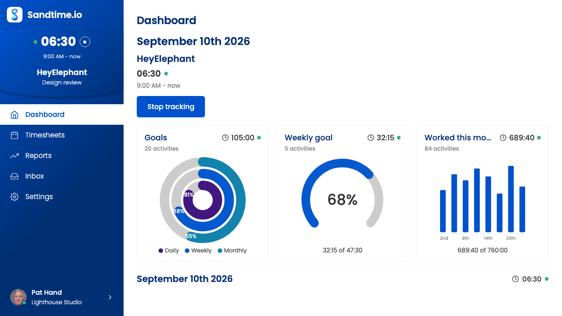
The week, project by project
A week at a glanceType hours straight in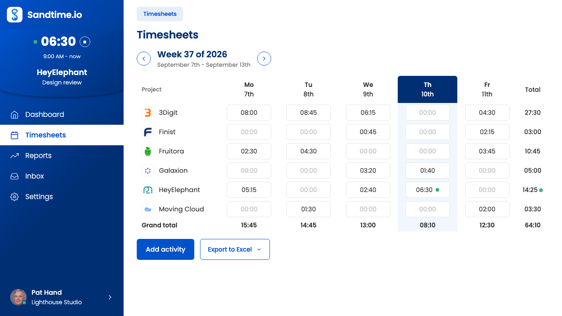
Forgot to start it? Add it afterwards
Add time after the factMark an entry billable or not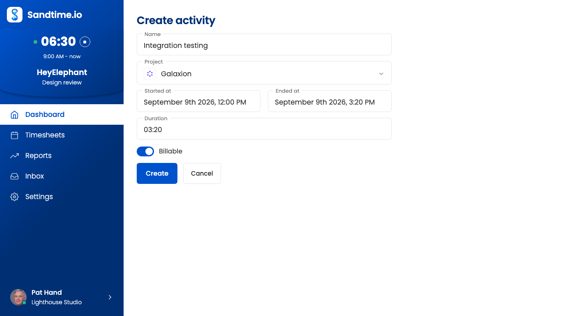
Numbers you can invoice from
Cost per personExport to Excel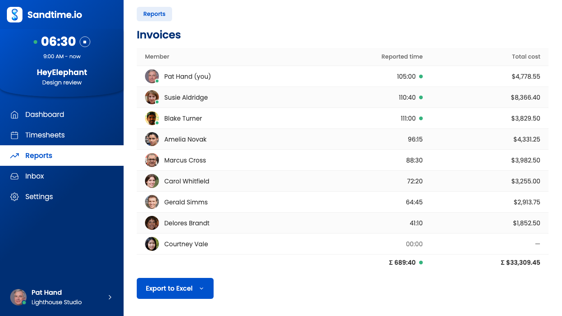
What the team actually did
Hours workedWho worked on what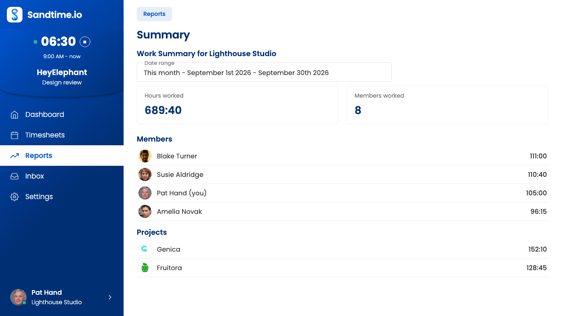
Every project in one list
Archived hidden by defaultClick one to edit it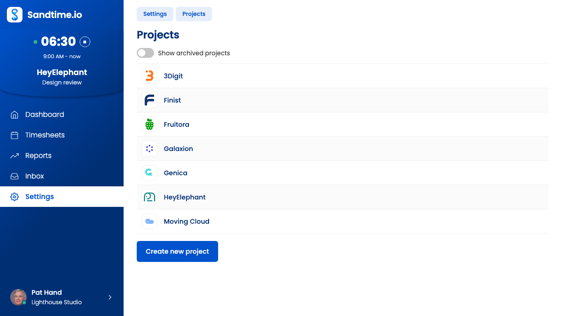
Reports built in, and the ones you add
Summary report built inBuild your own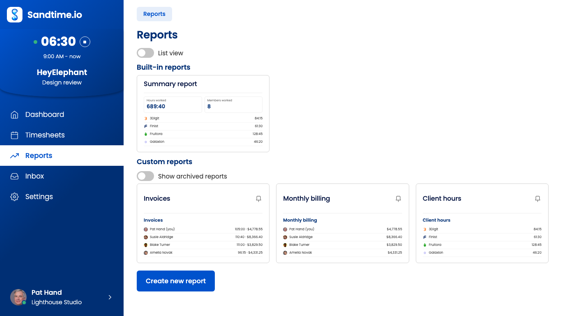
Set the rules once, then forget them
Round to the nearest 15 minutesLock each week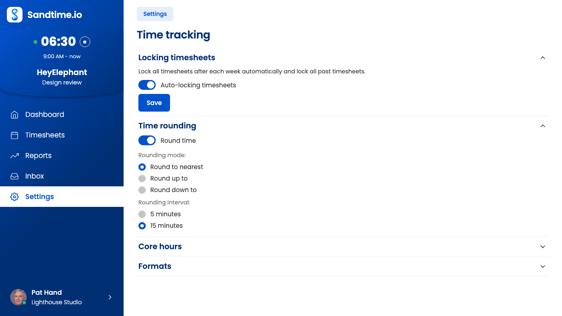
Everything you can do without opening the app
The icon shows your tracking status
When a timer is running, the Sandtime.io tray icon switches to its active state. Hover over the icon and the tooltip shows your elapsed time - "Sandtime.io - 1:23:45". You always know you are tracking, without opening the app.
Start or stop from the right-click menu
Right-click the tray icon for the quick-action menu. Start a timer, stop the running one, or open Settings - without bringing up the full app window. Full timer control in two clicks.
Close the window, keep the timer running
Press X on the app window and Sandtime.io hides to the tray. Your timer keeps running. The window disappears but time tracking continues without interruption.
A sudden shutdown does not leave a timer running
With Stop tracking on shutdown on, the app notes once a minute that a timer is still going. If Windows restarts for an update or the battery runs flat, the next launch ends the entry at the last minute the PC was on.
Starts on your last project
Start tracking in the icon's menu picks up the project and Billable setting of your most recent activity, so the usual case takes one click. Change either while the timer runs.
Quit ends the entry on the minute
With Stop tracking on shutdown on, Quit in the icon's menu ends the running entry on that minute. Closing the window never does, so Quit is the one to use at the end of the day.
Setting up Sandtime.io on Windows
The Windows app comes from the Microsoft Store, which is the whole installation: open the Store, search for Sandtime.io, select Get, and sign in with your account. There is no installer to download, no setup wizard, and no administrator password to ask IT for. The Store keeps the app updated in the background, and removing it later works like any other Store app, from Windows Settings.
It runs on Windows 10 and Windows 11 on 64-bit (x64) PCs. The Store build is x64 only, so a Windows on ARM laptop runs it through emulation. If the Store is blocked on a work machine, nothing is lost: the same account works in any modern browser, and the Chrome Extension adds a timer to the toolbar.
Start the timer with Windows, stop it at shutdown
Two settings under Settings > Time tracking > Desktop app turn the working day into something you do not have to remember:
- Start tracking on startup starts a timer the moment the app opens. The entry takes the project and the Billable setting from your most recent activity, the same as the Start tracking button.
- Stop tracking on shutdown ends the running timer when you quit. Windows closes apps without warning when it shuts down, so while a timer runs the app notes once a minute that it is still going, and the next launch closes the leftover entry at the last minute the PC was on. It never adds time you did not work.
Sandtime.io does not add itself to your startup programs, so the first half needs one step in Windows. Press Windows key + R, type shell:startup, and put a Sandtime.io shortcut in the folder that opens. From then on, turning on the PC opens the app and the timer starts with it. The desktop tracking guide covers both settings in detail.
One thing to know: sleep, a closed lid, and a locked screen do not quit the app, so the timer keeps counting through them. Stop it first if you end the day by closing the lid. The shutdown recovery only steps in after a real shutdown, crash, or flat battery, when the next launch ends the leftover entry at the last minute the PC was on.
Working from the taskbar
The Sandtime.io icon sits in the notification area next to the clock, and it changes while a timer runs. Hover over it and the tooltip shows the elapsed time. Right-click it for Start tracking or Stop tracking, Settings, and Quit; a plain click brings the window back.
Closing the window hides the app rather than quitting it, so a running timer keeps running. Use Quit from the icon's menu when you want the app, and with Stop tracking on shutdown the timer, to end.
A day on Windows
Maria is a bookkeeper who works from a Windows laptop. At 8:55 AM she opens the lid, the app opens from the Startup folder, and a timer starts on yesterday's client. At 10:30 AM a call about a different client comes in, so she right-clicks the icon, stops the timer, opens the window, and starts one on the right project. When she forgets to switch after lunch, she fixes it in the afternoon by adding the entry after the fact with its start and end time. At 5:40 PM she shuts the laptop down; Stop tracking on shutdown closes the last entry, and on Friday she checks the week in Timesheets before she submits it for approval.
What it does not record
Sandtime.io records the hours people log, with the timer or by hand. It does not record which apps or websites are open, takes no screenshots, and logs no keystrokes, so it is not a screen time tracker. If you want to know how long you spent in each program, that is a different kind of tool; if you want hours per client or project that you can bill or report on, this is it. The Help Center explains why Sandtime.io is not employee monitoring software.
Alongside the browser and your phone
The Windows app signs in to the same account as the web app, the iPhone and iPad app, and the Android app. A timer started on the PC can be stopped from a phone on the way home, and entries logged anywhere show up in timesheets and reports everywhere else. For teams, timesheet approvals and reminders work the same on every device, and everyone you invite uses Sandtime.io free.
Notes for IT
- Installs from the Microsoft Store per user, without administrator rights or a driver.
- Updates arrive through the Store; there is no separate updater running in the background.
- The desktop settings are personal. An administrator cannot switch Start tracking on startup on for the team.
- The app loads your account from sandtime.io, so it needs an internet connection to open and save entries.
Why get Sandtime.io from the Microsoft Store?
Reviewed by Microsoft
Every app on the Microsoft Store goes through security and quality review before it is listed. No hidden payloads, no admin rights needed, no driver installation.
Always up to date
The Microsoft Store pushes updates to Sandtime.io automatically. You always run the latest version - no manual downloads, no update prompts to dismiss.
Uninstalls like any store app
Add it from the Windows Store with one click. Remove it cleanly through Windows Settings whenever you want, just like any other app you got from the Store.
Frequently asked questions
Is Sandtime.io available on the Microsoft Store?
How do I install a time tracking app from the Windows Store?
Does Sandtime.io work on Windows 10 and Windows 11?
Yes. It runs on Windows 10 and Windows 11 on a 64-bit (x64) PC and installs from the Microsoft Store without admin rights. The Store build is x64 only, so Windows on ARM runs it through emulation.
Is the Windows time tracking app free?
Does Sandtime.io track screen time or app usage?
No. Sandtime.io records the hours people log with the timer or by hand, not which apps or websites are open, and it takes no screenshots. It can follow the PC itself: with Start tracking on startup under Settings, Time tracking, Desktop app, the timer starts when Windows opens the app, and Stop tracking on shutdown ends the entry at the last minute the PC was on.
Can my team use the app too?
Get Sandtime.io for Windows
Download the app and sign in with your Sandtime.io account to start tracking.
Step-by-step instructions are in the Help Center: Start and stop tracking with the desktop app
Also on your other devices
One account, and the entries follow you between them. Sandtime.io is free for unlimited users on every platform.
New to Sandtime.io?
Create your free account to get started.