Online Timesheets for Teams
See what your team worked on each day. Submit hours for approval, lock past periods automatically, and export invoice-ready timesheets to Excel.

What you get with Sandtime.io timesheets
Weekly view
See all work entries for the full week in one place. Daily and weekly totals are calculated automatically.
Manual entry
Add hours after the fact in whatever format works for you. Fill in a timesheet at the end of the day or at the end of the week.
Approval workflow
People submit their own week, Administrators approve or reject it from the approval email or the Inbox, and every decision records who made it and when.
Auto-locking
Past timesheets lock automatically after each week ends. Administrators can unlock individual periods for corrections when needed.
Project breakdown
Hours are recorded per project and client. See at a glance how time is distributed across all active work.
Export to Excel
Download invoice-ready timesheets as Excel for payroll, invoicing, or reporting. Share directly with your accountant or HR team.
Who uses timesheets
- Freelancers billing clients at an hourly rate
- Agencies tracking hours across multiple client projects
- Teams preparing weekly payroll submissions
- Companies documenting working hours for labor compliance
In short: the Sandtime.io timesheet is one person's week on one screen: a row per project, a column per day, a total for each, and a grand total. It is a view of the tracked entries rather than a second form to fill in, so timer time appears on it by itself and a missing day can be typed straight into a cell. From the same page the week exports to Excel or CSV and goes for approval, and past weeks can lock. It is free for unlimited users.
Filling in a week, step by step
- Open Timesheets. The header reads, for example, Week 39 of 2026; step through weeks with Previous week and Next week, or click the header to pick one. Weeks run Monday to Sunday.
- Read the grid: one row per project you belong to, plus Unassigned, a Total column for each row, and a Grand total row for each day and the week.
- Type a duration into an empty project and day cell to add time. The new entry starts at your organization's core-hours start, or right after that day's latest entry. A cell that already holds more than one entry, or one that crosses midnight, opens that day's list instead so nothing is overwritten.
- Use Add activity for a full entry with a name, start, and end.
- Under Filters, switch on Show weekends for Saturday and Sunday, or Show archived projects for old work. Public holidays for your organization's country are highlighted.
- Open the export menu for Export to Excel or Export to CSV: projects down the side, days across, totals on the right and at the bottom.
- In the Approvals section, choose Submit for approval when the week is done.
Reminders and locking
An Administrator can turn on Auto-locking timesheets under Settings, Time tracking, Locking timesheets. Each week then locks as the next one begins, at midnight on Monday in the organization's time zone, and switching it on locks every past week at once. While auto-locking is on, a Fill timesheet reminder email goes out every Friday at 6 PM to each member who switched it on under Settings, Notifications; it is off for everyone until they opt in.
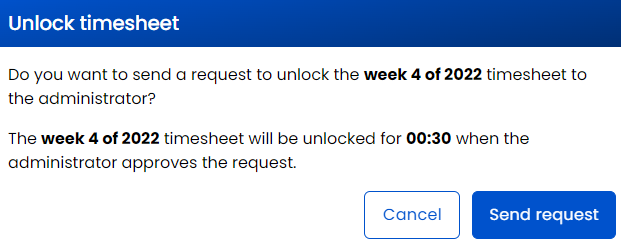
A locked week is read-only. Its owner can ask for it back with Unlock timesheet and Send request, and when an Administrator approves, the week opens for the Unlock duration: 30 minutes unless the organization sets anything up to 24 hours. Then it locks again by itself.
A worked example: week 39 at a five-person agency
The agency runs with auto-locking on, and four of its five people have opted into the Friday reminder.
- Friday, September 25, 2026, 6 PM. The reminder email says week 39 locks in two days. Tomasz opens Timesheets and sees a Grand total of 30:00: Wednesday is empty because he forgot the timer at a client workshop.
- He types 7:30 into the Acme cell for Wednesday. The entry starts at 9:00, the core-hours start, and the week now reads 37:30. He chooses Submit for approval.
- Monday, September 28, 00:00. Week 39 locks on schedule. The Administrator approves the submitted weeks from the approval emails and the Inbox; an approved week stays locked.
- Tuesday. Anna spots a mistyped project on Thursday of week 39. She sends an unlock request, the Administrator approves it, and she has 30 minutes to move the entry before the week locks again.
- For payroll, the Administrator exports each week with Export to CSV, or runs one report over the whole month.
What it deliberately does not do
- No copy of last week. Recurring hours are typed in or tracked, so the week records what happened rather than what was planned.
- No monthly or two-week grid. The timesheet is a week; longer periods come from a report, as the guide to two-week pay periods shows.
- No leave or attendance module. Time off can go on a non-billable project, and the free absence tracker template covers balances.
- No editing a locked week in place. Corrections go through an unlock, which is the point of locking.
How it connects to the rest of Sandtime.io
The grid fills from time tracking on any device, rows come from projects, and the week moves on through timesheet approvals, locking, and reminders. Excel export and reports take the hours to payroll or an invoice. People still on paper can start from the free timesheet templates, the help center explains locking and unlocking, and the blog covers logging time in a timesheet. Weighing a dedicated timesheet tool? See the timesheet software overview or the comparison with Timesheet Portal.
Timesheet questions
Do timesheets fill in from tracked time automatically?
Yes. Hours tracked with the timer or entered manually appear in the weekly view, so the timesheet is a view of the record rather than a second thing to fill in.
Can I export a timesheet for invoicing or payroll?
Yes. Timesheets and reports export to Excel and CSV, so the hours can go straight into an invoice, a payroll run, or a client’s own template.
What happens to a timesheet once it is approved?
It locks, which preserves the version that was approved. An administrator can unlock a period when a genuine correction is needed, and the change is recorded.
Is there a limit on how many people can submit timesheets?
No. Sandtime.io is free for unlimited users, so every person who needs to submit hours can have an account without a seat cost.
Can I type hours straight into the timesheet?
Yes. Type a duration into an empty project and day cell and Sandtime.io creates the entry, starting at your core-hours start or after that day's latest entry. Cells holding several entries open the day's list instead.
When does a week lock?
With auto-locking on, each week locks at midnight on Monday in the organization's time zone, and turning it on locks every past week at once. An approved week locks whether or not auto-locking is on.
Does Sandtime.io remind people to fill in their timesheet?
While auto-locking is on, an email goes out every Friday at 6 PM to each member who switched on the fill timesheet reminder in their notification settings. It is off until each person opts in.
Is there a monthly or two-week timesheet?
The timesheet shows one week at a time. For a month, start from the prepared Monthly timesheet report, and for a two-week pay period, save a report with a 14-day date range.
Start filling out timesheets today
Free for unlimited users. No credit card required.