Time Tracking Alternatives
Choose Sandtime.io for complete timesheets and timely client billing, without surveillance and free for unlimited users. Choose a specialist when you need automatic capture, attendance, invoicing, or resource planning.
Find the situation you are actually in
Start with the problem you need to solve: a free-plan limit, monitoring your team does not want, or a workflow that no longer fits. Each comparison explains when to switch and when to keep the specialist.
Their free plan ran out
Compare what your team can finish on the free plan, not just how many timers it can start. Check approvals, locking, rates, and exports before choosing.
 Clockify Alternative
Clockify capped its free plan at 5 users in April 2026. Sandtime.io stays free for unlimited users, with approvals, reminders, and locking included.
- Free for unlimited users, not 5
- Approvals and reminders included free
- Multi-currency and historical rates
- No screenshots or GPS on any plan
 Toggl Track Alternative
Toggl Track charges per seat beyond a small free plan and puts approvals and locking on Premium. Sandtime.io keeps the whole workflow free for unlimited users.
- Free for unlimited users
- Approvals and locking included free
- Multi-currency and historical rates
- Both companies are European
 TrackingTime Alternative
TrackingTime is free for unlimited users too, but approvals, locking, rates, and CSV exports sit on its paid plans. Sandtime.io includes them free and hosts data in the EU.
- Both free for unlimited users
- Approvals, locking, and rates free, not on Pro
- EU hosting instead of United States
- Honest about TrackingTime's task and invoicing scope
 Traqq Alternative
Traqq is a privacy-first operations suite with invoicing, expenses, PTO, and offline desktop tracking. Sandtime.io offers unlimited free users, mobile apps, API and MCP access, and documented EU hosting.
- Free for unlimited users, not 3
- Mobile apps plus public API and MCP
- Both reject screenshots and keystroke logging
- Honest about Traqq's broader operations suite
 TMetric Alternative
TMetric is free for two seats and keeps free-plan data for seven days. Sandtime.io is free for unlimited users and keeps the record.
- Free stops at two seats there
- Seven-day history on their free plan
- Team timesheets two tiers up
- Honest about their integration catalog
 My Hours Alternative
My Hours is free for five users and puts approvals, auto-locking and rates on Pro. Sandtime.io includes all of it for unlimited users.
- No sixth-person cliff
- Approvals and locking included free
- Historical rates included
- Honest about invoicing
 Beebole Alternative
Beebole combines custom reports and resource planning. Its free plan covers five users; rates, currencies, and multi-level approvals start on Essential. Sandtime.io keeps rates, approvals, and locking free for unlimited users.
- Free for unlimited users, not 5
- Rates and currencies free, not on Essential
- Native iPhone and Android apps
- Honest about Beebole's budgets and planning
 actiTIME Alternative
actiTIME is free for three users, then per user. Sandtime.io has no user limit, though actiTIME adds leave management and an off-the-shelf self-hosted license.
- Free stops at three users there
- No user limit here
- Approvals and locking included free
- Honest about leave and licensing
 Everhour Alternative
Everhour keeps its integrations off the free plan and starts paid at five seats. Sandtime.io is free for unlimited users with no minimum.
- Integrations are paid-only there
- No five-seat minimum here
- Approvals and locking included free
- Honest about the Asana and Jira gap
Time tracking with monitoring attached
These bundle timesheets with screenshots, activity scoring or location tracking. Sandtime.io replaces the timesheet half on purpose and has none of the rest.
 Hubstaff Alternative
Hubstaff tracks with screenshots, activity levels, and GPS. Sandtime.io has none of that on any plan and stays free for unlimited users.
- No screenshots, activity levels, or GPS
- Free for unlimited users, no seat minimum
- Approvals and locking included free
- Honest about when to keep Hubstaff
 Time Doctor Alternative
Time Doctor has no free plan and starts screenshots on its cheapest tier. Sandtime.io has no monitoring at any price and is free for unlimited users.
- No free plan on their side
- Screenshots from the entry tier
- No monitoring here at any price
- Honest about BPO proof requirements
 DeskTime Alternative
DeskTime tracks automatically and sorts the day into productive and unproductive. Sandtime.io records what people report and grades none of it.
- No productivity scoring
- No background tracking at all
- Free for unlimited users
- Honest about automatic capture
 Insightful Alternative
Insightful, formerly Workpuls, captures apps, websites, idle time, and screenshots for productivity analytics, priced per tracked seat. Sandtime.io keeps only the timesheet, reported by each person and approved weekly.
- No screenshots or app tracking
- No Stealth mode, nothing runs in the background
- Free for unlimited users
- Honest about Insightful's monitoring depth
The price changed under you
Pricing models that shifted after teams had already built their billing around them.
 Harvest Alternative
Move from Harvest’s seat-plus-usage pricing to free time tracking for unlimited users, with reminders, approvals, locking, and invoice-ready reports.
- Free for unlimited users
- No seat or usage charges
- Approvals, reminders, and locking included
- Invoice-ready reports and exports
Built for a particular world
Strong products aimed at a specific market. Worth reading before assuming a general tracker is the upgrade.
 ZEP Alternative
ZEP is German project time tracking for consultancies, with no free plan and three editions. Sandtime.io covers the timesheet chain free.
- No free plan, only a trial
- Built for consultancies, priced by edition
- Honest about expenses and DATEV
- Free for unlimited users
 Clockodo Alternative
Clockodo records working time, breaks, and absences for German compliance, with projects and rates on Pro. Sandtime.io covers project time only, free for unlimited users, hosted in the EU.
- Project time and rates free, not on Pro
- Free for the whole team, not one user
- EU hosting, not German hosting
- Honest that Clockodo wins on attendance
 timr Alternative
timr bundles attendance, project time, and a GPS mileage log, hosted in Germany. Choose it for clock-ins, field staff, or vehicles; Sandtime.io keeps approved project timesheets free for unlimited users.
- Project timesheets free, not per user
- Rates without the Plus account fee
- Approvals, reminders, and locking included
- Honest that timr wins on attendance and mileage logs
 Jibble Alternative
Jibble is free attendance tracking with clock-ins, face recognition, GPS, and pay-period approvals for payroll. Sandtime.io is free project timesheets that each person submits weekly and an administrator approves and locks.
- Both free for unlimited users
- People submit their own week, then it locks
- No screenshots, GPS, or face scans
- Honest that Jibble wins on attendance
 ClickTime Alternative
ClickTime is a paid labor-cost suite with approvals from Team and budgets and resource planning on Premier. Sandtime.io replaces the timesheet layer only, free for unlimited users, and suits nonprofits reporting hours per grant.
- Approvals free, not from Team
- No 25 or 200 user caps
- Hours per grant for nonprofits, free
- Honest about ClickTime's budgets and planning
 Timesheet Portal Alternative
Timesheet Portal is a UK pay-and-bill platform sold per module and per user, with expenses, invoicing, leave, and client approvals. Sandtime.io covers internal project timesheets only, free for unlimited users, hosted in the EU.
- No price per module or per user
- Approval that locks the week, included free
- EU hosting on OVHcloud
- Honest that agencies need Timesheet Portal's pay and bill
 Productive Alternative
Productive is an agency suite with budgets, resource planning, invoicing, and CRM, priced per user, with timesheet submission and time locking on Ultimate. Sandtime.io covers the timesheet layer only, free for unlimited users.
- Submit, approve, and lock the week, free
- No three-seat minimum
- MCP server and REST API included
- Honest about Productive's agency suite
 TimeCamp Alternative
Looking for a TimeCamp alternative? Sandtime.io includes timesheet approvals, reminders, and historical rates free - no paid tier required.
- Approvals included for free
- No surveillance features
- Historical rates on the free plan
- Automatic timesheet reminders
 Kadromierz Alternative
Kadromierz manages schedules, attendance, leave, and Polish work-time records. Compare it with Sandtime.io when the real decision is attendance versus project reporting.
- Honest workflow comparison
- Shift scheduling versus project time
- Attendance and GPS are Kadromierz strengths
- Free project timesheets for unlimited users
Or build it yourself
Owning the software instead of renting it: a custom build, or open source on a server you run.
Build vs Buy
Thinking of building your own time tracking tool? See the real five-year cost, what you would have to build, and when building is the right call.
- The full five-year cost, not just the build
- What AI did and did not change
- When building is genuinely right
- Or extend Sandtime.io through the API
 Kimai Alternative
Kimai is open source and free if you run the server; Kimai Cloud is priced per user. Sandtime.io is hosted in the EU and free for unlimited users, with approvals and apps included.
- Hosted and free, no server to run
- Approvals without a plugin or Professional plan
- First-party mobile and desktop apps, API and MCP
- Honest about Kimai's invoicing and 30+ languages
Pick the comparison route that matches the real buying problem
Use these guides to estimate unrecorded billable time, evaluate your client-work process, compare pricing, or review the broader buying criteria.
Measure billable leakage first
When the problem is hidden in lost billable work and you want proof before comparing another feature list.
Open the calculatorSee the core commercial page
The buyer-facing page for time tracking software, built around billing, visibility, and trust.
See the overviewSee the agency workflow
For teams billing client work through retainers, scoped delivery, and project-based execution.
See the agency pageSee the freelancer workflow
For underbilling, juggling several clients, and reconstructing time before an invoice goes out.
See the freelancer pageOther time tracking tools worth knowing about
Compare workflows, not rankings. Start with complete timesheets for timely billing, then decide whether you need automatic capture, attendance, or a wider business suite.
This is Sandtime.io's own comparison catalog, not an independent ranking. Each product name links to its official source. Catalog workflow descriptions checked October 6, 2026; individual comparisons show their own pricing check dates.
Project timesheets
Choose project records over a wider business suite.
 eHour
eHourChoose Sandtime.io when approved project hours and billing exports are the goal. Keep eHour when Jira timers, SSO, or automated user provisioning are part of how the team records work.
Workflow sourceVerified Oct 6, 2026
 Klok
KlokChoose Sandtime.io for a shared timesheet approval process before billing elsewhere. Keep Klok when client tracking and invoice drafts belong in the same browser-based workflow.
Workflow sourceVerified Oct 6, 2026
 Lucen Track
Choose Sandtime.io when the team needs a separate project-hour record with approvals. Keep Lucen Track, formerly Timeneye, when recording time inside Microsoft Teams and Planner is central to adoption.
Workflow sourceVerified Oct 6, 2026
 mite
miteChoose Sandtime.io when project entries need a weekly submission and approval process. Keep mite when a lightweight record organized by projects and services is the workflow your team already wants.
Workflow sourceVerified Oct 6, 2026
 OfficeTimer
Choose Sandtime.io to close project timesheets for client billing. Keep OfficeTimer when time-off requests and attendance records need to sit alongside project and task timesheets; those are separate workforce needs.
Workflow sourceVerified Oct 6, 2026
 solidtime
Choose Sandtime.io for hosted team timesheets, approvals, and billing exports without operating the software yourself. Keep solidtime when inspecting open-source code or managing your own deployment is a purchasing requirement.
Workflow sourceVerified Oct 6, 2026
 Tick
TickChoose Sandtime.io when the bottleneck is collecting and approving hours before billing. Keep Tick when the team needs to see time consumed against project and task budgets while work is underway.
Workflow sourceVerified Oct 6, 2026
 timeBuzzer
Choose Sandtime.io when completing and approving team timesheets matters more than a capture device. Keep timeBuzzer when its physical buzzer makes switching between projects easier to remember throughout the workday.
Workflow sourceVerified Oct 6, 2026
 Timenotes
Choose Sandtime.io when the job is getting project hours approved and ready to export. Keep Timenotes when absence requests and time-off calendars are part of the same team workflow.
Workflow sourceVerified Oct 6, 2026
 Timesheet
Choose Sandtime.io for explicitly recorded project hours reviewed by a team. Keep Timesheet when starting and stopping mobile timers through location or Wi-Fi automation is essential; Sandtime.io does not automate tracking from location.
Workflow sourceVerified Oct 6, 2026
 TimeTracker
Choose Sandtime.io for approved hours handed to an existing invoicing process. Keep TimeTracker when converting client time into itemized invoices in the same application is the requirement; Sandtime.io does not create invoices.
Workflow sourceVerified Oct 6, 2026
 Xpert-Timer
Choose Sandtime.io when desktop time records need to become shared, approved project timesheets. Keep Xpert-Timer when detailed desktop project timers and activity records are the working environment your team relies on.
Workflow sourceVerified Oct 6, 2026
Employee monitoring
These tools combine time records with workforce visibility.
 Apploye
Choose Sandtime.io when employees can report project hours without screenshot checks. Keep Apploye when reviewing captured screens and app usage is an explicit operational requirement; this is not part of Sandtime.io’s approach.
Workflow sourceVerified Oct 6, 2026
 Desklog
Choose Sandtime.io for reviewing submitted project hours rather than productivity scores. Keep Desklog when automatic work capture and productivity analysis are the information managers need, not just approved time for billing.
Workflow sourceVerified Oct 6, 2026
 Talygen
Choose Sandtime.io when timesheet completion is the missing piece and other business tools can stay. Keep Talygen when CRM, project operations, expenses, and workforce oversight need to remain in one business management suite.
Workflow sourceVerified Oct 6, 2026
 TopTracker
Choose Sandtime.io for trust-based project hours with a weekly approval trail. Keep TopTracker when freelancer billing relies on activity capture and screenshots as supporting evidence, rather than self-reported hours alone.
Workflow sourceVerified Oct 6, 2026
 Trackabi
Choose Sandtime.io when project timesheets can be reviewed without employee monitoring. Keep Trackabi when monitoring and leave management belong to the team’s operating process; approved billing hours do not replace those workflows.
Workflow sourceVerified Oct 6, 2026
 WebWork Time Tracker
Choose Sandtime.io when billing needs approved project hours, not captured screens. Keep WebWork Time Tracker when screenshot review and application-usage records are necessary alongside time tracking; switching would remove that monitoring evidence.
Workflow sourceVerified Oct 6, 2026
Automatic activity capture
Activity history can help reconstruct work that was not recorded manually.
 Chrometa
Choose Sandtime.io when people can deliberately record project hours before approval. Keep Chrometa when recovering billable work from computer activity and allocating it to clients is the primary need; manual timers will not recreate that history.
Workflow sourceVerified Oct 6, 2026
 ManicTime
Choose Sandtime.io to review hours that people have tracked or entered themselves. Keep ManicTime when an application and document timeline is needed to reconstruct the day before assigning work to projects.
Workflow sourceVerified Oct 6, 2026
 Memtime
Choose Sandtime.io when a shared approval process matters more than automatic reconstruction. Keep Memtime when users need locally stored activity history to recover forgotten work before choosing which project entries to share.
Workflow sourceVerified Oct 6, 2026
 RescueTime
Choose Sandtime.io for manually tracked project hours, submission, and approval. Keep RescueTime when its automatic capture and Timesheets product help reconstruct billable project work; it offers more than focus tracking, but captures activity Sandtime.io does not.
Workflow sourceVerified Oct 6, 2026
 Rize
RizeChoose Sandtime.io when complete, approved hours are the output your clients need. Keep Rize when automatic time capture and focus insights help the team understand how workdays are spent, beyond a billing record.
Workflow sourceVerified Oct 6, 2026
 Timely
Choose Sandtime.io when people will track or enter their own project hours for review. Keep Timely when automatic activity capture and AI-assisted timesheet drafts are needed to recover work that users would otherwise forget.
Workflow sourceVerified Oct 6, 2026
 Timing
Choose Sandtime.io when Mac users need to submit hours into a shared team approval process. Keep Timing when reconstructing project work from automatically recorded Mac activity is the essential part of time tracking.
Workflow sourceVerified Oct 6, 2026
 WakaTime
Choose Sandtime.io for client-project hours that include meetings, support, and other non-coding work. Keep WakaTime when editor-level coding activity and development-time analytics are the evidence needed, rather than a complete client timesheet.
Workflow sourceVerified Oct 6, 2026
Attendance and workforce tools
Shift coverage, clock-ins, payroll, and employment operations are different from project timesheets.
 Connecteam
Choose Sandtime.io for project timesheets supporting client billing. Keep Connecteam when deskless teams need employee time clocks, shift scheduling, and operational communication together; project-hour approval is not a substitute for running shifts.
Workflow sourceVerified Oct 6, 2026
 Deel
DeelChoose Sandtime.io when the missing record is approved project hours for a client. Keep Deel for global hiring, HR, and payroll operations. A time export can support an existing process, but Sandtime.io does not employ people or run payroll.
Workflow sourceVerified Oct 6, 2026
 Deputy
Choose Sandtime.io when managers need project hours approved before client billing. Keep Deputy when staffing shifts, recording attendance, and connecting worked hours to payroll are the day-to-day requirements.
Workflow sourceVerified Oct 6, 2026
 Homebase
Choose Sandtime.io for project records that a client can review before billing. Keep Homebase when the business runs on hourly shifts, employee clock-ins, and payroll. Client timesheets and shift attendance answer different questions.
Workflow sourceVerified Oct 6, 2026
 QuickBooks Time
Choose Sandtime.io when approved project time can be exported into your current billing process. Keep QuickBooks Time when field-team GPS records and the QuickBooks payroll connection are essential; Sandtime.io does not provide that location or payroll workflow.
Workflow sourceVerified Oct 6, 2026
 Rippling
Choose Sandtime.io for a project-hour approval and billing handoff alongside your existing HR system. Keep Rippling when time and attendance must connect directly to employee records and payroll rather than be maintained as a separate project record.
Workflow sourceVerified Oct 6, 2026
 TimeDock
Choose Sandtime.io when people can record project work without a physical clock-in point. Keep TimeDock when on-site QR or NFC punches and payroll exports are needed; a manually entered project timesheet does not verify presence.
Workflow sourceVerified Oct 6, 2026
 When I Work
Choose Sandtime.io for collecting project hours before approval and client billing. Keep When I Work when employees need schedules and attendance tracking for shifts. Knowing which project was billed does not tell you who should cover the next shift.
Workflow sourceVerified Oct 6, 2026
Project and resource planning suites
Choose these when time records need to live inside wider project operations.
 Avaza
AvazaChoose Sandtime.io when task planning and invoicing already work elsewhere and timesheets need attention. Keep Avaza when resource scheduling, project tasks, expenses, and invoices need one connected operating workflow.
Workflow sourceVerified Oct 6, 2026
 ClickUp
Choose Sandtime.io when time approval should have its own process while tasks remain in ClickUp. Keep ClickUp’s time tracking when recording time directly beside tasks and documents is more important than maintaining a separate timesheet system.
Workflow sourceVerified Oct 6, 2026
 Deltek Replicon
Choose Sandtime.io when the requirement is complete project timesheets and billing exports. Keep Deltek Replicon when enterprise project time, workforce records, and professional-services operations need a broader coordinated system.
Workflow sourceVerified Oct 6, 2026
 Intervals
Choose Sandtime.io when tasks can stay in another tool and the priority is closing approved hours. Keep Intervals when task assignment, project time, and budget monitoring need to remain in one service-team workspace.
Workflow sourceVerified Oct 6, 2026
 Paymo
PaymoChoose Sandtime.io to approve hours before handing them to an established invoice process. Keep Paymo when project tasks, team scheduling, and turning tracked work into client invoices need to stay connected inside one application.
Workflow sourceVerified Oct 6, 2026
 Teamdeck
Choose Sandtime.io when the challenge is completing project timesheets before billing. Keep Teamdeck when bookings, availability, and time-off calendars drive resource planning. A record of past hours does not replace a plan for future capacity.
Workflow sourceVerified Oct 6, 2026
 Teamwork.com
Choose Sandtime.io when a separate approval trail and billing export are sufficient. Keep Teamwork.com when client project delivery, resource planning, budgets, and profitability reporting need to be managed together.
Workflow sourceVerified Oct 6, 2026
 TimeLog
Choose Sandtime.io when approved time needs to feed a billing process that already exists. Keep TimeLog when professional-services planning connects project time, resource allocation, and revenue management in a broader operating system.
Workflow sourceVerified Oct 6, 2026
 Wrike
WrikeChoose Sandtime.io when project planning can stay separate from timesheet submission and approval. Keep Wrike when work planning and resource allocation are the main requirements and time reports need to remain beside that work.
Workflow sourceVerified Oct 6, 2026
Billing and accounting tools
These connect recorded work to invoices, accounting, or legal matters.
 Bill4Time
Choose Sandtime.io when the missing input is approved hours for an existing invoice system. Keep Bill4Time when legal matter billing and invoice management are required. A project-time export is not a legal billing system.
Workflow sourceVerified Oct 6, 2026
 FreshBooks
Choose Sandtime.io when timesheet approval is the bottleneck and accounting can remain in FreshBooks. Keep FreshBooks for creating invoices, managing expenses, and accounting. Sandtime.io prepares time records; it does not replace the financial ledger.
Workflow sourceVerified Oct 6, 2026
 Paydirt
Choose Sandtime.io for team-reviewed time that will be billed in another tool. Keep Paydirt when client time tracking and producing agency invoices belong in the same application, rather than an export-based handoff.
Workflow sourceVerified Oct 6, 2026
 TimeLive
Choose Sandtime.io when approved project hours are enough to unblock billing. Keep TimeLive when the process also needs expense records, attendance, and payroll-related workflows. Those records carry information beyond client-project hours.
Workflow sourceVerified Oct 6, 2026
 TimeSolv
Choose Sandtime.io for approved project-time exports into an existing billing system. Keep TimeSolv when legal matter billing and trust accounting are required; timesheet approval does not replace management of client funds.
Workflow sourceVerified Oct 6, 2026
 TimeStatement
Choose Sandtime.io when approved hours will be reconciled with invoices elsewhere. Keep TimeStatement when time, expenses, and multilingual, multicurrency invoicing need one workflow. Sandtime.io supports billing reports, not invoice creation.
Workflow sourceVerified Oct 6, 2026
Personal and desktop trackers
Individual routines and native interfaces can matter more than team processes.
 aTimeLogger
Choose Sandtime.io when personal time records need project assignment and team approval for billing. Keep aTimeLogger when tracking daily activities, personal goals, and charts is the purpose, rather than collecting client-ready timesheets.
Workflow sourceVerified Oct 6, 2026
 Hours TimeLord
Choose Sandtime.io when time records need a weekly submission and approval trail. Keep Hours TimeLord when visual timelines and timers are what make daily recording work for you or your team.
Workflow sourceVerified Oct 6, 2026
 OfficeTime
Choose Sandtime.io when desktop and mobile entries need shared team approval before export. Keep OfficeTime when its native time and expense workflow suits individual billing and you do not need to move those records into a shared approval process.
Workflow sourceVerified Oct 6, 2026
 Timeular
Choose Sandtime.io for shared project timesheets without a physical tracking device. Existing Timeular customers may prefer their supported hardware workflow within EARLY and TimeTac; the vendor directs new signups to TimeTac, not a standalone Timeular product.
Workflow sourceVerified Oct 6, 2026
 Tyme
TymeChoose Sandtime.io when project hours need a shared approval process across the team. Keep Tyme when native Apple time tracking and expense recording are central to your personal work routine.
Workflow sourceVerified Oct 6, 2026
 WorkingHours
Choose Sandtime.io when tracked hours must be submitted for team approval and client reporting. Keep WorkingHours when device-based timers, tags, exports, and personal cloud synchronization are sufficient for your individual tracking routine.
Workflow sourceVerified Oct 6, 2026
Test the workflow before switching
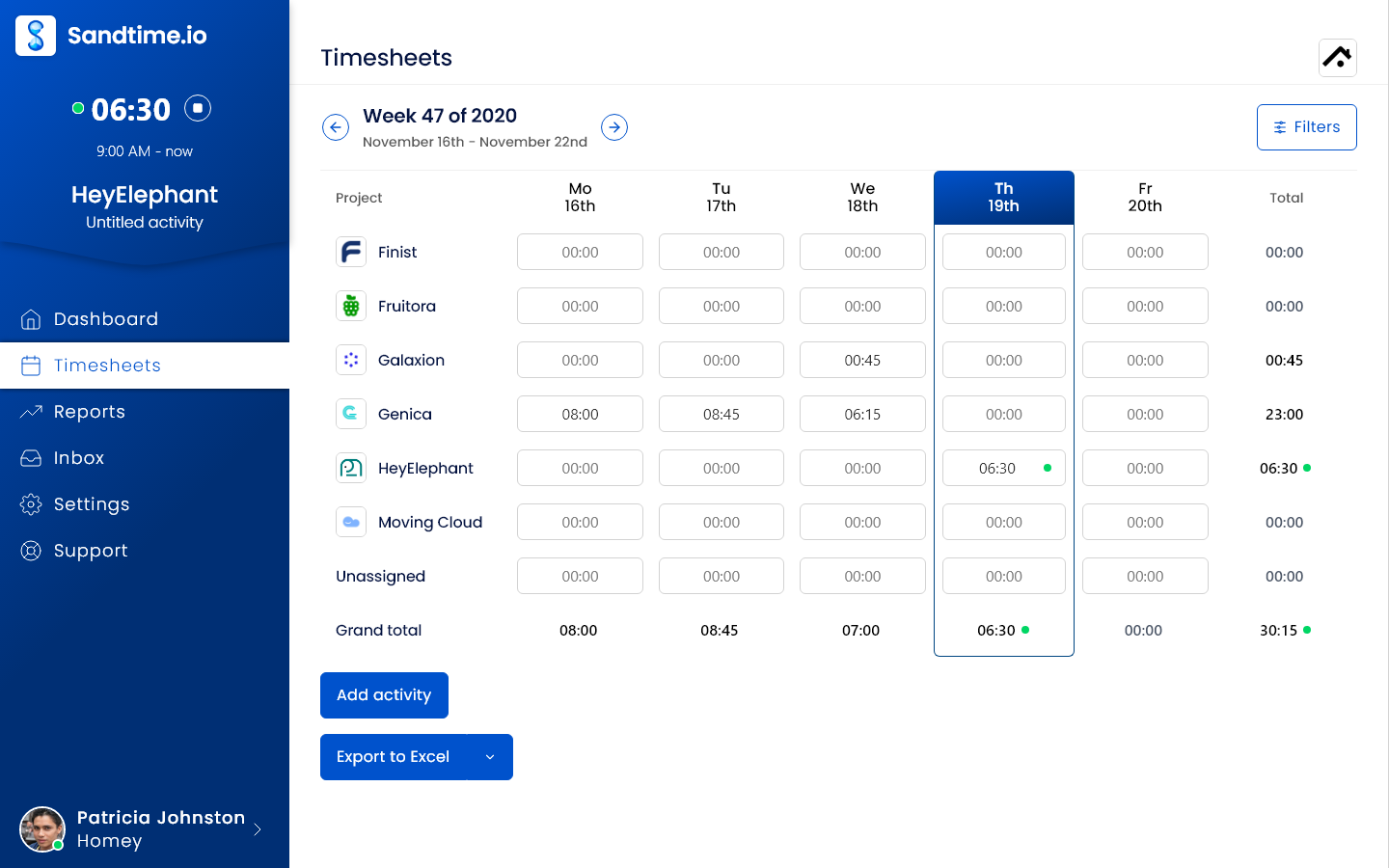
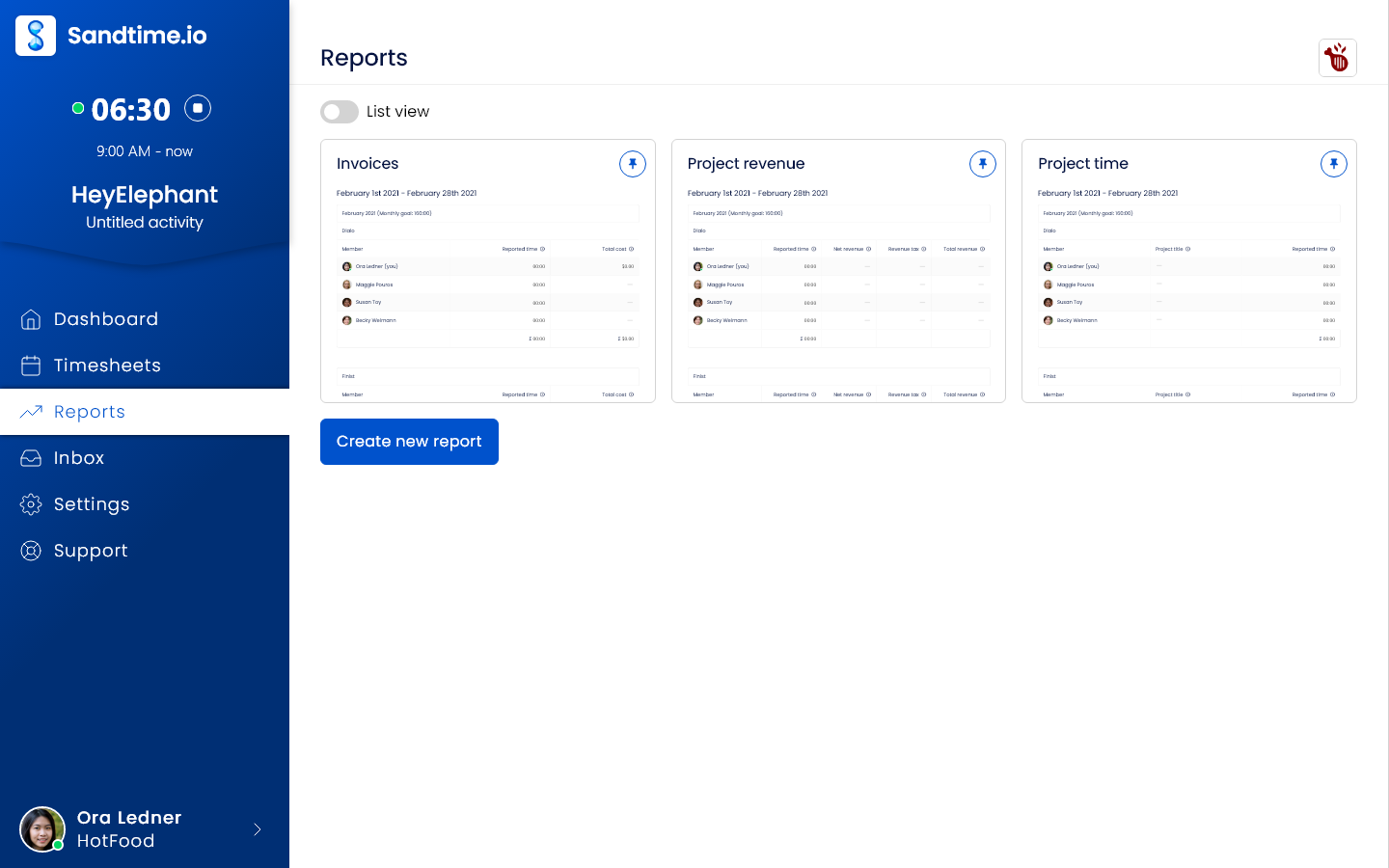
The useful test is whether complete, approved hours reach billing on time. These are real Sandtime.io screens, not mockups of a competitor's product. The screenshots use the English interface; Polish and French interfaces are also available.
Record the work
Use one client project for a complete billing cycle. Track or enter hours yourself; Sandtime.io does not reconstruct work from app or website activity.
Close the week
Submit, approve, and lock the weekly timesheet. Friday email reminders require auto-locking and each user's notification opt-in; they are off by default.
Check the billing handoff
Compare the exported hours and amounts with your existing billing records before switching. Sandtime.io supplies reports and exports, not an invoicing engine.
Keep payroll, attendance, automatic capture, legal billing, and resource planning in the evaluation if your team depends on them. A simpler timesheet tool is not a replacement for those workflows.
A billing handoff you can check
Follow a fictional week with 14 recorded hours, 12 billable hours, and EUR 960 ready for your existing invoice process. Inspect real report screens and download the actual CSV and Excel exports without an account.
See the worked timesheet-to-billing example
Screenshot source: the public Sandtime.io brand kit · Read the approval guide · Read the reminder conditions
Why teams choose Sandtime.io
Close timesheets before billing
Submit weekly timesheets for approval and lock approved hours before exporting them for billing. Keep a clear record instead of rebuilding the month from memory.
Trust-first instead of surveillance-first
No screenshots, no keystroke logging, and no invasive monitoring. Teams get accountability without the adoption penalty of bossware.
Built for client-ready reports
Turn tracked time into reports clients, managers, and finance can actually use without rebuilding hours from memory.
Free without seat tax
Free for unlimited users - no seat limits and no per-user pricing. Registered nonprofits are eligible for a custom offer.
Try one project before switching your team
Create a free workspace, record a billing cycle, and check the exported hours against your current records. Keep your existing tool until the workflow fits.
Join the 4,000+ freelancers and teams already tracking their hours here.