Roles and Permissions
Three roles keep everyday work clear: Users track their own time, Project Administrators manage their project teams, Administrators approve timesheets and control the organization. No unnecessary access by default.

The three role levels explained
User role
Track time, fill timesheets, and build reports. See teammates’ entries on the projects you share, with no access to organization settings.
Project Administrator role
Manage the members of the projects you administer and see their cost and revenue rates. Approvals stay with Administrators.
Administrator role
Full access to organization settings, every project, every member, all cost and revenue rates, and timesheet approvals.
Timesheet approval rights
Only Administrators can approve, reject, lock, and unlock timesheets. Users submit and wait for review.
Settings access control
Only admins can change organization-wide settings, locking configuration, and security controls.
Principle of least privilege
Give each person the smallest role that still lets them do their job. Keeps data clean and reduces accidental changes.
Who benefits from role-based access
- Organizations where managers should see team hours but not change settings
- Companies where only HR or finance should access billing-sensitive reports
- Teams with contractors who need User access but nothing beyond time tracking
- Multi-department organizations with distinct management hierarchies
In short: Sandtime.io has three roles. An Administrator runs the organization, sets rates, and is the only role that approves, rejects, locks, and unlocks timesheets. A Project Administrator is assigned per project and looks after that project's team. A User tracks their own time and sees teammates only on shared projects. Roles cost nothing, because Sandtime.io is free for unlimited users.
What each role can do
The rules below are enforced by the server, not only hidden in the interface.
- Create projects, invite people, change someone's organization role: Administrator only.
- Change organization settings such as time rounding, timesheet locking, core hours, and the custom subdomain: Administrator only. Everyone else sees the current policy read-only.
- Approve or reject timesheets and unlock requests: Administrator only. Project Administrators do not approve.
- Set cost and revenue rates: Administrator only.
- See rates: an Administrator sees all of them. A Project Administrator sees the revenue rates on their project and the cost rates of its members. A User sees none, including their own.
- Edit, delete, or move someone else's entry: Administrator only. Everyone edits their own entries while the week is unlocked.
- See other people's time: an Administrator sees everyone. A User sees their own entries plus teammates' time on the projects they share.
- Submit a timesheet for approval: everyone, for their own week.
Giving someone a role, step by step
- Invite the person: Settings, Organization, Members, then Invite members. They join as a User, and no password is involved. The invitation guide covers what they receive.
- To make them an Administrator, open their profile in Members and change Role. An organization can have several Administrators, and the last one cannot step down until someone else is promoted.
- To make them a Project Administrator, open the project in Settings, Projects, pick the person in Members, and set Role within the project. The same person can administer one project and be an ordinary member of another.
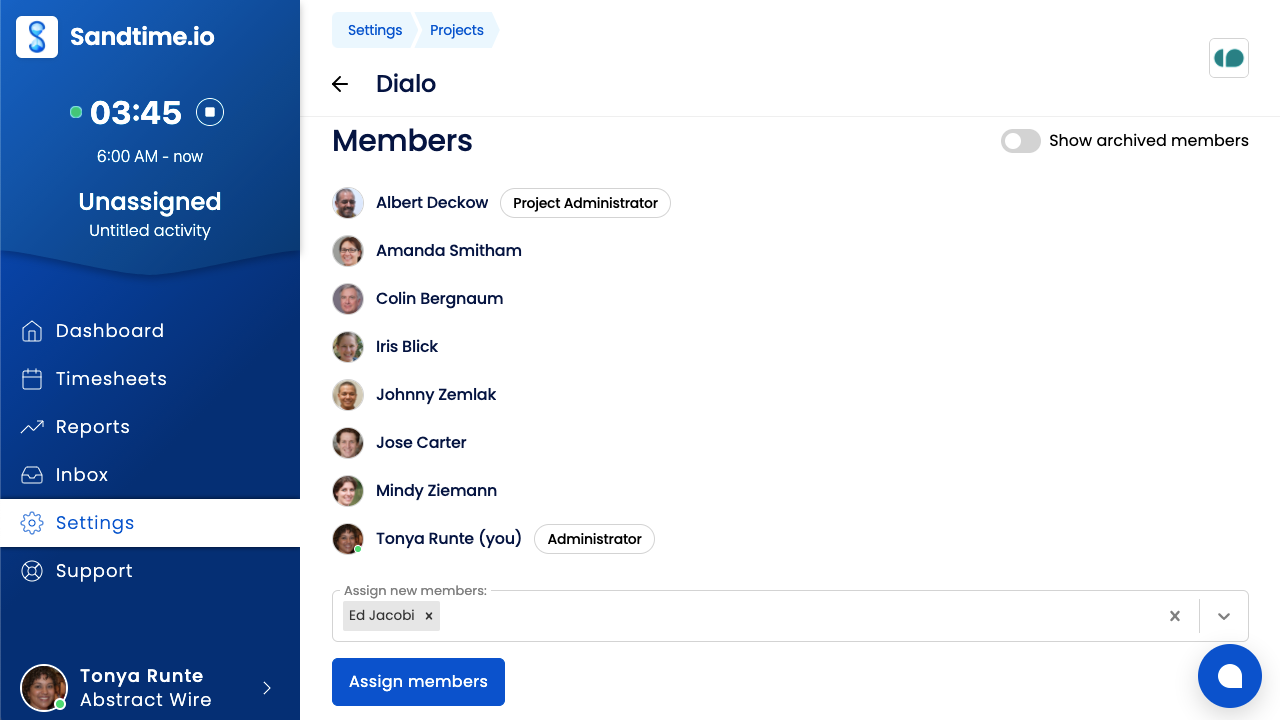
A worked example: a 12-person agency
The agency has two Administrators, the founder and the operations lead, so approvals do not stop when one of them is on holiday. Two account leads are Project Administrators on the client projects they run. Seven employees and one freelance developer are Users.
- On Friday, the ten people who track time submit their weeks. Both Administrators get the approval emails, and either one can decide.
- An account lead opens her project and sees the revenue rate of each person on it and their cost rates, so she can judge the project's margin. She cannot see the rates on the other account lead's project.
- She wants to bring the freelancer, already invited to the organization, onto her project. Assigning him sends a request, and the operations lead approves it.
- The freelancer, a User on that one project, sees his own hours, his project teammates' time on it, and the Administrators. He does not see other projects, other teams, or any rate, including his own.
- A designer logged Tuesday twice. Only she, or an Administrator, can fix the entry; the account lead cannot, even on her own project.
What it deliberately does not do
- There are no custom roles or per-permission toggles. Three fixed roles cover the ground, and project membership does the fine-grained work.
- There is no approver-only or read-only viewer role. Approving timesheets comes with the Administrator role.
- There is no manager-per-team approval chain: approval requests go to all Administrators.
- There is no enterprise single sign-on with SAML or SCIM. People sign in with an emailed link or code, or with Google, Microsoft, Apple, or Yahoo on the same address. See sign-in options.
How it connects to the rest of Sandtime.io
Roles decide who closes the loop on timesheet approvals, who configures locking, and who sees money in reports and multi-currency rates. Project membership, set up on the project management page, decides who sees whom; project visibility and the help article on who can see whom go deeper. The full reference is in roles and permissions, and a written policy can start from the free time tracking policy template.
Roles and permissions questions
What roles exist in Sandtime.io?
Three. A User tracks their own time and sees teammates’ entries on shared projects, a Project Administrator manages the members of the projects they administer, and an Administrator has full access to settings, every project, every member, all rates, and timesheet approvals.
Can a User see everyone else’s hours?
No. A User sees their own entries and those of teammates on the projects they share, and nothing from other projects or the organization settings. Only Administrators see the whole organization.
Who can invite new people?
Organization administrators. A regular member who tries is pointed at their administrator rather than being left to guess.
Do extra roles cost anything?
No. Sandtime.io is free for unlimited users, and roles are part of the product rather than a paid tier.
Can a Project Administrator approve timesheets?
No. Approving, rejecting, locking, and unlocking timesheets is reserved for Administrators, and the server enforces it. A Project Administrator looks after their project's team and sees its rates, but does not decide on timesheets.
Can an organization have more than one Administrator?
Yes, and it is a good idea, so approvals do not stall when one person is away. Approval requests go to every Administrator, and the last Administrator cannot step down until someone else has been promoted.
Can a User see their own hourly rate?
No. Users see no cost or revenue rates, including their own. Administrators set and see every rate, and a Project Administrator sees the rates of the people on the projects they administer.
Does Sandtime.io support custom roles or SAML single sign-on?
No. There are three fixed roles, and project membership does the fine-grained work. People sign in with an emailed link or code, or with Google, Microsoft, Apple, or Yahoo; there is no SAML or SCIM.
Set up your team with the right roles
Free for unlimited users. No credit card required.