An Insightful alternative that keeps the timesheet and drops the monitoring
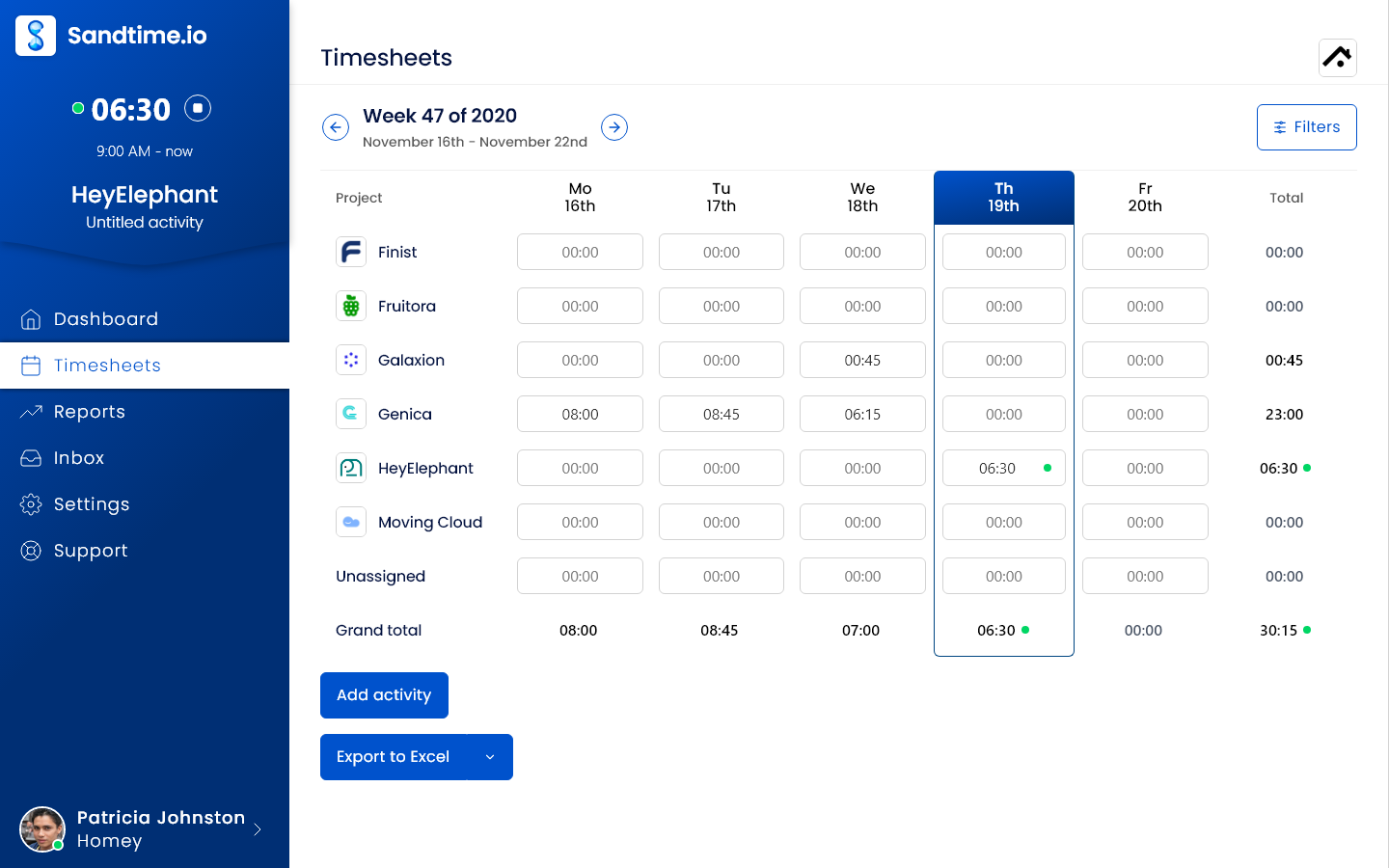
Insightful, formerly Workpuls, records apps, websites, active and idle time, and screenshots, and turns them into productivity analytics. Sandtime.io replaces only the time tracking half of that: people report their own hours against projects, submit the week, and an administrator approves and locks it, free for unlimited users.
Insightful is workforce analytics and employee monitoring software from Insightful.io, Inc., headquartered in New York and formerly sold as Workpuls. It sells Workforce Analytics, Workflow Optimization, Combo, and Enterprise plans per tracked seat, with automatic clock-ins, app and website usage, screenshots, productivity analysis, and a Stealth mode, plus paid add-ons for on-demand screenshots and screen recording. Visit Insightful website
Sandtime.io vs Insightful: the short answer
Insightful is the better choice when you need to see how work happens on each computer; Sandtime.io is the better choice when you need trustworthy project hours without watching anyone. Insightful's Workforce Analytics plan costs $8 per seat per month billed annually and captures apps, URLs, idle time, and screenshots. Sandtime.io collects none of that. It replaces only the time tracking half, with approvals and locking free for unlimited users, and that trade is the point.
Choose Sandtime.io when you want the hours, not the footage
People track time with the timer on the web, desktop, phone, Slack, or the Chrome extension, or type it in afterwards. They submit the week, an administrator approves it, and it locks. Reports show hours by project, person, and date with the rate that applied on the day. Nobody's screen is captured.
Choose Insightful when monitoring is the requirement
Insightful is built for operations and security teams that want device-level evidence: automatic clock-ins, app and website usage, active and idle time, engagement levels, screenshots, screen recording, irregular behavior alerts, shift schedules, and insider threat detection. If a client contract or an internal policy requires that evidence, Sandtime.io cannot provide it.
Sandtime.io vs Insightful at a glance
What each product records and where Insightful's plans place it, as of September 30, 2026.
| Decision factor | Sandtime.io | Insightful |
|---|---|---|
| Main job | Self-reported project timesheets that are submitted, approved, locked, and reported with rates | Workforce analytics and employee monitoring from activity captured on each computer |
| Price | Free for unlimited users and projects | Per tracked seat per month, billed annually: Workforce Analytics $8, Workflow Optimization $12 in beta, Combo $16. Enterprise custom |
| How hours are recorded | A timer the person starts, or entries they type | Automatic or manual clock-in, automatic timesheets, and manual or offline time |
| Screenshots and screen recording | None, and none planned | Screenshots on Workforce Analytics, Combo, and Enterprise. On-demand screenshots and screen recording as $4 add-ons |
| Apps, websites, and idle time | Not recorded | App and website usage, full URLs, window titles, active and idle time, and mouse and keyboard activity counts |
| Productivity scoring | None | Productive time analysis, categorized work time, and engagement levels |
| Hidden tracking | Nothing runs unless the person starts it | Stealth mode, which people cannot stop from running |
| Timesheet approvals | Submit, approve, and reject the week, in the app or from the email in one click, and the approved week locks, included free | Manual time that employees add goes to an admin or manager for approval. Audit logs on Enterprise |
| Rates and billing reports | Dated cost and revenue rates with a currency per rate, billable time, and Excel and CSV exports, included free | Time on projects and tasks on Workforce Analytics, Combo, and Enterprise. Invoicing and budgeting listed as coming soon |
| Attendance and shifts | None. Core hours are an expected-hours goal, not attendance | Clock-ins, breaks, shift scheduling, schedule adherence, and absence alerts |
| Data retention | Deleting an account or organization removes it from active systems; backups expire after 14 days | Screenshots and recordings up to two months, activity logs up to three months, other data up to 24 months |
| API, MCP, and SSO | A public REST API, an MCP server, and sign-in with Google, Microsoft, Apple, or Yahoo, included free | API on every plan. SSO on Enterprise |
| Hosting | OVHcloud in the European Union, built in Poland; self-hosting arranged case by case for Enterprise | Google Cloud in the US and EU, a Saudi Arabia platform, private cloud, and on-premise from 250 licenses |
| Best fit | Teams that bill or report project hours and trust people to report them | Operations, compliance, and security teams that want device-level evidence of work |
Why teams choose Sandtime.io instead of Insightful
Nothing to switch off
Sandtime.io has no screenshots, app or URL tracking, idle detection, or activity scores on any plan, because it has none of those features. The monitoring question has a one-word answer.
No per-seat bill
Insightful charges for every tracked seat, from $8 a month billed annually. Sandtime.io is free for unlimited users, so contractors and part-timers can report hours without a purchase order.
A week people sign off themselves
Each person submits their own week, an administrator approves it from the app or the email, and it locks. The record is a declaration the person stands behind, not an inference from their mouse.
Rates and exports for billing
Cost and revenue rates carry start dates and their own currency, and reports export to Excel or CSV, which is what a client invoice or a payroll run needs.
Adoption instead of resistance
Teams stop working around a tracker they resent. When nobody is watched, the conversation moves from what the screenshot showed to whether the week is complete.
Less to negotiate with a works council
A tool that cannot observe behavior has less to agree with employee representatives. Sandtime.io runs on OVHcloud in the EU and publishes its subprocessors.
Which product should your team choose?
Start with the question you are trying to answer: how people spend their time at the computer, or how many hours went into each project and client.
Choose Sandtime.io
Pick Sandtime.io when you bill clients or report hours per project, when people should submit and stand behind their own timesheets, when monitoring would hurt trust or needs works council approval, and when the budget for time tracking is zero.
Choose Insightful
Pick Insightful when a contract, a regulator, or your own policy requires screenshots, app and website histories, idle alerts, attendance records, or insider threat detection, and a per-seat price is acceptable for that scope.
Split the two jobs
If Insightful mostly produces timesheets today, move time tracking to Sandtime.io and keep Insightful only for the roles that truly need monitoring. Fewer tracked seats means a smaller Insightful bill.
What Insightful costs per month
Insightful charges for every tracked seat. For a team of 10 on Workforce Analytics that is $80 a month billed annually, or $160 with on-demand screenshots and screen recording. Sandtime.io tracks nobody and costs $0 for any team size.
Sandtime.io
Self-reported project time for everyone
Freefor unlimited users, no credit card required
- 5 users$0 a month
- 10 users$0 a month
- 25 users$0 a month
- 50 users$0 a month
- A timer or typed entries, nothing captured in the background
- Submit, approve, and lock weekly timesheets
- Dated cost and revenue rates in any currency
- Excel and CSV export
- A REST API and an MCP server
Insightful Workforce Analytics
The entry plan, with screenshots and app tracking
$8per tracked seat per month, billed annually
- 5 seats$40 a month$80 with screenshots and recording
- 10 seats$80 a month$160 with screenshots and recording
- 25 seats$200 a month$400 with screenshots and recording
- 50 seats$400 a month$800 with screenshots and recording
- Automatic clock-in and automatic timesheets
- App and website usage, active and idle time
- Screenshots and productive time analysis
- Time on projects and tasks
Insightful Combo
Workforce Analytics plus Workflow Optimization
$16per tracked seat per month, billed annually
- 5 seats$80 a month
- 10 seats$160 a month
- 25 seats$400 a month
- 50 seats$800 a month
- Everything in Workforce Analytics
- Workflow Optimization tools
- Payroll
- On-demand screenshots and screen recording still add-ons
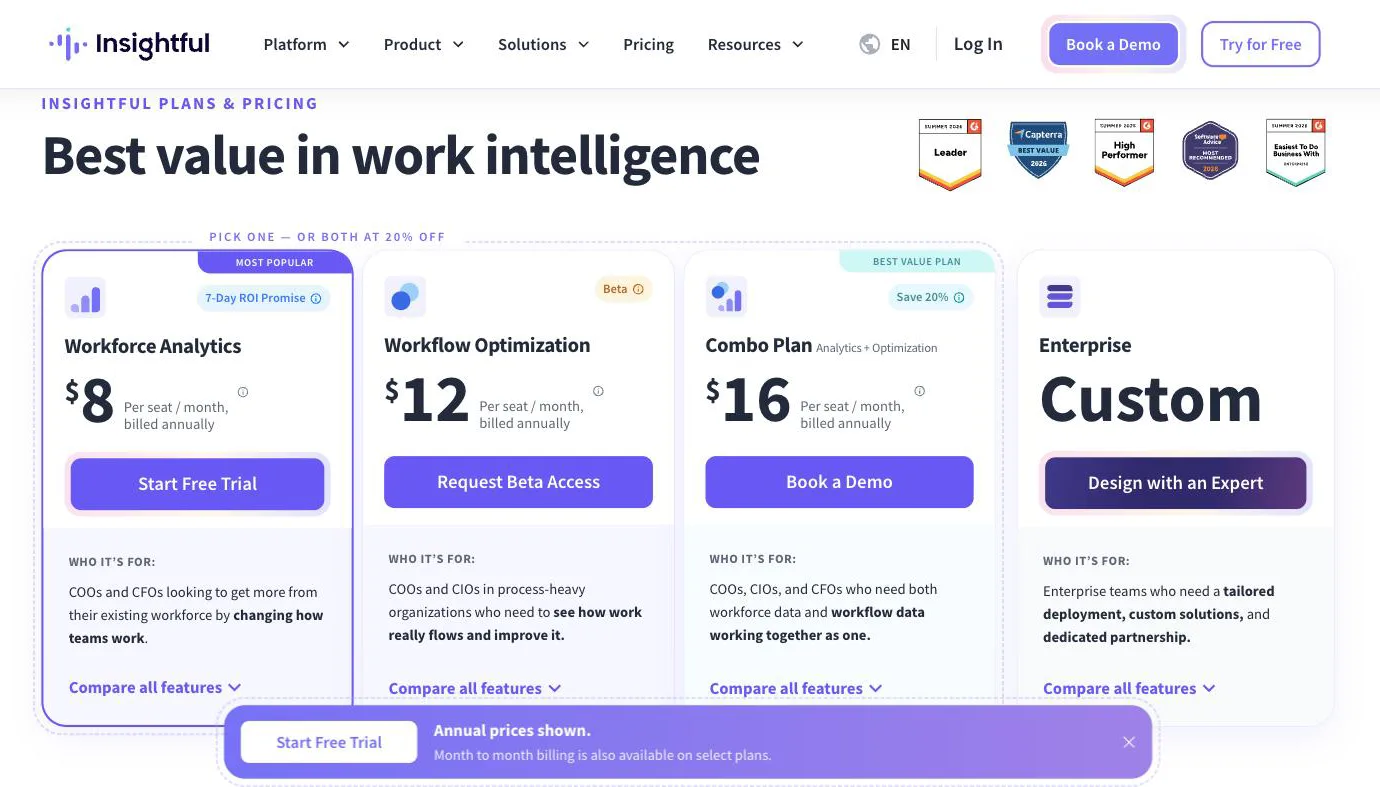
Monthly cost at list price in US dollars, billed annually. Insightful does not charge for Admin, Manager, and Client users unless they are tracked too. Taxes and negotiated terms are excluded. Comparing another monitoring tool? See Sandtime.io vs Hubstaff.
Watch the 75-second Sandtime.io product tour
See the timer, timesheets, reporting flow, integrations, and mobile apps before creating an account. The video is served directly by Sandtime.io, so it does not contact a third-party player.
Prices and plans checked on September 30, 2026. If Insightful's pricing page disagrees, trust Insightful, and see Sandtime.io pricing for ours.
Insightful vs Sandtime.io: frequently asked questions
Direct answers about monitoring, screenshots, Stealth mode, prices, approvals, hosting, and moving your team.
What is the best Insightful alternative?
It depends on why you use Insightful. If you need screenshots, app and website histories, idle alerts, or productivity scores, the alternative is another monitoring product, and Sandtime.io has none of those features. If what you actually need is accurate project hours that people submit and a manager approves, Sandtime.io is a free alternative for unlimited users that records only what each person reports.
Does Sandtime.io take screenshots or track apps and websites like Insightful?
No. Sandtime.io has no screenshots, screen recording, app or URL tracking, idle detection, activity levels, keystroke counts, or productivity scoring. These are not switched off by default; they do not exist in the product and are not planned. Hours come from a timer the person starts or from entries they type.
How much does Insightful cost?
Checked September 30, 2026, Insightful listed Workforce Analytics at $8 per seat per month billed annually, Workflow Optimization at $12 in beta, the Combo plan at $16, and Enterprise at a custom price, with month-to-month billing on select plans. On-demand screenshots and screen recording are $4 add-ons each, and higher-frequency screenshots, up to 120 an hour, are $3. The trial runs 7 days.
What is Insightful Stealth mode?
Insightful's help center describes two visibility modes. Visible mode lets people clock in manually and track time on tasks and projects. Stealth mode captures data continuously with no employee control, and the help center says people tracked in Stealth mode cannot stop Insightful from running. Sandtime.io has no equivalent, because nothing runs unless the person starts a timer or enters time.
Is Sandtime.io free for unlimited users?
Yes. Sandtime.io is free for unlimited users and projects, with no per-seat fee and no credit card required. Timesheet approvals, locking, roles, reports, Excel and CSV exports, historical rates, multi-currency support, the REST API, and MCP access are all included, and registered nonprofits can ask for a custom offer.
How do managers trust hours without monitoring?
Through the workflow instead of an activity feed. Each person submits the week, an administrator approves or rejects it in the app or in one click from the email, the approved week locks, and any later change needs an unlock request that leaves a record. A weekly total that does not match the work is a conversation, which is easier to have than a disputed screenshot.
Where do Insightful and Sandtime.io host data?
Insightful stores cloud data on Google Cloud in the United States and the European Union, offers US, EU, and Saudi Arabia platforms, and sells private cloud and on-premise deployments, with on-premise requiring at least 250 employee licenses. Sandtime.io runs on OVHcloud in the European Union and is built in Poland. Both can keep data in the EU, so the difference is what gets collected, not where it sits.
Can I move from Insightful to Sandtime.io?
Yes, but not automatically. Export the Insightful time and attendance reports you need to keep, then recreate active projects, people, and current rates in Sandtime.io. Tell the team that tracking is now self-reported, run one weekly approval cycle, and compare totals before you uninstall the Insightful agent. Keep Insightful if you still need its attendance, shift, or security features.
Comparing something else?
Teams weighing this one usually weigh these too.
Run one week of self-reported timesheets
Invite the whole team at no seat cost, let everyone report and submit one week, approve it, and compare the export with the Insightful time report you use today.