Settings, core hours, and dashboard goals
Core hours define the default start and end of the workday in Sandtime.io. They also set the expected daily, weekly, and monthly goals shown on the dashboard. Everything lives in one place: Settings > Time tracking > Core hours.
Set core hours
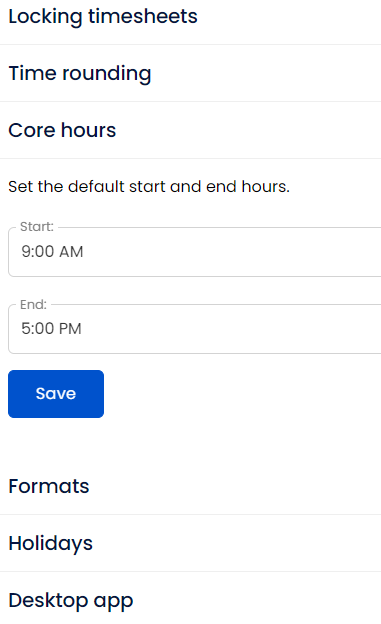
Pick the Start and End time of the standard workday and save. The length of the window becomes the expected day for the whole organization. Only an Administrator can change it.
Follow the step-by-step guide to setting core hours.
Set a weekly goal
There is no separate goal field. The weekly target is the expected day multiplied by the working days of that week, so moving the end time earlier turns a 40-hour week into a 30-hour or 20-hour one.
Follow the step-by-step guide to setting a weekly goal.
Why do core hours and goals matter?
If someone works part-time, the dashboard should not still assume a full 40-hour week. Adjusting Core hours updates the expected goal automatically.
Examples:
9:00 AMto5:00 PMproduces an 8-hour day and a 40-hour week.9:00 AMto3:00 PMproduces a 6-hour day and a 30-hour week.
Weekends count as 0 expected hours. Public holidays do too, once a country is selected in Settings > Time tracking > Holidays, so a week with one public holiday targets less than a full week.
The rest of Settings
Core hours live under Time tracking, alongside the settings in the next section. The other sections of Settings are:
- Account - your own profile, your timesheets, the projects assigned to you, and your activity history.
- Organization - organization name, note, and currency, plus Members and the activity they report.
- Projects - the projects you are assigned to, access to archived ones, and creating a new one.
- Notifications - which events you want to hear about.
- Integrations - Slack, the browser extension, and API keys.
- Setup assistant - the first setup checklist. Only Administrators see this one.
- About and help - product information and support.
Related settings worth checking
- Locking timesheets if you want weeks to close automatically - see locking and unlocking timesheets.
- Time rounding if reported durations should be presented in rounded intervals - see time rounding.
- Holidays to pick the country whose public holidays reduce the expected hours.
- Formats for how dates, times, and durations are displayed.
- Desktop app for whether tracking starts when the app launches and stops when it closes - see Start and stop tracking with the desktop app.
- Notification settings if you want goal or overlap alerts to be quieter.
Learn more about core hours and work goals in Sandtime.io.