Free volunteer hours log template
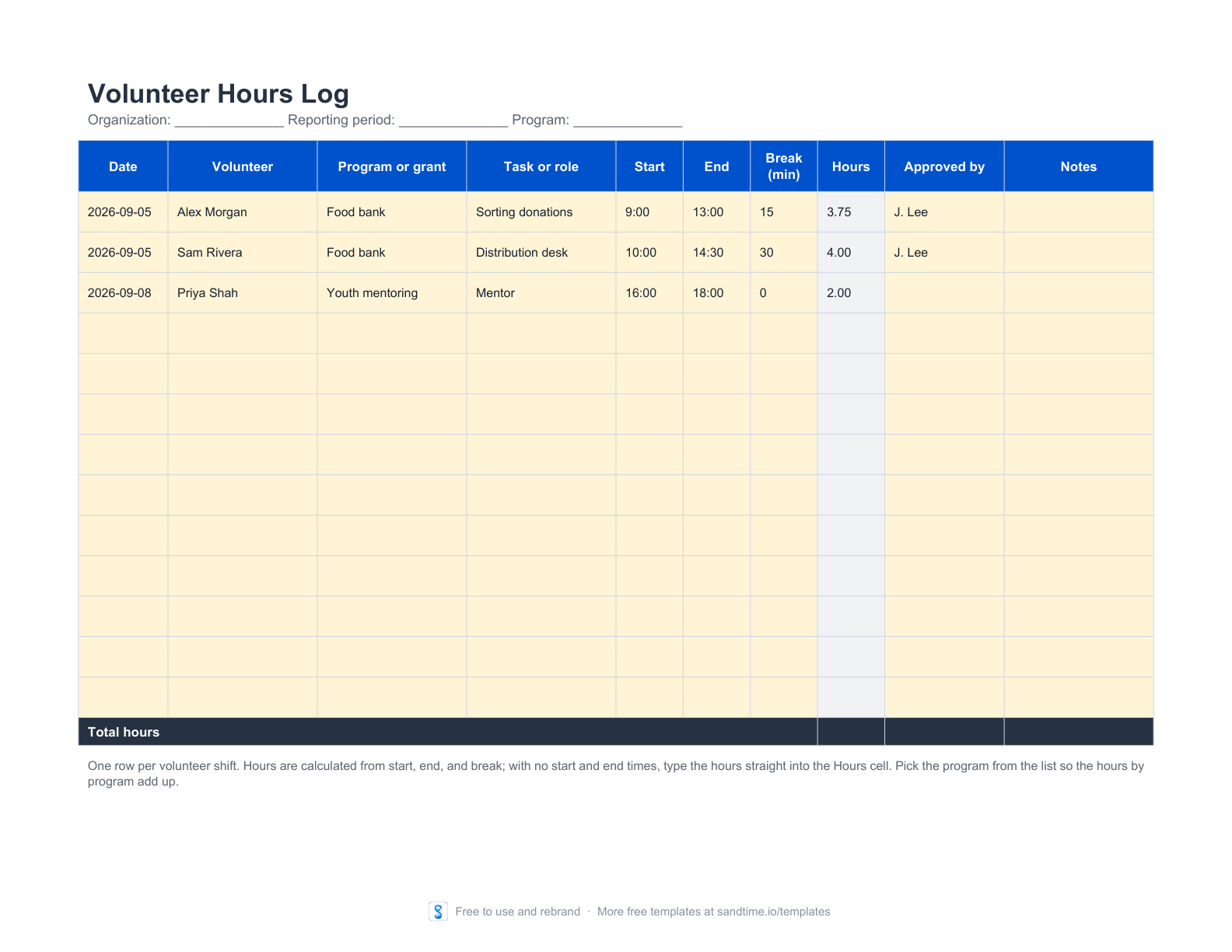
Log each volunteer shift with its program or grant, start and end time, and approver. The workbook totals hours per program and counts your volunteers.
- No signup or email address
- Editable and printable formats
- Rebrand it for your clients, no attribution
How to track volunteer hours for free
Record one row per volunteer shift: the date, the volunteer, the program or grant, the task, the start and end time, and who approved it. This free Excel log calculates the hours from start, end, and break, totals them per program or grant, and counts your volunteers, so the figures for a grant or donor report are ready at the end of the period. Print the PDF when volunteers sign in on paper at an event; it ends with a summary and signature lines for the coordinator and the approver.
For paid staff on the same grant, use the timesheet templates or the project time log, and the attendance sheet to record who was present each day. What funders of European projects expect from those records is covered in the guide to timesheets for EU-funded projects.
When the log outgrows one coordinator, see how nonprofits track time in Sandtime.io, or compare the best volunteer time tracking tools for nonprofits.
Edit it digitally or print a clean copy
Best for nonprofits, charities, schools, and community groups that report volunteer hours to a board, a funder, or donors.
A useful starting point, not an empty shell
- Shift rows with volunteer, program or grant, task, start, end, break, and approver
- Automatic hours, approved and awaiting-approval totals, and a volunteer count
- Hours per program or grant, and a printable summary with signature lines
- Enter the organization, reporting period, and program, then list your programs or grants in the table under the summary.
- Add one row per volunteer shift with start, end, and break, and have a coordinator sign off each row under Approved by.
- Copy the hours per program into your grant or donor report, and sign the printed summary for the period.
Keep the template until the process needs more
A shared file can be the right tool for a new or small process. Sandtime.io becomes useful when reminders, approvals, locked records, project data, reports, and Excel exports must stay dependable across a growing team.
Collect volunteer hours without chasing paper sheets
Sandtime.io is free for unlimited users. Volunteers log their shifts in the iPhone or Android app, a coordinator approves the timesheets, past periods lock, and reports export to Excel or CSV for the funder.
Free for unlimited users. No screenshots, keystroke logging, or activity scores.
Questions about this free template
How can I track volunteer hours for free?
Use a shared spreadsheet such as this log: one row per shift with the date, the volunteer, the program or grant, the start and end time, and who approved it. Keep the Excel file where your coordinators can edit it, and print the PDF as a sign-in sheet for events. Once more people log hours than one coordinator can collect, a free time tracking app lets volunteers enter their own hours instead.
What records do funders usually ask for with volunteer hours?
It depends on the funder, so read the grant agreement or the donor’s reporting guidelines first. Requests commonly cover who volunteered, on which date, for how many hours, on which program or grant, what the work was, and who confirmed it. A log that records all of these for every shift, with a signed summary for the period, answers most requests without rebuilding the figures later.
How do I total volunteer hours per program or grant?
Type your programs or grants into the table under the summary, then pick the program from the list on each shift. The workbook adds up the hours for each program, shows its share of the total, and puts hours that match no listed program under Other or unlisted programs, so a misspelled name shows up instead of disappearing from the report.
What if a volunteer only knows the total hours?
Leave the start and end time empty and type the hours straight into the Hours cell. The total, the approved hours, and the hours per program count that row like any other.
When does a spreadsheet stop working for volunteer hours?
A spreadsheet starts to strain when many volunteers work across several sites or events: a coordinator retypes paper sheets, chases missing shifts, and merges copies of the file before every report. Sandtime.io is free for unlimited users. Volunteers log hours in the iPhone or Android app or in the browser, a coordinator approves their timesheets, and past periods lock so reported hours stop changing. Registered nonprofits can also ask about a custom offer.
Is this template really free?
Yes. The editable file and the printable PDF are free and need no email address. We place them in the public domain rather than licensing them, so you may copy, edit, rebrand, redistribute, and use them commercially without asking permission.
Can I edit the template?
Yes. Open the Excel file in Microsoft Excel or import it into Google Sheets. Pale yellow cells are intended for input and grey cells contain calculated summaries.
Which format should I print?
Download the PDF when you need a clean paper copy. It uses high-contrast lines, safe print margins, and a layout designed for common A4 and US Letter printers.
Does this template guarantee compliance?
No. It is a general operational starting point and does not guarantee legal, payroll, tax, employment, record-retention, or labor-law compliance. Adapt it to the rules and contracts that apply to your organization.
Can I share or rebrand it?
Yes. Share the original file, add your own branding, publish an adapted version, or use it commercially. Nothing has to be credited back to us.
When should a team move beyond a template?
A file works well while one person owns the process and the team can keep it current. Consider Sandtime.io when reminders, approvals, locked records, project data, reports, and reliable exports need to work together.