Can I Log Time on Weekends in Sandtime.io?
Yes - Sandtime.io supports time entry on Saturday and Sunday. To show weekend days in your timesheet, open Timesheets, click Filters, and turn on Show weekends. Saturday and Sunday appear alongside the other days of the week, and Sandtime.io saves the setting so you only need to enable it once.
Why don't weekends appear in my timesheet?
In Timesheets, Saturday and Sunday are hidden by default to keep the weekly grid compact. They are not locked or disabled - just hidden. One toggle shows them.
Steps to enable weekends
- Open Timesheets.
- Click Filters.
- Turn on Show weekends.
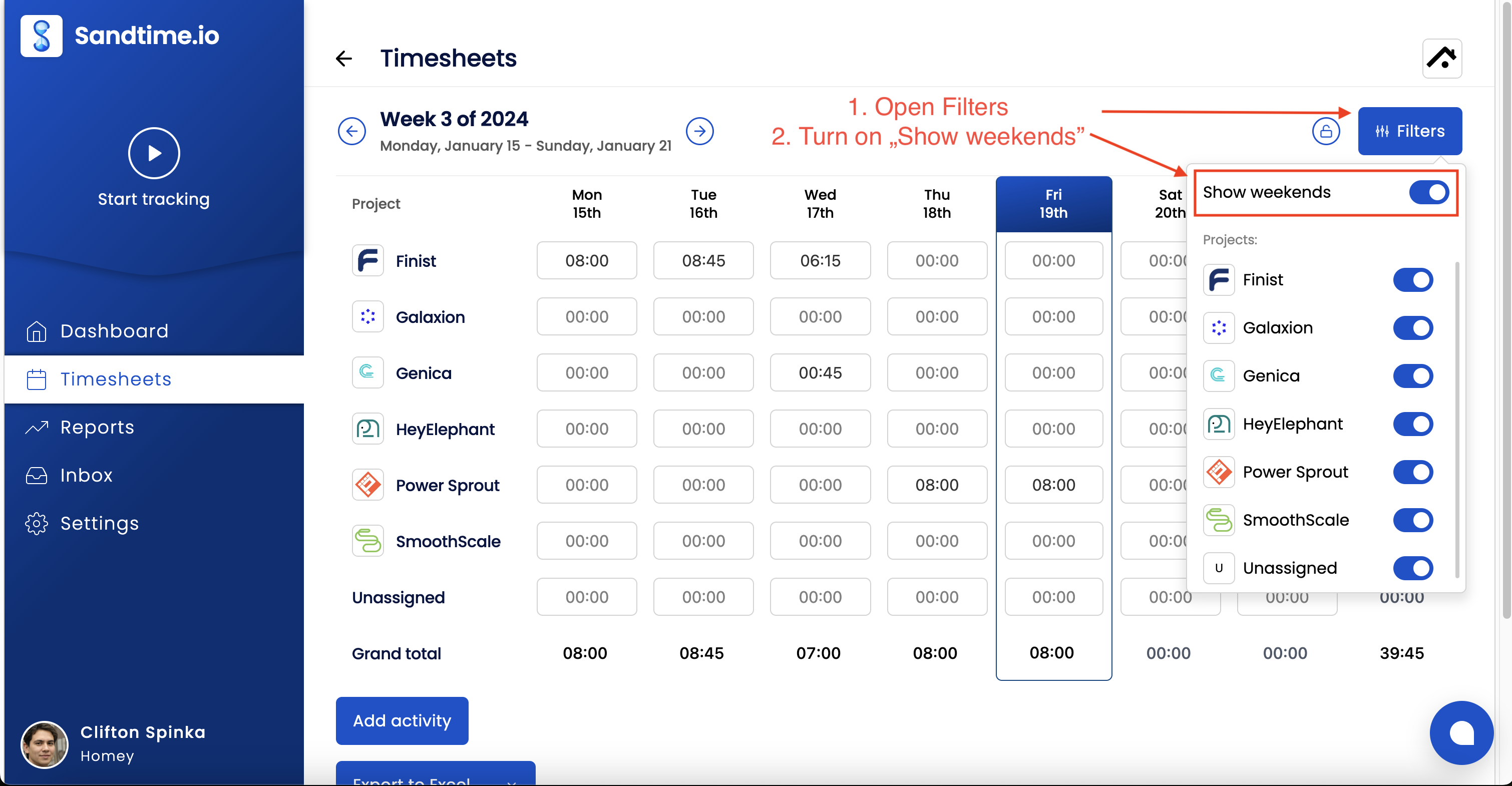
The setting is remembered automatically. You will not need to repeat this next week.
Adding time on weekends
Once weekends are visible, you can track time the same way as any other day:
- Start the built-in timer on the weekend day.
- Add an activity manually for the specific Saturday or Sunday.
- Edit an existing entry to move it to a weekend date.
For a full guide including how weekend hours interact with your weekly goal, see Include weekends in worktime.