Core Hours and Work Goals
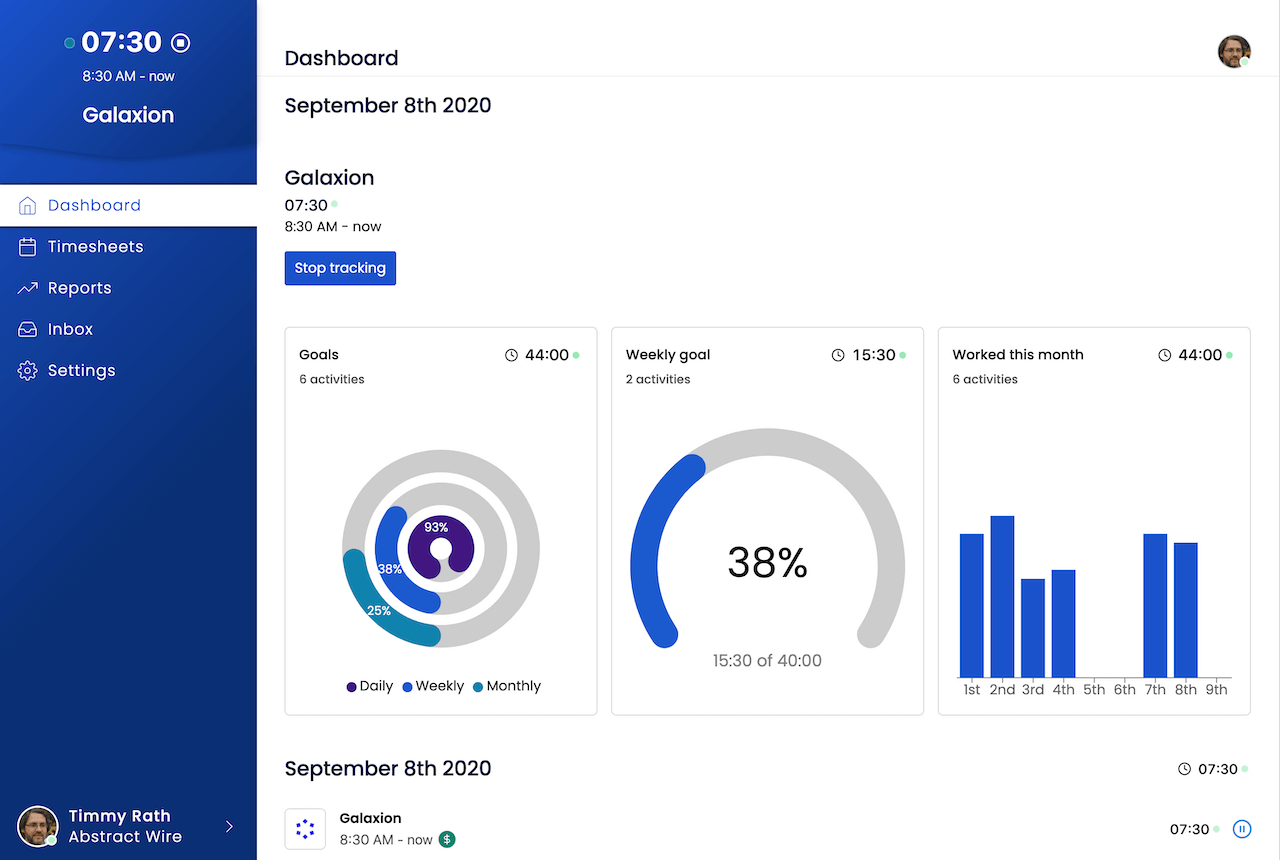
Define expected working hours for each team member and track daily, weekly, and monthly progress on the dashboard. Works for any schedule.
What core hours give you
Configurable work hours
Set the default start and end of the workday for your organization. Daily goals are calculated automatically.
Daily goal tracking
The dashboard shows each member's progress toward their expected daily hours in real time.
Weekly and monthly goals
Weekly and monthly goals are derived from core hours automatically - no separate configuration needed.
Part-time support
Adjust core hours for part-time employees so their goals reflect a 30-hour or 20-hour week, not a full 40.
Flexible schedules
Works for any schedule - standard days, shortened hours, compressed weeks, or flexible arrangements.
Dashboard visibility
Team members and managers see hour goals and actuals at a glance on the dashboard without running a report.
Who uses core hours
- Managers tracking whether the team is hitting expected hour targets each week
- Part-time employees whose dashboard should reflect a 30-hour week, not 40
- Organizations with flexible policies who still want visibility on scheduled hours
- HR teams setting up new employees with the correct schedule expectations
Set up your team's work schedule
Free for unlimited users. No credit card required.